<?xml version="1.0" encoding="utf-8"?><feed xmlns="http://www.w3.org/2005/Atom" xml:lang="en"><title>Xavier Zhang (aka Professor) - on his way to becoming the nation’s ideal husband</title><subtitle>Xavier Zhang (aka Professor), on his way to becoming the nation’s ideal husband. Tech first, and firmly convinced of the power of disruptive innovation.</subtitle><link href="https://gmlg.com/en/" rel="alternate"/><link href="https://gmlg.com/en/feeds/all.atom.xml" rel="self"/><id>https://gmlg.com/en/feeds/all.atom.xml</id><updated>2024-07-11T00:00:00+08:00</updated><entry><title>Quitting Smoking, Standing Practice, and More: (II) Standing Practice</title><link href="https://gmlg.com/en/how-to-practice-the-basic-of-chinese-kongfu.html" rel="alternate"/><published>2024-07-11T00:00:00+08:00</published><updated>2024-07-11T00:00:00+08:00</updated><author><name>Xavier Zhang</name></author><id>tag:gmlg.com,2024-07-11:https://gmlg.com/en/how-to-practice-the-basic-of-chinese-kongfu.html</id><summary type="html">&lt;p>This week, during a traditional Chinese medicine lecture organized by the company, a colleague asked about various matters related to standing practice. Since Professor has recently been studying standing practice, he happened to give a rough answer. As I have some free time today, I have organized it properly for your reference.&lt;/p></summary><content type="html"><![CDATA[<p><em>Epigraph: The day I began writing this is the anniversary of the “July Seventh Incident.” In remembrance of our compatriots, our generation too should strengthen itself and never allow China to sink again.</em></p>
<p>Chinese martial arts have a long and deep history. Speaking only of internal boxing methods, there is a saying about four great famous styles: “Shaolin boxing,” “Xingyi boxing,” “Baguazhang,” and “Taijiquan.” Besides these four great styles, all kinds of smaller folk boxing systems have also emerged endlessly, such as Tongbei boxing, Mizong boxing, Wing Chun, and Pigua boxing. In the old days, all had famous masters passing them down.</p>
<p>Unfortunately, over the past hundred-plus years, the land of China has suffered continuous warfare, compounded by all kinds of campaigns to discard the old and usher in the new, making the inheritance of national martial arts truly difficult. If one wants an intuitive sense of how difficult this inheritance has been, one can first learn how difficult it was in traditional society for clan bloodlines to be passed on.</p>
<p>In 2012, Mr. Chen Xi of Fudan University&rsquo;s Institute of Historical Geography published a paper in <em>Southern Population</em>. Across more than two hundred years of the Ming and Qing dynasties, only 13.61% of people, after surviving competition for existence, were able to have descendants of their own.</p>
<figure class="article-media">
  <a class="media-link" href="https://os.niaodian.com/2024/07/e328ae3ab8d064221a75657563c12457.JPG" data-lightbox>
    <img src="https://os.niaodian.com/2024/07/e328ae3ab8d064221a75657563c12457.JPG" alt="Southern Population - Chen Xi study" loading="lazy" decoding="async">
    <span class="sr-only">Open larger image: Southern Population - Chen Xi study</span>
  </a></figure><p>Against such a cruel historical background of intergenerational competition, the Chinese people&rsquo;s passion for martial valor still preserved the inheritance of national martial arts to a certain extent. However, in martial schools throughout history, lineage heads have always made distinctions between inner-door and outer-door transmission of skills (labels such as “indoor disciple” are also embodiments of various bad customs), and from time to time there has been the worry that “if you teach the apprentice, the master starves.” As a result, the inheritance of sect martial arts often emphasized only techniques and routines, and rarely devoted effort to cultivating internal power or breathing methods.</p>
<p>Thus, in today&rsquo;s martial world, we only see a certain Teacher Baoguo being hammered by a young sanda fighter, while it is hard to see masters like Shang Ji anymore. Although that Teacher Baoguo was Shang Ji&rsquo;s indoor disciple, he did not grasp the true meaning of Xingyi boxing. Both master and disciple have published related books. After reading them, it seems that Teacher Baoguo had not yet entered the gate and only had some rough personal understanding of old master Guo Yunshen&rsquo;s insights, while senior Shang Ji&rsquo;s book is clearly more pragmatic. Interested readers may explore and compare them on their own.</p>
<p>This kind of regret in the national-martial-arts circle is truly exposed to the fullest in Liao Fan&rsquo;s film <em>The Master</em>.</p>
<p>Returning to internal martial arts, today they seem more often reduced to health-preservation exercises practiced by elderly people in parks. Little do people know that internal boxing methods are in fact skills for combat and repelling enemies. In orthodox internal lineages, besides teaching special techniques, masters must also teach disciples where one may “strike” and where one “must not strike” when facing an opponent, so as to avoid recklessly taking lives.</p>
<p>The foundation of internal martial arts is standing practice. Although the sources of internal boxing arts vary in quality, they share a somewhat similar wonder in this practice of standing.</p>
<p>In the process of writing this article, I mainly consulted boxing manuals from various branches of internal Xingyi boxing. The focus is on how to strengthen the body through practicing standing, rather than on the essentials of combat technique.</p>
<h2 id="anecdotes-from-the-martial-world">Anecdotes from the Martial World</h2>
<hr>
<p>Before formally introducing standing practice, let me first tell readers a few martial-world anecdotes as light entertainment.</p>
<p>In 1915, Zhang Boling, president of Nankai School, hired senior internal-martial-arts expert Han Muxia as a martial-arts instructor, dedicated to teaching martial skills to young students. This gave Han Muxia the opportunity to open a martial arts school around Tianjin and take in many disciples.</p>
<p>Among this cohort of students was a young scholar of excellent academic performance who, admiring Han Muxia&rsquo;s reputation, went to his martial arts school and asked to come study martial arts every night. Han Muxia had a very pleasant conversation with the young man and immediately agreed. From then on, every night the young man came to the school on time to learn martial arts. Among the fundamentals was standing practice.</p>
<p>This young man not only repeatedly placed first in academic examinations, but also advanced extremely well in internal boxing practice, with his kung fu growing very quickly. So much so that Han Muxia&rsquo;s son, Han Youxia, was repeatedly admonished by his father to learn from this young man.</p>
<p>Through cold and heat, the young man studied Xingyi boxing with his honored teacher Han Muxia and achieved quite a lot. It was not until the autumn of 1917, when the young man crossed east to Japan to study, that they parted.</p>
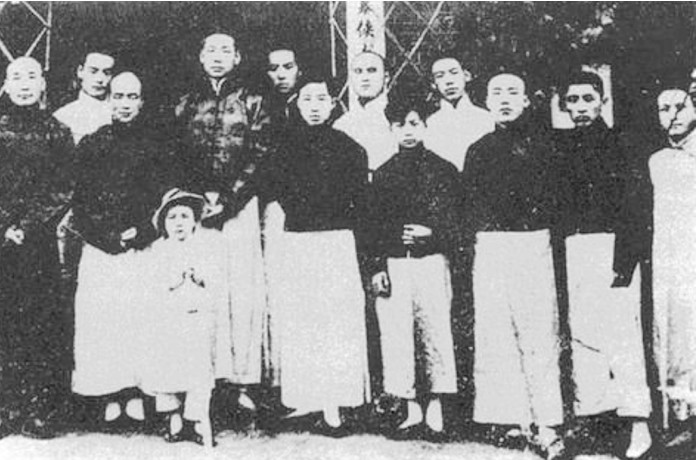
<p>By 10 years later, this young man had grown into a youth and, using the pen name from his student days in Shanghai, transformed into “Wu Hao” and gradually accomplished great things. Another 4 years later, because of the “Aitang Village Incident,” the name “Wu Hao” became known throughout the land.</p>
<p>Still later, the young man joined the revolutionary cause all the way, and after enduring countless hardships and dangers, finally reached the pinnacle of power.</p>
<p>This young man was Zhou Enlai, courtesy name Xiangyu.</p>
<figure class="article-media">
  <a class="media-link" href="https://os.niaodian.com/2024/07/a38b7671a1ec81fe84be755fc90bf7c3.png" data-lightbox>
    <img src="https://os.niaodian.com/2024/07/a38b7671a1ec81fe84be755fc90bf7c3.png" alt="image.png" loading="lazy" decoding="async">
    <span class="sr-only">Open larger image: image.png</span>
  </a></figure><p>The second anecdote came by chance while reading history books. Since this year began, besides studying past-life hypnosis and theories of reincarnation, Professor has also been reading Tang history, especially stories from the middle and late Tang.</p>
<p>The assassination of Wu Yuanheng was one of the most sensational unsolved cases of the middle Tang. Historical records state that the true mastermind behind the scenes was very likely the military governor Li Shidao, while the person most suspected of organizing and planning the actual assassination was a monk named Yuanjing. Let us first look at how the history books describe Monk Yuanjing:</p>
<blockquote>
<p>Yuanjing was over eighty years old and had once been a general under Shi Siming; he was fierce and valiant beyond compare. After he was captured, a strongman struck his shin with a stone hammer but could not break it. He cursed, “You whelps cannot even break a man&rsquo;s leg, and you call yourselves strong men!” He then placed his own foot and broke it himself. As he was about to die, he sighed, “You have ruined my affair, and I cannot see Luoyang run with blood!” &ndash; <em>New Book of Tang</em>, Biographies, Volume One Hundred Thirty-Eight</p>
</blockquote>
<p>In plain terms, Monk Yuanjing was already over eighty and had once served under Shi Siming. He was extremely fierce and brave.</p>
<p>After government troops captured Monk Yuanjing, in order to prevent him from escaping, they had a strongman smash his lower leg with a stone hammer, but the leg did not break. So this villainous monk cursed loudly: “Bastards, you cannot even smash a man&rsquo;s leg apart. What kind of tough guys are you?”</p>
<p>Then Yuanjing broke his own lower leg. When he was about to die, he viciously lamented: “You ruined my damn business. I cannot make Luoyang run with rivers of blood!”</p>
<p>Although this historical account does not specify Monk Yuanjing&rsquo;s martial routines, judging from his experience hiding as a monk in Shaolin, what he practiced was most likely Shaolin boxing among the internal styles. Although this villainous monk was malicious, he had indeed practiced internal martial arts properly; otherwise, at over eighty years old, he would not still have had such a hard and fierce physique (bones).</p>
<p>Both of the above anecdotes are stories verifiable in official histories.</p>
<p>By this point, I imagine all of you have a preliminary impression of the benefits that standing practice can bring.</p>
<h2 id="the-change-in-stereotypes">The Change in Stereotypes</h2>
<hr>
<p>At first, Professor knew very little about internal boxing and the foundation of standing practice. The reason was simple: Professor&rsquo;s field of study was modern medicine, which is based on rigorous scientific research as evidence. For traditional medical theories not supported by experiments or data, he had a rather skeptical attitude. Martial-arts theory, which similarly comes from traditional inheritance, naturally was also affected by stereotypes because it lacks precise theoretical logic and data support.</p>
<p>However, Professor&rsquo;s connection with internal boxing can also be traced back to the age when he had just started university, basically the same time he came into contact with modern medicine. In those ancient early days, the internet was not as developed as it is now, and online communication on campus mainly took place on the school&rsquo;s own BBS forum.</p>
<p>One day, among the top ten hot posts, I saw a post in which a lady introduced some interesting stories about her husband&rsquo;s practice of standing. It had quite a mysterious flavor. From then on, Professor became curious about standing practice and internal boxing methods. Later, in the library, he wanted to borrow related books and unexpectedly really found a book on internal Xingyi boxing.</p>
<p>Looking back now, it was an excellent introductory book. Unfortunately, I have long forgotten its title, which I now rather regret.</p>
<p>The book introduced many fundamentals of internal Xingyi boxing, especially its explanations of standing practice, on which it spent considerable effort. From the functions and benefits of different standing methods to step-by-step introductions to practice points, and even photo demonstrations, it quickly helped Professor understand the ins and outs.</p>
<p>Referring to the book&rsquo;s explanation, after considering both function and difficulty, Professor chose “hunyuan zhuang” as the object of his attempt. After practicing simply a few times, he felt he had already grasped the essentials, but also found the process of standing rather punishing. Added to the aforementioned stereotypes, he was soon attracted by other things and lost enthusiasm. Thus, although he has been in contact with internal boxing for 20 years, he has made almost no progress. Truly laughable, laughable.</p>
<p>As for the change in stereotypes, that begins with my old father&rsquo;s surgery two years ago.</p>
<p>Two years ago, on the eve of Shanghai&rsquo;s lockdown, I happened to receive a call from my mother saying that my old father had been found to have a major health problem and needed surgery as soon as possible. I immediately told my family to arrange a transfer to a top-tier hospital and book surgery, while calling my manager to ask for leave and buying the nearest high-speed train ticket back to my hometown. The timing was frighteningly precise: as soon as I had left, Shanghai officially began its lockdown, so I somehow inexplicably escaped. After returning home, I was still arranged to quarantine in a small dark hotel room for 14 days. Fortunately, my old father&rsquo;s surgery went smoothly. By the time I was released, he was just about to be discharged. After completing all the hospital&rsquo;s required visitation procedures and testing certificates, I bought a pile of things and went to see him. At last I was no longer nagged by the old man with “Why hasn&rsquo;t my son come to see me?”</p>
<p>One month after discharge, the follow-up examination results were all normal.</p>
<p>Two months later, seeing that he was recovering well, I wondered whether there was any exercise that would not be too intense yet could still help strengthen his body. So I demonstrated the key points of hunyuan zhuang to him and asked him to practice for a few days first to see the effect.</p>
<p>People who first practice standing often give up easily because their legs tremble or they cannot grasp the method. To help the old man build confidence, Professor also began practicing standing himself. Gradually, through this process, he extended the time from rookie-level less than 3 minutes to being able to persist for 15–20 minutes per session. But the old man was quite cunning: every day he would stop as soon as he had stood for 5 full minutes. Although his standing time was short, fortunately he persisted every day without fail, and there were indeed some effects.</p>
<p>Whenever I asked the old man whether he felt any bodily changes after standing practice, the feedback was positive. He said directly that his previous constipation had improved a lot. Looking at my own results from standing practice, there seemed to be little. Until one day later, when I rested briefly after standing and noticed some unusual sensations.</p>
<p>This unusual sensation was that, while resting on my side, I felt the rhythm of the taichong channel. It was a rhythmic movement with extremely strong impact force. At first I mistakenly thought it was the rhythm of the heartbeat, but later discovered it was not. This force of the taichong channel seemed to start from beneath the right foot and rush straight toward the top of the head. Its strength was clearly stronger than the rhythm one feels from pressure on blood vessels (such as the pulse), more like shock waves, continuous and unending.</p>
<p>After feeling this impact rhythm more times, I began looking up information and learned that this situation should be related to the chong vessel.</p>
<p>At this point, my view of traditional medicine and martial arts was completely reversed, and I gradually began trying to understand the traditional medical principles that might be hidden within martial techniques. I am still in the process of studying and understanding this knowledge. The later conjectures in this article about the relationship between standing practice and meridians are only Professor&rsquo;s current personal experience; readers still need to assess them with discernment.</p>
<h2 id="common-standing-practices-in-internal-boxing">Common Standing Practices in Internal Boxing</h2>
<hr>
<p>The many anecdotes introduced above are mainly meant to arouse everyone&rsquo;s interest in internal standing practice. Having written this far, it is finally time to enter the main topic.</p>
<p>Generally speaking, the standing practices of internal Xingyi boxing can roughly be divided into “health standing practices” for strengthening the body and “combat standing practices” that emphasize fighting opponents.</p>
<p>Because different lineages have different origins, records of “health standing practices” appear only in a few boxing manuals. Health standing practices can generally be divided into standing, sitting, and lying forms. Their goal is mainly to relax body and mind, with greater emphasis on intention. Common health standing practices include “parallel-step supporting-and-embracing stance,” “parallel-step lifting-and-embracing stance,” “parallel-step lifting-and-inserting stance,” “parallel-step leaning-and-embracing stance,” “parallel-step supporting-and-pressing stance,” “parallel-step pushing-and-lifting stance,” “seated stepping-on-cotton lifting-and-embracing stance,” “seated hooking-and-lifting supporting-and-embracing stance,” “lying supporting-and-pressing stance,” “lying supporting-and-embracing stance,” and various others.</p>
<p>Health standing practices are more suitable for physically weak people or those newly recovered from serious illness. They do not insist on increasing internal force, but seek only for intention to travel through the whole body, warm and bathing-like; for breathing to be soft, even, fine, and long; and for comfort and effectiveness, stopping at what is appropriate. In other words, they place more emphasis on recovery and convalescence.</p>
<p>“Combat standing practices” place somewhat more emphasis on actual fighting and can be divided into static stances and moving stances. Static stances are mainly still while the practitioner stands; moving stances are active.</p>
<p>Xingyi boxing gives first place to the santi stance, also known as the sancai form or ziwu stance. In addition, common “combat standing practices” include songjing stance, hunyuan stance, qiankun stance, taiji stance, fuhu stance (liangyi), fixed-force stance, wuji stance, liuhe stance (chicken-step stance), eagle-form standing practice, bear-form standing practice, and so on.</p>
<p>As one of Xingyi boxing&rsquo;s most important fundamentals, the santi form is a method composed according to Xingyi boxing principles, the basic requirements and characteristics of the boxing method, and the three-body activity of the human body (head, hands, feet; the three bodies are each divided into three sections, <em>and the boxing principle seems to have something in common with Tongbei boxing</em>). It is also the most basic method for seeking the liuhe hunyuan whole-body force, so Xingyi boxing also has the saying that “all methods come from the santi form.”</p>
<p>For ordinary people with no martial foundation at all, the santi form as a moving-standing practice is obviously a fundamental that is too difficult. After all, ordinary people have not yet fully adjusted their bodily state. Even if they begin with the santi form, the benefits gained are very few. Therefore, Professor more strongly recommends that everyone begin with the static stance “hunyuan zhuang,” then, after gaining a certain foundation, go on to practice the santi form as well as later Xingyi routines and frames.</p>
<p>Hunyuan zhuang benefits the body&rsquo;s movement of qi and blood. As long as it is practiced properly, long-term persistence can nourish the heart and kidneys well. The rest of this article will also introduce “hunyuan zhuang” as the core. Hunyuan zhuang also has moving-stancing methods, but this article will still focus mainly on static standing.</p>
<h2 id="preparations-before-standing-practice">Preparations Before Standing Practice</h2>
<hr>
<p>Before formally introducing the details of how to practice hunyuan zhuang, all you great heroes still need to confirm some preparatory work in advance.</p>
<ul>
<li>
<p>First is the choice of <strong>standing-practice environment</strong>. Since the core of hunyuan zhuang is regulating qi and blood, and the body needs to coordinate with breathing during practice, a good standing-practice environment is essential. Professor recommends that readers who have the conditions choose a place full of vitality for practice, and preferably somewhere that allows you to be “feet on solid ground.” In addition, besides ensuring air circulation, the chosen location should also avoid being in a draft. This is to avoid wind evil entering the body when the pores open during standing practice. During practice, clothing should be loose and comfortable, and shoes may be cloth shoes or cotton shoes more suitable for practice.</p>
</li>
<li>
<p>Second is the choice of <strong>standing-practice timing</strong>. Generally speaking, the appropriate time for standing practice is early morning or dusk. In summer especially, one should avoid standing at noon, so as not to let excessively hot weather make the body sweat profusely and deplete bodily fluids.</p>
</li>
<li>
<p>Finally, there is the influence of <strong>personal health</strong>. Although the hunyuan zhuang introduced in this article can unblock qi and blood, its exercise intensity is still very high. Please ensure your body is healthy and free of problems before practicing. If any readers are newly recovered from serious illness, they may first try quiet sitting or lying forms among the “health standing practices,” and after the body has recovered, then consider whether they can practice hunyuan zhuang. Later, Professor will also write a separate article introducing the method of quiet sitting; readers who need it, please stay tuned.</p>
</li>
<li>
<p>Last of the last, there is preparation in <strong>medical knowledge</strong>. If practitioners can learn some knowledge of human anatomy and meridians and acupoints in advance, it will be like adding wings to a tiger during practice.</p>
</li>
</ul>
<h2 id="how-to-practice-hunyuan-zhuang-and-its-key-points">How to Practice Hunyuan Zhuang and Its Key Points</h2>
<hr>
<p>The specific method for practicing hunyuan zhuang is as follows:</p>
<ol>
<li>The practitioner stands naturally, with both feet <strong>shoulder-width apart</strong> (about 3 foot-widths);</li>
<li>The body sinks down; both knees relax and bend downward, aligned with the toes, with the knee-joint angle slightly greater than 90 degrees;</li>
<li>Both arms lift from the sides to in front of the chest, fingers naturally slightly bent, palms facing the heart, both arms as if holding a ball;</li>
<li>The head lifts upward with <strong>xuling dingjin</strong>, the neck is upright, the chin slightly tucked in, and the head must be straight (not tilted, lowered, or raised);</li>
<li>The mouth naturally closes, the teeth lightly touch, and <strong>the tongue touches the upper palate</strong> (one may also feel the sensation of the tongue tip licking the upper gum);</li>
<li><strong>Contain the chest and pull up the back</strong>, <strong>sink the shoulders and drop the elbows</strong>;</li>
<li><strong>Sink qi to the dantian</strong>, slightly draw in the lower abdomen, keep the <strong>tailbone centered and upright</strong>, with a slight intention of supporting the lower abdomen forward;</li>
<li><strong>Loosen the waist and regulate qi</strong>, <strong>close the knees and tuck the hips</strong>, <strong>lift the anus and gather the buttocks</strong>, drawing in the anal gate;</li>
<li>With both feet, <strong>grip the ground downward with all ten toes</strong>;</li>
<li>Relax all the muscles of the whole body. Do not tense up. Let the whole body&rsquo;s weight relax through the skeletal frame into the heels;</li>
<li>Breathe naturally, evenly, softly, and at length (the methods of breathing are slightly complex; beginners should first focus on looseness and stillness);</li>
<li>The eyes may look forward, or one may close the eyes to rest the spirit; the spirit platform should be clear.</li>
</ol>
<p>The key meaning of the so-called <strong>xuling dingjin</strong> lies in tucking in the chin, after which the cervical spine can become upright, as if an invisible thread at the crown of the head were suspending our head. Note that tucking the chin is not lowering the head.</p>
<p>Although <strong>the tongue touching the upper palate</strong> is simple, its effect is wonderfully great. The tongue is the tip of flesh; when it curls, qi descends. If one wants to keep the ren vessel in the front of the body and the du vessel in the back open, the upper pass is that the tongue must press upward to build the “magpie bridge.” When the magpie bridge is open, the body&rsquo;s upper qi can pass; the lower pass is the huiyin point. When huiyin is open, the lower qi can pass. Therefore, when practicing Xingyi boxing, the upper part requires the tongue to touch the upper palate, and the lower part requires lifting the anal gate and gathering huiyin, so that the whole body can circulate qi.</p>
<p><strong>Contain the chest and pull up the back</strong> is also written as <strong>enfold the chest and pull up the back</strong>; the focus lies in the words <strong>pull up the back</strong>. When pulling up the back, make the thoracic spine as upright as possible, so that the entire chest cavity reaches its maximum capacity. Note that one should avoid puffing out the chest, which instead easily causes the chest cavity to draw inward.</p>
<p>In <strong>sink the shoulders and drop the elbows</strong>, “sinking the shoulders” means letting the shoulders hang down, which is different from relaxing the shoulders. When the shoulders hang down, the shoulder blades protrude and open outward, opening the chest and sending qi downward, sinking qi to the dantian. Hanging the shoulders requires the shoulders and body to become one, so qi can pass through to the elbows; when the elbows drop, qi passes to the wrists; when the wrists are extended, force reaches the fingertips or the fist edge. When sinking the shoulders, be sure to avoid lifting the shoulders high, or even raising them up. Of course, this is the posture when not issuing force. When boxing power is issued, that is a different scene.</p>
<p>For <strong>sinking qi to the dantian</strong>, the dantian here refers to the lower dantian, namely the “qihai” point, located one and a half cun below the navel. The mnemonic for locating qihai says: “One cun and five fen below the navel; this is where qihai comes into being. To find it, do not leave the abdominal midline; neither left nor right, follow the center.”</p>
<blockquote>
<p>The three dantian described by Daoists: the upper dantian is between the eyebrows, horizontally connecting to the interbrain; the middle dantian is between the two breasts, horizontally connecting the lungs and heart; the lower dantian is below the navel, horizontally connecting the area between the kidneys and the large and small intestines. &ndash; Nan Huai-Chin · <em>Quiet Sitting, Cultivating the Dao, and Longevity</em></p>
</blockquote>
<p>The key point of <strong>loosening the waist and regulating qi</strong> lies in “loosening the waist.” Only by achieving the effect of loosening the waist can one smooth the qi above and below and adjust the body&rsquo;s center of gravity. The key point of loosening the waist is “sinking the waist.” Similar to xuling dingjin and pulling up the back, it also means making the lumbar spine upright and relaxing the waist, which benefits qi-and-blood circulation. Note that although your little butt may be perky, you should avoid sticking the buttocks out during standing practice. This is of the utmost importance.</p>
<p><strong>Lifting the anus and gathering the buttocks</strong> is relatively easy to understand. This action has two purposes. From the perspective of human structure, lifting the anus and gathering the buttocks helps open the pelvis; during practice there is a sense that the pelvis turns upward. From the perspective of meridians, when lifting the anus and gathering the buttocks, huiyin tightens, which better connects the ren and du vessels.</p>
<p><strong>Closing the knees</strong>: when both knees are slightly bent, having an inward closing and tucking force is called closing the knees. <strong>Tucking the hips</strong>: when both knee joints close and tuck inward, this is called tucking the hips. The purposes of <strong>sinking the waist</strong> and <strong>closing the knees and tucking the hips</strong> are both to better open up the pelvic structure.</p>
<p>When these actions are combined, their effect on body shape is to help the body&rsquo;s qi and blood move more smoothly, connecting inside and outside, and thereby better regulating and nourishing qi and blood. In addition, these actions are also quite beneficial for opening the three passes of <strong>yuzhen, jiaji, and weilü</strong>, and these three passes happen to greatly influence the body&rsquo;s qi-and-blood circulation. Over the long term, this can further achieve the effect of “<strong>stretching the tendons and pulling the bones</strong>.”</p>
<p>After standing practice ends, you can spread both arms outward in a circle and slowly lower both palms from above the head, coordinating with adjustments in breathing to finish the practice and relax. Finally, rub both hands together until warm, stroke the face, and massage the top of the head from front to back with the pads of the fingers. Only then is the full set of standing practice complete.</p>
<p>After finishing standing practice, you can also pat the joints of the body to further help qi and blood move. If persisted in over the long term, this also counts as a small technique for dispelling dampness from the body. The specific method is: practice patting with both palms 9 times, then successively pat the left and right elbow joints, armpits, groin, and knee hollows, each 9 times. The force of patting should be moderate; it is best if it can produce a crisp patting sound.</p>
<p>Apart from the body shape and frame of standing practice, breathing methods are truly another most important field of learning. In <em>A Subtle Selection of Xingyi Boxing Arts</em>, Liu Dianchen even wrote a separate piece called <em>On the Dantian</em> to discuss its importance: first in “gathering,” second in “moving,” and he emphasized that “if one is not indulged in sexual desire, does not lose kidney essence, and preserves and nourishes oneself properly, then original qi will naturally become abundant.”</p>
<p>Because qi practice is truly rather profound and mysterious, Professor does not dare lightly instruct readers before fully understanding it. If readers truly want to learn knowledge in this area, they can refer to Shen Huazhang&rsquo;s <em>Xingyi Boxing Course</em>:</p>
<blockquote>
<p>Stand properly in the posture described above, then lower the eyelids, look inward to the ancestral aperture and inhale, combine into one line and use intention to descend to the navel and pause briefly. While inhaling, the navel, yongquan, and huiyin simultaneously lift qi; draw in the tailbone, contract the front yin, let the ribs naturally open, lift the high bones behind the ears, and true qi naturally travels along the spine through the du vessel, passes the three passes, and reaches the niwan. When exhaling, imagine true qi descending along the ren vessel to the lower dantian below the navel (outside the lower dantian: behind the rectum, above huiyin, in front of the bladder; that is, the uterine opening in women and the ejaculation site in men, medically called the inner mingmen; between the two kidneys is the outer mingmen. Mingmen is the gate through which the fetus enters and exits, the gate of life; Daoists call it the dantian, the aperture of life and death, and this aperture connects the eight extraordinary vessels). Continue like this cycle after cycle, like a ring without end. Persist for 49 days, and the small heavenly circuit will open.</p>
</blockquote>
<p>Alternatively, a faster way may be to go to <strong>No. 650 Wanping South Road</strong> and consult a specialist.</p>
<p>People only know No. 600 Wanping South Road, but do not know there is also the magical No. 650 Wanping South Road. How lamentable.</p>
<p>One extra reminder: standing practice must be done <strong>within your ability</strong>. One must not stand until sweating profusely and depleting bodily fluids. As the days of practice lengthen, the amount of time one can persist in a single standing session will naturally become longer and longer. For a physically weak beginner to persist in standing for 5 minutes each day is already a very remarkable achievement. Be sure to develop the habit of standing practice every day, and do not give up halfway. That would truly be a pity.</p>
<h2 id="experiences-from-practicing-hunyuan-zhuang">Experiences from Practicing Hunyuan Zhuang</h2>
<hr>
<p>Since Professor began consistently practicing hunyuan zhuang, his experiences are roughly as follows:</p>
<ul>
<li>
<p><strong>Hunyuan zhuang is a movement from the inside out</strong>. Unlike ordinary exercise, standing practice is more like a movement from the inside out, a kind of exercise that does not require frequent limb movement. Every time Professor stands for about 20 minutes, he feels his body begin to warm slightly. If he continues to around 30 minutes, his forehead begins to sweat lightly. Generally, when I reach the point of slight sweating, Professor ends the standing practice.</p>
</li>
<li>
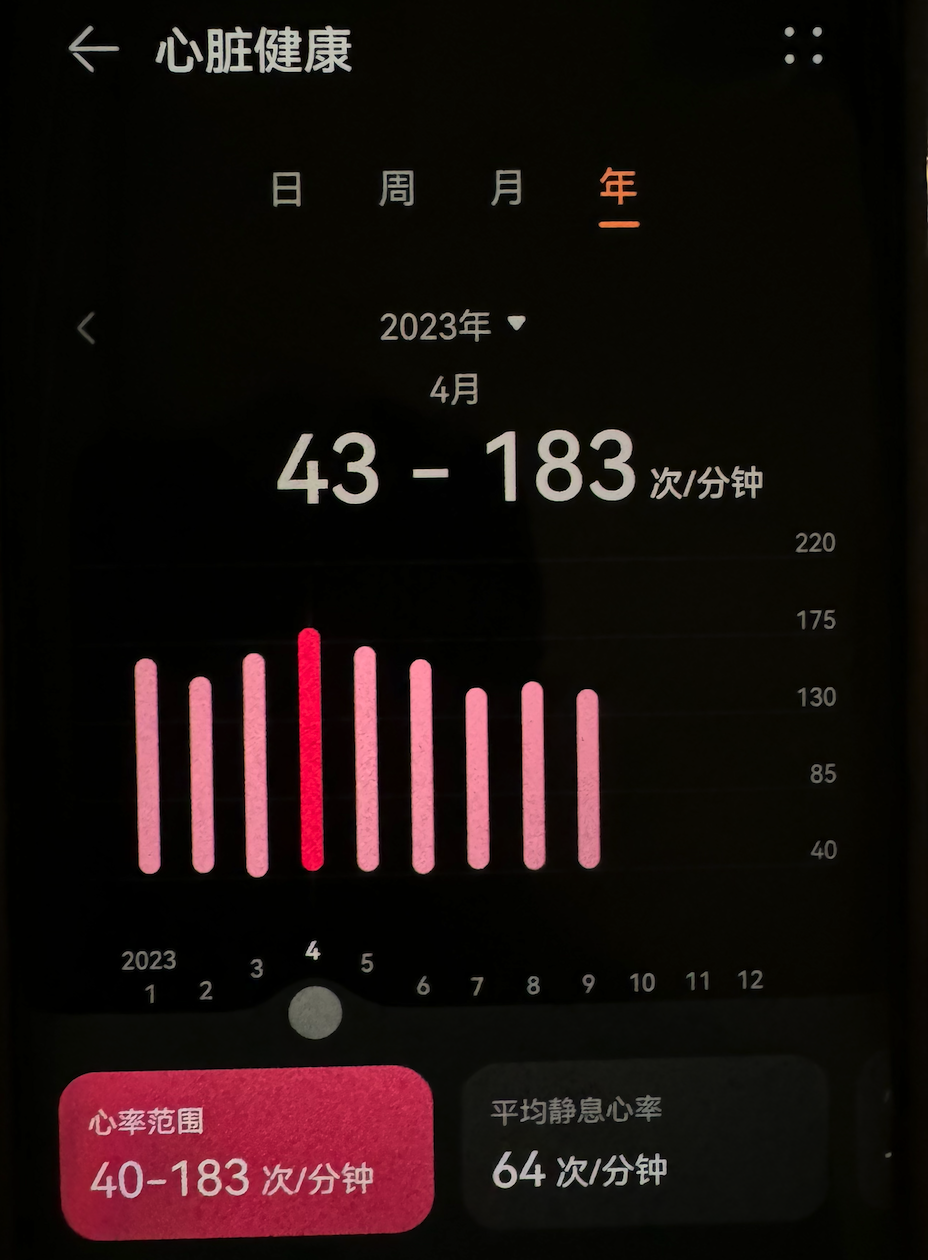
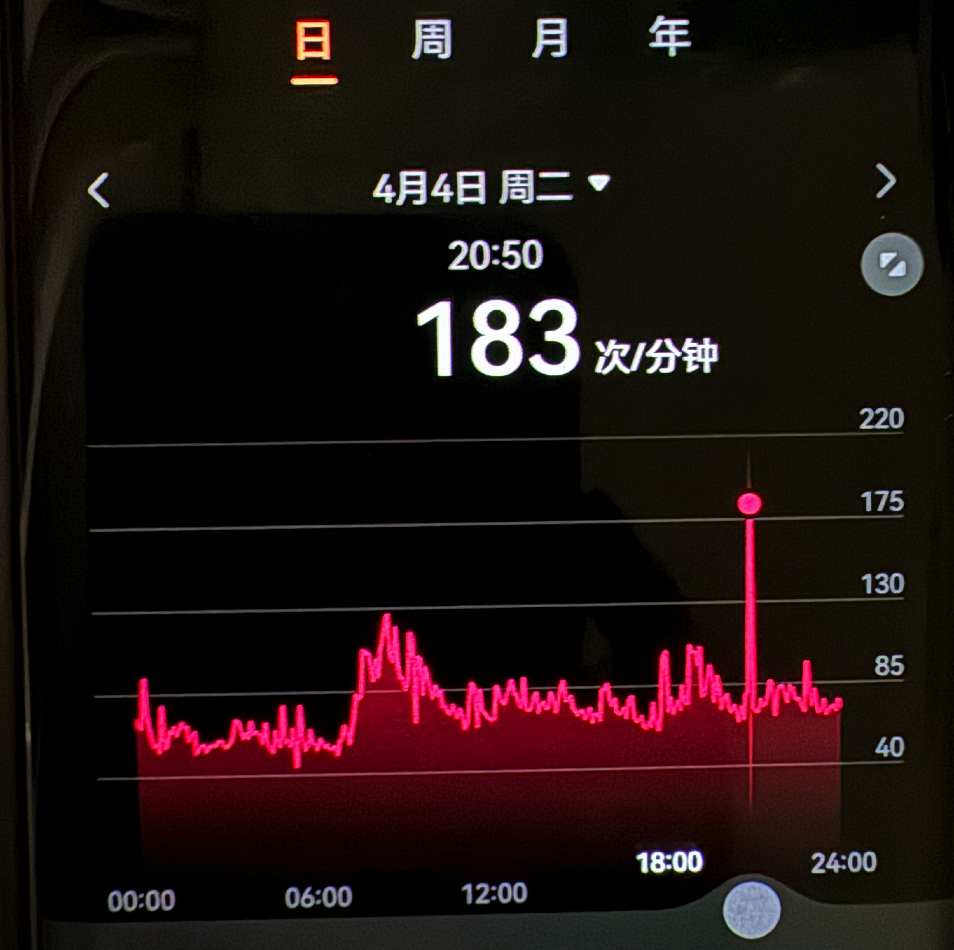
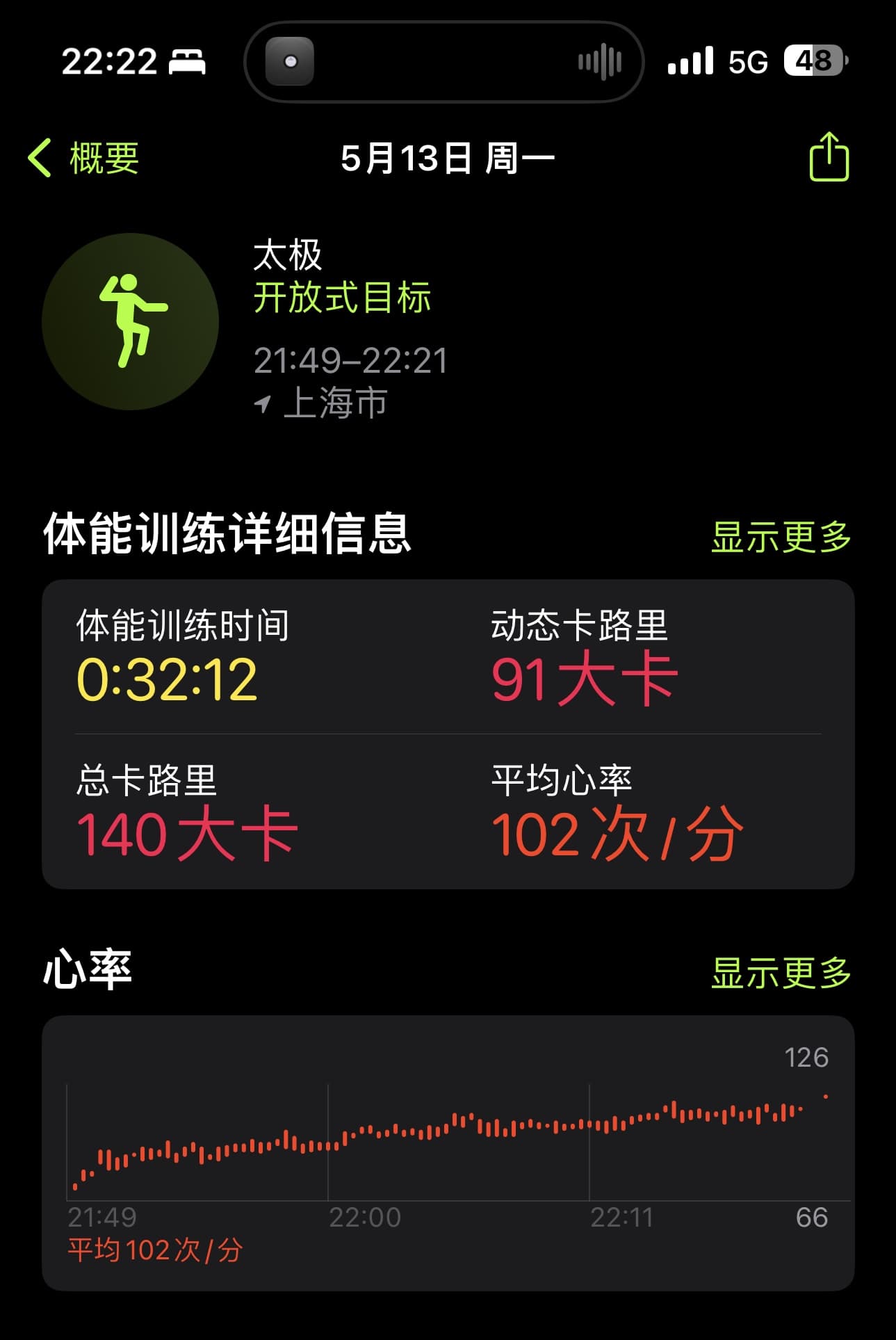
<p><strong>The rise in heart rate during standing practice is steadier</strong>. As a form of exercise, standing practice is not low in intensity, so heart rate gradually increases during the process. The change in heart rate during standing practice is steadier and can clearly be seen to tend more toward a steadily rising straight line. This heart-rate pattern, to some extent, indicates from the side that standing practice improves cardiovascular-system function more gently. Or, perhaps, during standing practice, the movement of qi and blood really does become smoother. <img class="inline-media" src="https://os.niaodian.com/2024/07/e4331c298a0d1e0dfcb263105ffdf9cb.jpg" alt="IMG_2590.jpg" loading="lazy" decoding="async"></p>
</li>
<li>
<p><strong>The appearance and disappearance of a sense of blockage in the chest</strong>. When I first began consistently standing, there was actually no feeling in the chest. Later, after standing for a period of time, Professor found that a clear sense of blockage began to appear in the chest, as if something in the chest became delayed between breaths. When this feeling first appeared, Professor was almost scared enough to wet himself, thinking: could this be insufficient coronary blood supply? If something went wrong by accident, that would be rather bad! After standing, heart rate and blood pressure were normal, so I did not continue worrying. Later, I slowly found that the sense of blockage disappeared, while heart rate and blood pressure did not change much compared with before. It was truly somewhat strange.</p>
</li>
<li>
<p><strong>Gastrointestinal function seems a little better than before, but also seems more sensitive</strong>. Professor&rsquo;s digestive function has never been very good, so changes in gastrointestinal function after standing practice are quite noticeable. It just also seems to have become more sensitive; it is truly not compatible with pre-prepared dishes at all. Whenever I eat them, I inevitably feel unwell.</p>
</li>
<li>
<p><strong>There are more farts</strong>. The increase in farting has two scenarios. One is during standing practice: for a period, I would be standing and suddenly burst out a series of chained farts, which was really something. The other is while sitting normally in daily life, when a fart suddenly pops out as well. However, after 2 consecutive months of standing practice, both situations have become less and less frequent. This phenomenon also seems to indicate that standing practice enhances gastrointestinal peristalsis. It appears that standing practice is indeed a movement from the inside out!</p>
</li>
</ul>
<h2 id="the-benefits-and-shortcomings-of-hunyuan-zhuang">The Benefits and Shortcomings of Hunyuan Zhuang</h2>
<hr>
<p>According to Shang Ji in <em>Xingyi Boxing Combat Arts</em>, the benefits of standing practice are mainly as follows:</p>
<blockquote>
<p>During standing practice, the ten toes grip the ground, the soles are hollow and contained, the knees are lifted, the hips are embraced, and the anus is lifted, producing a good kidney-tonifying effect. This is because yongquan in the sole is an acupoint of the kidney meridian; the waist is the residence of the kidneys; the heel is the key of the kidneys; and the knees and shins all belong to the kidneys. The kidneys are the congenital foundation; when the kidney channel is open, kidney essence is sufficient and kidney qi is vigorous, so the body is naturally strong. From the posture of standing practice, the lower limbs bear more weight than in ordinary standing. Especially with embracing the hips, circulation and metabolism in the pelvic cavity and the bones and soft tissues of the lower limbs can be strengthened, blood flow increased, and the body&rsquo;s neurohumoral regulatory system maintained in dynamic balance. The two arms are raised, which helps the intercostal muscles and diaphragm contract simultaneously; when inhaling, the thorax expands and the abdomen protrudes, greatly increasing pulmonary ventilation, while the permeability of the alveolar wall also increases. All of the above play an active role in promoting recovery. Medical practice has proved that many patients with kidney deficiency, seminal emission, lumbar soreness and weakness, neurasthenia, and stubborn insomnia have achieved satisfactory therapeutic results through standing-practice exercise.</p>
</blockquote>
<p>As a form of exercise for strengthening the body, hunyuan zhuang has advantages, and inevitably also has shortcomings.</p>
<p>Professor has practiced hunyuan zhuang for only a short time and has not had the chance to visit seniors and ask for instruction, so his feelings are not yet deep. But from the materials I have browsed so far, I have learned of two shortcomings.</p>
<p>First, standing for a long time in standing practice harms the bones. This view comes from Daoist priest Zhang Zhishun. Professor thinks it has some truth, but with a premise. Standing practice emphasizes looseness and stillness, using the skeleton to support the whole body&rsquo;s weight. If the method is not correct, it is indeed possible to injure the bones, especially things like articular cartilage. But there is a premise here: this may happen only when one does standing practice without practicing qi, that is, without mastering the key to breathing methods.</p>
<p>Second, after standing practice reaches a certain level, it is easy to develop “yang hyperactivity.” The manifestation of yang hyperactivity is fearing heat but not cold. To show yang hyperactivity, one must already have achieved something in qi practice; in other words, one&rsquo;s breathing-method skill has already reached a small degree of accomplishment. Xiangyu introduced earlier had signs of yang hyperactivity. Whether judging from his habit of often wearing only a thin overcoat in winter, or from the living habits revealed by Ms. Deng, Mr. Zhou very likely had a certain degree of “yang hyperactivity.” If his practice of martial arts had not been neglected because of government affairs, he might well have become a grandmaster of his generation.</p>
<h2 id="summary">Summary</h2>
<hr>
<p>I truly never expected that writing this one piece at such length would again almost reach ten thousand Chinese characters. It is really somewhat exaggerated. Perhaps this is also one of the reasons why my writing speed has slowed so much this year: writing one article is truly too exhausting. Thinking that this series has at least 2–3 more pieces to write makes me collapse a little.</p>
<p>Returning to standing practice, Professor actually does not think standing practice is particularly magical. It is only a form of exercise for strengthening the body, while also allowing one to practice internal power within internal martial arts and possessing potential for fighting and combat technique. The article says very little about combat, and some methods for practicing internal power are also not covered. Another day, if Professor achieves something in his studies, he will add more.</p>
<h2 id="references">References</h2>
<hr>
<ul>
<li>Shang Ji · <em>Xingyi Boxing Combat Arts</em></li>
<li>Shen Huazhang · <em>Xingyi Boxing Course</em></li>
<li>Liu Dianchen · <em>A Subtle Selection of Xingyi Boxing Arts</em></li>
<li>Li Wenbin and Shang Zhirong · <em>A Subtle Selection of Shang-Style Xingyi Boxing and Weapons</em></li>
<li>Ma Linzhang · <em>Xinyi Boxing</em>; <em>The True Meaning of Xinyi Boxing</em></li>
<li>Yao Chengguang · <em>Yiquan Training Methods</em></li>
<li>Song Guanghua · <em>Song-Style Xingyi Boxing</em></li>
<li>Nan Huai-Chin · <em>Quiet Sitting, Cultivating the Dao, and Longevity</em></li>
<li>Xue Dian · <em>Lectures on Xingyi Boxing Arts</em></li>
<li>Shan Changwen · <em>Qi-Family Tongbei Boxing</em></li>
<li>Zhu Tiances · <em>Xingyi Boxing Martial-Arts Course</em></li>
</ul>
]]></content></entry><entry><title>Quitting Smoking, Standing Practice, and More: (I) Quitting Smoking</title><link href="https://gmlg.com/en/how-to-quit-smoking.html" rel="alternate"/><published>2024-05-31T00:00:00+08:00</published><updated>2024-05-31T00:00:00+08:00</updated><author><name>Xavier Zhang</name></author><id>tag:gmlg.com,2024-05-31:https://gmlg.com/en/how-to-quit-smoking.html</id><summary type="html">&lt;p>Over the past half year, I have basically stopped smoking, which can count as an initial success in quitting. I also began consistently practicing the foundational standing practice of internal Xingyi boxing and have gained a few small insights, so I wanted to record them for future reference when my boxing improves. While writing, I found there was far too much content, so I will split it into separate articles.&lt;/p></summary><content type="html"><![CDATA[<p>I did not expect the first article of 2024 to be delayed until now before I finally began writing it. In the blink of an eye, it is already the end of May (month 5). Thinking that this year is almost half over, I would truly feel ashamed if I did not update again. And so, this article came into being.</p>
<p>What I originally wanted to write was quite broad and mixed, covering all sorts of topics. Then I thought about it and, for readers&rsquo; convenience, simply decided to introduce them under different themes. That is why this first piece is about quitting smoking.</p>
<p>Over the past half year, Professor has been somewhat dispirited emotionally and indeed could not summon much energy to write. By contrast, there have been some changes in life habits. I quit smoking and began practicing standing practice every day. My interest in internal martial arts also rose to an unprecedented level, and I finally seem able to practice them seriously.</p>
<p>Returning to the matter of quitting smoking, I believe many old smokers have probably tried it before.</p>
<p>One does hear some success stories, but when it comes to oneself, it always feels beset with a thousand difficulties. Professor will use today&rsquo;s writing as a chance to look back on his experience over the years of smoking, quitting, relapsing, and finally quitting for good. I hope it can offer inspiration and help to readers with the same trouble.</p>
<h2 id="looking-back-on-my-smoking-history">Looking Back on My Smoking History</h2>
<hr>
<p>Professor&rsquo;s smoking history probably goes back to a breezy evening in May (month 5) of 2006, when a light wind was blowing.</p>
<p>At that time, Professor was already in year 2 of medical school and had gradually become familiar with the heaviness and complexity of medical courses. Besides anatomy, which was highly practical, he also had to learn physiology, pathology, molecular biology, and other foundational medical courses. The difficulty of each course was often directly proportional to the thickness of the textbook. Many subjects started from zero, and some courses used purely English textbooks. The learning curve was steep indeed, so much so that even thinking back on it now still feels thrilling. I vaguely remember buying a molecular-biology vocabulary book from a bookstore back then and memorizing it fiercely whenever I had spare time. It was rather fulfilling.</p>
<p>The tight rhythm of classes day and night, combined with challenging academic pressure, plus the magical feng shui treasure land of the ancient capital where the school was located that caused Professor to suffer insomnia until 3 a.m. every night, inevitably left a gloomy feeling wandering in his heart.</p>
<p>So on that evening in May (month 5), I went to the small shop beside the cafeteria, bought a pack of cigarettes and a lighter, walked into the sports field, sat alone on the steps of the stands, quietly lit a cigarette, and silently told myself: “Bro, you have to learn how to smoke!”</p>
<p>The first experience of smoking is usually not very good. After lighting that first cigarette, I smoked while choking and coughing, and my heart shook violently: “What the hell is this? Where is the pleasure? Nonsense!”</p>
<p>I had thought that after this ordinary evening, my curiosity about smoking would fade away. Unfortunately, after that experience, some switch seemed to have been flipped, and I slowly picked up the bad habit of smoking.</p>
<p>Perhaps it really was because the academic pressure was too great. After I began smoking, the frequency and amount quickly reached 1 pack (20 cigarettes) per day. Over all these years, except during a few intermittent periods of quitting, it remained at this frequency until I quit smoking in January (month 1) of this year. Thinking about it now is quite frightening. After all, when studying medicine, I knew that once the smoking index exceeds 400 cigarette-years (cigarettes per day × years), the risk of certain diseases increases greatly.</p>
<p>Different tobacco products taste quite different, but in the end they all merely give the brain a moment of dizzy haze through nicotine. Of the cigarettes Professor has smoked, the best-tasting were first the Shanghai-made Panda cigarettes (tobacco shops generally sell them at a markup, so the value for money is not great), followed by certain specific batches of soft-pack Zhonghua (the Zhonghua usually sold in convenience stores tastes extremely bad). The one I smoked most was Su Yan, from university all the way until before I quit, which counts as my most long-term choice. Of course, in student days the cigarettes I smoked were much more varied; the main principle was to scrape together a pack when I had no money. Looking back at early blog posts, I found that my old self was a complete goofball:</p>
<figure class="article-media">
  <a class="media-link" href="https://os.niaodian.com/2024/06/72218e41847f4b0f71f2b96a7ad62c76.png" data-lightbox>
    <img src="https://os.niaodian.com/2024/06/72218e41847f4b0f71f2b96a7ad62c76.png" alt="image.png" loading="lazy" decoding="async">
    <span class="sr-only">Open larger image: image.png</span>
  </a></figure><p>When reviewing this history, Professor also kept reflecting: why would a poor university student, even in economically difficult circumstances, still persist in such a bad habit as smoking?</p>
<p>It was only when I read <em>Poor Economics</em> that I saw one observed phenomenon: when poor people have more money, their choices often tend toward making life a little less dull, rather than making the most rational decision to buy more staple food to ensure the calories needed each day. In essence, this is still only a surface phenomenon. After all, when someone is trapped in the present circumstances and cannot change reality with their existing horizon, pattern of thinking, and rational decision-making ability, it is actually quite reasonable for them to make a choice that bystanders see as neither “rational” nor “appropriate.” This probably explains why, during university, I did not add a chicken drumstick to every meal, but insisted on buying a pack of cigarettes instead. Studying medicine was truly too bitter!</p>
<p>However, once that person resolves to break through the barriers—for example, resolves to quit smoking—then every turning point follows.</p>
<p>Back to the topic of quitting smoking. In so many years of smoking, the experiences I can truly remember of gaining pleasure from smoking are actually few and far between. More often, smoking seemed to become a way to pass loneliness, or a means of socializing. This feeling is rapidly amplified during attempts to quit smoking, and it is also why many people find it so hard to quit successfully.</p>
<p>Strong psychological dependence and an easily accessible smoking environment are challenges every person quitting smoking has to face.</p>
<p>Frankly speaking, although smoking is not behavior worth advocating, it is indeed an effective social tool. Especially in a city like Shanghai, where indoor smoking is banned, going downstairs to smoke makes it easy to meet fellow smokers from one&rsquo;s own company or other companies in the same building. During chats and exchanges, it is quite easy to obtain new information or knowledge. This means that when a person who wants to quit smoking truly begins to try, he needs to actively reshape the smoking environment around himself, including the social environment.</p>
<p>Of course, apart from the so-called social advantages, smoking has almost nothing but disadvantages.</p>
<p>In any case, smoking is a bad habit. It harms not only oneself, but also others indirectly. Especially under China&rsquo;s relatively open smoking-control policies, secondhand smoke can be smelled almost everywhere. After Professor quit smoking, he became very sensitive to the smell of smoke and was surprised to find that almost every time he exited the subway, walked along the street, or waited at an intersection for the traffic light, he could smell a faint tobacco odor. Even after quitting smoking, one may still be unable to escape tobacco&rsquo;s harm. This requires the joint effort of society as a whole.</p>
<h2 id="experiences-of-quitting-smoking">Experiences of Quitting Smoking</h2>
<hr>
<p>Before officially quitting, Professor had actually had several experiences of quitting smoking, but unfortunately all failed.</p>
<p>As a smoker with a medical background, Professor had long been aware of tobacco&rsquo;s harms and did have some willingness to quit. At first, I would occasionally try going a day without smoking, but it would not be long before my heart began to itch unbearably, and I could not help lighting another cigarette. Later, I gradually came to understand what kind of wretch I was and wondered whether I could smoke a few fewer cigarettes each day, so at least the total daily amount would go down. You should know that in our era, there was still a rumor going around that smoking one cigarette would shorten life by about 6 minutes. If the total amount could be reduced, it should also help health.</p>
<p>Although I now know this idea is one of the misconceptions about quitting smoking, I did try it for a while back then. Ridiculously, it was not long before I relapsed into old habits, and it even had the consequence of my smoking more and more.</p>
<p>There were probably 2 truly formal attempts to quit smoking, in 2019 and 2022 respectively. The methods were very different; only the ending was the same: neither succeeded.</p>
<p>The 2019 attempt mainly relied on personal willpower, combined with medication: smoking-cessation drugs prescribed by a hospital. That year, Company B happened to have a quit-smoking campaign, so I signed up along the way, with great expectations of successfully quitting.</p>
<p>This quitting attempt was very serious and lasted more than 3 months from start to finish. During those 3 months, I did not smoke a single cigarette and held on entirely by willpower. During this period, I also called the campaign&rsquo;s smoking-cessation hotline 2 times, and each conversation lasted 1 hour. The counselor on the other end of the line gave many practical suggestions, such as throwing away all items related to smoking, as well as some psychological-preparation techniques. During this process, I also finished taking the smoking-cessation medicine.</p>
<p>Although I forced myself to persist for 3 months through willpower, my mental state was extremely uncomfortable. It was like a tug-of-war: I was constantly competing with another invisible version of myself. More frighteningly, during the quitting period, my mood was extremely irritable and easily angered, as if my entire body were covered with powder kegs that would explode at the slightest spark. I was completely like a little tyrant ready to fight heaven, earth, and the air.</p>
<p>After suffering through 3 months of psychological dependence and the torment of explosive emotions, Professor finally decided to give up quitting smoking. I felt that if things continued this way, I would soon lose my job. After all, at that time the way Line looked at me had already become a bit off&hellip;</p>
<p>At the end of November (month 11) in 2022, as everyone knows, domestic controls were suddenly and completely lifted, followed by the experience of catching COVID for the first time. Professor was infected in early December (month 12) and gradually recovered in late December (month 12), going through about 3 weeks of life-and-death torment. During this time, except for smoking when the symptoms were still not obvious on day 1, I never touched cigarettes again afterward.</p>
<p>After a serious illness, people&rsquo;s understanding of life often becomes a little more transparent. Hmm, I never wanted to smoke again.</p>
<p>This quitting attempt lasted about 2 months and ended when I celebrated New Year in Xiamen in 2023, during that trip. Xiamen seems not to favor me; I should avoid it in the future.</p>
<p>Fortunately, from January 21 (month 1) this year until now, I can count as having quit smoking completely.</p>
<p>Why did it succeed this time? Because heaven once again gave a sign: if I did not quit, I felt I was going to be done for&hellip; 😂😂😂</p>
<h2 id="why-quitting-smoking-is-so-hard">Why Quitting Smoking Is So Hard</h2>
<hr>
<p>Based on Professor&rsquo;s own quitting experience, the difficulty of quitting smoking comes down to 3 dimensions of influence: nicotine withdrawal reactions at the physical level, psychological dependence at the mental level, and an external environment unfriendly to quitting. Of course, these are only Professor&rsquo;s personal experiences. Everyone&rsquo;s actual circumstances differ, and the challenges they face will naturally differ as well.</p>
<h3 id="first-let-us-talk-about-nicotine-withdrawal-reactions-during-quitting">First, let us talk about <strong>nicotine withdrawal reactions</strong> during quitting.</h3>
<p>To understand nicotine withdrawal, one first needs to understand how nicotine acts in the body. For readers&rsquo; convenience, Professor will simplify the relevant pharmacological knowledge as much as possible. If professional readers see this, please do not mind.</p>
<p>Nicotine is also called tobacco alkaloid. The “smoke nicotine amount” generally marked on the side of a cigarette pack refers to the concentration of this substance produced during the burning of each cigarette. When old smokers judge whether a cigarette tastes “light” or “heavy,” they are usually referring to the effect brought by this indicator.</p>
<p>Nicotine is an acetylcholine-receptor agonist. It can specifically bind to acetylcholine receptors in the body, thereby acting on the human sympathetic/parasympathetic nervous systems and the central nervous system. Compared with a relatively “proper” neurotransmitter like acetylcholine, nicotine has a higher “intimacy” with the receptors: not only does it bind more tightly, it also binds for longer, so the neural signals sent after binding are somewhat stronger.</p>
<p>So, what signals does nicotine send?</p>
<p>After nicotine is absorbed through pulmonary circulation into the blood, it can pass through the blood-brain barrier and reach the brain in about 7 seconds, acting directly on relevant functional areas and <strong>stimulating the production of “dopamine,”</strong> thereby creating feelings of pleasure and comfort. In addition, nicotine also stimulates the sympathetic/parasympathetic nervous systems, <strong>prompting the body to release adrenaline and norepinephrine,</strong> causing a series of effects such as faster heartbeat, faster breathing, and higher blood pressure. Put plainly, it is like “getting a shot of chicken blood and enjoying a quick thrill.”</p>
<p>For a long-term smoker, nicotine&rsquo;s frequent “shot of chicken blood and quick thrill” effect also stimulates the brain to form its own unique “reward mechanism,” which is the so-called “addictive” effect.</p>
<p>When we start trying to quit smoking, there is no way to give ourselves that “shot of chicken blood,” nor can we “enjoy the thrill.” At the same time, the brain cannot establish an effective “compensatory” “reward mechanism,” so naturally quitting smoking becomes very hard and painful.</p>
<p>So you see, at the physical level, if you want to overcome the influence of “nicotine withdrawal reactions,” the best way is to establish a healthier “reward mechanism,” such as exercise. Of course, using medication for nicotine-replacement therapy is also one option.</p>
<h3 id="second-psychological-dependence-is-even-stronger-than-nicotine-addiction">Second, <strong>psychological dependence</strong> is even stronger than nicotine addiction.</h3>
<p>Purely from personal experience, Professor believes that the influence of “psychological dependence” during quitting is greater than that of “nicotine withdrawal reactions.” In the previous 2 failed quitting experiences, the final defeat in every case came at the hands of “psychological dependence.”</p>
<p>No matter how strong your willpower and action to quit smoking may be, and even if you yourself may be a person of extremely tough and decisive character who can rely entirely on a “thought seal” to restrain yourself from smoking, the accumulated negative feedback in your emotions—irritability, anger, anxiety, worry, and even violent tendencies—may ultimately still cause your great quit-smoking plan to fail at the last step.</p>
<p>Therefore, when you truly resolve to quit smoking, you must make complete psychological preparations, and you <strong>must treat your commitment to quitting smoking as a truly great undertaking</strong>. Constantly give yourself positive emotional feedback, build confidence, and hold a firm belief that this undertaking of quitting smoking will succeed. At the same time, for the commitment you have made to quit smoking, you should uphold it consistently every morning, every afternoon, every dusk, and at every moment of every day.</p>
<p>Seeking support from friends and family, or guidance from professionals, are all very effective auxiliary methods. But in the end, all external factors still depend on your firm belief in quitting smoking, or what might be called “sudden enlightenment.” When you truly understand the real meaning of quitting smoking, you will surely be able to reach the shore of success! 💪💪💪</p>
<h3 id="finally-smoking-is-something-far-too-easy-to-do">Finally, <strong>smoking is something far too easy to do</strong>.</h3>
<p>It has to be said that the domestic tobacco environment is indeed somewhat too relaxed, and smoking is basically not difficult at all. Cigarettes can be bought in convenience stores that are almost everywhere.</p>
<p>In addition, domestic cigarette packaging is very attractive. On this point, we really should learn more from overseas examples and give smokers more warnings on the packaging. Doing so would indeed have some effect. Imagine that when you see cigarettes in a duty-free shop, every pack is printed with blackened lung-anatomy images. Even if you wanted to smoke at the time, after seeing such an unlucky-looking image, you would probably not have much appetite for it.</p>
<p>Another unfriendly external environment for quitting is that many domestic social interactions are inseparable from cigarettes.</p>
<p>When we resolve to quit smoking, besides clearing away any smoking-related items from every aspect of our work and living environments, we also need to complete “social isolation” within our own social circles.</p>
<p>The so-called “social isolation” here does not mean giving up social interaction entirely, but actively refusing “tobacco socializing.” This is also related to the commitment to quitting smoking mentioned above. A person quitting smoking should always maintain his commitment to himself and shoulder the responsibility of saying no to “tobacco socializing.”</p>
<p>Of course, Professor has recently been pleasantly surprised to find that the external environment for quitting smoking has gradually begun to improve.</p>
<p>On May 25 (month 5), Shanghai officially released the <em>Requirements for the Setting and Management of Outdoor Smoking Areas</em>, which will come into effect on September 1 (month 9) this year. This is China&rsquo;s first standard specification for outdoor smoking areas.</p>
<p>Shanghai has once again taken the lead in the country, and the Shanghai municipal government deserves everyone&rsquo;s praise. 👍👍👍</p>
<h2 id="ways-to-quit-smoking">Ways to Quit Smoking</h2>
<hr>
<p>Professor recommends several methods for quitting smoking, hoping they can help more old smokers walk out of the haze of quitting and gain a healthier lifestyle.</p>
<h3 id="1-the-easy-way-to-stop-smoking">1. The Easy Way to Stop Smoking</h3>
<p><em><strong>Very effective</strong></em></p>
<p>When talking about quitting smoking, one must mention the book <em>The Easy Way to Stop Smoking</em>. The author is an old British smoker named Allen Carr.</p>
<p>The main reason I recommend this book is that the author provides many extremely valuable concepts in it. Reading the whole book can help you quickly understand the preparations for quitting smoking and some common misconceptions.</p>
<p>The point that influenced Professor personally the most is that the method of “quitting by cutting down” is not advisable, which matches my own experience. In addition, a large portion of this book is actually teaching old smokers how to prepare psychologically in order to deal with potential challenges during quitting. This is exactly what Professor mentioned earlier: the hardest part of quitting smoking.</p>
<p>Therefore, I would recommend that every old smoker determined to formally quit should quickly finish reading this book.</p>
<h3 id="2-counseling">2. Counseling</h3>
<p><em><strong>Effective</strong></em></p>
<p>The effectiveness of counseling for people quitting smoking varies from person to person. The main reason is that many counselors engaged in smoking-cessation counseling do not smoke themselves. Their experience and knowledge largely remain at the theoretical stage.</p>
<p>Of course, the good side is that counselors have a very strong capacity for empathy. When you encounter difficulties during quitting, cannot hold on and want to give up, or feel emotionally depressed and unable to find relief, the help and support provided by a counselor can let you pass through this difficult period more peacefully.</p>
<h3 id="3-smoking-cessation-medication">3. Smoking-Cessation Medication</h3>
<p><em><strong>Effective</strong></em></p>
<p>From Professor&rsquo;s previous quitting experience, smoking-cessation medication still mostly stays within the scope of nicotine-replacement therapy. If you are more inclined to use exercise to resist physical withdrawal reactions, drug treatment is not necessarily required.</p>
<p>Smoking-cessation medication cannot guarantee that you will definitely quit successfully, nor does it mean that after a hospital prescribes smoking-cessation medication, there will no longer be psychological dependence on tobacco. This point needs to be clearly understood.</p>
<p>In addition, please note that some side effects of smoking-cessation medication may also aggravate emotional symptoms during quitting. Be sure to use it under the guidance of professional medical personnel at a professional medical institution.</p>
<h3 id="4-exercise">4. Exercise</h3>
<p><em><strong>Very effective</strong></em></p>
<p>Exercise, especially aerobic exercise, is highly recommended as one compensatory way for us to deal with “withdrawal reactions.”</p>
<p>When quitting smoking, our exercise plan should be reasonable, match our current physical condition, and proceed within our ability. Compared with burning a huge number of calories in a single workout, Professor more strongly encourages you to establish an appropriate exercise plan that you can persist in over the long term. When you begin exercising regularly over a long period, your whole body is mobilized, and your personal emotions can also become more positive. This is the charm of exercise.</p>
<p>The exercise Professor chose is Xingyi boxing among the internal martial arts, and at present he mainly practices standing practice among the fundamentals. This was also the second theme this article originally wanted to share. Unfortunately, the quitting-smoking section became too long, so I will introduce it in detail to readers later.</p>
<h3 id="5-quoy">5. Quoy</h3>
<p><em><strong>Very effective</strong></em></p>
<p>Quoy is a smoking-cessation app. At first, Professor was very resistant to this type of quit-smoking app. I thought, if using such an app, would it not be equivalent to having a program regularly remind you every day that it is now time to smoke?</p>
<p>After encountering the Quoy app, Professor&rsquo;s view completely changed. The developer of this app is absolutely also a quit-smoker who has endured many hardships.</p>
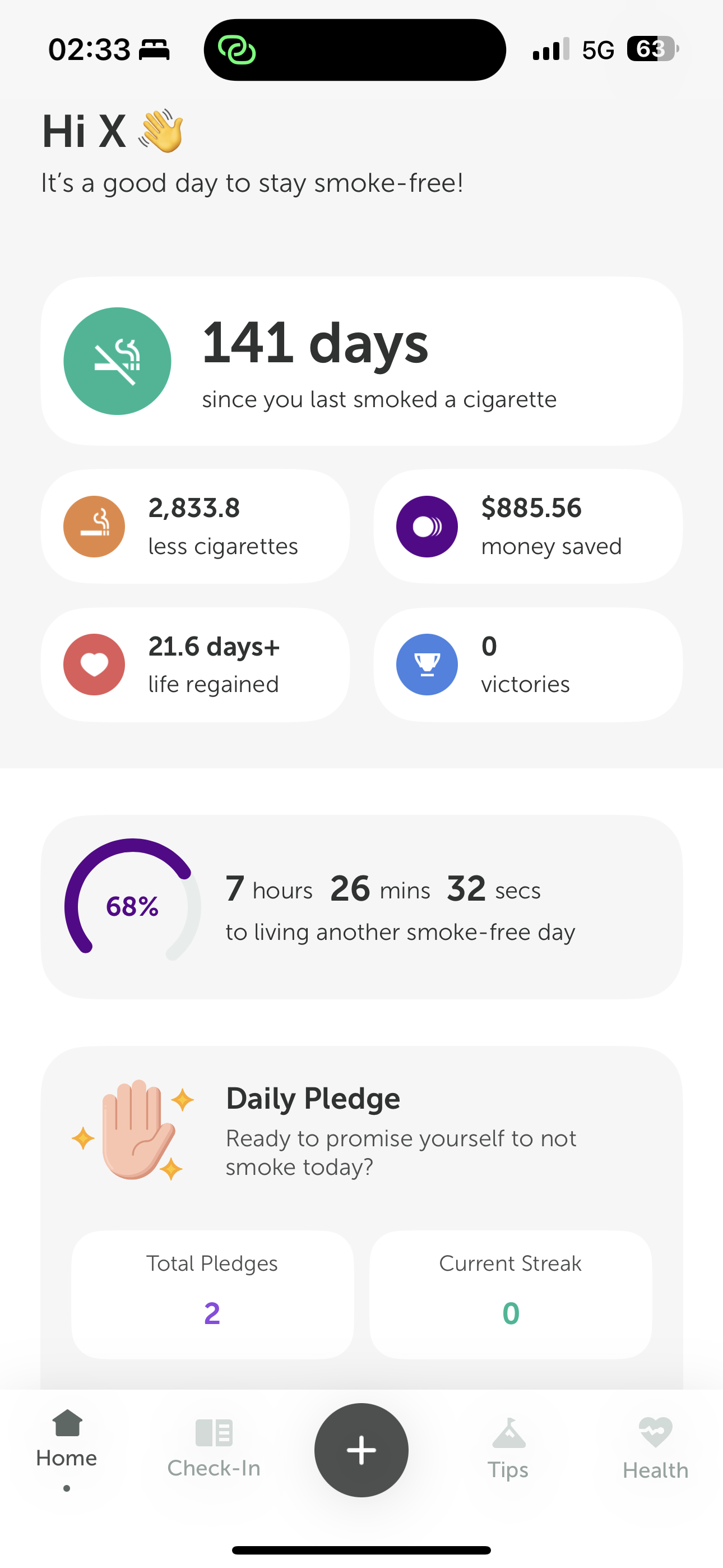
<p>This app can help people quitting smoking enter the right state very quickly, deeply understand the value of quitting, and regularly fulfill their commitment to their quit-smoking goal. During use, it continuously makes quitters realize that they are making progress, and it keeps strengthening self-identity and confidence in quitting.</p>
<figure class="article-media">
  <a class="media-link" href="https://os.niaodian.com/2024/06/fca738abc0cd1714de91687ff675119f.png" data-lightbox>
    <img src="https://os.niaodian.com/2024/06/fca738abc0cd1714de91687ff675119f.png" alt="IMG_3706.png" loading="lazy" decoding="async">
    <span class="sr-only">Open larger image: IMG_3706.png</span>
  </a></figure><p>Daily Pledge is the function Professor appreciates most. Although Professor no longer needs to check in every day, for smokers quitting for the first time, it can help everyone quickly develop the habit and strengthen their belief in quitting.</p>
<figure class="article-media">
  <a class="media-link" href="https://os.niaodian.com/2024/06/80f1c7971a56a86dcff50694ca4196b7.png" data-lightbox>
    <img src="https://os.niaodian.com/2024/06/80f1c7971a56a86dcff50694ca4196b7.png" alt="IMG_3707.png" loading="lazy" decoding="async">
    <span class="sr-only">Open larger image: IMG_3707.png</span>
  </a></figure><h3 id="6-firm-belief">6. Firm Belief</h3>
<p><em><strong>Very effective</strong></em></p>
<p>You are far stronger than you imagine. Once you establish a firm belief in quitting smoking, you will certainly be able to overcome all the difficulties encountered in the process! Please be sure to give yourself confidence and hold fast to your commitment to quitting smoking.</p>
<p>Among the 6 methods above, firm belief is the most difficult, but it is also the most effective. Once you have thought clearly about why you want to quit smoking, firm belief will not only accompany you during the period of quitting; it will become the main thread running through the rest of your life. Once you succeed in quitting smoking, I believe you will likewise be invincible and unconquerable in any future undertaking!</p>
<h2 id="summary">Summary</h2>
<hr>
<p>Quitting smoking is not easy. Through the experience shared in this article, Professor hopes that every smoker attempting to quit will succeed. Leslie Cheung once had a quit-smoking-themed song, <em>No Smoke, Only Flowers</em>, with excellent lyrics: “In childhood there was no it; memories were like paintings, and every day I breathed in and breathed out without relying on it.”</p>
<p>I wish all of you success in quitting smoking!</p>
<h2 id="references">References</h2>
<hr>
<ul>
<li><a href="https://zh.wikipedia.org/wiki/%E5%B0%BC%E5%8F%A4%E4%B8%81">https://zh.wikipedia.org/wiki/%E5%B0%BC%E5%8F%A4%E4%B8%81</a></li>
<li><a href="https://mp.weixin.qq.com/s/dpc31Diz5QRfCQzqPpIhKQ">https://mp.weixin.qq.com/s/dpc31Diz5QRfCQzqPpIhKQ</a></li>
<li><a href="https://apps.apple.com/us/app/stop-smoking-tracker-quoy/id6444828976">https://apps.apple.com/us/app/stop-smoking-tracker-quoy/id6444828976</a></li>
<li><a href="https://www.youtube.com/watch?v=YKx5Q_kOMwE">https://www.youtube.com/watch?v=YKx5Q_kOMwE</a></li>
</ul>
]]></content></entry><entry><title>2023 Is Almost Over, and I Do Not Miss It at All</title><link href="https://gmlg.com/en/sayonara-year-2023.html" rel="alternate"/><published>2023-12-27T00:00:00+08:00</published><updated>2023-12-27T00:00:00+08:00</updated><author><name>Xavier Zhang</name></author><id>tag:gmlg.com,2023-12-27:https://gmlg.com/en/sayonara-year-2023.html</id><summary type="html">&lt;p>2023 is almost over, and yet I do not miss it at all. Standing in the present and looking toward the future, I only hope for world peace.&lt;/p></summary><content type="html"><![CDATA[<p>In 4 more days, 2023 will be over. And yet, I do not miss it at all.</p>
<p>Professor has never been especially enthusiastic about year-end notes, but this year feels a little different. If I do not write something down, I fear I may regret it years from now. So I will roughly record a few episodes here, as material for future nostalgia.</p>
<h2 id="keyword-of-the-year-chaotic-good">Keyword of the Year: Chaotic Good</h2>
<hr>
<p>Before unpacking this year&rsquo;s keyword, it is necessary to explain what “chaotic good” means.</p>
<p>“Chaotic good” comes from the game setting of <em>Dungeons &amp; Dragons</em>. In the game, there are 9 alignments in total, and “chaotic good” is one of them.</p>
<blockquote>
<p>“Chaotic good” is also known as the “rebel” alignment, the “free spirit” alignment, or the “cynic” alignment. Chaotic good characters support any change that makes the world better and despise all bureaucratic institutions that hinder social progress. They value not only their own freedom, but also the freedom of others. They believe in goodness and justice, but do not obey laws and rules; they hate coercion and the act of inciting others. They always want to do good, yet their theories and actions are often not accepted by the world.</p>
</blockquote>
<p>However, in Professor&rsquo;s keyword of the year, “chaotic good” is not meant in quite such an extreme game-defined sense. It only needs to be split into “chaotic” and “good.”</p>
<p>“Chaotic” represents changes in the external environment, while “good” means that throughout this process, one can still follow one&rsquo;s heart and act with a belief in reason and integrity.</p>
<p>“Chaotic” seems easy enough to understand. From the lingering impact of the Russia-Ukraine war at the beginning of the year to the escalation of the Israeli-Palestinian conflict at year&rsquo;s end, this year made people in China who had long grown used to peace and progress—Professor included—taste for the first time that something like “World War III” is not merely a story in a novelist&rsquo;s imagination, but a practical political issue that could happen in the real world at any moment. The year&rsquo;s character seemed to be full of chaos and turbulence. Beyond increasingly frequent regional wars and conflicts, the domestic economic environment also became ever more challenging, and the direct effect was that the chill of the industry winter cut even more deeply.</p>
<p>In recent years, people in the pharmaceutical industry have faced increasingly frequent and severe changes. From the “soul-crushing” price negotiations in the national reimbursement talks a few years ago, to the recent medical anti-corruption campaign sweeping the entire industry, it seems that practitioners across the whole industry chain, upstream and downstream, are facing unprecedented challenges. The era marked by VUCA (Volatility, Uncertainty, Complexity, Ambiguity) has arrived, and I believe industry practitioners will use this word more and more often. Of course, there is no need for everyone to be anxious. These changes put practitioners more or less on the same starting line, and we will always be able to find solutions through cross-functional collaboration. If you do feel excessively anxious, I recommend watching Dr. Brene Brown&rsquo;s TED talk, <em>The power of vulnerability</em>. I believe it will be enlightening.</p>
<p>Even so, we must also clearly recognize that the state&rsquo;s guidance and reform of the medical industry is, overall, positive and progressive. The industry is undergoing a historic upheaval. Professor is more inclined to see this as an era full of enormous opportunities, rather than narrowly believing that current policies and external-environment challenges will hinder full competition in the industry.</p>
<p>In the middle of the year, the National Healthcare Security Administration released the <em>2022 Statistical Bulletin on the Development of National Healthcare Security</em>. The data in it was quite encouraging:</p>
<blockquote>
<p>By the end of 2022, the number of people enrolled in national basic medical insurance (hereinafter basic medical insurance) reached 134592 ten-thousand people, with the participation rate remaining above 95%; in 2022, total revenue of the national basic medical insurance (including maternity insurance) fund was 30922.17 hundred million yuan, an increase of 7.6% over the previous year; total expenditure of the national basic medical insurance (including maternity insurance) fund was 24597.24 hundred million yuan, an increase of 2.3% over the previous year; the current-year balance of the national basic medical insurance (including maternity insurance) fund was 6324.93 hundred million yuan, and the accumulated balance was 42639.89 hundred million yuan, of which the accumulated balance of individual accounts for employee basic medical insurance (hereinafter employee medical insurance) was 13712.65 hundred million yuan.</p>
</blockquote>
<p>It should be understood that, as the largest payer in China&rsquo;s medical market, national medical insurance plays an extremely prominent role in our public-hospital-led healthcare system. In 2019, about 50% of public hospitals&rsquo; medical and pharmaceutical revenue came from direct settlement by medical insurance, while in county-level hospitals and primary-level institutions, medical insurance fund revenue accounted for 56% and 65% of income respectively (Source: National Healthcare Security Research Institute). Looking at the changes in medical insurance fund revenue and expenditure over the past dozen or so years, we can clearly see that the scale of national medical insurance has maintained stable, high-speed growth. This means that the entire industry still has enormous room for development. Together with expectations of intensified population aging, the medical industry will certainly be a very important piece in the country&rsquo;s economic landscape in the future—or rather, a pillar industry.</p>
<p>Think back to 10 years ago, when the scale of our medical insurance had only just crossed the 8000 hundred-million-yuan threshold, roughly a bit over 1000 hundred million US dollars. At that time, MNCs&rsquo; China businesses often accounted for less than 5% of their global revenue, and China&rsquo;s market ranking was far behind markets like the “little devils.”</p>
<p>Over these 10 years, we have had national reimbursement negotiations, volume-based procurement, the two-invoice system, consistency evaluation, and a series of industry reforms that came down like thunder. At the same time, we have also been surprised to find that MNCs&rsquo; China businesses gradually began to exceed 5% of global revenue, even 10% or more, and the market ranking gradually caught up with the “little devils,” even rising to second place in the global market, behind only the United States.</p>
<p>More importantly, we have found that local BioTech forces are becoming increasingly strong. In many subfields, they have gradually shown a tendency toward global leadership. Compared with the excellent performance of First-in-Class products, an even more positive change may be that more and more multinational giants are planning China-in strategies at the new-product R&amp;D and clinical-experience stages. The goal is also very clear: they hope new products can be launched in the Chinese market simultaneously at first launch, thereby fully unlocking the products&rsquo; commercial value.</p>
<p>All of this was once unimaginable to us, yet it is also happening in the present that we are personally experiencing, crystallized in the painful moments when industry people complain endlessly and even shed tears at negotiation sites.</p>
<p>It is precisely because of this that the second meaning in the keyword of the year emerges: “good.”</p>
<p>How does one follow one&rsquo;s heart and do the right thing in a VUCA environment?</p>
<p>This is a very difficult question to answer, and each person may even have a different answer. The company Professor works for has always upheld high compliance and ethical standards. Imperceptibly, this has also become Professor&rsquo;s requirement for himself in work and life.</p>
<p>At work, as an employee in a support function, Professor&rsquo;s efforts in digitalization and innovation achieved a few modest results this year. By introducing innovative technology platforms, we improved business efficiency while simplifying processes and reducing compliance risks. In life, I continued making monthly donations to UNICEF this year. At the same time, as a happy bachelor enjoying singlehood and therefore possessing plenty of spare time, I also began writing a blog to share knowledge. In addition, I started actively embracing AI and seriously studied LinkedIn Learning courses related to AI ethics.</p>
<p>Professor has always firmly believed that technological progress will create a better future for humanity, and therefore will embrace innovation with a more open mindset. Of course, we should also repeatedly forecast and manage the risks that come with it. For that reason, an MVP (minimum viable product) is often a good start.</p>
<p>Doing the right thing and welcoming the future with a positive mindset—this is probably the portrait of this year. I hope that in the days to come, I can always keep my original heart.</p>
<h2 id="work-the-office-politics-circle-one-cannot-escape">Work: The Office-Politics Circle One Cannot Escape</h2>
<hr>
<p>In the blink of an eye, Professor has already been with his current company for 4 years.</p>
<p>I vaguely remember that 4 years ago, a headhunter recommended this company because it had just opened a new headcount for Customer Journey Excellence work. The purpose was to improve the company&rsquo;s overall effectiveness in digital customer engagement, and they hoped the candidate would have experience related to Loyalty Programs. The headhunter felt that Professor&rsquo;s background was, overall, quite a good match for the position, and this company happened to be one of the few industry companies Professor had long admired. So after an in-depth discussion, the headhunter forwarded my resume to HR.</p>
<p>HR&rsquo;s call arrived as scheduled. Many questions were covered, but one question that still leaves a deep impression was: why do you want to join the company? Hmm, a good question. At the time, I communicated candidly with HR and expressed a strong desire to join the company and create value for the enterprise. The subsequent rounds of communication also went very smoothly. 2 weeks later, I joined at lightning speed, just in time to enter the company in 2020 on the first working day. Later, when chatting with colleagues, Professor would always jokingly say that he had “been working at the company since the 20&rsquo;s.” This series of efficient processes also once left Professor with a strong impression of the company&rsquo;s administrative efficiency.</p>
<p>It is an honor that, in the blink of an eye, I have already worked here for 4 years.</p>
<p>Over these years, everything seemed to be going reasonably smoothly. The working atmosphere was relatively harmonious, and colleagues came across in communication as very positive, enterprising, and inclusive. In fact, these were concrete manifestations of the company&rsquo;s values. Honestly, such a working environment and office atmosphere are exceptionally rare. At least, that is how Professor once felt.</p>
<p>2023 may have been destined to be an extraordinary year. There were great changes and many transformations; the enterprising spirit remained unchanged, and the company was still highly inclusive.</p>
<p>Only, gradually, there came to be more of a taste of office politics. In fact, that taste had always been there. The only difference lay in how rich it became, and therefore whether each person would deliberately pay attention to it.</p>
<p>These changes were not merely evolving quietly within some department or team. More often, they felt like proactive transformation of the entire organization as the company faced challenges in the external environment. As a member of the organization, one should actively adjust one&rsquo;s mindset and embrace change. On this point, Professor has not done enough. Although Professor has plenty of experience using change-management tools in project management, when he himself becomes one of the people who need to change, he still needs to be more agile.</p>
<p>Lately, I have gradually begun to enjoy reading books, especially books on history. By chance, I saw this passage of history:</p>
<blockquote>
<p>On March (month 3) 10, 1912, <em>Yuan Shikai</em> announced in Beijing that he would take office as provisional president, and the victorious <em>fruit</em> of the Xinhai Revolution was thus stolen by <em>Yuan Shikai</em>.</p>
</blockquote>
<p>You see, Lord Yuan understood very well how to embrace change.</p>
<h2 id="life-rediscovering-the-joy-of-music">Life: Rediscovering the Joy of Music</h2>
<hr>
<p>In life, the biggest change this year was probably rediscovering my passion for music.</p>
<p>Professor has a clay xun that he had not been able to make sound for years. This year, I finally seemed to find the technique for playing the xun. Though haltingly, I can now follow teaching materials and play the notes “do re mi fa sol la si.”</p>
<p>At first, my interest in the clay xun was probably because I loved Sojiro&rsquo;s <em>The Original Scenery of the Hometown</em>. This extremely ethereal piece of music is mainly played on the clay xun that Sojiro personally fired. The piece is very famous and has been used as background music in many period dramas. Friends who have not heard it can find it and give it a listen; I believe it will sound familiar.</p>
<p>Let us talk a little more about the xun.</p>
<p>The ancient xun can be counted as an instrument from remote antiquity. The earliest archaeologically traceable ancient xun is said to come from the era when humans lived in communal tribes, more than 7 thousand years ago.</p>
<p>Imagine that the instrument being played today was, in some tribe 7 thousand years ago, picked up by a young person who went out hunting with the others and gently played it to imitate some wild beast that has long since gone extinct. I wonder whether that day&rsquo;s hunt brought everyone a rich harvest. Hopefully they did not return to the settlement empty-handed; otherwise, someone would probably have gone hungry again!</p>
<p>When I studied in Xi&rsquo;an in the past, I went to antique markets, and clay xun were everywhere. Yet whenever I looked at those black clay xun on vendors&rsquo; stalls back then, I always felt something strange in my heart. At the time, I probably never imagined that nearly twenty years later, I would pick one up and repeatedly study how to make it sound. This feeling is as if the present self shook hands with the self from another time and space.</p>
<p>Besides that, I also bought the new AirPods Pro, and Apple happened to include a 6-month Apple Music trial.</p>
<p>The AirPods Pro have already justified their price, and they are more than enough for listening to Apple Music.</p>
<p>In the official Replay ’23 recap, the artist I listened to most and loved most was still Tarcy Su. So many years have passed, from middle school to middle age, from the ignorant boy for whom days felt like years, to a middle-aged uncle whose hair remains robust. My favorite songs may often change, but whenever I hear your singing, a faint sense of happiness always appears.</p>
<p>Thank you for letting your singing accompany Professor for so many years, dear Ms. Su.</p>
<figure class="article-media">
  <a class="media-link" href="https://os.niaodian.com/2024/05/9823abb3653e344560b81d93883253ea.PNG" data-lightbox>
    <img src="https://os.niaodian.com/2024/05/9823abb3653e344560b81d93883253ea.PNG" alt="IMG_1552.PNG" loading="lazy" decoding="async">
    <span class="sr-only">Open larger image: IMG_1552.PNG</span>
  </a></figure><h2 id="investing-forget-about-it">Investing: Forget About It</h2>
<hr>
<p>The A-share market this year was truly beyond absurd.</p>
<p>This year&rsquo;s economy was also full of challenging voices everywhere. It seems there was hardly any industry especially worth singling out for discussion.</p>
<p>I have long since stopped looking at my stock account. As long as I do not look, it cannot hurt me, hahaha.</p>
<p>As for investing, let us pretend it does not exist.</p>
<p>By the way, I wish all of you an early escape from being trapped in losing positions!</p>
<h2 id="a-little-mystical-story">A Little Mystical Story</h2>
<hr>
<p>Finally, let me tell a little mystical story.</p>
<p>This year, I had 2 very special experiences. I cannot say clearly whether they were illusions, but they did feel rather supernatural, so I will briefly record them here.</p>
<p>Once, while Professor was scrolling through short videos, he happened to come across a “person” dancing.</p>
<p>At that moment, the first psychological reaction in my heart after seeing it was: “What kind of world is this now? How are foxes all coming out to livestream themselves dancing?” Then I realized something was wrong—the one dancing should have been a human! So I tried carefully to identify it clearly, yet what I kept seeing was the form of a fox. Only in the end, by reconstructing it little by little from the details of the facial features, did I finally restore it into the form of a normal person. Unfortunately, I did not take a screenshot at the time, so now there is no way to confirm whether it was merely an illusion caused by blurred vision.</p>
<p>The other time was an experience in real life.</p>
<p>On Shanghai Metro Line 1 during the evening rush hour, there were especially many passengers, and the crowded carriage was full of men and women anxious to get home. On one occasion, when Professor was transferring at Hanzhong Road, a group of passengers happened to get on and stood near the door. Originally, Professor did not notice anything unusual, until at one point he happened to look up and noticed that the figure of a person beside him looked slightly blurred while playing with a phone. When I looked carefully, it turned out to be a long-faced, horse-faced person, which truly gave me a fright! Later, when getting off, I deliberately and quietly stared again, and what I indeed saw was a long-faced, horse-faced person.</p>
<p>These two experiences were separated by several months, so they probably were not illusions caused by stress or emotional factors during a particular period. Yet the only reasonable explanation seems to be illusion.</p>
<p>Most likely, either something is wrong with this world, or, with even higher probability, something is wrong with Professor.</p>
<p>Later, while having a meal, I shared these two bizarre experiences with Betty. She thought it might have been influenced by having previously read books on physiognomy and the like. But thinking carefully, books such as <em>Bingjian</em> do not seem to contain descriptions this outrageous, and these two illusions seemed more like something felt through “observing qi.”</p>
<p>Still, there is no need to dwell on it. Let us treat them as illusions. After all, we must have a dialectical-materialist mindset; how could it be so easy in this human world to see demons and monsters?</p>
<h2 id="new-year-outlook-safety--health">New-Year Outlook: Safety &amp; Health</h2>
<hr>
<p>2023 is almost over, and I do not miss it at all.</p>
<p>2024 is coming, and I am full of expectations for it. I hope that in the new year, my family and I can all be safe and healthy.</p>
<p>Finally, I send everyone a touch of sunset glow. May your new year be prosperous and fiery red!</p>
<figure class="article-media">
  <a class="media-link" href="https://os.niaodian.com/2024/05/8821391eebeb05eec94bda47aac0a1bc.JPG" data-lightbox>
    <img src="https://os.niaodian.com/2024/05/8821391eebeb05eec94bda47aac0a1bc.JPG" alt="IMG_1530.JPG" loading="lazy" decoding="async">
    <span class="sr-only">Open larger image: IMG_1530.JPG</span>
  </a></figure><h2 id="references">References</h2>
<hr>
<ul>
<li><a href="https://zh.wikipedia.org/zh-cn/%E9%98%B5%E8%90%A5_%28%E9%BE%99%E4%B8%8E%E5%9C%B0%E4%B8%8B%E5%9F%8E%29">https://zh.wikipedia.org/zh-cn/%E9%98%B5%E8%90%A5_(%E9%BE%99%E4%B8%8E%E5%9C%B0%E4%B8%8B%E5%9F%8E)</a></li>
<li><a href="http://www.nhsa.gov.cn/art/2023/7/10/art_7_10995.html">http://www.nhsa.gov.cn/art/2023/7/10/art_7_10995.html</a></li>
<li><a href="https://zh.wikipedia.org/wiki/%E5%9F%99">https://zh.wikipedia.org/wiki/%E5%9F%99</a></li>
</ul>
]]></content></entry><entry><title>Business Insight: How to Do Sales Forecasting</title><link href="https://gmlg.com/en/business-excellence-how-to-do-sales-forecasting.html" rel="alternate"/><published>2023-11-21T00:00:00+08:00</published><updated>2023-11-21T00:00:00+08:00</updated><author><name>Xavier Zhang</name></author><id>tag:gmlg.com,2023-11-21:https://gmlg.com/en/business-excellence-how-to-do-sales-forecasting.html</id><summary type="html">&lt;p>At a recent departmental Cycle Meeting, I heard a colleague from L&amp;D share some internal learning resources. I gave them a quick try, and it was also a good chance to study some proper business knowledge and get back to serious work. The course content was quite good, so I am also sharing how to do sales forecasting here, hoping it may help readers who need it.&lt;/p></summary><content type="html"><![CDATA[<h2 id="foreword">Foreword</h2>
<hr>
<p>At a recent departmental Cycle Meeting, I heard a colleague from L&amp;D share some internal learning resources. I gave them a quick try, and it was also a good chance to study some proper business knowledge and get back to serious work. The course content was quite good, so I am also sharing how to do sales forecasting here, hoping it may help readers who need it.</p>
<h2 id="understanding-sales-forecasting">Understanding Sales Forecasting</h2>
<hr>
<h3 id="1-what-is-sales-forecasting">1. What Is Sales Forecasting?</h3>
<p>Sales forecasting is a prediction of a sales department’s performance over a period of time. It can help managers and marketers coordinate around key business priorities, especially limited funds or resources. The essential point is to minimize the gap between the forecast value and the actual sales value as much as possible.</p>
<p>At the same time, there is also the concept of safety stock, which aims to reduce as much as possible the consequences of forecasts that are too low or too high. Ultimately, it helps companies operate better while protecting them from uncertainty.</p>
<h3 id="2-the-importance-of-sales-forecasting">2. The Importance of Sales Forecasting</h3>
<p>Sales forecasting affects quite a wide range of areas in actual business operations. Its importance includes, but is not limited to:</p>
<ul>
<li><strong>Affecting corporate financial planning</strong>: influencing stock prices or managers’ investment decisions;</li>
<li><strong>Building and managing sales teams</strong>: influencing territory design, sales target setting, performance evaluation, and so on;</li>
<li><strong>Affecting operating decisions in collaborating departments</strong>: support departments may be influenced by sales forecasts when allocating resources, such as dividing speaker quotas;</li>
<li><strong>Affecting people-management approaches</strong>: influencing how HR designs employee compensation and benefits structures, and when to conduct recruitment activities at what scale, and so on;</li>
<li><strong>Affecting the scale of corporate investment</strong>: providing expectations for the cash flow of an acquisition target, thereby determining the acquisition amount.</li>
</ul>
<h3 id="3-the-sales-forecasting-process">3. The Sales Forecasting Process</h3>
<p>Sales forecasting is a systematic process involving multiple business functions. To conduct sales forecasting, you need to <strong>build the right team</strong> (Win as ONE Team; teamwork allows all departments to align around the forecast), <strong>identify team members and roles</strong> (sales team, marketing team, finance department, operations department), and <strong>clarify project goals and timelines</strong>.</p>
<p>The brief process is as follows:</p>
<ol>
<li><strong>Analyze the market</strong>: business category, market size, market trends and dynamics, and so on;</li>
<li><strong>Collect data</strong>: collect only data relevant to the forecast; if desired data is missing, reasonable assumptions can be made;</li>
<li><strong>Determine the method</strong>: qualitative, quantitative, or a combination of both;</li>
<li><strong>Test the forecast</strong>: run the forecasting model against historical sales cycles, test its effect, and determine whether further adjustments are needed;</li>
</ol>
<h2 id="preparing-for-sales-forecasting">Preparing for Sales Forecasting</h2>
<hr>
<h3 id="1-define-the-market-category">1. Define the Market Category</h3>
<p>The market category is your competitive space. The competitive space can be defined very broadly (more competition), or very narrowly (less competition), depending on the product and business model. When doing sales forecasting, it is best to invite colleagues from the marketing department to participate and understand how they define the market category.</p>
<p>In addition, you need to understand the existing market trends in each category: are sales rising, falling, or flat? At the same time, you also need to understand the factors behind those trends so that you can make more accurate forecasts.</p>
<h3 id="2-understand-market-dynamics">2. Understand Market Dynamics</h3>
<p>We are more familiar with internal company information, but external market dynamics often directly affect the accuracy of sales forecasting results. For example, competitors’ market strategies and marketing activities may affect our sales volume.</p>
<p>In addition, we should actively understand the impact of <strong>laws, regulations, and political changes</strong> on sales expectations. Beyond that, there are customer behavior, technological changes/innovations/breakthroughs, internal business strategy changes, and so on.</p>
<h3 id="3-choose-a-forecasting-method">3. Choose a Forecasting Method</h3>
<p>Forecasting methods fall into two categories: qualitative and quantitative. Qualitative methods rely more on people’s inputs, while quantitative methods rely more on numerical data inputs. Excellent sales forecasters combine and apply both methods comprehensively.</p>
<p>Before choosing a method, you can test yourself with the following questions:</p>
<ul>
<li>How well do I understand the market?</li>
<li>Is the market growing or declining? Why?</li>
<li>Are there new consumer (customer), competitor, or technology trends?</li>
<li>Is my market a seasonal business?</li>
<li>How well do salespeople and distributors understand the market?</li>
<li>How much past sales data do I have?</li>
<li>What methods did my predecessor use? Were they successful? Were there any major forecasting errors?</li>
</ul>
<p>A beginner can use qualitative methods first to obtain relevant professional knowledge and market information.</p>
<p>A good forecast should combine quantitative and qualitative methods.</p>
<h2 id="using-quantitative-forecasting-methods">Using Quantitative Forecasting Methods</h2>
<hr>
<h3 id="1-collect-data">1. Collect Data</h3>
<p>The most commonly used data source is historical sales data. However, it is important to use clean data, meaning the data must meet requirements such as being <strong>accurate</strong>, <strong>undistorted</strong>, and <strong>undamaged</strong>. We should find as much historical sales data as possible, and we can ask colleagues from finance or IT to help collect the most accurate and comprehensive existing data.</p>
<p>Before using it, we also need to check the data. First, be sure to determine the time period corresponding to the sales data, such as hourly, daily, monthly, quarterly, or yearly. Use <strong>quarterly data</strong> as much as possible; research shows that this time cycle often produces more accurate forecasting results. Then, plot how the data changes over time. A trend chart can vividly show historical changes in sales data and can also reveal obvious abnormal fluctuations; at that point, you need to understand the reasons behind the fluctuations. Finally, pay attention to other details, such as whether discount factors exist.</p>
<p><strong>The key is to keep the data consistent</strong>, and to remove historical data that does not reflect the current business.</p>
<h3 id="2-rolling-method">2. Rolling Method</h3>
<p>The principle of rolling forecasting is: past actual sales = future sales forecast. It is more suitable for businesses with stable sales revenue and sales volume that is not affected by seasonal factors. For example, we can use last month’s actual sales result as next month’s sales forecast.</p>
<p>The advantage of rolling forecasting is that it can serve as a benchmark for comparison with other forecasting methods. By comparing the size of the average error, you can determine whether to use the rolling forecasting method.</p>
<p><strong><em><strong>Tip:</strong></em></strong> When calculating absolute error, you can use the ABS function in Excel. ABS stands for absolute, and its usage is as follows:</p>
<div class="code-wrap" tabindex="0" aria-label="excel 代码块，可水平滚动">
  <div class="terminal-chrome" aria-hidden="true">
    <span class="terminal-dot terminal-dot--close"></span>
    <span class="terminal-dot terminal-dot--minimize"></span>
    <span class="terminal-dot terminal-dot--maximize"></span>
    <span class="code-label">excel</span>
  </div>
  <div class="highlight"><pre tabindex="0" class="chroma"><code class="language-fallback" data-lang="fallback"><span class="line"><span class="cl">= ABS(C3-B3)</span></span></code></pre></div>
</div>
<p>The result returns the absolute value of <code>C3-B3</code>; even if it is negative, it will return the positive form.</p>
<h3 id="3-moving-average">3. Moving Average</h3>
<p>The moving average method uses the average sales from the past few months as the sales forecast for the next month. For example, the average sales from months 2 - 5 = forecast sales volume for month 6 in this example.</p>
<p>If sales volume is affected by seasonal factors, we can also apply weights to the moving average, which is the weighted moving average method. For example, month 2 sales volume * 10% + month 3 sales volume * 20% + month 4 sales volume * 30% + month 5 sales volume * 40% = month 6 forecast sales volume. The weighting coefficients need to be determined according to the actual situation.</p>
<h3 id="4-exponential-smoothing">4. Exponential Smoothing</h3>
<p>The smoothing forecasting method is simple to calculate. It requires only the <strong>current-period sales volume</strong> (A), the <strong>current-period forecast value</strong> (F), and the <strong>current-period weighting factor</strong> (S, the smoothing coefficient). That is:</p>
<div class="code-wrap" tabindex="0" aria-label="excel 代码块，可水平滚动">
  <div class="terminal-chrome" aria-hidden="true">
    <span class="terminal-dot terminal-dot--close"></span>
    <span class="terminal-dot terminal-dot--minimize"></span>
    <span class="terminal-dot terminal-dot--maximize"></span>
    <span class="code-label">excel</span>
  </div>
  <div class="highlight"><pre tabindex="0" class="chroma"><code class="language-fallback" data-lang="fallback"><span class="line"><span class="cl">(A*S)+(F*(1-S))
</span></span><span class="line"><span class="cl"># A = 最近时段的实际销量
</span></span><span class="line"><span class="cl"># S = 平滑系数，采用小数形式
</span></span><span class="line"><span class="cl"># F = 最近时段的预测值（上一个时段的平滑计算结果）</span></span></code></pre></div>
</div>
<p>The smoothing forecasting method considers both historical actual sales volume and historical forecast values.</p>
<ul>
<li><input disabled="" type="checkbox"> Question: How should the smoothing coefficient be determined?</li>
</ul>
<h2 id="using-qualitative-forecasting-methods">Using Qualitative Forecasting Methods</h2>
<hr>
<h3 id="1-use-estimates-provided-by-customers">1. Use Estimates Provided by Customers</h3>
<p>Accuracy is based on how well we understand our customers, and how well customers understand themselves.</p>
<p>Customers can be divided into 4 categories:</p>
<ul>
<li>Customers who buy products <strong>only</strong> from you</li>
<li>Customers who <strong>also</strong> buy products from you</li>
<li>Customers who buy only <strong>competitors’</strong> products</li>
<li>Customers who <strong>do not buy</strong> this type of product at all</li>
</ul>
<p>Use a top-down method: first, estimate the total number of customers; second, determine the proportion of each customer type; then estimate the potential sales for each group based on customer numbers and aggregate them.</p>
<p>Use a customer-centered forecasting method: research what customers plan to buy from us in the future and what their spending plans are, then make an estimate.</p>
<h3 id="2-use-estimates-provided-by-sales-representatives-and-distributors">2. Use Estimates Provided by Sales Representatives and Distributors</h3>
<p>First, ask sales representatives and distributors to estimate total annual sales volume, then break it down by month or quarter.</p>
<p>It is important to note that the greatest risk in asking sales representatives and distributors to estimate sales volume is that they are unlikely to distinguish between sales forecasts and sales targets (sales quotas). Sales representatives tend to set sales targets lower than the actual market situation.</p>
<p>You should avoid sales representatives “sandbagging.” Sandbagging means artificially lowering the sales forecast in order to obtain a sales target (sales quota) that is easier to achieve. This is also why qualitative and quantitative methods need to be combined.</p>
<p>In addition, for estimates provided by sales representatives, you need to further understand what assumptions their conclusions are based on. For example: adding new customer development? Losing customers? New competitors appearing in the territory? Price changes? New marketing campaigns? Newly launched products?</p>
<p>Finally, you can use <strong>expected value (EV)</strong> analysis. Expected value is a forecast for a given region, calculated by multiplying each possible outcome by its respective probability and then summing all outcomes. That is:</p>
<div class="code-wrap" tabindex="0" aria-label="excel 代码块，可水平滚动">
  <div class="terminal-chrome" aria-hidden="true">
    <span class="terminal-dot terminal-dot--close"></span>
    <span class="terminal-dot terminal-dot--minimize"></span>
    <span class="terminal-dot terminal-dot--maximize"></span>
    <span class="code-label">excel</span>
  </div>
  <div class="highlight"><pre tabindex="0" class="chroma"><code class="language-fallback" data-lang="fallback"><span class="line"><span class="cl">EV=可能值*各自概率</span></span></code></pre></div>
</div>
<p>You can ask sales representatives or distributors how much sales revenue each customer can generate, and what the probability is:
<img class="inline-media" src="https://os.niaodian.com/2023/11/85aaad7d48f99dc9683440daf3f818ec.png" alt="2023-11-21 180606.png" loading="lazy" decoding="async"></p>
<p>Calculation result:
<img class="inline-media" src="https://os.niaodian.com/2023/11/3b889bf74d4919e5592b58676b8b7ae0.png" alt="2023-11-21 181241.png" loading="lazy" decoding="async"></p>
<p>Compared with asking sales representatives to provide total annual sales volume forecasts, expected value analysis has a smaller error. At the same time, expected value analysis also uses sales representatives’ tacit knowledge of their own territories, and that knowledge can help us make more accurate sales forecasts.</p>
<h3 id="3-listen-to-an-expert-panel">3. Listen to an Expert Panel</h3>
<p>When you are in an unpredictable market, experts’ insights often help reduce forecasting errors. When building an expert panel, you should look as much as possible for people with diverse and distinctive views of the industry. These people may be distributed across different links in our business pathway and can be invited according to actual needs. The diversity of the panel also helps eliminate biases that any one panel member may have.</p>
<p>After establishing the expert panel, you need to determine what information you should obtain from them. For example, should you estimate new cases nationwide, regionally, or within a target market, or should you estimate the number of new cases each year, each quarter, or even each month? You should clearly define the questions the expert panel is best suited to solve, so that you can obtain unique information.</p>
<p>It should be noted that the most important thing is not each person’s forecast result, but the assumptions used by the panel members. These assumptions can provide the most critical information for setting a reasonable forecast. Accept important assumptions and find ways to validate them.</p>
<h2 id="summary">Summary</h2>
<hr>
<p>When I first saw the <em>Sales Forecasting</em> course, I did not take it nearly as seriously as I did after finishing it. As a colleague in a company support function, Professor’s main job responsibilities are more related to technology, and are instead somewhat distant from sales management in the real world. Studying the <em>Sales Forecasting</em> course this time broke my previous inertial thinking to some extent, and can also be considered an opportunity to fully embrace business management.</p>
<p>In fact, if we use the <em>Sales Forecasting</em> course to look at the changes and turbulence in the industry over the past few years, it is easy to find that many emerging innovative companies may not have done a good job with commercialization, especially with reasonable sales management. Perhaps when the market and investment environment are good, everything is fine. But once they encounter changes in the external policy environment or a capital winter, they have no choice but to cut the size of their sales organizations on a large scale, which in fact accelerates the deterioration of the industry environment.</p>
<p>At present, we are in a period of historic transformation. Many market changes are things we have never encountered in experience, and the challenges of industry transformation are placing higher demands on every company. How to improve the efficiency and effectiveness of commercial teams in a rapidly changing market environment by integrating limited resources, thereby maximizing business value, is worth deep reflection by everyone in the industry.</p>
<p>In this winter with such unusually strange weather, learning a little more knowledge is never a bad thing.</p>
<h2 id="references">References</h2>
<hr>
<ul>
<li><a href="https://www.linkedin.com/learning/sales-forecasting-2/">https://www.linkedin.com/learning/sales-forecasting-2/</a></li>
</ul>
]]></content></entry><entry><title>A Belated iPhone 15 Pro Max and Apple Watch Ultra 2 Experience Report</title><link href="https://gmlg.com/en/iphone-15-pro-max-and-apple-watch-ultra-2-review.html" rel="alternate"/><published>2023-10-15T00:00:00+08:00</published><updated>2023-10-15T00:00:00+08:00</updated><author><name>Xavier Zhang</name></author><id>tag:gmlg.com,2023-10-15:https://gmlg.com/en/iphone-15-pro-max-and-apple-watch-ultra-2-review.html</id><summary type="html">&lt;p>Apple’s September event has been over for more than a month, and more than half a month has passed since reservations opened on the official website. Professor is here to talk with everyone about this belated iPhone 15 Pro Max and Apple Watch Ultra 2 experience report.&lt;/p></summary><content type="html"><![CDATA[<p>Apple’s September (9) event has been over for more than a month, and more than half a month has passed since reservations opened on the official website. Professor is here to talk with everyone about this belated iPhone 15 Pro Max and Apple Watch Ultra 2 experience report.</p>
<h2 id="background">Background</h2>
<hr>
<p>For a long time, Professor’s use of personal electronic devices has been rather mixed. I have never had an especially strong preference between Apple products and products from the Microsoft and Android camps. The devices I used before mainly included Apple’s MacBook Pro and iPad Pro, a Windows ThinkPad laptop for work, Huawei phones, watches, VR glasses, and wireless earbuds, plus a few odds and ends.</p>
<p>All of that changed this autumn.</p>
<p>The reason I used Huawei products back then was simply the China–US trade war: Trump began imposing trade sanctions on China, so I switched to a whole series of Huawei products that year.</p>
<p>I still remember when my American colleague Rebecca, who worked with us at the time, came to Shanghai on a business trip from the German headquarters. During dinner, while chatting, she asked why the device she saw Professor using during the daytime training was a MacBook (I had lent my work computer to her so she could train colleagues in China), yet I did not use an iPhone. I told her then: since the U.S. government had decided to “Ban” Huawei, I had decided to “Ban” the iPhone and switch to Huawei products. Rebecca looked utterly speechless, which secretly delighted Professor.</p>
<p>That year, our China business had just surpassed Japan to become the world’s second-largest market. It seemed like a joke at the time, yet nobody expected that, even today, 4 or 5 years later, those sanctions would still be in place. It is just that Professor is no longer an advocate for Huawei products, which is a little sad to think about.</p>
<p>The trigger for replacing my devices this time was mainly that the old devices had long started to feel outdated, while the A17 series chip Apple showed at the event made me perhaps a little too excited. Especially after moving to a 3nm process, the performance improvement ought to have an impressive side to it. Since the phone carries so much personal privacy and has become an inseparable part of life, concerns over information security and privacy protection made Professor want to migrate back into the iOS ecosystem more quickly.</p>
<p>Since the phone was going back to iOS, the watch naturally had to switch back to watchOS as well. And that is the premise for this iPhone 15 Pro Max and Apple Watch Ultra 2 experience report.</p>
<h2 id="the-official-sites-mysterious-presale">The Official Site’s Mysterious Presale</h2>
<hr>
<p>To be honest, the reservation experience on the official website this time was passable overall; it was just that a few steps in the middle were rather baffling. I still hope brands will try not to play the “hunger marketing” game anymore. If inventory really is insufficient, then strengthen supply-chain management.</p>
<p>Because the Apple Watch Ultra 2 presale started earlier, and demand did not seem as strong as for the iPhone, it was delivered very smoothly on 9 / 22, without any trouble.</p>
<p>By comparison, reserving and receiving the iPhone 15 Pro Max was more tortuous.</p>
<p>First, after the official website opened reservations at 8 p.m., it could not be opened until nearly half an hour later. There was also a small episode here: Professor refreshed in Chrome for more than 20 minutes and still could not get the purchase page to load, so I turned around and switched to Safari. After logging in, it loaded very quickly. I have no idea whether that was just an illusion.</p>
<p>Then, after painstakingly placing the order and completing payment via WeChat Pay, the order still kept showing as pending payment. Seeing that the remaining payment countdown had only just over 10 minutes left, I thought the payment had failed. So I called the official 400 hotline for consultation. Good grief, the phone queue also took just over 10 minutes. I mean, was iPhone demand really this fierce this time? When I finally got through, the agent said they could not find the order number. Good lord, could the order have been lost&hellip;</p>
<p>Just as I was speechless, I casually refreshed the page again. Fortunately, I found that the order status had updated to “You have completed payment” (it was not even willing to use the more formal Chinese character “您”). The agent on the other end also said they had found the order, and then began shouting in an extremely sentimental tone, “Sir, congratulations, you have successfully reserved an iPhone 15 Pro Max,” plus a huge pile of similar scripted lines, which left me not knowing whether to laugh or cry.</p>
<p>After hanging up, I also complained to Steve on WeChat. He could not get anything to load in the Apple Store app either, so he went to shower first. Later, when he placed his order, he was about 20 minutes later. With just that tiny time difference, Professor’s estimated delivery date was 10 / 10, while his was 10 / 10-17, roughly. In the end, though, everyone’s devices arrived early: Professor got mine on 9 / 28, while his arrived only on 10 / 8, after a longer wait.</p>
<p>Overall, it feels like demand for this year’s 15 series is still strong, but it also seems there was a large wave of scalper returns; otherwise, Professor’s unit could not have arrived so much earlier. You can also glimpse a trace of this from the scalper-market prices in the early days after launch. Most likely, overall sales of this year’s 15 series will not be especially ideal. If you hold Apple stock, you may need to be careful for a while (laughs 😂).</p>
<figure class="article-media">
  <a class="media-link" href="https://os.niaodian.com/2023/10/2a77c8de07d3a5d8a31dd141fe208243.PNG" data-lightbox>
    <img src="https://os.niaodian.com/2023/10/2a77c8de07d3a5d8a31dd141fe208243.PNG" alt="IMG_0565.PNG" loading="lazy" decoding="async">
    <span class="sr-only">Open larger image: IMG_0565.PNG</span>
  </a></figure><h2 id="accessories-to-buy">Accessories to Buy</h2>
<hr>
<p>Based on my experience so far, there are some necessary accessories that I highly recommend everyone pick up together.</p>
<h3 id="apple-watch-ultra-2-accessory-recommendations">Apple Watch Ultra 2 Accessory Recommendations</h3>
<ol>
<li><strong>Titanium watch bezel</strong>: Strongly recommended. Because the Ultra 2 has such a “burly build,” it is very easy to bump in daily use. That includes, but is not limited to, intimate contact with these objects: desktops, laptops, desk edges, doorframes, washbasins, walls, and so on.</li>
<li><strong>Tempered glass watch protector</strong>: This is an essential accessory, mainly to prevent screen scratches from affecting the viewing experience. A standard Corning glass film is fine; there are also sapphire-glass options and the like. Rich folks, feel free.</li>
<li><strong>Watch band</strong>: Optional accessory. The one Professor ordered this time was the “Alpine Loop.” It looks fine, but it is extremely inconvenient to take off and put on. Every time I remove it for charging, I do so very carefully, because I am rather worried that using too much force could make the metal hook smash the watch crystal. If possible, choosing the “Trail Loop” at purchase might be a more appropriate approach.</li>
</ol>
<h3 id="iphone-15-pro-max-accessory-recommendations">iPhone 15 Pro Max Accessory Recommendations</h3>
<ol>
<li><strong>Tempered glass screen protector</strong>: The market for iPhone tempered glass screen protectors is quite chaotic, with prices all over the place, from tens to hundreds. The materials are basically Corning glass, sapphire glass, AR anti-reflective glass, and so on. Before buying, I recommend watching some review videos to help choose the right brand. Professor uses a relatively cheap Corning glass protector; it cost a few dozen yuan, and so far I feel there is no problem with it. Also, I do not really recommend privacy tempered glass protectors: they affect screen brightness and the viewing experience. Unless you have a special use case, there is no need to choose one.</li>
<li><strong>Phone camera-lens protector</strong>: Highly recommended. After installation, its impact on shooting quality is negligible, but it provides a full sense of security. The main reason is that this generation of iPhone has huge lenses, and the whole lens area takes up more than half the phone’s width. Even with a case on, when placed flat on a desk, it is easy for clutter on the desk to scratch it. During the National Day holiday, I ate hot pot with friends on an uneven stone tabletop; because I was using a lens protector, I felt much more at ease.</li>
<li><strong>Phone case</strong>: There are many MagSafe-compatible phone cases, but Professor has still not found a particularly reliable item so far. That includes the pseudo-leather case I bought myself (I thought it was leather from the advertising, but it turned out to be plastic). Magnetic strength seems to be a fairly challenging issue. To be honest, the bare phone feels best in the hand, and a phone case is honestly superfluous. After all, people play with devices; devices should not play with people. If conditions allow, just get AC+.</li>
<li><strong>Magnetic charger</strong>: Another item in a rather chaotic market, with all kinds of prices. Some three-in-one chargers actually dare to list for over 1,000 yuan. Are accessory brands this brave now? When buying, pay attention to choosing accessories that meet official standards: QI certification, MagSafe magnetic charging, and PD fast charging.</li>
<li><strong>Wireless power bank</strong>: Choose according to need. Prices are still rather firm at the moment, so you can look forward to Double 11.</li>
<li><strong>External storage</strong>: Optional accessory. In fact, choosing the 512G version this time was also a compromise, but I really no longer have much capacity anxiety. Thinking back to the days of using the 6s, I was troubled every day about which apps to delete to leave enough storage space for photos.</li>
<li><strong>Livestreaming accessories</strong>: Choose according to need. Selfie tripods, recording microphones, fill lights, and even stabilizers and so on—one can only say this generation of iPhone is looking more and more like a professional film-and-video creation tool. I am just very curious: accessory brands do not seem very interested in deeply researching accessory lenses for the iPhone, and the related products I found on JD.com all looked pretty crappy. I hope that one day professional-quality iPhone cinema lenses will appear.</li>
</ol>
<h2 id="user-experience">User Experience</h2>
<hr>
<h3 id="apple-watch-ultra-2-watchos-10-experience">Apple Watch Ultra 2 watchOS 10 Experience</h3>
<p>Apple Watch’s product strength has always been outstanding. It had already been 4 or 5 years since I last used an Apple Watch. In recent years, I had been using Huawei’s first-generation GT watch all along.</p>
<p>After switching back to the Ultra 2 this time, the most direct feeling is that it pays more attention to health. At the functional level, this should mainly be thanks to Apple’s long-term investment in health tracking. Today’s Apple Watch can help us meet almost all of our health-tracking needs. From physical to mental health, there are corresponding native apps to help users manage their health continuously—or, in other words, to help users develop the habit of health management.</p>
<p>Before sharing the watch experience, it is inevitably necessary to compare it with the watch I used before. Every product has its own features, value, and shortcomings. Professor’s comparison here is not about right or wrong, only real experience feedback from a user.</p>
<p><strong>The value and shortcomings of the Huawei watch</strong></p>
<p>What impressed me most about the Huawei Watch GT I used before was its battery life. A 2-week battery life meant absolutely no battery anxiety. Even today, after 4 years of use, a single charge can still fully carry the needs of a workweek. Since Professor has always worn a watch while sleeping and synchronously performed sleep monitoring, the watch’s actual working time was still quite long-lasting.</p>
<p>Functionally speaking, the Huawei watch could also satisfy a large portion of personal needs. Things like heart rate, sleep monitoring, workout records, NFC transit cards, Alipay payments, breathing training, barometer, compass, stress detection, and so on. The only real pity is that many functions are relatively passive and require the user to trigger them actively, so in actual use, the only functions I truly used often were heart-rate and sleep monitoring, plus NFC subway tap-in. In other words, the vast majority of product functions were actually wasted. During use, I also did not develop good exercise habits; of course, that is mainly because Professor himself does not really like exercise, so I cannot dump the blame on the product 😂.</p>
<p>The shortcomings are also obvious.</p>
<p>First, this generation of GT watch probably did not use an independent watch OS, so third-party apps could not be installed. That took away a lot of the fun from expanding watch usage scenarios, though it was still enough.</p>
<p>Second, data recording had to be used together with Huawei’s Health app. This is not really a design problem; it is mainly because the Health app has too many ads and overly cluttered information, which meant I basically did not open it in ordinary times. As a result, all the health data basically became just for show to me. That said, this app sometimes also has some magical features, such as recording snoring, which resolved Professor’s long-standing curiosity.</p>
<p>Finally, there are large errors in the accuracy of data recording. This mainly concerns heart-rate monitoring, where there is considerable uncertainty. Professor used e-cigarettes for 3 years before, which gradually triggered heart-rate problems. At rest, my heart rate would easily be over 100 beats/minute; if I walked slightly faster, it would rise to over 150 beats/minute, and at its highest it even reached over 190 beats/minute. Of course, these were all results recorded by the watch. When I saw this data at the time, Professor thought I was about to die, which was very frightening. Yet the physical-exam results for my heart were still basically normal, so it was very confusing. Unfortunately, this watch did not have an ECG function, so there was no way to know whether my heart rhythm at the time was sinus rhythm. After carefully observing for a while, I found it might still be watch-monitoring error. For example, in the case below, Professor is very curious what on earth I was doing at 8:50 that evening 🤔.</p>
<figure class="article-media">
  <a class="media-link" href="https://os.niaodian.com/2023/10/cfe6add044eaf458522368919d9b3e48.png" data-lightbox>
    <img src="https://os.niaodian.com/2023/10/cfe6add044eaf458522368919d9b3e48.png" alt="image.png" loading="lazy" decoding="async">
    <span class="sr-only">Open larger image: image.png</span>
  </a></figure><figure class="article-media">
  <a class="media-link" href="https://os.niaodian.com/2023/10/f0bae49466ac47018f068cefe9926759.png" data-lightbox>
    <img src="https://os.niaodian.com/2023/10/f0bae49466ac47018f068cefe9926759.png" alt="image.png" loading="lazy" decoding="async">
    <span class="sr-only">Open larger image: image.png</span>
  </a></figure><p><strong>The value and shortcomings of Apple Watch</strong></p>
<p>The greatest value of Apple Watch may be that it assists users in developing healthy living habits and continuously reinforces users’ health awareness. Relatively speaking, watchOS is a highly intelligent operating system. It makes the watch intervene more actively in the user’s behavior patterns. From the alarm waking you up every morning to the nearly screen-off display effect after Sleep mode starts at night, it seems to be constantly reinforcing and hinting that users should embrace a more active and healthier lifestyle.</p>
<p>At the same time, it can interact with the phone almost seamlessly, and many modes and settings can also directly “Mirror iPhone,” which connects it closely with users’ actual usage scenarios. For example, when you are in Sleep mode, the watch automatically dims the watch-face display and locks regular interactions; you must press and hold the crown button to unlock it. This has real practical value for helping the user focus on sleep itself before bed. However, some people also say “Mirror iPhone” may increase power consumption; Professor’s feeling during use does not seem to make this obvious.</p>
<p>In addition, Apple Watch Ultra 2 also supports eSIM functionality. China Mobile users only need 10 yuan per month to enable it, which is very practical for expanding watch usage scenarios. When exercising, you no longer need to carry your phone in a running backpack, and you do not even need a heart-rate strap. With just one watch, you can complete almost all monitoring needs.</p>
<p>During just a few weeks of use, Professor felt direct benefits in the following areas:</p>
<ol>
<li><strong>Medication reminders</strong>: After the medications being used are set up, the watch really does tirelessly remind me every day to take medicine on time. I used to be dismissive of similar reminder features, but the reminders on Apple Watch seem noticeably more effective. At least so far, there has not been a single day when I missed a dose. Even if one day I was several hours past the scheduled medication time, I was still able to complete the medication after later reminders. The value and meaning of this function have never been so huge, and personally I feel the watch’s reminder efficiency far exceeds phone reminders.</li>
<li><strong>Mental health</strong>: Emotion logging at random daily time points and nightly all-day mood-record reminders, plus the watch actively inviting the user to do mindfulness meditation or deep breathing to adjust the current mood after detecting changes in physiological indicators—these self-learning functional designs have given these previously simple functions stronger scenario value and user value.</li>
<li><strong>Exercise management</strong>: The three rings made Professor start paying attention to exercise, and I have also gradually begun exercising. The long-term value still needs further observation, but in the short term, it has already produced behavioral change. At least, every time the watch reminds me to stand for 1 minute, I try to obediently complete it as much as possible (a few times it told Professor to stand up while I was on the toilet; Professor refuses to accept this 😠).</li>
<li><strong>Sleep management</strong>: Although Sleep mode is very helpful, Professor’s sleep has been too poor for a long time. I am currently trying hard to move toward the mode set by the watch, but it is very challenging. I feel the system should have better management value for people with normal sleep. For people like Professor who have long-term sleep disorders, the level of active intervention still seems too low.</li>
<li><strong>Device unlocking</strong>: Wearing the watch can automatically unlock the MacBook and iPhone, which is quite convenient.</li>
<li><strong>Navigation and route finding</strong>: Following the watch is much more convenient and safer than picking up the phone and constantly staring at the map. At least while walking, you will not step into empty air or trip over obstacles.</li>
<li><strong>Spatial item finding</strong>: Thanks to the new-generation U2 chip, indoor navigation and item finding are much more accurate. I mainly use it to navigate to find the iPhone, though I do not use it that much.</li>
</ol>
<figure class="article-media">
  <a class="media-link" href="https://os.niaodian.com/2023/10/781a0968644dd11fa799f4ac3e1fbb62.JPG" data-lightbox>
    <img src="https://os.niaodian.com/2023/10/781a0968644dd11fa799f4ac3e1fbb62.JPG" alt="IMG_0221.JPG" loading="lazy" decoding="async">
    <span class="sr-only">Open larger image: IMG_0221.JPG</span>
  </a></figure><p>Where there are advantages, there will naturally also be shortcomings.</p>
<p>The first thing to complain about is what was mentioned earlier: sometimes it makes people stand up while they are on the toilet, which leaves me quite speechless. I do not know whether, after a period of self-learning, it can become more obedient.</p>
<p>Second is that battery life is too short. Charging every day is honestly a very annoying thing, especially when I think that I must not forget to bring the watch charging cable when traveling for business. It feels bothersome. Fortunately, I basically do not travel much for business now, so it is not a big problem.</p>
<p>Then there is the fact that sleep monitoring is not very accurate. It seems temporarily unable to recognize scenarios such as naps and afternoon naps. To be honest, this is admittedly a little hard on Apple Watch. Professor’s sleep is not merely poor; it is extremely irregular, especially during holidays. Long-term sleep deprivation really affects external appearance and health. I hope the watch can complete its self-learning as soon as possible and better adapt to and manage my sleep.</p>
<p>Finally, the transit card in Wallet needs to be purchased separately on the watch; it cannot be shared with the one on the phone. I did not know this at first. I thought that cards in the same app should be present on both sides, so the first time I used the watch to tap through the subway gate, I swiped for a long time like an idiot. What kept popping up on the watch was the credit card, and I was still wondering why it had not worked.</p>
<p>Overall, satisfaction with Apple Watch Ultra 2 is still quite high, and the user experience is very smooth. If, like Professor, you also care about self-health management, I highly recommend buying one.</p>
<h3 id="iphone-15-pro-max-ios-17-experience">iPhone 15 Pro Max iOS 17 Experience</h3>
<p>Professor chose the natural titanium model, and its appearance is genuinely handsome. When the phone first arrived, I was amazed as soon as I unboxed it. It feels a bit heavy in the hand, but the hand feel is very good. The display effect of the 6.7-inch screen is also quite stunning, which can be considered an Apple product tradition: it never skimps on materials.</p>
<p>What did surprise me was the iPhone’s packaging box, which seemed rather plain and simple. There were also some issues with the design of this packaging box: it did not wrap the phone very tightly, so many tragic moments of dropping the phone right after unboxing also appeared online. After everyone gets the phone, you still need to be careful when unboxing to avoid the phone sliding straight out and falling to the ground.</p>
<p>After turning it on, I finally saw the long-missed iOS system again. After so many years, Apple’s UI design is still outstanding. Some feelings truly only become profound after something is lost and then regained. When I saw the system’s clean interface and could not find the slightest trace of advertising, I felt this was what a phone was originally supposed to look like. Even the preinstalled official software looked friendly at this moment.</p>
<p>You need to know that over the past several years, while using a Huawei phone every day, I had to face omnipresent ads and useless system-preinstalled apps that could not be deleted. Every time, I felt very discouraged and deeply wondered whether my original patriotic enthusiasm had been a bit ridiculous. To avoid seeing ads, I turned off many functions in HarmonyOS, and even gave up using apps such as the smart assistant. Even so, when opening the app market or theme market and seeing a screen full of inexplicable apps and advertisements, I felt deep despair. Perhaps phones really should be replaced a bit more frequently.</p>
<p>Perhaps life really should be lived a little more freely: buy what you like, and quickly throw away what you do not.</p>
<p>However, what truly changed Professor’s impression of Huawei was the experience of applying for the “Cangjie” language beta test. That is another story. That experience finally made Professor understand that everyone’s values are not the same. From then on, my feelings toward Huawei slowly faded. When I looked at it through the eyes of an ordinary commercial company, I no longer felt it had any special halo. The commercial world is cruel by nature: winners become kings, losers are bandits, and the resources you can mobilize determine the ceiling of your future. Whether selling sentiment or selling anxiety, in essence it is only a commercial strategy.</p>
<p>Back to the point: let’s continue talking about the iOS 17 experience.</p>
<p>After activating the phone, of course I first needed to run some tests and look at the specific scores and the gap from the previous generation. I decisively downloaded GeekBench 6, and the test results are as follows:</p>
<figure class="article-media">
  <a class="media-link" href="https://os.niaodian.com/2023/10/e0d1abe50dd931e11c5e50e2504bef04.jpeg" data-lightbox>
    <img src="https://os.niaodian.com/2023/10/e0d1abe50dd931e11c5e50e2504bef04.jpeg" alt="JPEG image-4C51-B768-66-0.jpeg" loading="lazy" decoding="async">
    <span class="sr-only">Open larger image: JPEG image-4C51-B768-66-0.jpeg</span>
  </a></figure><p>The AnTuTu benchmark is as follows:</p>
<figure class="article-media">
  <a class="media-link" href="https://os.niaodian.com/2023/10/6c92ce3fb71511f1ccf4327b28b5e7c3.PNG" data-lightbox>
    <img src="https://os.niaodian.com/2023/10/6c92ce3fb71511f1ccf4327b28b5e7c3.PNG" alt="IMG_0228.PNG" loading="lazy" decoding="async">
    <span class="sr-only">Open larger image: IMG_0228.PNG</span>
  </a></figure><p>At first glance, after the A17 chip adopted the 3nm process, CPU single-core and multi-core performance improved by around 10–15%, while GPU performance improved by around 20–25% because it has one more core than the previous-generation chip. To be honest, this result is below my psychological expectations after watching the launch event. In addition, I later tested it many times in different environments. In extreme cases, such as testing with the phone placed in a refrigerator (scores dropped sharply), or testing after upgrading to iOS 17.03, which had already solved the overheating issue, the results were not very stable. I deeply suspect TSMC’s first-generation 3nm process should still be very immature. Previously I only knew the yield was low, but from the current picture, performance also seems not very stable. This does not seem like especially good news for the new-generation MacBook Pro with a 3nm M3 chip launching early next year.</p>
<figure class="article-media">
  <a class="media-link" href="https://os.niaodian.com/2023/10/801652696caa735be592d1ee7e1bc612.jpeg" data-lightbox>
    <img src="https://os.niaodian.com/2023/10/801652696caa735be592d1ee7e1bc612.jpeg" alt="Screenshot 2023-10-15 at 01.34.54.jpeg" loading="lazy" decoding="async">
    <span class="sr-only">Open larger image: Screenshot 2023-10-15 at 01.34.54.jpeg</span>
  </a></figure><p>Anyway, the A17 chip currently used in the iPhone is still the strongest phone chip in history. For daily phone use, purely in terms of performance, it is already extremely excessive. Add to that the Pro series itself upgrading memory to 8G, and saying the system smoothness is silky is not an overstatement. What we should look forward to even more is the performance after AAA titles are natively ported to iPhone. It is expected that very soon, in November (11), we will be able to experience the power of the legendary ray-tracing effect.</p>
<p>In actual use, Professor is very satisfied with the overall iOS 17 system. Especially after 17.03 fixed the overheating issue and the failure of the 80% charging limit, it can basically receive more than 85 points.</p>
<p>But even a powerhouse like the iPhone 15 series still has some designs one cannot help complaining about. First and foremost is the “Dynamic Island.”</p>
<p><strong>Dynamic Island is an extremely stupid design</strong></p>
<p>Even if everyone on the internet hypes “Dynamic Island” to the skies, and even if they say things like “Dynamic Island is Apple’s miraculous craftsmanship that turns decay into magic,” Professor still firmly believes that <strong>Dynamic Island is an extremely stupid design</strong>, bar none. Of the 15 points lost in the score above, at least 10 were because of this stupid and idiotic Dynamic Island design.</p>
<p>Here is a simple example.</p>
<p>Careful users may already have noticed that Professor has always used the phone’s hotspot to provide internet access for other devices. By default, the Dynamic Island area displays the hotspot icon, and tapping it takes you directly to hotspot settings. Here, what Dynamic Island provides is actually a shortcut entry for a service. But in users’ real usage scenarios, the situations encountered will be more complex and may involve multiple system services or third-party app services needing to use Dynamic Island. However, the system does not provide Dynamic Island with priority switching or an option for short-term persistent display. As a result, when a more time-sensitive service needs to use Dynamic Island as a shortcut entry, a tap will directly misfire into the service that first occupied Dynamic Island (in Professor’s case here, the phone hotspot).</p>
<p>There is actually already a solution to this problem. For example, when using Podcasts, the service icon automatically shrinks to the right side to avoid accidental touches. But when other services come in, because the area where Dynamic Island is located cannot actually serve a complete display function, the service flashes by and then disappears without a trace. The most typical example is when a call comes in. Professor has already several times not known how to answer the phone when a call came in. Although part of the blame here lies with the phone-and-watch linkage, and in theory it can be resolved by changing settings, in the end it still violates user intuition.</p>
<p>When Professor logged in to a Wise account, this stupid Dynamic Island design nearly drove me mad. Wise requires two-factor verification when logging in on a new device for the first time. The several methods provided were all not very feasible; the only feasible way was to send a verification code through Whatsapp. Ridiculously, logging in to Whatsapp also requires two-factor verification, and the SMS would not come through, so I had no choice but to choose a phone call. The call did come in, but the voice prompt said I had to press “4” to obtain it; if there was no response for a few seconds, the other side hung up directly. Thanks to this stupid Dynamic Island design, in short, Professor spent 2 days and answered 4 calls from Houston before completing the Wise account login.</p>
<p>Another stupid aspect of Dynamic Island’s design is that it is extremely easy to touch by mistake. When browsing WeChat or Reeder, I habitually tap the top bar to refresh. Well, now Professor knows that if I want to tap the top bar to refresh, I have to tap the top bar slightly below and to the left of Dynamic Island. It really is “a stupid design lets you master one little trick every day”!</p>
<p>I have to say, after cursing Dynamic Island, I feel much more comfortable. Only now can I recommend some decent apps to everyone.</p>
<h2 id="app-recommendations">App Recommendations</h2>
<hr>
<p>That the iOS ecosystem has a good user experience is at least one-third thanks to excellent third-party apps. Professor will briefly recommend some apps I commonly use here for everyone’s reference:</p>
<ol>
<li><strong>Podcasts</strong>: A genuinely commendable official app. It is hard to imagine that, under such a heavily commercialized iOS ecosystem, the official side can actually provide a platform with such high information quality, and one that is completely free. Many people may love listening to audiobooks, yet rarely use podcasts, which is truly a great loss. Here I simply recommend a few channels for your reference; they are basically technology-oriented: Lex Fridman Podcast, 硅谷 101, 硬地骇客, Huberman Lab, 知本论.</li>
<li><strong>TED</strong>: If podcasts are a high-quality channel for acquiring audio information, then TED is absolutely a high-quality channel for acquiring video information that you cannot miss. Many items here are talks by scholars and famous people: easy to understand, lively, and interesting. It is very easy to be inspired by wise people. Trust me, you will definitely like it.</li>
<li><strong>Books</strong>: Another genuinely commendable official app. Multi-device sync is extremely smooth. Usually Professor imports books on the MacBook and then reads them on the iPad or iPhone. It is completely private, with no need to worry about someone with ulterior motives using social-engineering techniques to analyze you as they might on WeChat Reading.</li>
<li><strong>Reeder</strong>: An excellent RSS reader. A powerful tool for text-based reading, and the best tool for obtaining timely information in fields you choose yourself. The user experience is excellent. Used together with FreshRSS and RSSHub (please refer to <a href="https://gmlg.com/deploy-freshrss-and-rsshub-with-docker-on-oracle-arm-instance.html">Quickly Deploy FreshRSS and RSSHub Services on an OCI ARM Instance with Docker and Traefik</a>), the effect is superb.</li>
<li><strong>Obsidian</strong>: A strongly recommended personal knowledge-management and note-taking app that supports Markdown syntax. Similar options include Logseq, but Professor personally uses Obsidian heavily, so I recommend it more. It supports multiple platforms, can sync across devices, has abundant plugins, and has a healthy open-source ecosystem. Combined with other software such as Zotero and so on, it can build a smooth and efficient workflow for research, study, recording, and writing.</li>
<li><strong>Bitwarden</strong>: An extremely excellent password-manager app that can be used together with a self-hosted Vaultwarden service. After installation, please enable it under “Settings - Passwords - Password Options” for a system-level silky experience.</li>
<li><strong>Streaks</strong>: A habit-building app that can be combined with Shortcuts to build automated workflows. Its fitness app Streaks Workout is also worth trying.</li>
<li><strong>Code</strong>: What coder does not need a mobile editor? Code is already open source. Although it requires payment in the App Store, you can go to the official website to join TestFlight and keep using it for free.</li>
<li><strong>小黄历</strong>: An excellent free perpetual-calendar app developed by Chinese developers. Its in-app purchases are tip-like in nature. The experience is excellent, and Professor has already tipped. Rich folks, feel free.</li>
<li><strong>NextCloud</strong>: An open-source, self-hostable multi-device synchronization tool. Please note that this is a synchronization tool, not a pure backup tool, though it does have backup functionality. Professor actually also uses it to synchronize and back up photos. Of course, I use self-hosted services after all—after all, you would not want photos of you and young models leaking out either 🤣.</li>
<li><strong>Others</strong>: There are honestly too many excellent apps, including the official Notes, Reminders, Freeform, and Shortcuts, as well as third-party apps such as Vector Q (photo stylization), DailyCircle (anniversaries), Omnivore (read-it-later), Snapseed (photo editing), Sketchbook (sketching), Curve (vector drawing), Vostok (image stitching), Carnets plus (Jupyter Notebook), FABY FM (white noise), TieRight (tie-tying tutorial), and so on. Readers can explore more possibilities on their own.</li>
</ol>
<figure class="article-media">
  <a class="media-link" href="https://os.niaodian.com/2023/10/c68e010abe85f105897a98cbc6166fb5.JPG" data-lightbox>
    <img src="https://os.niaodian.com/2023/10/c68e010abe85f105897a98cbc6166fb5.JPG" alt="IMG_0222.JPG" loading="lazy" decoding="async">
    <span class="sr-only">Open larger image: IMG_0222.JPG</span>
  </a></figure><h2 id="summary">Summary</h2>
<hr>
<p>Writing to this point, I have finally finished this experience report.</p>
<p>In fact, considering some external influences, there is a lot of content in the article that I did not mention. There is also some content I honestly have no motivation to write about, such as configuring end-to-end encryption and the like. There is also how to use Shortcuts to configure automated workflows. This part is actually a very big Topic, and in Professor’s view, it is one of the highlights of the iOS system’s powerful functionality. If I were to share it, I should create a separate series of articles to talk about it.</p>
<p>In addition, I did not discuss the artificial-intelligence potential of the iPhone 15 Pro Max. Of course, whether this part of its capabilities, combined with the U2 ultra-wideband chip in the future, will derive surprising application scenarios is also very worth looking forward to.</p>
<p>Finally, a bit of reflection. Nowadays, whenever I write an article, it easily runs to over ten thousand Chinese characters. Professor does not know whether I am gradually getting used to writing long-form pieces, and I do not mind whether anyone will seriously read them. In any case, the shift from absorber toward producer is ultimately a good thing. At present, I may be writing more articles; in the future, I hope I can also develop some valuable iOS apps and become a true developer.</p>
<p>Let us encourage each other!</p>
<h2 id="references">References</h2>
<hr>
<ul>
<li>Everything in this entry comes from Professor personally playing with the devices; there are currently no external references.</li>
</ul>
]]></content></entry><entry><title>A Small Piece of Leap-Year Knowledge Learned by Chance</title><link href="https://gmlg.com/en/leap-year-in-python-coding.html" rel="alternate"/><published>2023-10-06T00:00:00+08:00</published><updated>2023-10-06T00:00:00+08:00</updated><author><name>Xavier Zhang</name></author><id>tag:gmlg.com,2023-10-06:https://gmlg.com/en/leap-year-in-python-coding.html</id><summary type="html">&lt;p>Today, while looking through a tutorial, Professor happened to learn a few small points about leap years, so he is recording them.&lt;/p></summary><content type="html"><![CDATA[<p>Today, while looking through a tutorial, Professor happened to learn a few small points about leap years, so he is recording them.</p>
<h2 id="cause">Cause</h2>
<hr>
<p>During the holiday, while reading <em><a href="https://github.com/jackfrued/Python-100-Days#python---100%E5%A4%A9%E4%BB%8E%E6%96%B0%E6%89%8B%E5%88%B0%E5%A4%A7%E5%B8%88">Python - 100天从新手到大师</a></em>, I saw an exercise with an example for judging leap years:</p>
<div class="code-wrap" tabindex="0" aria-label="Python 代码块，可水平滚动">
  <div class="terminal-chrome" aria-hidden="true">
    <span class="terminal-dot terminal-dot--close"></span>
    <span class="terminal-dot terminal-dot--minimize"></span>
    <span class="terminal-dot terminal-dot--maximize"></span>
    <span class="code-label">Python</span>
  </div>
  <div class="highlight"><pre tabindex="0" class="chroma"><code class="language-Python" data-lang="Python"><span class="line"><span class="cl"><span class="s2">&#34;&#34;&#34;
</span></span></span><span class="line"><span class="cl"><span class="s2">输入年份 如果是闰年输出True 否则输出False
</span></span></span><span class="line"><span class="cl"><span class="s2">
</span></span></span><span class="line"><span class="cl"><span class="s2">Version: 0.1
</span></span></span><span class="line"><span class="cl"><span class="s2">Author: 骆昊
</span></span></span><span class="line"><span class="cl"><span class="s2">&#34;&#34;&#34;</span>
</span></span><span class="line"><span class="cl"><span class="n">year</span> <span class="o">=</span> <span class="nb">int</span><span class="p">(</span><span class="nb">input</span><span class="p">(</span><span class="s1">&#39;请输入年份: &#39;</span><span class="p">))</span>
</span></span><span class="line"><span class="cl"><span class="c1"># 如果代码太长写成一行不便于阅读 可以使用\对代码进行折行</span>
</span></span><span class="line"><span class="cl"><span class="n">is_leap</span> <span class="o">=</span> <span class="n">year</span> <span class="o">%</span> <span class="mi">4</span> <span class="o">==</span> <span class="mi">0</span> <span class="ow">and</span> <span class="n">year</span> <span class="o">%</span> <span class="mi">100</span> <span class="o">!=</span> <span class="mi">0</span> <span class="ow">or</span> \
</span></span><span class="line"><span class="cl">          <span class="n">year</span> <span class="o">%</span> <span class="mi">400</span> <span class="o">==</span> <span class="mi">0</span>
</span></span><span class="line"><span class="cl"><span class="nb">print</span><span class="p">(</span><span class="n">is_leap</span><span class="p">)</span></span></span></code></pre></div>
</div>
<p>Although the code’s logic is very clear, I was nevertheless quite puzzled: if this way of writing is used for the judgment, the starting point of leap years seems as if it should be the year 0 CE. So I briefly looked up some related knowledge about leap years and, sure enough, found some details I had never noticed before.</p>
<h2 id="definition-of-a-leap-year">Definition of a Leap Year</h2>
<hr>
<p>The definition of a leap year learned from Wikipedia is as follows:</p>
<blockquote>
<p><strong>A leap year</strong> means a year that has 366 days, that is, one day more than an ordinary year. Leap years are established to make up for the gap between the human calendar’s stipulated year length of 365 days and the average <a href="https://zh.wikipedia.org/wiki/%E5%9B%9E%E6%AD%B8%E5%B9%B4" title="回归年">tropical year</a> of about 365.24219 days. Different calendars have different <a href="https://zh.wikipedia.org/wiki/%E7%BD%AE%E9%96%8F" title="置闰">intercalation</a> methods. In the <a href="https://zh.wikipedia.org/wiki/%E5%84%92%E7%95%A5%E6%9B%86" title="儒略历">Julian calendar</a>, 1 leap day is inserted every 4 years, and 1 year averages 365.25 days. In the <a href="https://zh.wikipedia.org/wiki/%E6%A0%BC%E9%87%8C%E9%AB%98%E5%88%A9%E5%8E%86" title="格里高利历">Gregorian calendar</a>, 3 leap days are omitted every 400 years, and the average is 365.2425 days. The extra day is day 29 of month 2 in February.</p>
</blockquote>
<p>As the Julian calendar is the predecessor of the Gregorian calendar, we do not need to dwell on it too much; it is enough to understand it according to the Gregorian calendar (the common calendar). Simply put, whenever it is a leap year, month 2 has day 29 as the leap day.</p>
<p>A year with a leap day is called a <strong>leap year</strong>; the opposite is an <strong>ordinary year</strong>. An ordinary year has 365 days, and a leap year has 366 days.</p>
<p>It should be noted here that the <strong>lunar calendar</strong> (also called the “old calendar”) has the concepts of leap years and leap months, and it is still quite different from leap years in the Gregorian calendar. The number of days in each lunar-calendar month is determined precisely according to the waxing, waning, fullness, and absence cycle of the phases of the moon. 1 synodic month (<strong>朔望月</strong>), from one new moon to the next, is about 29.53 days long. When calendar months are formulated, they are distinguished as big and small months: a big month has 30 days, and a small month has 29 days. The year is based on 12 months, and an ordinary year is about 11 days shorter than a tropical year (solar year). Therefore, in order to match the tropical year, one month is added every 2 to 3 years; the added month is the leap month, and that year is then a leap year. The leap month is calculated according to the rules of the lunar calendar, and the logical rules are slightly complex, so I will not expand on them here.</p>
<p>This article still mainly introduces the leap-year rules of the Gregorian calendar.</p>
<h2 id="starting-year-of-leap-years">Starting Year of Leap Years</h2>
<hr>
<p>In the Gregorian calendar (common calendar), the starting year for leap years is fixed. According to the Gregorian calendar, the rules for leap years (after the Common Era) are recalculated starting from 4 CE. This is because in 46 BCE, the Roman emperor Julius Caesar adopted the suggestion of the Egyptian astronomer Sosigenes, introduced the concept of leap years into the Julian calendar (the predecessor of the Gregorian calendar), and began implementing it on month 1 day 1, 45 BCE (the first day of the Julian calendar). In order to correct the time deviation in the calendar system, Julius Caesar decided to set up a leap year every 4 years, that is, one extra day every 4 years. Day 25 of month 2 in 4 CE was the first adjusted day.</p>
<p>Therefore, starting from 4 CE, there is a leap year every 4 years. Of course, in order to correct the error of the Julian calendar, the Gregorian calendar added more complete rules for leap years. But there are also some small bugs in this, and the Gregorian calendar’s handling can also be said to be simple and direct. You can flip through the calendar App on your phone and look for month 10 of 1582; there will be a surprise.</p>
<p>There is also an extra small piece of knowledge: Russia’s October Revolution actually happened on month 11 day 7, 1917, but why is it called the “October” Revolution? In fact, it is also because Russia was still using the Julian calendar at the time and had not corrected the corresponding error according to the Gregorian calendar.</p>
<p>Next, let us look together at the intercalation rules in the Gregorian calendar.</p>
<h2 id="intercalation-rules">Intercalation Rules</h2>
<hr>
<p>The calculation logic for leap years usually follows the rules below:</p>
<ol>
<li>
<p><strong>A year that can be divided exactly by 4 is a leap year.</strong> This is the most basic rule. If a year can be divided exactly by 4 (that is, the year can be divided by 4 with no remainder), then it may be a leap year. For example, the years 2004 and 2008 are leap years because they can be divided exactly by 4 with no remainder.</p>
</li>
<li>
<p><strong>However, a year that can be divided exactly by 100 and cannot be divided exactly by 400 is not a leap year.</strong> This rule is to correct rule 1 for being too loose. If a year can be divided exactly by 100 (that is, the year can be divided by 100 with no remainder), but cannot be divided exactly by 400, then it is not a leap year. For example, the year 1900 is not a leap year, because it can be divided exactly by 100 but cannot be divided exactly by 400 with no remainder.</p>
</li>
<li>
<p><strong>A year that can be divided exactly by 400 is still a leap year.</strong> Even if a year can be divided exactly by 100, if it can be divided exactly by 400, then it is still a leap year. This rule ensures that years such as 2000 and 2400, which can be divided exactly by 400, are leap years.</p>
</li>
</ol>
<p>The combination of these three rules ensures the calculation logic for leap years. Through these rules, we can judge whether any given year is a leap year.</p>
<p>Summary in two sentences:</p>
<blockquote>
<p>Every year divisible by 4 is a leap year, but a year divisible by 100 must also be divisible by 400 to be a leap year. Therefore, 1700, 1800, and 1900 are not leap years, while 2000 is a leap year.</p>
</blockquote>
<p>Summary in one sentence:</p>
<blockquote>
<p><strong>Leap every four years, no leap every hundred years, leap again every four hundred years</strong></p>
</blockquote>
<p>In fact, the scope to which the rules above apply only reaches 3200 CE. If we extrapolate into a broader river of time, 2 more rules can be added:</p>
<ol>
<li>Every 3200 years, <strong>do not leap</strong>;</li>
<li>Every 172800 years, <strong>leap</strong>;</li>
</ol>
<p>In theory, the rules can continue to extend further onward, but for those of us living in 2023, the significance is already not great. I am really rather curious what the world in 3200 will be like, and what sort of appearance the Earth in 172800 will have.</p>
<h2 id="summary">Summary</h2>
<hr>
<p>Previously, I only knew that leap years require a leap every four years. I did not expect that according to the calendar, there are also the rules of no leap every hundred years and leap again every four hundred years. Sure enough, for detailed knowledge points, it is still necessary to follow a pragmatic spirit and understand them deeply and clearly.</p>
<p>This can also show that programming actually requires a very rigorous working attitude, and also needs sufficient related domain knowledge as support.</p>
<h2 id="references">References</h2>
<hr>
<ul>
<li><a href="https://github.com/jackfrued/Python-100-Days">https://github.com/jackfrued/Python-100-Days</a></li>
<li><a href="https://zh.wikipedia.org/wiki/%E9%97%B0%E5%B9%B4">https://zh.wikipedia.org/wiki/%E9%97%B0%E5%B9%B4</a></li>
<li><a href="https://zh.wikipedia.org/wiki/%E5%85%AC%E5%8E%86">https://zh.wikipedia.org/wiki/%E5%85%AC%E5%8E%86</a></li>
<li><a href="https://zh.wikipedia.org/wiki/%E5%84%92%E7%95%A5%E6%9B%86">https://zh.wikipedia.org/wiki/%E5%84%92%E7%95%A5%E6%9B%86</a></li>
<li><a href="https://zh.wikipedia.org/wiki/%E8%BE%B2%E6%9B%86">https://zh.wikipedia.org/wiki/%E8%BE%B2%E6%9B%86</a></li>
<li><a href="https://www.topys.cn/article/31374">https://www.topys.cn/article/31374</a></li>
</ul>
]]></content></entry><entry><title>Some Thoughts on Diversity, Inclusion, and Equity</title><link href="https://gmlg.com/en/talk-about-diversity-equity-and-inclusion.html" rel="alternate"/><published>2023-09-30T00:00:00+08:00</published><updated>2023-09-30T00:00:00+08:00</updated><author><name>Xavier Zhang</name></author><id>tag:gmlg.com,2023-09-30:https://gmlg.com/en/talk-about-diversity-equity-and-inclusion.html</id><summary type="html">&lt;p>Every September is the company’s Global Diversity and Inclusion Month. Today, on the last day of September, Professor talks with everyone about some thoughts on diversity, inclusion, and equity. These are humble personal views, without any tendentious stance, and I hope they will give readers some inspiration.&lt;/p></summary><content type="html"><![CDATA[<h2 id="background">Background</h2>
<hr>
<p>Every September is the company’s Global Diversity and Inclusion Month, a tradition that has continued for more than ten years. Every time this month comes around, the company holds a series of activities and online and offline Workshops to spread the idea of diversity and inclusion. From the global CEO to the China CEO level, this activity is treated with great importance, with the aim of promoting the organization’s values of diversity, equity, and inclusion at the company level so as to better serve our customers and patients.</p>
<p>Today, on the last day of month 9, Professor would like to talk with everyone about some thoughts on diversity, inclusion, and equity. These are humble personal views, without any tendentious stance. If you have your own views and position, Professor respects that.</p>
<h2 id="what-is-diversity-and-inclusion--dei-">What Is Diversity and Inclusion ( DE&amp;I )</h2>
<hr>
<p>Diversity and inclusion ( DE&amp;I ) mainly contains the three dimensions of diversity ( Diversity ), equity ( Equity ), and inclusion ( Inclusion ), and is part of the corporate values upheld by more and more organizations. Usually, these organizations are committed to supporting different individual groups, including but not limited to people of different races, religions, abilities, genders, and sexual orientations.</p>
<p>From an organizational perspective, building a diversity and inclusion ( DE&amp;I ) corporate culture is not easy, especially in the current “de-globalization” landscape full of VUCA (Volatility, Uncertainty, Complexity, Ambiguity) challenges. Under the great banner of Western democratic freedom and equal-rights thinking, companies’ earlier efforts in diversity and inclusion have therefore become increasingly important. Fortunately, the company where Professor currently works has long attached considerable importance to this in its corporate culture, so it is also easier to glimpse some differences in the practice of diversity and inclusion under different Chinese and Western cultural backgrounds.</p>
<p>Promoting the three elements of diversity and inclusion at the organizational level often requires different strategies.</p>
<p>For promoting organizational diversity, what the company most needs to influence is every person in the organization and their ideas, making the greatest possible effort to let employees know and understand the value of diversity, practice it in daily work, and make their own efforts and contributions in the process.</p>
<p>For promoting organizational equity, frankly, this is the most difficult of the three dimensions. Professor will explain the reasons for the difficulty in detail below. Promoting organizational equity at the company level needs a series of efforts in internal policies, practice guidance, and organizational design as support; this also means that corporate leaders need to view the matter from a strategic perspective. How to ensure that, under the principle of organizational equity, the company can retain vitality and agility and achieve its established business goals is in fact a great test of leadership.</p>
<p>Finally, in promoting an inclusive organizational culture, the focus is on building an inclusive corporate culture and encouraging employees to speak up bravely and contribute their own strength.</p>
<p>We have talked a lot above about company-level efforts, but the most important component in realizing diversity and inclusion ( DE&amp;I ) is actually still every person in the organization. Whether a Leadership Team Member, a functional department, or a support department, only the active participation and contributions of every employee can ultimately help us build a relatively complete diversity and inclusion corporate culture. Very often, as employees, we need to make enormous efforts to change existing ideas and abandon possible unconscious biases.</p>
<p>Believe me, this is not easy to do. It requires us to be clearly aware of what actions we can take, how to make changes, and how to shift our mindset, thereby driving changes in practical behavior. If everyone longs to be seen, heard, valued, and respected, then we should participate with an open mindset; even if it is very difficult, we should show empathy while seeking to understand others’ views.</p>
<h2 id="diversity--diversity-">Diversity ( Diversity )</h2>
<hr>
<p>Diversity refers to the variety of similarities and differences among people, usually called dimensions of diversity, including but not limited to: sex, gender identity and expression, ethnicity, race, native or indigenous identity/origin, age, generation, disability, sexual orientation, culture, religion, belief system, marital status, parental status, pregnancy, socioeconomic status/caste, appearance, language and accent, mental health, education, geography, nationality, work style, work experience, work role and function, thinking style, and personality type. The representation of the various dimensions of diversity within an organization may vary by geography, time, or organization.</p>
<p>For traditional Eastern culture, because the influence of Confucian ideas is too profound, ordinary people’s ideas often easily fall into a situation similar to a “binary paradox.” The most typical example is that a certain Mr. Li of a certain Baidu once said that “Chinese people are willing to trade privacy for convenience.” It seems as if Chinese people can forever choose only one of privacy and convenience, and that there is no beautiful future in which groups who value privacy and groups who value convenience can exist under the same time and space.</p>
<p>However, even the “binary paradox” in economics (the free flow of capital and the independence of monetary policy cannot both be had) eventually derived the theory of the “trilemma” (among the free flow of capital, exchange-rate stability, and the independence of monetary policy, at most two can be chosen). As ordinary people, we might as well view this world with a more open mindset. After all, human civilization is developing continuously, and our era is also continuing to progress under the push of the wave of technology.</p>
<p>We know that biodiversity built the beautiful planet on which we live, and the development of human civilization cannot be separated from a world of biodiversity. Whether it is the food, medicine, energy, and chemical raw materials necessary for our survival, or the climate environment built by ecosystems, all are closely related to the planet’s biodiversity. By the same logic, at the organizational level, or more broadly, at the national level, for employees, for citizens, and for thousands upon thousands of ordinary members of the public, diversity exists universally. For the public, accepting diversity among groups of people is accepting ourselves.</p>
<p>When embracing diversity, the challenge lies in overcoming unconscious bias, especially those stale rumors and gossip. In this process, themes related to equity and inclusion are often also involved, and the three are often connected with and influence one another.</p>
<p>To give a simple example, I believe everyone, in their past lives, has more or less been subtly instilled with some fixed impressions about people from different regions. For example, Northeasterners are said to have relatively bold and forthright personalities, Shanghainese are said to be relatively exclusionary, and Hubei people are said to be relatively crafty—isn’t there the saying, “nine-headed birds in the sky, Hubei fellows on the ground”? The unconscious biases created by these fixed ideas often cause us, when getting along with different types of people, to unconsciously develop guarded or discriminatory feelings, thereby affecting production and life practice. This is the resonance that arises between the ideas of diversity and inclusion.</p>
<p>Of course, embracing diversity does not mean that one must unconditionally accept everything wholesale. As adults with the ability to judge, we should rationally evaluate and respond to scenarios that may be more complex according to the actual situation. What is rather harsh about reality is that the complexity of the world often exceeds our imagination. If what we face is a situation similar to a threat to life or the causing of major loss, caution and avoidance do not conflict with our idea of supporting diversity.</p>
<p>In addition, embracing diversity is also closely related to equity. For example, in a company’s recruitment process, if it blindly pursues the principle of diversity first, it may head down the road of extreme political correctness and thereby harm equity.</p>
<p>So you see, is embracing diversity not very challenging? We are always in a process of constant evolution, striving to shape ourselves and our organizations into something better.</p>
<h2 id="equity--equity-">Equity ( Equity )</h2>
<hr>
<p>Equity is about fairness and justice. It is about how to promote fairness in opportunity and well-being by taking careful and well-considered action to eliminate systemic, group, and individual barriers. Equity is achieved by identifying and eliminating the policies, practices, attitudes, and cultural messages that lead to and reinforce unfair outcomes. <strong>The distinction between equality ( Equality ) and equity ( Equity ) must be emphasized</strong>. Although both promote fairness, equality achieves it by treating everyone equally, regardless of needs and circumstances. Equity achieves this by treating people in different ways, depending on needs, circumstances, and consideration of historical and systemic inequalities.</p>
<p>Very often, people tend to confuse the concepts of equality and equity. Even for the same idea about DE&amp;I, the United Kingdom calls it EDI ( Equality, Diversity and Inclusion ). You see, Great Britain merely emphasizes equality. As for the difference between equality and equity, when Professor was reading Boston University’s Toolkit on DE&amp;I, he found an illustration from <a href="https://www.instagram.com/restoringracialjustice/?hl=en">@restoringracialjustice</a> that explains the difference between the two very well:</p>
<figure class="article-media">
  <a class="media-link" href="https://os.niaodian.com/2023/10/558a907e6f63a296e22a90cbdec3227f.jpg" data-lightbox>
    <img src="https://os.niaodian.com/2023/10/558a907e6f63a296e22a90cbdec3227f.jpg" alt="Equity.jpg" loading="lazy" decoding="async">
    <span class="sr-only">Open larger image: Equity.jpg</span>
  </a></figure><p>From this picture, it is very intuitive to understand that the effort required to achieve equity ( Equity ) is far more complex than equality ( Equality ). This is also why Professor said earlier that promoting organizational equity is much more difficult than the other two.</p>
<p>At the same time, if we combine this picture and then look back at the recent anti-corruption storm in the pharmaceutical industry, it seems easier for us to understand the good intentions of the superstructure. In fact, the Chinese government has long been working to realize fairness and justice in the industry and to create a more positive and healthy medical market. As practitioners in the medical industry, besides recognizing the government’s actions, we should start from ourselves and practice business conduct with high ethical standards, thereby ultimately benefiting patients.</p>
<h2 id="inclusion--inclusion-">Inclusion ( Inclusion )</h2>
<hr>
<p>Inclusion is a dynamic state concerning emotional feelings, a sense of belonging, and practical behavior, in which the power of diversity needs to be valued and used to create a fair, healthy, high-performing organization. An inclusive culture and environment ensure that everyone can gain fair access to resources and opportunities. It also enables individuals and groups to feel safe, respected, heard, encouraged, motivated, and valued.</p>
<p>Inclusion is the last dimension we mention, but it is also the dimension that most needs individuals to practice it actively.</p>
<p>In the past, Professor was a rather aggressive person. In order to achieve established project goals, he was often very forceful and would invisibly bring enormous pressure to partners. This also gave him a very poor reputation in the IT department he mainly interfaced with. Back then, when their structure was adjusted and they needed to replace the project owner who interfaced with him, the IT Head specifically reminded the new owner to be careful of Professor, because “Professor is very hard to deal with.” It is no wonder the IT colleagues complained; some former ways of cooperating were indeed not very appropriate. There was even one time in an Agile Team Weekly Huddle when he almost made a girl from the neighboring team cry. Thinking back on it now, he often feels self-reproach and guilt, and constantly reminds himself that in future work and life he needs to continue working hard to practice the idea of diversity and inclusion, so that partners and team members can feel respected, heard, and valued.</p>
<p>Professor will also work hard to practice this idea in life.</p>
<h2 id="tips-for-practicing-dei">Tips for Practicing DE&amp;I</h2>
<hr>
<p>From team managers to individual employees, we can all contribute our own strength to building a diverse and inclusive organizational culture, and show constructive actions and results. Here are some small tips for everyone to refer to in the process of practice:</p>
<ul>
<li>
<p><strong>Participate in dialogue</strong>: try to understand and temporarily set aside the desire to debate. Ask your team what they need you to do now, commit to continuing open dialogue, and become a visible supporter.</p>
</li>
<li>
<p><strong>Examine your mindset</strong>: what ideas or unconscious biases might you hold? What prevents you from supporting those whose views/ideas may be different from yours?</p>
</li>
<li>
<p><strong>Self-education</strong>: learn about others’ life experiences and viewpoints through books, articles, films, and/or museums.</p>
</li>
<li>
<p><strong>Show empathy</strong>: temporarily set aside judgment ( Judgment ), remain open, and be willing to include, listen to, and respect others’ viewpoints.</p>
</li>
</ul>
<p>All of this requires a growth mindset—that is, one oriented toward self-improvement and willing to persevere when facing challenges and failure, because every challenge and failure is an opportunity for growth rather than a signal that our ability is insufficient.</p>
<h2 id="in-closing">In Closing</h2>
<hr>
<p>I believe that if you have read this far, you already understand that embracing the values of diversity and inclusion is not simple, but it is not out of reach either.</p>
<p>A diversity and inclusion corporate culture can bring employees an enormous sense of belonging, and is hugely valuable for an organization. Taking Professor’s company as an example, globally, <strong>71%</strong> of employees firmly believe they can obtain good career development at the company. At the annual meeting, the leadership also revealed that the company’s turnover rate is much lower than the industry average. Referring to the performance growth of recent years, I believe that the diversity and inclusion corporate culture and high standards of business ethics deserve great credit for healthy business growth.</p>
<p>May everyone have the capacity for diversity and inclusion, and be able to feel safe, respected, heard, encouraged, motivated, and valued!</p>
<h2 id="references">References</h2>
<hr>
<ul>
<li>[1.] <a href="https://www.bu.edu/diversity/resource-toolkit/inequity-equality-equity-and-justice/">https://www.bu.edu/diversity/resource-toolkit/inequity-equality-equity-and-justice/</a></li>
<li>[2.] <a href="https://www.mckinsey.com/featured-insights/mckinsey-explainers/what-is-diversity-equity-and-inclusion">https://www.mckinsey.com/featured-insights/mckinsey-explainers/what-is-diversity-equity-and-inclusion</a></li>
<li>[3.] <a href="https://en.wikipedia.org/wiki/Diversity,_equity,_and_inclusion">https://en.wikipedia.org/wiki/Diversity,_equity,_and_inclusion</a></li>
<li>[4.] <a href="https://dictionary.cambridge.org/dictionary/english/edi?q=EDI">https://dictionary.cambridge.org/dictionary/english/edi?q=EDI</a></li>
</ul>
]]></content></entry><entry><title>Accidentally Activating a Stripe Hong Kong Account</title><link href="https://gmlg.com/en/activate-stripe-account-with-hkid.html" rel="alternate"/><published>2023-09-25T00:00:00+08:00</published><updated>2023-09-25T00:00:00+08:00</updated><author><name>Xavier Zhang</name></author><id>tag:gmlg.com,2023-09-25:https://gmlg.com/en/activate-stripe-account-with-hkid.html</id><summary type="html">&lt;p>A Stripe account whose last login was 7 years ago somehow had its payment-receiving function accidentally activated, though I still feel a little nervous about it!&lt;/p></summary><content type="html"><![CDATA[<p>Some time ago, it was rather popular to exploit a bug to activate the payment-receiving function of a Stripe Hong Kong account. Unexpectedly, the Professor somehow managed to activate it successfully this time too. However, because some of the information filled in contained mistakes, even after activation I do not feel very at ease. I will briefly record this activation process as a backup.</p>
<h2 id="preface">Preface</h2>
<hr>
<p>As an internet payment processing platform, Stripe can help individuals or companies accept payments online. After years of development, Stripe has now become infrastructure for online payments and is a unicorn in this field without any doubt.</p>
<p>What is rather unfortunate is that Stripe’s current business scope does not include mainland China. Therefore, even if one can successfully register an account, it is very difficult to successfully activate the account’s payment and payout functions. For that reason, after the Professor registered an account in 2016, he never activated it. The last login record for the account was actually 7 years ago.</p>
<p>One day I happened to see online that using a Hong Kong identity could successfully activate it, but the author actually priced that article at 4.99 USD, which was simply outrageous. So the Professor explored a little to see whether activation could succeed, and unexpectedly it actually worked. Therefore, I am taking this opportunity to share the process with everyone for reference.</p>
<h2 id="prerequisites">Prerequisites</h2>
<hr>
<ul>
<li>A registered Stripe account</li>
<li>A mainland China passport</li>
<li>Basic knowledge of HKID</li>
</ul>
<h2 id="a-little-hkid-knowledge">A Little HKID Knowledge</h2>
<hr>
<p>Hong Kong smart identity cards include two types: the Hong Kong Permanent Identity Card and the Hong Kong Identity Card. Their evolution, much like historical change, has gone through several major stages: paper identity cards, laminated identity cards, new laminated identity cards, first-generation computerized identity cards, second-generation computerized identity cards, smart identity cards, and today’s new smart identity cards.</p>
<p>From the Immigration Department’s official website, the information on the face of the current (new) smart identity card is as follows:
<img class="inline-media" src="https://os.niaodian.com/2023/09/d212d32f364fef57fc8dd155900f5bc6.jpg" alt="new_hkid_information_sc.jpg" loading="lazy" decoding="async"></p>
<p>The HKID information attempted in this article is the <strong>identity card number (note)</strong> shown in the image above.</p>
<p>What does the first letter of an HKID represent?</p>
<p>Before 1983, the English letter of an HKID was determined by the location of the Registration of Persons office at the time. For example, Hong Kong Island used A, D, and H; Kowloon used B, E, and G; and the New Territories used C. If a newly registered person had no Chinese name, a double-letter prefix such as XA, XB, or XC would be used.</p>
<p>Starting from March (3) 28, 1983, anyone registering for an identity card for the first time would be issued an identity card with the letter K. Until August (8) 1, 1990 AD, the Registration of Persons Office began issuing identity cards with the letter P. Identity cards with the letter R began being issued on December (12) 28, 2000, while identity cards with the letter M began being issued on August (8) 1, 2011; identity cards with the letter F began being issued on February (2) 24, 2020 onward.</p>
<p>In addition, for people born in Hong Kong, starting from January (1) 1, 1980, their birth certificate number would usually become their future identity card number. This also gave rise to a batch of identity card numbers beginning with the letters Z (from 1980), Y (from 1989), S (from 2005), and N (from 2019).</p>
<p>Between 1989 and 1995, the Registration of Persons Office also issued identity cards with the letter W to people who came to Hong Kong to work under the Supplementary Labour Scheme and to foreign domestic helpers. After that and until 2019, new registration records for the two types of people above used the letters WX.</p>
<p>Outside these rules, the Registration of Persons Office also began issuing identity cards starting with the letter J to consular staff of consulates on October (10) 23, 1991, which could be described as quite distinctive.</p>
<p>Finally, there are also some letter-prefix rules that have been discontinued. For example, for children under 11 years old, the letter V was once used for the “Document of Identity for Visa Purposes” number, which would also be the future identity card number, but this rule was discontinued in 2003 and is no longer used. The Registration of Persons Office also briefly used the letters L and T to issue identity cards, but they too have long since been discontinued.</p>
<p>For unused letters such as I, O, Q, U, and X, further attention still needs to be paid to official notices from the Registration of Persons Office.</p>
<h2 id="activation-steps">Activation Steps</h2>
<hr>
<h3 id="1-start-activation">1. Start Activation</h3>
<p>Log in to the Stripe account that has already been created and begin the activation steps.
<img class="inline-media" src="https://os.niaodian.com/2023/09/a3be4eb4cb252371724f0f6b41fc76a1.png" alt="Screenshot 2023-09-26 at 10.52.26 PM.png" loading="lazy" decoding="async"></p>
<h3 id="2-fill-in-basic-information">2. Fill in Basic Information</h3>
<p>The basic information that needs to be filled in includes: Business type, Personal details, Business details, Public details.</p>
<p>For business type, choose an Individual located in Hong Kong:
<img class="inline-media" src="https://os.niaodian.com/2023/09/7caac4b6be0a163c54b441b9eec3b5b8.png" alt="image.png" loading="lazy" decoding="async"></p>
<p>In personal details, legal name, email, and date of birth can be filled in truthfully. For the address, you can use the address of relatives or friends in Hong Kong, but be sure to use a real address. For the phone number, you can use a mainland China number, and Stripe’s SMS messages can be received normally. HKID has rule-based validation; if you directly use a mainland China passport number, it will not pass. However, HKID is not a required field here. Even if it is left blank, you can actually proceed to the next step, and you can leave it until the final step before completing it.
<img class="inline-media" src="https://os.niaodian.com/2023/09/778034ddbcc3d7c797641f0f8db8ca94.png" alt="image.png" loading="lazy" decoding="async"></p>
<p>In business details, for industry, you can choose an item under the Digital products category, filling it in according to your actual business situation. For Business website, you can enter the domain of an independent site, or you can enter a URL from the X platform. Fill in the description truthfully. Here it should be noted that <strong>if you plan to enable Alipay or WeChat payment functions, it is strongly recommended to use an independent-site domain, and the site should already have products listed</strong>.
<img class="inline-media" src="https://os.niaodian.com/2023/09/8b8a2266b75b452b0115b848835875aa.png" alt="image.png" loading="lazy" decoding="async"></p>
<p>In public information, the Shortened descriptor will be displayed on the payment page. Just use a clear business abbreviation.
<img class="inline-media" src="https://os.niaodian.com/2023/09/4e0b0ce19c3ecd9cd782f61eb9062b1e.png" alt="image.png" loading="lazy" decoding="async"></p>
<h3 id="3-fill-in-bank-information">3. Fill in Bank Information</h3>
<p>Filling in bank information is very important. It is recommended to use a Hong Kong bank account opened offline. Of course, you can also use a Hong Kong receiving account from WorldFirst, but WorldFirst now requires transaction details when withdrawing to domestic bank cards, which is not especially convenient.
<img class="inline-media" src="https://os.niaodian.com/2023/09/2eee9c99a4e18d053b93ab71a0682fba.png" alt="image.png" loading="lazy" decoding="async"></p>
<h3 id="4-add-two-step-verification">4. Add Two-Step Verification</h3>
<p>Add it as needed:
<img class="inline-media" src="https://os.niaodian.com/2023/09/cd0500f67fa75db001fa6e9d53124902.png" alt="image.png" loading="lazy" decoding="async"></p>
<h3 id="5-fill-in-tax-information">5. Fill in Tax Information</h3>
<p>This part is optional:
<img class="inline-media" src="https://os.niaodian.com/2023/09/89a64658c6593ec73b43e156ff91054a.png" alt="image.png" loading="lazy" decoding="async"></p>
<h3 id="6-agree-and-submit">6. Agree and Submit</h3>
<p>After filling everything in, you will enter the Review and finish check page. If the previous information is complete and correct, you can submit it.
<img class="inline-media" src="https://os.niaodian.com/2023/09/7e6d7383406b01631be6c793cd6402be.png" alt="Screenshot 2023-09-27 at 12.04.49 AM.png" loading="lazy" decoding="async"></p>
<h3 id="7-submit-additional-information">7. Submit Additional Information</h3>
<p>After submission is complete, the account still has not activated its payment-receiving function at this time. The system prompts that additional verification information is needed:
<img class="inline-media" src="https://os.niaodian.com/2023/09/4870d763c7a64d85b06c52810fba1e2e.png" alt="image.png" loading="lazy" decoding="async"></p>
<p>After opening it, the following is displayed, then click Update:
<img class="inline-media" src="https://os.niaodian.com/2023/09/1a164ff92ad9092a5cca985c3cdc2e03.png" alt="image.png" loading="lazy" decoding="async"></p>
<blockquote>
<p>For additional security, please have this person finish verifying their identity with a government-issued ID.<br>
<strong>Proof of identity document</strong><br>
The identity information you entered cannot be verified. Please correct any errors or upload a document that matches the identity fields (e.g., name and date of birth) that you entered.</p>
</blockquote>
<p>Click the edit button in the upper-right corner of the information box, try to update the HKID to the mainland China passport ID (it probably still cannot pass the field’s logical validation), and at the same time click Upload document:
<img class="inline-media" src="https://os.niaodian.com/2023/09/0c267a36ffaa9bb91e2679d12498d562.png" alt="image.png" loading="lazy" decoding="async"></p>
<p>Upload a passport photo as prompted. Actually, I hesitated here for a while, since it is such sensitive personal information. But after glancing at the amount of losses in my stock account — forget it, just fill it in:
<img class="inline-media" src="https://os.niaodian.com/2023/09/1ea93971c872fbcd01af079e5b433964.png" alt="Group.png" loading="lazy" decoding="async"></p>
<p>After submitting, under normal circumstances, the payment-receiving function should already be usable.
<img class="inline-media" src="https://os.niaodian.com/2023/09/5b0658d94d4b352299c2cf61dc81fbe1.png" alt="image.png" loading="lazy" decoding="async"></p>
<h2 id="summary">Summary</h2>
<hr>
<p>This time, the Professor activated it with a Hong Kong identity purely by accident. I do not recommend that everyone imitate this method for receiving payments for business services in a production environment. After all, Stripe’s current business scope does not include mainland China, and there may be unpredictable account risk-control issues in the future. However, it is still extremely helpful for development testing and for becoming familiar with Stripe’s entire payment system.</p>
<p>If you want to activate a Stripe account through regular channels, it is recommended that you register a Stripe account in the name of a company. Of course, it must be in a country or region currently supported by the business. Common choices include registering companies in Hong Kong, the United Kingdom, and the United States. Generally, there are fairly mature ways to complete this online, though there will be some costs.</p>
<p>Finally, I wish all readers wealth and abundant fortune!</p>
<h2 id="references">References</h2>
<hr>
<ul>
<li><a href="https://www.immd.gov.hk/hks/services/hkid/smartid.html">https://www.immd.gov.hk/hks/services/hkid/smartid.html</a></li>
<li><a href="https://portal.worldfirst.com.cn/store">https://portal.worldfirst.com.cn/store</a></li>
</ul>
]]></content></entry><entry><title>An Unexpected Encounter with “Disability”</title><link href="https://gmlg.com/en/an-unexpected-disability-experience.html" rel="alternate"/><published>2023-09-15T00:00:00+08:00</published><updated>2023-09-15T00:00:00+08:00</updated><author><name>Xavier Zhang</name></author><id>tag:gmlg.com,2023-09-15:https://gmlg.com/en/an-unexpected-disability-experience.html</id><summary type="html">&lt;p>Shanghai has seen a lot of wind and rain lately, with unusually erratic temperatures. It often rains at night, and as the temperature drops sharply, the “dark wind and drifting rain slip into the cold window” without one noticing. So, quite unintentionally, the Professor had an unexpected experience of “disability.”&lt;/p></summary><content type="html"><![CDATA[<p>Shanghai has seen a lot of wind and rain lately, with unusually erratic temperatures. It often rains at night, and as the temperature drops sharply, the “dark wind and drifting rain slip into the cold window” without one noticing. So, quite unintentionally, the Professor had an unexpected experience of “disability.”</p>
<h2 id="disability-without-the-slightest-warning">“Disability” Without the Slightest Warning</h2>
<hr>
<p>After finishing yesterday’s article update, it was already 3 a.m. before I knew it, and I was still feeling drowsy. So I washed up, sat on the sofa and finished a cigarette, drank the water left in my cup, and went to bed.</p>
<p>Before sleeping I felt a little stuffy, so I set the fan to the lowest natural-breeze setting, put it on a 1-hour timer, and sank into sleep.</p>
<p>At 7 a.m., I was awakened by the alarm on my phone and found that the blanket I had used the night before had already been thrown aside, while my body lay sprawled openly on the bed. From the moment I woke up, waves of swelling pain came from my lower back, and my body felt somewhat rigid. I wanted to get up and wash, but a current-like pain suddenly surged from the lumbosacral area, leaving me unable to move.</p>
<p>A thought flashed through my mind: “This is bad. This is bad!”</p>
<p>Sure enough, when I calmed down and carefully sensed the changes in different parts of my body, I was rather alarmed. At that moment I was still lying flat on the bed. The dull swelling pain in my lower back was still bearable, but I seemed unable to move; even the slightest attempt to turn over brought unbearable pain. Only my limbs, head, and neck could still move freely, and small movements there were not too agonizing.</p>
<p><strong>So, I tried to get out of bed.</strong></p>
<p>Something that had originally been a simple little thing now seemed unimaginably difficult to me.</p>
<p>Truly unimaginably difficult.</p>
<p>Because the slightest twist of the trunk caused extreme pain, the entire act of getting up depended on the coordination of my limbs, head, and neck. In particular, the coordination between my arms and lower limbs was both clumsy and demanding of precise control.</p>
<p>First, I raised my head, looked around, and figured out where my body was positioned. Next, using my hips as the center, I slowly used my hands and feet to rotate my body toward the edge of the bed. When my calves had reached the edge, I bent my knees and lowered them. By then I had already spent quite a bit of energy, and I would still accidentally trigger pain, so I needed to rest for a while.</p>
<p>Then I placed both arms at my sides, bent my left arm, and used my right hand to force my body slightly toward the left so I could apply strength more easily. Next I coordinated both arms, slowly pressed both hands into the mattress on either side of my body, and exerted force with my forearms and upper arms at the same time, moving from bent to straight and propping up my torso in the process. I tried the whole process 2–3 times and finally managed to sit up. During it, the pain again surged like a huge wave.</p>
<p>After resting briefly, I tried to stand. At this point, the sensations in my body and lower limbs were utterly different, almost like two separate worlds. If I relied only on my pelvis and lower limbs to stand, it still caused intense pain, and the lumbosacral pain would radiate into my chest and back, making it extremely hard to persist. With no other choice, I used both hands to brace the roots of my thighs, kept my entire torso perfectly straight, and then relied solely on my leg muscles to support my whole body from sitting to standing. Fortunately, I usually practice standing meditation, so the strength of my lower-limb muscles was enough to overcome these challenges.</p>
<p>Although I successfully stood up, it was actually very hard to hold. When upright, the pain in my body was especially obvious, and there was almost a faint tendency to fall over. At that moment I had to put both hands at my waist for support. Only then could I slowly move my steps toward the bathroom.</p>
<p>Roughly estimated, the whole process of getting out of bed took <strong>5–7 minutes</strong>. You see, a trivial thing for an ordinary person can require extraordinary effort from a “disabled” person. Precisely because of this enormous contrast, ordinary people find it even harder to show empathy toward “disabled” people, because the difficulties “disabled” people face often far exceed ordinary people’s imagination.</p>
<p>If not for this unexpected experience, the Professor would also have found it hard to understand what the word “disability” truly means for an independent individual.</p>
<h2 id="pain-levels-and-activity-limitations">Pain Levels and Activity Limitations</h2>
<hr>
<p>To fully understand why even the small act of getting out of bed became such a challenge, we can first learn a little about pain levels, so that everyone can more intuitively feel the obstacles the Professor encountered in the process above.</p>
<h3 id="1-assessing-pain-severity">1. Assessing Pain Severity</h3>
<p>Clinically, many scales can be used to assess pain severity. For patients who can speak, self-assessment of pain is the gold standard, while external signs of pain, such as crying, facial muscle twitching, swaying, and rocking, are secondary. For patients who have difficulty communicating and for young children, behavioral and physiological nonverbal indicators may be the main source of information.</p>
<center><img style="border-radius: 0.3125em; box-shadow: 0 2px 4px 0 rgba(34,36,38,.12),0 2px 10px 0 rgba(34,36,38,.08);" src="https://os.niaodian.com/2023/09/ea03b473eb9618e9f54c15859cbf2b76.gif" width = 100% height = 100% align = center></center>
<p>In this article, to make things easier to understand, we use the <strong>Numerical Rating Scales, NRS</strong> to evaluate pain severity during movement, so everyone can gain a clearer understanding of the activity limitations.</p>
<p>An NRS usually consists of a series of numbers, with verbal anchors representing the full possible range of pain intensity. Generally speaking, patients rate pain from 0 to 10, from 0 to 20, or from 0 to 100; 0 represents &ldquo;no pain,&rdquo; while 10, 20, or 100 represents the other extreme of the pain scale, such as &ldquo;the worst pain imaginable,&rdquo; &ldquo;the worst pain,&rdquo; or &ldquo;maximum pain.&rdquo; NRS requires patients to have an abstract understanding of scales, as well as a certain level of reading comprehension. Therefore, NRS is more suitable for patients aged 10 or above who have a certain level of education. In addition, some studies have found that NRS has relatively poor repeatability, so when conducting longitudinal follow-up trials, researchers should choose carefully when using NRS for pain assessment.</p>
<p>The Professor uses a 0-to-10 rating method in this article.</p>
<figure class="article-media">
  <a class="media-link" href="https://os.niaodian.com/2023/09/9e9f9d2780a10d2c9b6059db602d4f48.jpg" data-lightbox>
    <img src="https://os.niaodian.com/2023/09/9e9f9d2780a10d2c9b6059db602d4f48.jpg" alt="painratescaleg539684888_1333907.jpg" loading="lazy" decoding="async">
    <span class="sr-only">Open larger image: painratescaleg539684888_1333907.jpg</span>
  </a></figure><p>Readers interested in pain assessment can read the <a href="https://rs.yiigle.com/cmaid/1209267">Chinese Expert Consensus on the Application of Pain Assessment Scales (2020 Edition)</a> to learn more.</p>
<h3 id="2-activity-limitations">2. Activity Limitations</h3>
<p>In this “disability” incident, because the core affected area was the spinal region of the chest and lumbosacral area, any movement requiring bending over or involving force on the thoracic spine, lumbar spine, or lumbosacral junction would be limited. Here is a simple description of what those were:</p>
<ul>
<li><strong>Getting out of bed</strong>: As described above, I believe everyone already understands this fairly well. Throughout the process of getting out of bed, pain was always present, reaching as high as 7 points and at least around 3–4 points. Now that 24 hours have passed, the obstacle to getting out of bed has been greatly reduced; I can complete the sequence of movements in about 10 seconds, with the highest pain at roughly 2–3 points.</li>
<li><strong>Standing</strong>: At first I could not stand independently and had to have something to support me. If I forced myself to stand alone, the pain was around 6–7 points; with support, it could be slightly relieved to 5–6 points. Now that 24 hours have passed, standing is basically not much of a problem. I can basically no longer feel pain, though occasionally there is still a dull ache of 1–2 points.</li>
<li><strong>Walking</strong>: At first, while keeping my entire trunk as still as possible, I relied completely on lower-limb strength to move slowly. From time to time I needed to bend my knees and use both hands against the roots of my thighs for auxiliary support. The pain level throughout the process stayed around 5 points. Now that 24 hours have passed, walking is basically not a big problem, with only a dull ache of around 1 point.</li>
<li><strong>Brushing teeth</strong>: I could not do it independently, so I failed to brush my teeth that morning. By evening I could brush my teeth, but I could not bend over at all, otherwise there would still be current-like pain.</li>
<li><strong>Pouring water</strong>: Because I was sitting on the sofa and bending over to pour water, I did not pay attention to using the correct posture, causing my waist to bear the force directly. It hurt so badly that I sucked in a breath of cold air: 7 points. Now, after 24 hours, pouring water carefully still cannot avoid bearing weight, so the pain level is around 3 points.</li>
<li><strong>Sitting and standing from a seat</strong>: At first I could not sit or stand independently and had to have support. For example, when sitting at the desk, I had to rely on my upper arms to support myself on the desktop before I could sit down, and getting up was the same. I also could not maintain a sitting position for too long; about 5 minutes was the limit, and the pain stayed between 4–6 points throughout. Now that 24 hours have passed, if I keep my body upright and have a cushion as a support point for my lower back, I can already sit for a long time, but there is still a dull ache of about 1–2 points. Both feet must be fully planted on the ground; if I let one foot droop over the other, the pain intensifies to around 2–3 points.</li>
<li><strong>Working on a computer</strong>: Similar to sitting and standing from a seat. Now, 24 hours later, I can work on a computer for a relatively longer time. This article is currently being written in exactly this state. The pain is consistent with sitting, but I need to keep my finger strikes from being too wide, and both palms need to stay on either side of the trackpad as support, so that the weight of my upper arms does not transfer directly to my trunk.</li>
<li><strong>Putting on and taking off clothes</strong>: Fortunately, the current temperature is still acceptable, and putting on a T-shirt is not too difficult. The more troublesome part is putting on and taking off trousers. Let’s not talk about it; it is all tears. It is going to hurt no matter what, and it just depends how many times it hurts.</li>
<li><strong>Picking up food delivery</strong>: Ordering takeout was already 10 hours after the “disability.” When it arrived, the delivery guy was rather anxious and called out several rounds. Although I responded each time, perhaps the system was urging him because the order was urgent, so he placed the meal on the parcel box at the door. When I opened the door, the Professor held the door handle and tried to bend his knees and squat down to pick it up. The young man noticed this too, and proactively came back to hand the meal to the Professor, saving quite a bit of trouble. Here I thank this delivery guy surnamed Zhou; the tip has already been arranged (👍). Overall, when picking up takeout, one needs to pay particular attention to the posture for receiving it, and there must be support to lean on in order to avoid pain as much as possible. Pain rating: about 2 points.</li>
<li><strong>Picking up parcels</strong>: This was limited to moving the parcel from the outside of the door to the inside. I’ll open it later. I had no energy to fuss with it.</li>
<li><strong>Crossing one leg over the other</strong>: At first I could not do it. I still cannot do it now; there is referred pain, and further observation is needed.</li>
<li><strong>Going up and down stairs</strong>: I did not dare test it. I’ll try going downstairs later. It is now 40 hours later; I have already gone downstairs to the convenience store to buy a few things and had a meal while I was out. Going up and down stairs is basically no problem anymore.</li>
<li><strong>Peeing</strong>: Too painful to look back on. The current situation is that I have finally regained masculine glory and can stand independently to pee again. Somehow, I even felt an inexplicable sense of accomplishment (???).</li>
<li><strong>Showering</strong>: By evening, with the limitations somewhat eased, I could only manage a simple rinse for the time being. One must be extremely cautious and avoid falling.</li>
</ul>
<h2 id="understanding-our-spine">Understanding Our Spine</h2>
<hr>
<p>Under normal circumstances, when encountering a problem like this, the correct response is definitely to <strong>go to the hospital promptly for consultation and treatment</strong>.</p>
<p>After all, the Professor has formal training in clinical medicine, so he did not panic too much. I will also share some knowledge about our spine along the way. However, I was rather hesitant about whether to write this part, because for general readers, this content might cause discomfort. I will keep it brief.</p>
<h3 id="1-anatomy-of-the-vertebral-column">1. Anatomy of the Vertebral Column</h3>
<p>To make it easier for readers to understand the possible physiological changes in this “disability” incident, let us first look at the physiological anatomy of the vertebral column. The illustration below comes from Frank H. Netter’s textbook <em>Netter’s Atlas of Human Anatomy</em>.</p>
<figure class="article-media">
  <a class="media-link" href="https://os.niaodian.com/2023/09/cbe5b33c0639d40668d9b5744f1ce061.png" data-lightbox>
    <img src="https://os.niaodian.com/2023/09/cbe5b33c0639d40668d9b5744f1ce061.png" alt="image.png" loading="lazy" decoding="async">
    <span class="sr-only">Open larger image: image.png</span>
  </a></figure><p>In the human axial skeleton, the vertebral column, as the main component of the trunk skeleton, contains 24 vertebrae, 1 sacrum, and 1 coccyx, which are connected by bony articulations to form the spine. Its main functions are to support the trunk and protect the spinal cord. Movement of the spine is limited between two adjacent vertebrae, but the range of motion of the entire spine is relatively large, allowing extension, flexion, lateral flexion, rotation, and circumduction.</p>
<p>What the Professor encountered this time was mainly restricted spinal movement in the lumbar curvature between T12~S1. In common terms, it was “throwing out my back”; only, throwing out my back just by sleeping sounds rather unusual. I would rather borrow the term “stiff neck” and call it a “stiff waist.”</p>
<p>The structure of the spine is actually quite complex. The nerves, muscles, blood vessels, ligaments, and intervertebral connection structures within it are all extremely precise and beautiful. The illustrations below come from the textbook <em>Systematic Anatomy</em>.</p>
<figure class="article-media">
  <a class="media-link" href="https://os.niaodian.com/2023/09/43e4e3dd8702fb97fc8d18291039204d.png" data-lightbox>
    <img src="https://os.niaodian.com/2023/09/43e4e3dd8702fb97fc8d18291039204d.png" alt="image.png" loading="lazy" decoding="async">
    <span class="sr-only">Open larger image: image.png</span>
  </a></figure><figure class="article-media">
  <a class="media-link" href="https://os.niaodian.com/2023/09/8d9a8054b671cb34b1e4dd35bb778d56.png" data-lightbox>
    <img src="https://os.niaodian.com/2023/09/8d9a8054b671cb34b1e4dd35bb778d56.png" alt="Screenshot 2023-09-16 at 3.16.08 PM.png" loading="lazy" decoding="async">
    <span class="sr-only">Open larger image: Screenshot 2023-09-16 at 3.16.08 PM.png</span>
  </a></figure><h3 id="2-muscles-nerves-and-blood-vessels-of-the-spine">2. Muscles, Nerves, and Blood Vessels of the Spine</h3>
<p>The distribution of the muscles, nerves, and blood vessels of the spine is relatively complex, and atlases make it easier to understand quickly. The illustrations below come from Frank H. Netter’s textbook <em>Netter’s Atlas of Human Anatomy</em>.</p>
<p>Back muscles — superficial layer:
<img class="inline-media" src="https://os.niaodian.com/2023/09/d1c1e9391a669be4359073cf35f07900.png" alt="image.png" loading="lazy" decoding="async"></p>
<p>Back muscles — intermediate layer:
<img class="inline-media" src="https://os.niaodian.com/2023/09/fd9e1b90e16d01b36fa3beb7a2965227.png" alt="image.png" loading="lazy" decoding="async"></p>
<p>Back muscles — deep layer:
<img class="inline-media" src="https://os.niaodian.com/2023/09/bd506f45ab6833928c5d60a12c2206dc.png" alt="image.png" loading="lazy" decoding="async"></p>
<p>Spinal cord in situ and anterior rami of spinal nerves:
<img class="inline-media" src="https://os.niaodian.com/2023/09/8f700392d8e0256d09abf3be29390f53.png" alt="image.png" loading="lazy" decoding="async"></p>
<p>Spinal arteries:
<img class="inline-media" src="https://os.niaodian.com/2023/09/eae0f57e8f0499fecd74a14ce7eb5669.png" alt="image.png" loading="lazy" decoding="async"></p>
<p>I cannot help but marvel once again at the beauty of the human body!</p>
<h2 id="simple-symptomatic-care-and-rehabilitation">Simple Symptomatic Care and Rehabilitation</h2>
<hr>
<p>This is not professional treatment advice. It is merely a record of what I did that day to relieve the discomfort:</p>
<ol>
<li><strong>Pain relief</strong>: I did not use medication for pain relief; I only adjusted my body movements to avoid pain.</li>
<li><strong>Heat therapy</strong>: I placed heat patches on the lumbar spine to speed up local blood circulation and try to reduce the impact of muscle spasm.</li>
<li><strong>Massage</strong>: Massaging the erector spinae muscles on both sides of the lumbar spine with my fingertips and wrists provided some relief.</li>
<li><strong>Movement</strong>: Appropriate activity, such as walking around and shaking my legs while sitting.</li>
<li><strong>Sleep</strong>: Lying flat and having a good long sleep. After resting for one night, I found the symptoms had clearly eased.</li>
</ol>
<h2 id="how-to-avoid-disability">How to Avoid “Disability”</h2>
<hr>
<ol>
<li><strong>Avoid catching cold and keep warm in daily life</strong>: This plain and unadorned advice was something the Professor cared little about when young, but now he treats it as a rule, and it can even be counted as a piece of supreme wisdom. Especially when seasons change and the climate varies greatly, getting chilled or frozen can very easily trigger a series of problems. When I was studying in the past and read Lu Xun writing that Xianglin Sao’s husband died of wind-cold, I found it unbelievable. How could a grown man catch wind-cold just from getting rained on and chilled a little? And after he had mostly recovered, how could a bowl of cold rice cause the wind-cold to recur and even take his life? After all, when I was young, I was often caught in the rain and never saw any problem, and I drank cold beverages without a second thought. Now, having reached middle age, I finally understand that a middle-aged man’s body and health are actually extremely fragile. It is not easy to stay warm day to day and avoid catching cold.</li>
<li><strong>Maintain a good routine</strong>: Staying up late is the enemy of health. A good night’s sleep not only leaves people full of energy, but also makes them emotionally stable.</li>
<li><strong>Buy a good mattress</strong>: A good mattress can protect and support the spine during sleep. Sleep occupies only 1/3 of human time, but in fact a mattress accompanies us longer than most objects do, so buying a good mattress is absolutely necessary. However, if you have a herniated disc, please be more cautious. You may need to consult a doctor before deciding, because to relieve pain in patients with disc herniation, a firm plank bed may be the more appropriate choice; the specifics depend on the individual situation.</li>
<li><strong>Fall in love with ergonomics</strong>: Ergonomic design should absolutely become one of our basic principles when making purchases. For example, many categories such as furniture and computer accessories now have good ergonomic products available. Oh, and do not forget: lumbar cushions and throw pillows are also very useful!</li>
<li><strong>Use ergonomic postures</strong>: In daily work and life, we should always pay attention to maintaining correct posture, such as sitting posture, walking posture, and posture when carrying objects, and so on.</li>
</ol>
<center><img style="border-radius: 0.3125em; box-shadow: 0 2px 4px 0 rgba(34,36,38,.12),0 2px 10px 0 rgba(34,36,38,.08);" src="https://os.niaodian.com/2023/09/fdddb4298d3a02374157fa6b82ebbb2a.png" width = 100% height = 100% align = center></center>
<h2 id="what-can-we-do-for-disabled-people">What Can We Do for “Disabled” People?</h2>
<hr>
<p>I wonder whether everyone has this feeling: in daily life, there seems to be less and less attention paid to people with physical disabilities. During the Professor’s student years, one would often still see policy campaigns for disabled people, or reports about their stories. But somehow, from some point onward, I could no longer notice them.</p>
<p>I am not sure whether this can be called “Unintentional Neglect.” After all, this is an era of information overload. Every day, everyone receives massive amounts of information, and there are countless national and public affairs to care about. Although I may also have such blind spots in social awareness, occasionally something still triggers related associations.</p>
<p>Several times on my way to work, while walking along the road leading to the metro, I saw the tactile paving occupied by casually parked shared bicycles and thought: if someone really followed the tactile paving, would they be harmed?</p>
<p>As ordinary citizens, we often lament that what we can do is always very limited, and what our abilities can change is also extremely limited. The fate of individuals is always connected with the times. As the times sweep each of us along, can we also contribute some tiny bit of strength to make this era friendlier to “disabled” people?</p>
<p>For example, when parking a shared bicycle, avoid pressing it onto tactile paving.</p>
<p>Or, if you are developing a piece of software, could you consider the accessibility needs of people with visual or hearing impairments?</p>
<p>Or further, if your ability and influence are greater, could you also help society give “disabled” people more attention?</p>
<p>A grain of sand in the era may be inconspicuous in the long river of history, yet it can be of great benefit to you and me in the present. As the saying goes, with great power comes great responsibility.</p>
<p>Let us encourage one another.</p>
<h2 id="references">References</h2>
<hr>
<ul>
<li>Haefeli M, Elfering A. Pain assessment. Eur Spine J. 2006 Jan;15 Suppl 1(Suppl 1):S17-24. doi: 10.1007/s00586-005-1044-x. Epub 2005 Dec 1. PMID: 16320034; PMCID: PMC3454549. <a href="https://www.ncbi.nlm.nih.gov/pmc/articles/PMC3454549/">link</a></li>
<li><a href="https://www.msdmanuals.cn/professional/neurologic-disorders/pain/evaluation-of-pain">Evaluation of Pain</a></li>
<li><a href="https://rs.yiigle.com/cmaid/1209267">Chinese Expert Consensus on the Application of Pain Assessment Scales (2020 Edition)</a></li>
<li>Dulina, Ľuboslav &amp; Gola, Arkadiusz &amp; Gašo, Martin &amp; Horvathova, Blanka &amp; Bigošová, Eleonóra &amp; Barbusova, Miroslava &amp; Plinta, Dariusz &amp; Kyncl, Jiří. (2021). Influence of Various Types of Office Desk Chair for Dynamizing the Operation Assessed by Raster Stereography. Applied Sciences. 11. 4910. 10.3390/app11114910. <a href="https://www.researchgate.net/publication/351884635_Influence_of_Various_Types_of_Office_Desk_Chair_for_Dynamizing_the_Operation_Assessed_by_Raster_Stereography">link</a></li>
</ul>
]]></content></entry><entry><title>Outrageous: The Obsidian Notes Disappearing Act Caused by NextCloud Sync</title><link href="https://gmlg.com/en/how-nextcloud-ruins-all-my-obsidian-notes.html" rel="alternate"/><published>2023-09-13T00:00:00+08:00</published><updated>2023-09-13T00:00:00+08:00</updated><author><name>Xavier Zhang</name></author><id>tag:gmlg.com,2023-09-13:https://gmlg.com/en/how-nextcloud-ruins-all-my-obsidian-notes.html</id><summary type="html">&lt;p>It has been nearly half a month since the last update. It was not that I did not want to write, but that I ran into some trouble. The self-hosted NextCloud sync-and-backup setup I had been using went wrong and at one point caused all my Obsidian notes to disappear, including every article here!&lt;/p></summary><content type="html"><![CDATA[<h2 id="how-it-started">How It Started</h2>
<hr>
<p>Friends who know me may know that I have long used Oracle OCI instances to self-host some everyday internet services for my own use. The 4-core, 24G ARM instance provided by Oracle does indeed perform very well, and with Docker, Traefik, and Portainer, it is very convenient to manage all kinds of services.</p>
<p>Of course, precisely because it is so convenient, enabling services is often very simple and direct, and I tend not to think too much about global dependency relationships. Later, as more and more containers were running under Docker, I gradually began to notice some uncertainty in existing services.</p>
<p>For example, in the <code>docker-compose.yml</code> file, I had previously not specified the internal IP address of each container. This meant that every time the docker daemon was restarted or the machine was rebooted, containers would automatically obtain internal IPs according to their random startup order. Usually this was fine and did not cause major problems. The reason it became a problem was that the WordPress deployed on the instance needed an additional <code>extra_hosts</code> setting pointing to Traefik&rsquo;s internal IP address to avoid the error &ldquo;Your site could not complete a loopback request&rdquo; (that is another story, and I may discuss it in detail another time). Since the contents of <code>extra_hosts</code> are not suitable for changing every time, the idea that came to mind was to fix Traefik&rsquo;s IP under a custom Network.</p>
<p>That was the original, simplest idea.</p>
<p>In fact, there was nothing wrong with that idea at all.</p>
<p>The problem is that I always can&rsquo;t resist tinkering when there is no need. Who could withstand that!</p>
<p>So let&rsquo;s carefully reconstruct how I led myself step by step into the pit. I hope I can take this as a warning in the future: be careful when alone! Be careful when alone! Be careful when alone!</p>
<h2 id="reconstructing-the-story">Reconstructing the Story</h2>
<hr>
<p>Several months had passed since I last deployed NextCloud. I had been using it for sync and backup across multiple end devices and felt pretty good about it—so good that I directly put all my notes and some very important files into it.</p>
<p>To be honest, NextCloud&rsquo;s product features and performance are quite good, and multi-device sync is very smooth. It was just that before going through this trouble, I had not realized that <strong>NextCloud is actually only sync software and cannot be used as a backup system</strong>. Precisely because I had not formed the correct understanding, I rashly assumed that as long as the files on my local device were still there, they would definitely be automatically synced to the server side.</p>
<p>So in the end, this was really a problem caused by misunderstanding.</p>
<p>Then what exactly did I do that almost led to tragedy? The steps were as follows. If any one of them had not been done, the Obsidian notes disappearing act probably would not have happened:</p>
<ul>
<li>I rewrote NextCloud&rsquo;s <code>docker-compose.yml</code> file and specified internal IPs in the Network;</li>
<li>A sudden thought occurred to me: since I was going to bring the containers up again anyway, why not upgrade while I was at it? So I ran <code>sudo docker compose down</code>, and while I was at it, I removed the images too. After all, I could pull the latest version again—what was there to fear?</li>
<li>So I ran <code>sudo docker image prune -f -a</code>; delete them, delete them, delete them all;</li>
<li>Since the images were gone, should I also delete the locally persisted container data? After all, once it synced again later, it would upload the local files to the server. That would also avoid leaving a pile of versioned files on the server taking up space, which would not do. So I steeled myself, and once the mighty <code>rm</code> came out, you know what happened—whoosh;</li>
<li>All right, after doing all this, it was time to witness a miracle. I quickly ran <code>sudo docker compose up</code> to see whether the containers came up normally. Hey, guess what? It worked! Damn, I really am a genius!</li>
<li>Then I quickly visited the domain and configured the administrator account. Heh heh, clever as I am, I naturally set the username and password to the same as before, so wouldn&rsquo;t it sync directly afterward? Genius, truly a genius idea! Clever me, oh yeah! I logged into the web interface right away. Not bad, everything was normal, except that in the admin settings the external storage section still said &ldquo;smbclient&rdquo; was not installed and could not mount &ldquo;SMB/CIFS&rdquo;, &ldquo;SMB/CIFS using OC login&rdquo;; contact the administrator to install it. Small problem, fix it (see the reflection section below for the detailed method);</li>
<li>After successfully mounting external storage, I checked the logs. Everything was smooth. Good—then let the containers stay resident in the background: <code>sudo docker compose down &amp;&amp; sudo docker compose up -d</code>. Everything was basically done, so it was time to configure the client;</li>
<li>Here is where it got exciting. The client on my MacBook had previously been logged in, but now it showed a connection error. I opened the account and saw that even the avatar was greyed out. So I clicked the three dots next to the account, thinking that it looked like I would have to log in again after all. Therefore, I did not choose Remove account, but clicked Log out. After re-entering the account information (and even specifically regenerating an app password), wow, it logged in successfully right away. I was secretly pleased—sure enough, it was reliable! Then I opened Settings and saw that the sync folders from before were still there, and the app icon in the status bar also began showing that it was syncing;</li>
<li>Nice, nice. It looked like everything would be fully synced before long. That&rsquo;s me—so efficient, absolutely top-notch! Hahaha;</li>
<li>A few seconds later, syncing finished! At that moment, I faintly felt that something seemed wrong. My local notes were at least over a hundred megabytes, so how could it be that fast???</li>
</ul>
<p>Then I opened the sync log, and sure enough, it was a tragedy: everything was file deletion messages&hellip;&hellip;</p>
<p>So I went to Finder to check. What was going on??? Except for the 3 notes currently being edited in Obsidian, every other file in all synced folders was gone! I quickly opened Trash to check, and there was nothing there either!</p>
<p>I panicked. I really panicked. I was stunned.</p>
<p>I immediately searched and found that people on the official forum had encountered similar situations. Someone even replied to everyone that NextCloud is only a sync tool, not a backup tool. A newly started container has no files on the server side, so it thinks other devices should sync with the server side as well. Then it starts a killing spree, and the files on the computer are directly deleted without even asking you and without going into the trash. The great Obsidian notes disappearing act was staged just like that.</p>
<p>It felt like my heart had turned to ashes.</p>
<p>All roads lead to Rome, but you just had to choose—uh—a waterway?</p>
<p>However, a determined genius cannot be defeated. Who says a waterway cannot reach Rome?</p>
<blockquote>
<p>Now I am using it properly again after all. A false alarm, a false alarm.
<img class="inline-media" src="https://os.niaodian.com/2023/09/99bf50ca7496fd78db3b36da0292116e.png" alt="Screenshot 2023-09-14 at 11.10.34 PM.png" loading="lazy" decoding="async"></p>
</blockquote>
<h2 id="backup-backup-and-still-backup">Backup, Backup, and Still Backup!</h2>
<hr>
<p>Do not panic when things happen. First, give yourself a good slap.</p>
<p>The process of recovering the notes was relatively simple. The truly difficult part is that I cannot clearly remember which important files were lost; they really just disappeared like that. The only reason I could recover the notes was that they are what I use most often, they were synced most promptly across devices, and I also had a habit of regular backups, such as regularly merging them into iCloud. After all, the most convenient way to sync Obsidian on the iPad is still to use iCloud, so I had developed this periodic backup habit. Unfortunately, some recent notes were still lost, but things in the world are rarely perfect. Keep a normal heart, keep a normal heart.</p>
<p>Beyond syncing, backup is an indispensable step.</p>
<p>I originally wanted to share a feasible backup plan in this article, but the focus here is to emphasize the catastrophic consequences of confusing sync with backup, so I will not expand on it for now. If there is an opportunity later, I will write a separate article to share it.</p>
<h2 id="lessons-learned">Lessons Learned</h2>
<hr>
<h3 id="1-about-docker-container-networks">1. About Docker Container Networks</h3>
<p>Docker&rsquo;s network configuration is actually very feature-rich. Simply put, a network is a layer that allows services to communicate with one another.</p>
<p>Through the <code>networks</code> element, you can configure named networks that can be reused across multiple services. To use a network across multiple services, each service must be explicitly granted access through the <code>networks</code> attribute. The <code>networks</code> element also has other syntax that provides finer-grained control.</p>
<p>First, let&rsquo;s look at a simple example:</p>
<div class="code-wrap" tabindex="0" aria-label="YAML 代码块，可水平滚动">
  <div class="terminal-chrome" aria-hidden="true">
    <span class="terminal-dot terminal-dot--close"></span>
    <span class="terminal-dot terminal-dot--minimize"></span>
    <span class="terminal-dot terminal-dot--maximize"></span>
    <span class="code-label">YAML</span>
  </div>
  <div class="highlight"><pre tabindex="0" class="chroma"><code class="language-YAML" data-lang="YAML"><span class="line"><span class="cl"><span class="nt">services</span><span class="p">:</span><span class="w">
</span></span></span><span class="line"><span class="cl"><span class="w">  </span><span class="nt">proxy</span><span class="p">:</span><span class="w">
</span></span></span><span class="line"><span class="cl"><span class="w">    </span><span class="nt">build</span><span class="p">:</span><span class="w"> </span><span class="l">./proxy</span><span class="w">
</span></span></span><span class="line"><span class="cl"><span class="w">    </span><span class="nt">networks</span><span class="p">:</span><span class="w">
</span></span></span><span class="line"><span class="cl"><span class="w">      </span>- <span class="l">frontend</span><span class="w">
</span></span></span><span class="line"><span class="cl"><span class="w">  </span><span class="nt">app</span><span class="p">:</span><span class="w">
</span></span></span><span class="line"><span class="cl"><span class="w">    </span><span class="nt">build</span><span class="p">:</span><span class="w"> </span><span class="l">./app</span><span class="w">
</span></span></span><span class="line"><span class="cl"><span class="w">    </span><span class="nt">networks</span><span class="p">:</span><span class="w">
</span></span></span><span class="line"><span class="cl"><span class="w">      </span>- <span class="l">frontend</span><span class="w">
</span></span></span><span class="line"><span class="cl"><span class="w">      </span>- <span class="l">backend</span><span class="w">
</span></span></span><span class="line"><span class="cl"><span class="w">  </span><span class="nt">db</span><span class="p">:</span><span class="w">
</span></span></span><span class="line"><span class="cl"><span class="w">    </span><span class="nt">image</span><span class="p">:</span><span class="w"> </span><span class="l">postgres</span><span class="w">
</span></span></span><span class="line"><span class="cl"><span class="w">    </span><span class="nt">networks</span><span class="p">:</span><span class="w">
</span></span></span><span class="line"><span class="cl"><span class="w">      </span>- <span class="l">backend</span><span class="w">
</span></span></span><span class="line"><span class="cl"><span class="w">
</span></span></span><span class="line"><span class="cl"><span class="nt">networks</span><span class="p">:</span><span class="w">
</span></span></span><span class="line"><span class="cl"><span class="w">  </span><span class="nt">frontend</span><span class="p">:</span><span class="w">
</span></span></span><span class="line"><span class="cl"><span class="w">    </span><span class="c"># Use a custom driver</span><span class="w">
</span></span></span><span class="line"><span class="cl"><span class="w">    </span><span class="nt">driver</span><span class="p">:</span><span class="w"> </span><span class="l">custom-driver-1</span><span class="w">
</span></span></span><span class="line"><span class="cl"><span class="w">  </span><span class="nt">backend</span><span class="p">:</span><span class="w">
</span></span></span><span class="line"><span class="cl"><span class="w">    </span><span class="c"># Use a custom driver which takes special options</span><span class="w">
</span></span></span><span class="line"><span class="cl"><span class="w">    </span><span class="nt">driver</span><span class="p">:</span><span class="w"> </span><span class="l">custom-driver-2</span><span class="w">
</span></span></span><span class="line"><span class="cl"><span class="w">    </span><span class="nt">driver_opts</span><span class="p">:</span><span class="w">
</span></span></span><span class="line"><span class="cl"><span class="w">      </span><span class="nt">foo</span><span class="p">:</span><span class="w"> </span><span class="s2">&#34;1&#34;</span><span class="w">
</span></span></span><span class="line"><span class="cl"><span class="w">      </span><span class="nt">bar</span><span class="p">:</span><span class="w"> </span><span class="s2">&#34;2&#34;</span></span></span></code></pre></div>
</div>
<p>This Docker Compose configuration file describes a multi-container application that includes a proxy service <code>proxy</code>, an application service <code>app</code>, and a database service <code>db</code>. These services use different networks to isolate their communications. In the <code>services</code> section, the <code>proxy</code> and <code>db</code> services are isolated because they do not share a network. Only <code>app</code> can talk to both. The <code>frontend</code> network is used to connect the proxy and the application, while the <code>backend</code> network is used to connect the application and the database. In addition, the lower <code>networks:</code> section uses custom network drivers and options to configure the behavior of the networks.</p>
<p>Relatively speaking, the contents of the <code>services</code> section are very easy to understand. But the <code>networks:</code> section has a rather complex system of attributes that helps us finely control the network environment inside containers.</p>
<h3 id="2-attributes-of-docker-networks">2. Attributes of Docker Networks</h3>
<p>Before talking about Docker network attributes, we first need to clearly understand Docker&rsquo;s 3 default networks.</p>
<p>Use <code>docker network ls</code> to view Docker network information on the server. By default it should look something like this:</p>
<div class="code-wrap" tabindex="0" aria-label="bash 代码块，可水平滚动">
  <div class="terminal-chrome" aria-hidden="true">
    <span class="terminal-dot terminal-dot--close"></span>
    <span class="terminal-dot terminal-dot--minimize"></span>
    <span class="terminal-dot terminal-dot--maximize"></span>
    <span class="code-label">bash</span>
  </div>
  <div class="highlight"><pre tabindex="0" class="chroma"><code class="language-bash" data-lang="bash"><span class="line"><span class="cl">$ docker network ls
</span></span><span class="line"><span class="cl">NETWORK ID          NAME                DRIVER              SCOPE
</span></span><span class="line"><span class="cl">1befe23acd58        bridge              bridge              <span class="nb">local</span>
</span></span><span class="line"><span class="cl">726ead8f4e6b        host                host                <span class="nb">local</span>
</span></span><span class="line"><span class="cl">ef4896538cc7        none                null                local</span></span></code></pre></div>
</div>
<p>The output above shows that the bridge network is associated with the bridge driver. It is worth noting that networks and drivers are connected, but they are not the same thing. In this example, the network and driver have the same name, but they are not identical! The output above also shows that the bridge network&rsquo;s scope is local. This means the network only exists on this Docker host. This is true for all networks using the bridge driver—the bridge driver provides single-host networking.</p>
<p>The differences among these 3 networks are as follows:</p>
<ul>
<li><strong>bridge</strong> - the <code>bridge</code> network is the default network for new containers. Unless a different network is specified, all new containers will connect to this network.</li>
<li><strong>host</strong> - uses the host&rsquo;s network stack.</li>
<li><strong>none</strong> - disables networking.</li>
</ul>
<p>The syntax for using built-in networks such as <code>host</code> and <code>none</code> differs from custom networks because these networks are implicit outside the scope of Compose. To use them, you must define an external network named <code>host</code> or <code>none</code>, along with an alias that Compose can use (<code>hostnet</code> and <code>nonet</code> in the examples below), and then grant <code>services</code> permission to access that network through the alias. Examples:</p>
<div class="code-wrap" tabindex="0" aria-label="yml 代码块，可水平滚动">
  <div class="terminal-chrome" aria-hidden="true">
    <span class="terminal-dot terminal-dot--close"></span>
    <span class="terminal-dot terminal-dot--minimize"></span>
    <span class="terminal-dot terminal-dot--maximize"></span>
    <span class="code-label">yml</span>
  </div>
  <div class="highlight"><pre tabindex="0" class="chroma"><code class="language-yml" data-lang="yml"><span class="line"><span class="cl"><span class="nt">services</span><span class="p">:</span><span class="w">
</span></span></span><span class="line"><span class="cl"><span class="w">  </span><span class="nt">web</span><span class="p">:</span><span class="w">
</span></span></span><span class="line"><span class="cl"><span class="w">    </span><span class="nt">networks</span><span class="p">:</span><span class="w">
</span></span></span><span class="line"><span class="cl"><span class="w">      </span><span class="nt">hostnet</span><span class="p">:</span><span class="w"> </span>{}<span class="w">
</span></span></span><span class="line"><span class="cl"><span class="w">
</span></span></span><span class="line"><span class="cl"><span class="nt">networks</span><span class="p">:</span><span class="w">
</span></span></span><span class="line"><span class="cl"><span class="w">  </span><span class="nt">hostnet</span><span class="p">:</span><span class="w">
</span></span></span><span class="line"><span class="cl"><span class="w">    </span><span class="nt">external</span><span class="p">:</span><span class="w"> </span><span class="kc">true</span><span class="w">
</span></span></span><span class="line"><span class="cl"><span class="w">    </span><span class="nt">name</span><span class="p">:</span><span class="w"> </span><span class="l">host</span></span></span></code></pre></div>
</div>
<div class="code-wrap" tabindex="0" aria-label="yml 代码块，可水平滚动">
  <div class="terminal-chrome" aria-hidden="true">
    <span class="terminal-dot terminal-dot--close"></span>
    <span class="terminal-dot terminal-dot--minimize"></span>
    <span class="terminal-dot terminal-dot--maximize"></span>
    <span class="code-label">yml</span>
  </div>
  <div class="highlight"><pre tabindex="0" class="chroma"><code class="language-yml" data-lang="yml"><span class="line"><span class="cl"><span class="nt">services</span><span class="p">:</span><span class="w">
</span></span></span><span class="line"><span class="cl"><span class="w">  </span><span class="nt">web</span><span class="p">:</span><span class="w">
</span></span></span><span class="line"><span class="cl"><span class="w">    </span><span class="l">...</span><span class="w">
</span></span></span><span class="line"><span class="cl"><span class="w">    </span><span class="nt">networks</span><span class="p">:</span><span class="w">
</span></span></span><span class="line"><span class="cl"><span class="w">      </span><span class="nt">nonet</span><span class="p">:</span><span class="w"> </span>{}<span class="w">
</span></span></span><span class="line"><span class="cl"><span class="w">
</span></span></span><span class="line"><span class="cl"><span class="nt">networks</span><span class="p">:</span><span class="w">
</span></span></span><span class="line"><span class="cl"><span class="w">  </span><span class="nt">nonet</span><span class="p">:</span><span class="w">
</span></span></span><span class="line"><span class="cl"><span class="w">    </span><span class="nt">external</span><span class="p">:</span><span class="w"> </span><span class="kc">true</span><span class="w">
</span></span></span><span class="line"><span class="cl"><span class="w">    </span><span class="nt">name</span><span class="p">:</span><span class="w"> </span><span class="l">none</span></span></span></code></pre></div>
</div>
<p>After understanding these characteristics of the default networks, let&rsquo;s look at the meanings of Docker network attributes:</p>
<ul>
<li><strong>driver</strong>: specifies the driver this network should use. If no available driver exists on the platform, Compose returns an error message.</li>
<li><strong>driver_opts</strong>: specifies a set of key-value options to pass to the driver. These options depend on the driver. See the driver documentation for more information.</li>
<li><strong>attachable</strong>: if <code>attachable</code> is set to <code>true</code>, standalone containers should be able to attach to this network in addition to services. If a standalone container attaches to the network, it can communicate with services and other standalone containers that are also attached to the network.</li>
<li><strong>enable_ipv6</strong>: enables an IPV6 network.</li>
<li><strong>external</strong>: if set to <code>true</code>, <code>external</code> specifies that the lifecycle of this network is maintained outside the application. Compose will not attempt to create these networks; if the network does not exist, it returns an error. In addition, all other attributes except the name are irrelevant. If Compose detects any other attributes, it rejects the Compose file as invalid.</li>
<li><strong>ipam</strong>: ipam specifies custom IPAM configuration. It is an object containing multiple attributes, each optional. See <a href="https://docs.docker.com/compose/compose-file/06-networks/#ipam">ipam</a> for details.</li>
<li><strong>internal</strong>: when <code>internal</code> is set to <code>true</code>, an externally isolated network can be created.</li>
<li><strong>labels</strong>: use labels to add metadata to containers. You can use either an array or a dictionary. Reverse DNS notation is recommended to prevent label conflicts with labels used by other software. See <a href="https://docs.docker.com/compose/compose-file/06-networks/#labels">labels</a> for an example.</li>
<li><strong>name</strong>: <code>name</code> sets a custom name for the network. The name field can be used to reference networks containing special characters. It can also be combined with the <code>external</code> attribute to define the platform network that Compose should retrieve, usually by setting it to some parameter.</li>
</ul>
<p>Next, let&rsquo;s look at how it works in practice.</p>
<h3 id="3-configuring-containers-to-use-fixed-ips">3. Configuring Containers to Use Fixed IPs</h3>
<p>Returning to the starting point of the story: configuring fixed IPs for Docker containers. Here we use the NextCloud configuration as an example.</p>
<p>The <code>docker-compose.yml</code> file used in this story is as follows:</p>
<div class="code-wrap" tabindex="0" aria-label="YAML 代码块，可水平滚动">
  <div class="terminal-chrome" aria-hidden="true">
    <span class="terminal-dot terminal-dot--close"></span>
    <span class="terminal-dot terminal-dot--minimize"></span>
    <span class="terminal-dot terminal-dot--maximize"></span>
    <span class="code-label">YAML</span>
  </div>
  <div class="highlight"><pre tabindex="0" class="chroma"><code class="language-YAML" data-lang="YAML"><span class="line"><span class="cl"><span class="nt">version</span><span class="p">:</span><span class="w"> </span><span class="s1">&#39;3&#39;</span><span class="w">
</span></span></span><span class="line"><span class="cl"><span class="w">
</span></span></span><span class="line"><span class="cl"><span class="nt">services</span><span class="p">:</span><span class="w">
</span></span></span><span class="line"><span class="cl"><span class="w">  </span><span class="nt">nextcloud</span><span class="p">:</span><span class="w">
</span></span></span><span class="line"><span class="cl"><span class="w">    </span><span class="nt">image</span><span class="p">:</span><span class="w"> </span><span class="l">nextcloud:apache</span><span class="w">
</span></span></span><span class="line"><span class="cl"><span class="w">    </span><span class="nt">container_name</span><span class="p">:</span><span class="w"> </span><span class="l">nextcloud</span><span class="w">
</span></span></span><span class="line"><span class="cl"><span class="w">    </span><span class="nt">hostname</span><span class="p">:</span><span class="w"> </span><span class="l">nextcloud</span><span class="w">
</span></span></span><span class="line"><span class="cl"><span class="w">    </span><span class="nt">restart</span><span class="p">:</span><span class="w"> </span><span class="l">always</span><span class="w">
</span></span></span><span class="line"><span class="cl"><span class="w">    </span><span class="nt">ports</span><span class="p">:</span><span class="w">
</span></span></span><span class="line"><span class="cl"><span class="w">      </span>- <span class="m">127.0.0.1</span><span class="p">:</span><span class="m">8888</span><span class="p">:</span><span class="m">80</span><span class="w">
</span></span></span><span class="line"><span class="cl"><span class="w">      </span>- <span class="m">127.0.0.1</span><span class="p">:</span><span class="m">8443</span><span class="p">:</span><span class="m">443</span><span class="w">
</span></span></span><span class="line"><span class="cl"><span class="w">    </span><span class="nt">volumes</span><span class="p">:</span><span class="w">
</span></span></span><span class="line"><span class="cl"><span class="w">      </span>- <span class="l">./nc_data:/var/www/html</span><span class="w">
</span></span></span><span class="line"><span class="cl"><span class="w">      </span>- <span class="l">/onedrive:/data/onedrive   </span><span class="w"> </span><span class="c"># 数据持久化也映射 Rclone 网盘，方便挂载</span><span class="w">
</span></span></span><span class="line"><span class="cl"><span class="w">    </span><span class="nt">links</span><span class="p">:</span><span class="w">
</span></span></span><span class="line"><span class="cl"><span class="w">      </span>- <span class="l">db-nc</span><span class="w">
</span></span></span><span class="line"><span class="cl"><span class="w">    </span><span class="nt">depends_on</span><span class="p">:</span><span class="w">
</span></span></span><span class="line"><span class="cl"><span class="w">      </span>- <span class="l">redis-nc</span><span class="w">
</span></span></span><span class="line"><span class="cl"><span class="w">      </span>- <span class="l">db-nc</span><span class="w">
</span></span></span><span class="line"><span class="cl"><span class="w">    </span><span class="nt">networks</span><span class="p">:</span><span class="w">
</span></span></span><span class="line"><span class="cl"><span class="w">      </span><span class="nt">proxy</span><span class="p">:</span><span class="w">
</span></span></span><span class="line"><span class="cl"><span class="w">        </span><span class="nt">ipv4_address</span><span class="p">:</span><span class="w"> </span><span class="m">172.18.0.8</span><span class="w">
</span></span></span><span class="line"><span class="cl"><span class="c">#        ipv6_address: 2001:3984:3989::10</span><span class="w">
</span></span></span><span class="line"><span class="cl"><span class="w">    </span><span class="nt">environment</span><span class="p">:</span><span class="w">
</span></span></span><span class="line"><span class="cl"><span class="w">      </span>- <span class="l">REDIS_HOST=redis-nc</span><span class="w">
</span></span></span><span class="line"><span class="cl"><span class="w">      </span>- <span class="l">APACHE_PORT=11000</span><span class="w">
</span></span></span><span class="line"><span class="cl"><span class="w">      </span>- <span class="l">APACHE_IP_BINDING=0.0.0.0</span><span class="w">
</span></span></span><span class="line"><span class="cl"><span class="w">      </span>- <span class="l">MYSQL_HOST=db-nc</span><span class="w">
</span></span></span><span class="line"><span class="cl"><span class="w">      </span>- <span class="l">MYSQL_DATABASE=database   </span><span class="w"> </span><span class="c"># 不建议明文，可以使用docker secrets配置</span><span class="w">
</span></span></span><span class="line"><span class="cl"><span class="w">      </span>- <span class="l">MYSQL_USER=user           </span><span class="w"> </span><span class="c"># 不建议明文，可以使用docker secrets配置</span><span class="w">
</span></span></span><span class="line"><span class="cl"><span class="w">      </span>- <span class="l">MYSQL_PASSWORD=pass       </span><span class="w"> </span><span class="c"># 不建议明文，可以使用docker secrets配置</span><span class="w">
</span></span></span><span class="line"><span class="cl"><span class="w">    </span><span class="nt">labels</span><span class="p">:</span><span class="w">
</span></span></span><span class="line"><span class="cl"><span class="w">      </span>- <span class="l">traefik.enable=true</span><span class="w">
</span></span></span><span class="line"><span class="cl"><span class="w">      </span>- <span class="l">traefik.docker.network=proxy</span><span class="w">
</span></span></span><span class="line"><span class="cl"><span class="w">      </span>- <span class="l">traefik.http.routers.nextcloud.entrypoints=websecure</span><span class="w">
</span></span></span><span class="line"><span class="cl"><span class="w">      </span>- <span class="l">traefik.http.routers.nextcloud.rule=Host(`nc.yourname.com`)</span><span class="w">
</span></span></span><span class="line"><span class="cl"><span class="w">      </span>- <span class="l">traefik.http.routers.nextcloud.middlewares=default@file</span><span class="w">
</span></span></span><span class="line"><span class="cl"><span class="w">      </span>- <span class="l">traefik.http.routers.nextcloud.middlewares=error-pages</span><span class="w">
</span></span></span><span class="line"><span class="cl"><span class="w">
</span></span></span><span class="line"><span class="cl"><span class="w">  </span><span class="nt">redis-nc</span><span class="p">:</span><span class="w">
</span></span></span><span class="line"><span class="cl"><span class="w">    </span><span class="nt">image</span><span class="p">:</span><span class="w"> </span><span class="l">redis:alpine</span><span class="w">
</span></span></span><span class="line"><span class="cl"><span class="w">    </span><span class="nt">container_name</span><span class="p">:</span><span class="w"> </span><span class="l">redis-nc</span><span class="w">
</span></span></span><span class="line"><span class="cl"><span class="w">    </span><span class="nt">hostname</span><span class="p">:</span><span class="w"> </span><span class="l">redis-nc</span><span class="w">
</span></span></span><span class="line"><span class="cl"><span class="w">    </span><span class="nt">restart</span><span class="p">:</span><span class="w"> </span><span class="l">always</span><span class="w">
</span></span></span><span class="line"><span class="cl"><span class="w">    </span><span class="nt">networks</span><span class="p">:</span><span class="w">
</span></span></span><span class="line"><span class="cl"><span class="w">      </span><span class="nt">proxy</span><span class="p">:</span><span class="w">
</span></span></span><span class="line"><span class="cl"><span class="w">        </span><span class="nt">ipv4_address</span><span class="p">:</span><span class="w"> </span><span class="m">172.18.0.99</span><span class="w">
</span></span></span><span class="line"><span class="cl"><span class="c">#        ipv6_address: 2001:3984:3989::10</span><span class="w">
</span></span></span><span class="line"><span class="cl"><span class="w">    </span><span class="nt">expose</span><span class="p">:</span><span class="w">
</span></span></span><span class="line"><span class="cl"><span class="w">      </span>- <span class="m">6378</span><span class="w">
</span></span></span><span class="line"><span class="cl"><span class="w">
</span></span></span><span class="line"><span class="cl"><span class="w">  </span><span class="nt">db-nc</span><span class="p">:</span><span class="w">
</span></span></span><span class="line"><span class="cl"><span class="w">    </span><span class="nt">image</span><span class="p">:</span><span class="w"> </span><span class="l">mariadb:10.5</span><span class="w">
</span></span></span><span class="line"><span class="cl"><span class="w">    </span><span class="nt">container_name</span><span class="p">:</span><span class="w"> </span><span class="l">db-nc</span><span class="w">
</span></span></span><span class="line"><span class="cl"><span class="w">    </span><span class="nt">hostname</span><span class="p">:</span><span class="w"> </span><span class="l">db-nc</span><span class="w">
</span></span></span><span class="line"><span class="cl"><span class="w">    </span><span class="nt">command</span><span class="p">:</span><span class="w"> </span>--<span class="l">transaction-isolation=READ-COMMITTED --binlog-format=ROW</span><span class="w">
</span></span></span><span class="line"><span class="cl"><span class="w">    </span><span class="nt">restart</span><span class="p">:</span><span class="w"> </span><span class="l">always</span><span class="w">
</span></span></span><span class="line"><span class="cl"><span class="w">    </span><span class="nt">volumes</span><span class="p">:</span><span class="w">
</span></span></span><span class="line"><span class="cl"><span class="w">      </span>- <span class="l">./db_data:/var/lib/mysql</span><span class="w">
</span></span></span><span class="line"><span class="cl"><span class="w">    </span><span class="nt">networks</span><span class="p">:</span><span class="w">
</span></span></span><span class="line"><span class="cl"><span class="w">      </span><span class="nt">proxy</span><span class="p">:</span><span class="w">
</span></span></span><span class="line"><span class="cl"><span class="w">        </span><span class="nt">ipv4_address</span><span class="p">:</span><span class="w"> </span><span class="m">172.18.0.9</span><span class="w">
</span></span></span><span class="line"><span class="cl"><span class="c">#        ipv6_address: 2001:3984:3989::10</span><span class="w">
</span></span></span><span class="line"><span class="cl"><span class="w">    </span><span class="nt">environment</span><span class="p">:</span><span class="w">
</span></span></span><span class="line"><span class="cl"><span class="w">      </span>- <span class="l">MYSQL_DATABASE=database  </span><span class="w"> </span><span class="c"># 不建议明文，可以使用docker secrets配置</span><span class="w">
</span></span></span><span class="line"><span class="cl"><span class="w">      </span>- <span class="l">MYSQL_USER=user          </span><span class="w"> </span><span class="c"># 不建议明文，可以使用docker secrets配置</span><span class="w">
</span></span></span><span class="line"><span class="cl"><span class="w">      </span>- <span class="l">MYSQL_ROOT_PASSWORD=pass </span><span class="w"> </span><span class="c"># 不建议明文，可以使用docker secrets配置</span><span class="w">
</span></span></span><span class="line"><span class="cl"><span class="w">      </span>- <span class="l">MYSQL_PASSWORD=pass      </span><span class="w"> </span><span class="c"># 不建议明文，可以使用docker secrets配置</span><span class="w">
</span></span></span><span class="line"><span class="cl"><span class="w">    </span><span class="nt">expose</span><span class="p">:</span><span class="w">
</span></span></span><span class="line"><span class="cl"><span class="w">      </span>- <span class="m">127.0.0.1</span><span class="p">:</span><span class="m">3306</span><span class="p">:</span><span class="m">3306</span><span class="w">
</span></span></span><span class="line"><span class="cl"><span class="w">
</span></span></span><span class="line"><span class="cl"><span class="nt">volumes</span><span class="p">:</span><span class="w">
</span></span></span><span class="line"><span class="cl"><span class="w">  </span><span class="nt">db_data</span><span class="p">:</span><span class="w">
</span></span></span><span class="line"><span class="cl"><span class="w">  </span><span class="nt">nc_data</span><span class="p">:</span><span class="w">
</span></span></span><span class="line"><span class="cl"><span class="w">
</span></span></span><span class="line"><span class="cl"><span class="nt">networks</span><span class="p">:</span><span class="w">
</span></span></span><span class="line"><span class="cl"><span class="w">  </span><span class="nt">proxy</span><span class="p">:</span><span class="w">
</span></span></span><span class="line"><span class="cl"><span class="w">    </span><span class="nt">external</span><span class="p">:</span><span class="w"> </span><span class="kc">true</span><span class="w">
</span></span></span><span class="line"><span class="cl"><span class="w">    </span><span class="c"># 下面的字段仅为对 Docker 网络属性标签使用的示例，</span><span class="w">
</span></span></span><span class="line"><span class="cl"><span class="w">    </span><span class="c"># 当 external 设置为 true 时， </span><span class="w">
</span></span></span><span class="line"><span class="cl"><span class="w">    </span><span class="c"># Compose 并不会实际执行下方的属性标签。</span><span class="w">
</span></span></span><span class="line"><span class="cl"><span class="w">    </span><span class="nt">ipam</span><span class="p">:</span><span class="w">
</span></span></span><span class="line"><span class="cl"><span class="w">      </span><span class="nt">driver</span><span class="p">:</span><span class="w"> </span><span class="l">default    </span><span class="w"> </span><span class="c"># 单机版默认为 bridge，Swarm 版默认为 overlay</span><span class="w">
</span></span></span><span class="line"><span class="cl"><span class="w">      </span><span class="nt">config</span><span class="p">:</span><span class="w">
</span></span></span><span class="line"><span class="cl"><span class="w">        </span>- <span class="nt">subnet</span><span class="p">:</span><span class="w"> </span><span class="s2">&#34;172.18.0.0/16&#34;</span><span class="w">   </span><span class="c"># subnet 也可在创建网络时指定</span><span class="w">
</span></span></span><span class="line"><span class="cl"><span class="c">#        - subnet: &#34;2001:3984:3989::/64&#34;</span></span></span></code></pre></div>
</div>
<p>The configuration file as a whole is still very simple and clear. You would never expect that even this could trigger a great Obsidian notes disappearing act.</p>
<p>Here, under <code>services</code>, simply specify the network IP for each service. The lower <code>networks</code> section does not even need to be changed (I added some labels above to help everyone better understand Docker network attributes).</p>
<p>Of course, if multiple networks are involved, there are also things to note about how, under <code>services</code>, the <code>networks</code> labels are written for each service. In <code>docker-compose.yml</code>, label parameters can be written in 2 ways: <strong>Listing</strong> and <strong>Mapping</strong>.</p>
<p>Under the same label, only one style of parameter writing can be used. Mixing them will cause Compose to report an error. Simply put:</p>
<div class="code-wrap" tabindex="0" aria-label="YAML 代码块，可水平滚动">
  <div class="terminal-chrome" aria-hidden="true">
    <span class="terminal-dot terminal-dot--close"></span>
    <span class="terminal-dot terminal-dot--minimize"></span>
    <span class="terminal-dot terminal-dot--maximize"></span>
    <span class="code-label">YAML</span>
  </div>
  <div class="highlight"><pre tabindex="0" class="chroma"><code class="language-YAML" data-lang="YAML"><span class="line"><span class="cl"><span class="c"># Listing正确写法示例：</span><span class="w">
</span></span></span><span class="line"><span class="cl"><span class="w">    </span><span class="nt">networks</span><span class="p">:</span><span class="w">
</span></span></span><span class="line"><span class="cl"><span class="w">      </span>- <span class="l">default</span><span class="w">
</span></span></span><span class="line"><span class="cl"><span class="w">      </span>- <span class="l">proxy</span><span class="w">
</span></span></span><span class="line"><span class="cl"><span class="w">
</span></span></span><span class="line"><span class="cl"><span class="c"># Mapping正确写法示例（注意网络名是以冒号结尾）：</span><span class="w">
</span></span></span><span class="line"><span class="cl"><span class="w">    </span><span class="nt">networks</span><span class="p">:</span><span class="w">
</span></span></span><span class="line"><span class="cl"><span class="w">      </span><span class="nt">default</span><span class="p">:</span><span class="w">
</span></span></span><span class="line"><span class="cl"><span class="w">      </span><span class="nt">proxy</span><span class="p">:</span><span class="w">
</span></span></span><span class="line"><span class="cl"><span class="w">        </span><span class="nt">ipv4_address</span><span class="p">:</span><span class="w"> </span><span class="m">172.18.0.99</span><span class="w">
</span></span></span><span class="line"><span class="cl"><span class="w">        </span><span class="nt">ipv6_address</span><span class="p">:</span><span class="w"> </span><span class="m">2001</span><span class="p">:</span><span class="m">3984</span><span class="p">:</span><span class="m">3989</span><span class="p">::</span><span class="m">10</span><span class="w">
</span></span></span><span class="line"><span class="cl"><span class="w">
</span></span></span><span class="line"><span class="cl"><span class="c"># 错误示例：</span><span class="w">
</span></span></span><span class="line"><span class="cl"><span class="w">    </span><span class="nt">networks</span><span class="p">:</span><span class="w">
</span></span></span><span class="line"><span class="cl"><span class="w">      </span>- <span class="nt">proxy</span><span class="p">:</span><span class="w">
</span></span></span><span class="line"><span class="cl"><span class="w">        </span><span class="nt">ipv4_address</span><span class="p">:</span><span class="w"> </span><span class="m">172.18.0.99</span><span class="w">
</span></span></span><span class="line"><span class="cl"><span class="w">        </span><span class="nt">ipv6_address</span><span class="p">:</span><span class="w"> </span><span class="m">2001</span><span class="p">:</span><span class="m">3984</span><span class="p">:</span><span class="m">3989</span><span class="p">::</span><span class="m">10</span><span class="w">
</span></span></span><span class="line"><span class="cl"><span class="w">
</span></span></span><span class="line"><span class="cl"><span class="c"># 错误示例：</span><span class="w">
</span></span></span><span class="line"><span class="cl"><span class="w">    </span><span class="nt">networks</span><span class="p">:</span><span class="w">
</span></span></span><span class="line"><span class="cl"><span class="w">      </span>- <span class="l">default</span><span class="w">
</span></span></span><span class="line"><span class="cl"><span class="w">      </span><span class="nt">proxy</span><span class="p">:</span><span class="w">
</span></span></span><span class="line"><span class="cl"><span class="w">        </span><span class="nt">ipv4_address</span><span class="p">:</span><span class="w"> </span><span class="m">172.18.0.99</span><span class="w">
</span></span></span><span class="line"><span class="cl"><span class="w">        </span><span class="nt">ipv6_address</span><span class="p">:</span><span class="w"> </span><span class="m">2001</span><span class="p">:</span><span class="m">3984</span><span class="p">:</span><span class="m">3989</span><span class="p">::</span><span class="m">10</span></span></span></code></pre></div>
</div>
<p>Details often require particular attention.</p>
<h3 id="4-some-issues-you-may-encounter-with-the-nextcloud-container">4. Some Issues You May Encounter with the NextCloud Container</h3>
<p><strong>a. Client login failure</strong></p>
<p>When logging in with the client, you may encounter the problem <code>The polling URL does not start with HTTPS despite the login URL started with HTTPS. Login will not be possible because this might be a security issue. Please contact your administrator.</code> The solution is as follows:</p>
<div class="code-wrap" tabindex="0" aria-label="bash 代码块，可水平滚动">
  <div class="terminal-chrome" aria-hidden="true">
    <span class="terminal-dot terminal-dot--close"></span>
    <span class="terminal-dot terminal-dot--minimize"></span>
    <span class="terminal-dot terminal-dot--maximize"></span>
    <span class="code-label">bash</span>
  </div>
  <div class="highlight"><pre tabindex="0" class="chroma"><code class="language-bash" data-lang="bash"><span class="line"><span class="cl"><span class="c1"># 找到config.php文件：</span>
</span></span><span class="line"><span class="cl"><span class="nb">cd</span> ~/nc_data/config
</span></span><span class="line"><span class="cl">
</span></span><span class="line"><span class="cl"><span class="c1"># 编辑config.php文件</span>
</span></span><span class="line"><span class="cl">sudo nano config.php</span></span></code></pre></div>
</div>
<p>Then:</p>
<div class="code-wrap" tabindex="0" aria-label="text 代码块，可水平滚动">
  <div class="terminal-chrome" aria-hidden="true">
    <span class="terminal-dot terminal-dot--close"></span>
    <span class="terminal-dot terminal-dot--minimize"></span>
    <span class="terminal-dot terminal-dot--maximize"></span>
    <span class="code-label">text</span>
  </div>
  <div class="highlight"><pre tabindex="0" class="chroma"><code class="language-text" data-lang="text"><span class="line"><span class="cl"># 更新及添加这部分：
</span></span><span class="line"><span class="cl">  &#39;overwrite.cli.url&#39; =&gt; &#39;https://nc.yourname.com&#39;,
</span></span><span class="line"><span class="cl">  &#39;overwritehost&#39; =&gt; &#39;nc.yourname.com&#39;,
</span></span><span class="line"><span class="cl">  &#39;overwriteprotocol&#39; =&gt; &#39;https&#39;,</span></span></code></pre></div>
</div>
<p><strong>b. Mounting external storage</strong></p>
<p>Install smbclient in Docker (you have to do it again every time the machine or container service restarts, which is extremely annoying, though fortunately the already mounted cloud drives remain mounted):</p>
<div class="code-wrap" tabindex="0" aria-label="bash 代码块，可水平滚动">
  <div class="terminal-chrome" aria-hidden="true">
    <span class="terminal-dot terminal-dot--close"></span>
    <span class="terminal-dot terminal-dot--minimize"></span>
    <span class="terminal-dot terminal-dot--maximize"></span>
    <span class="code-label">bash</span>
  </div>
  <div class="highlight"><pre tabindex="0" class="chroma"><code class="language-bash" data-lang="bash"><span class="line"><span class="cl"><span class="c1"># 查看nextcloud實例的名稱</span>
</span></span><span class="line"><span class="cl">sudo docker ps
</span></span><span class="line"><span class="cl">
</span></span><span class="line"><span class="cl"><span class="c1"># 進入nextcloud的docker容器,nextcloud为容器名</span>
</span></span><span class="line"><span class="cl">sudo docker <span class="nb">exec</span> -it nextcloud bash
</span></span><span class="line"><span class="cl">
</span></span><span class="line"><span class="cl"><span class="c1"># 切換為容器內的root用戶，更新apt-get倉庫</span>
</span></span><span class="line"><span class="cl">apt-get update
</span></span><span class="line"><span class="cl">
</span></span><span class="line"><span class="cl"><span class="c1"># 安裝smbclient</span>
</span></span><span class="line"><span class="cl">apt-get install smbclient libsmbclient-dev
</span></span><span class="line"><span class="cl">
</span></span><span class="line"><span class="cl"><span class="c1"># 安裝smbclient的php擴展</span>
</span></span><span class="line"><span class="cl">pecl install smbclient
</span></span><span class="line"><span class="cl">
</span></span><span class="line"><span class="cl"><span class="c1"># 啟用smbclient</span>
</span></span><span class="line"><span class="cl">docker-php-ext-enable smbclient
</span></span><span class="line"><span class="cl">
</span></span><span class="line"><span class="cl"><span class="c1"># 隨後退出容器，重啟docker和守护进程即可</span>
</span></span><span class="line"><span class="cl">sudo systemctl restart docker
</span></span><span class="line"><span class="cl">sudo systemctl daemon-reload</span></span></code></pre></div>
</div>
<p>Even after installing smbclient, when mounting an Rclone remote disk that has already been mapped locally, you still cannot successfully add it to external storage in the backend, because the disk outside the container has not been mapped into the container. An additional mount is required.</p>
<div class="code-wrap" tabindex="0" aria-label="bash 代码块，可水平滚动">
  <div class="terminal-chrome" aria-hidden="true">
    <span class="terminal-dot terminal-dot--close"></span>
    <span class="terminal-dot terminal-dot--minimize"></span>
    <span class="terminal-dot terminal-dot--maximize"></span>
    <span class="code-label">bash</span>
  </div>
  <div class="highlight"><pre tabindex="0" class="chroma"><code class="language-bash" data-lang="bash"><span class="line"><span class="cl"><span class="c1"># 参考docker-compose.yml文件，已在volume挂载</span>
</span></span><span class="line"><span class="cl">    volumes:
</span></span><span class="line"><span class="cl">      - ./nc_data:/var/www/html
</span></span><span class="line"><span class="cl">      - /onedrive:/data/onedrive</span></span></code></pre></div>
</div>
<p><strong>c. After Docker re-pulls the latest NextCloud image, Security &amp; setup warnings show missing database indexes</strong></p>
<p>Error message:</p>
<blockquote>
<p>The database is missing some indexes. Since adding indexes on big tables could take some time, they were not added automatically. By running &ldquo;occ db:add-missing-indices&rdquo;, those missing indexes could be added manually while Nextcloud keeps running. Once the indexes are added, queries to those tables are usually much faster.<br>
-   Missing index &ldquo;systag_by_tagid&rdquo; in table &ldquo;oc_systemtag_object_mapping&rdquo;.<br>
-   Missing index &ldquo;textstep_session&rdquo; in table &ldquo;text_steps&rdquo;.</p>
</blockquote>
<p>Handling steps:</p>
<div class="code-wrap" tabindex="0" aria-label="bash 代码块，可水平滚动">
  <div class="terminal-chrome" aria-hidden="true">
    <span class="terminal-dot terminal-dot--close"></span>
    <span class="terminal-dot terminal-dot--minimize"></span>
    <span class="terminal-dot terminal-dot--maximize"></span>
    <span class="code-label">bash</span>
  </div>
  <div class="highlight"><pre tabindex="0" class="chroma"><code class="language-bash" data-lang="bash"><span class="line"><span class="cl"><span class="c1"># 进入容器的bash命令行</span>
</span></span><span class="line"><span class="cl">sudo docker <span class="nb">exec</span> -it nextcloud bash
</span></span><span class="line"><span class="cl"><span class="c1"># 参考官方指南进行修复</span>
</span></span><span class="line"><span class="cl">su www-data -s /bin/bash -c  <span class="s1">&#39;php occ db:add-missing-indices&#39;</span></span></span></code></pre></div>
</div>
<p>The output is as follows:</p>
<div class="code-wrap" tabindex="0" aria-label="bash 代码块，可水平滚动">
  <div class="terminal-chrome" aria-hidden="true">
    <span class="terminal-dot terminal-dot--close"></span>
    <span class="terminal-dot terminal-dot--minimize"></span>
    <span class="terminal-dot terminal-dot--maximize"></span>
    <span class="code-label">bash</span>
  </div>
  <div class="highlight"><pre tabindex="0" class="chroma"><code class="language-bash" data-lang="bash"><span class="line"><span class="cl">root@xxxxxxxxx:/var/www/html# su www-data -s /bin/bash -c  <span class="s1">&#39;php occ db:add-missing-indices&#39;</span>
</span></span><span class="line"><span class="cl">Check indices of the share table.
</span></span><span class="line"><span class="cl">Check indices of the filecache table.
</span></span><span class="line"><span class="cl">Check indices of the twofactor_providers table.
</span></span><span class="line"><span class="cl">Check indices of the login_flow_v2 table.
</span></span><span class="line"><span class="cl">Check indices of the whats_new table.
</span></span><span class="line"><span class="cl">Check indices of the cards table.
</span></span><span class="line"><span class="cl">Check indices of the cards_properties table.
</span></span><span class="line"><span class="cl">Check indices of the calendarobjects_props table.
</span></span><span class="line"><span class="cl">Check indices of the schedulingobjects table.
</span></span><span class="line"><span class="cl">Check indices of the oc_properties table.
</span></span><span class="line"><span class="cl">Check indices of the oc_jobs table.
</span></span><span class="line"><span class="cl">Check indices of the oc_direct_edit table.
</span></span><span class="line"><span class="cl">Check indices of the oc_preferences table.
</span></span><span class="line"><span class="cl">Check indices of the oc_mounts table.
</span></span><span class="line"><span class="cl">Check indices of the oc_systemtag_object_mapping table.
</span></span><span class="line"><span class="cl">Adding systag_by_tagid index to the oc_systemtag_object_mapping table, this can take some time...
</span></span><span class="line"><span class="cl">oc_systemtag_object_mapping table updated successfully.
</span></span><span class="line"><span class="cl">Adding additional textstep_session index to the oc_text_steps table, this can take some time...
</span></span><span class="line"><span class="cl">oc_text_steps table updated successfully.</span></span></code></pre></div>
</div>
<h3 id="5-nextcloud-is-a-sync-tool-not-a-backup-tool">5. NextCloud Is a Sync Tool, Not a Backup Tool!</h3>
<p>Syncing without backup is simply dancing on the edge of a knife—thrilling indeed!</p>
<p>I really do not have the energy to keep writing about backup tools. By this point I have already written more than 1 ten-thousand and 2 thousand Chinese characters.</p>
<p>Enough, enough. Staying alive matters. I&rsquo;m out, I&rsquo;m out.</p>
<h2 id="conclusion">Conclusion</h2>
<hr>
<p>Honestly, this incident seriously taught me a lesson. I had not developed good data backup habits before, and I never felt that self-use services needed much attention to stability. The mindset that I could do whatever I wanted because I was the only user should stop. In fact, for a single user, the need for data safety is often even more prominent; one careless move and the entire army is wiped out, leaving you with nowhere even to cry.</p>
<p>May you all take this as a warning.</p>
<p>Finally, let&rsquo;s talk about something happy. Since Apple&rsquo;s event on Tuesday, Apple Watch Ultra 2 reservations finally opened. I completed my reservation on the subway this morning, and now I am just waiting to receive it next Friday. Happy!</p>
<figure class="article-media">
  <a class="media-link" href="https://os.niaodian.com/2023/09/8bc5c610085fc05aec9ec1209ee29a41.png" data-lightbox>
    <img src="https://os.niaodian.com/2023/09/8bc5c610085fc05aec9ec1209ee29a41.png" alt="image.png" loading="lazy" decoding="async">
    <span class="sr-only">Open larger image: image.png</span>
  </a></figure><p>Next, I will wait to reserve the iPhone at 8 p.m. on Friday night~</p>
<h2 id="references">References</h2>
<hr>
<ul>
<li><a href="https://docs.docker.com/compose/compose-file/06-networks/#networks-top-level-element">Networks top-level element</a></li>
<li><a href="https://github.com/docker/labs/blob/master/networking/A2-bridge-networking.md">Bridge networking</a></li>
<li><a href="https://www.truenasscale.com/2021/03/08/945.html">Filling the holes in Docker NextCloud</a></li>
</ul>
]]></content></entry><entry><title>Quickly Deploying FreshRSS and RSSHub on an OCI ARM Instance with Docker and Traefik</title><link href="https://gmlg.com/en/deploy-freshrss-and-rsshub-with-docker-on-oracle-arm-instance.html" rel="alternate"/><published>2023-08-30T00:00:00+08:00</published><updated>2023-08-30T00:00:00+08:00</updated><author><name>Xavier Zhang</name></author><id>tag:gmlg.com,2023-08-30:https://gmlg.com/en/deploy-freshrss-and-rsshub-with-docker-on-oracle-arm-instance.html</id><summary type="html">&lt;p>After learning how to deploy container services with Traefik, let's look at how to quickly deploy the open-source RSS management tools FreshRSS and RSSHub on an OCI ARM instance through Docker, making it easier to enjoy more immersive reading.&lt;/p></summary><content type="html"><![CDATA[<h2 id="background">Background</h2>
<hr>
<p>For a long time, I read technical articles on a certain Q&amp;A platform. Unfortunately, that platform&rsquo;s algorithm always seemed to push odd, curiosity-driven topics at me, and there were simply too many ads. In the end, I decisively deleted the app, and the world instantly became quiet. After that, my main way of reading became browsing independent blogs. It was rather clumsy: I would read them in the mobile browser, and once the tabs were closed, I would forget about them. A couple of days ago, I downloaded Reeder 5 on the iPad as an RSS reader and found the interface quite nice, so I decided to self-host an RSS service to make daily use and management easier and improve the reading experience.</p>
<p>Sure enough, good habits are often forced onto the self-hosting path by free internet services. I have to sigh: free things are the most expensive after all!</p>
<h2 id="basic-concepts">Basic Concepts</h2>
<hr>
<p>RSS is a web/news-feed format often expanded as <a href="https://zh.wikipedia.org/wiki/Resource_Description_Framework" title="Resource Description Framework">RDF</a> Site Summary or Really Simple Syndication. It is a text format written in XML for publishing news headlines and content on the internet in a fully automated way. RSS is a type of web/news feed format specification that can aggregate content updates from source websites and automatically notify users (subscribers).</p>
<p>FreshRSS is a self-hosted RSS feed aggregator based on PHP. It is lightweight, easy to use, powerful, and customizable. It is feature-rich and powerful, supports multiple users, and has an anonymous reading mode. It also supports custom tags and provides application interfaces and a command-line interface based on the <a href="https://freshrss.github.io/FreshRSS/en/users/06_Mobile_access.html">Google Reader API</a> (recommended) and the <a href="https://freshrss.github.io/FreshRSS/en/users/06_Fever_API.html">Fever API</a> (partially limited in features and efficiency).</p>
<p>RSSHub is an open-source, easy-to-use, and extensible RSS feed generator that can generate RSS feeds from almost anything. RSSHub provides millions of pieces of content aggregated from various sources and can be used together with the browser extension <a href="https://github.com/DIYgod/RSSHub-Radar">RSSHub Radar</a> and the mobile helper apps <a href="https://github.com/Cay-Zhang/RSSBud">RSSBud</a> (iOS) and <a href="https://github.com/LeetaoGoooo/RSSAid">RSSAid</a> (Android).</p>
<p>In simple terms, we can use RSSHub to aggregate any content that does not support RSS into RSS feeds, then add those feeds to FreshRSS for management. After that, we can use FreshRSS&rsquo;s GReader API to import the content into client apps for reading, ultimately achieving the effect of making everything readable. The main advantage is that we no longer need to tolerate those inexplicable algorithms. It is old-school, but useful.</p>
<h2 id="prerequisites">Prerequisites</h2>
<hr>
<ul>
<li>You already have a cloud service instance (this article is based on practice with an Oracle Cloud Infrastructure ARM instance)</li>
<li>Docker and Docker Compose have been deployed</li>
<li>Traefik has been deployed</li>
</ul>
<h2 id="deployment-steps">Deployment Steps</h2>
<hr>
<h3 id="1-deployment-approach">1. Deployment Approach</h3>
<p>The <a href="https://hub.docker.com/r/freshrss/freshrss">official FreshRSS image</a> says that it supports ARM devices and can even run on a Raspberry Pi (Raspberry P 1). However, during actual setup I found that if I used the official image <code>image: freshrss/freshrss</code>, the freshrss service on Oracle OCI&rsquo;s ARM instance would exit endlessly and could not run normally.</p>
<p>Fortunately, the Linuxserver team also provides a <a href="https://hub.docker.com/r/linuxserver/freshrss">FreshRSS image</a>, using <code>image: lscr.io/linuxserver/freshrss</code>, which offers perfect support for arm64 devices.</p>
<p>For RSSHub, we can deploy it using the official docker-compose.yml example file. Considering that we will mainly use it together with FreshRSS on a single server, we will put it in the same docker-compose.yml file as FreshRSS.</p>
<p>When using Traefik as the reverse proxy, we configure a domain for FreshRSS. For RSSHub, it is enough to define the hostname clearly and add the service to the same network; later we can directly use the hostname to invoke RSSHub&rsquo;s functionality.</p>
<h3 id="2-configuration-file-example">2. Configuration File Example</h3>
<p>The complete docker-compose.yml file is as follows. Please point <code>rss.yourdomain.com</code> to your cloud instance IP address at your domain provider in advance:</p>
<div class="code-wrap" tabindex="0" aria-label="yaml 代码块，可水平滚动">
  <div class="terminal-chrome" aria-hidden="true">
    <span class="terminal-dot terminal-dot--close"></span>
    <span class="terminal-dot terminal-dot--minimize"></span>
    <span class="terminal-dot terminal-dot--maximize"></span>
    <span class="code-label">yaml</span>
  </div>
  <div class="highlight"><pre tabindex="0" class="chroma"><code class="language-yaml" data-lang="yaml"><span class="line"><span class="cl"><span class="nt">version</span><span class="p">:</span><span class="w"> </span><span class="s2">&#34;3&#34;</span><span class="w">
</span></span></span><span class="line"><span class="cl"><span class="w">
</span></span></span><span class="line"><span class="cl"><span class="nt">services</span><span class="p">:</span><span class="w">
</span></span></span><span class="line"><span class="cl"><span class="w">  </span><span class="nt">freshrss-db</span><span class="p">:</span><span class="w">
</span></span></span><span class="line"><span class="cl"><span class="w">    </span><span class="nt">image</span><span class="p">:</span><span class="w"> </span><span class="l">postgres:latest</span><span class="w">
</span></span></span><span class="line"><span class="cl"><span class="w">    </span><span class="nt">container_name</span><span class="p">:</span><span class="w"> </span><span class="l">freshrss-db</span><span class="w">
</span></span></span><span class="line"><span class="cl"><span class="w">    </span><span class="nt">hostname</span><span class="p">:</span><span class="w"> </span><span class="l">freshrss-db</span><span class="w">
</span></span></span><span class="line"><span class="cl"><span class="w">    </span><span class="nt">restart</span><span class="p">:</span><span class="w"> </span><span class="l">always</span><span class="w">
</span></span></span><span class="line"><span class="cl"><span class="w">    </span><span class="nt">volumes</span><span class="p">:</span><span class="w">
</span></span></span><span class="line"><span class="cl"><span class="w">      </span>- <span class="l">freshrss-db:/var/lib/postgresql/data</span><span class="w">
</span></span></span><span class="line"><span class="cl"><span class="w">    </span><span class="nt">environment</span><span class="p">:</span><span class="w">
</span></span></span><span class="line"><span class="cl"><span class="w">      </span><span class="nt">POSTGRES_USER</span><span class="p">:</span><span class="w"> </span><span class="l">username      </span><span class="w"> </span><span class="c"># 不建议明文，可以使用docker secrets配置</span><span class="w">
</span></span></span><span class="line"><span class="cl"><span class="w">      </span><span class="nt">POSTGRES_PASSWORD</span><span class="p">:</span><span class="w"> </span><span class="l">password </span><span class="w"> </span><span class="c"># 不建议明文，可以使用docker secrets配置</span><span class="w">
</span></span></span><span class="line"><span class="cl"><span class="w">      </span><span class="nt">POSTGRES_DB</span><span class="p">:</span><span class="w"> </span><span class="l">database_name        </span><span class="w"> </span><span class="c"># 不建议明文，可以使用docker secrets配置</span><span class="w">
</span></span></span><span class="line"><span class="cl"><span class="w">    </span><span class="nt">networks</span><span class="p">:</span><span class="w">
</span></span></span><span class="line"><span class="cl"><span class="w">      </span>- <span class="l">proxy</span><span class="w">
</span></span></span><span class="line"><span class="cl"><span class="w">
</span></span></span><span class="line"><span class="cl"><span class="w">  </span><span class="nt">freshrss-app</span><span class="p">:</span><span class="w">
</span></span></span><span class="line"><span class="cl"><span class="w">    </span><span class="nt">image</span><span class="p">:</span><span class="w"> </span><span class="l">ghcr.io/linuxserver/freshrss</span><span class="w">
</span></span></span><span class="line"><span class="cl"><span class="w">    </span><span class="nt">container_name</span><span class="p">:</span><span class="w"> </span><span class="l">freshrss-app</span><span class="w">
</span></span></span><span class="line"><span class="cl"><span class="w">    </span><span class="nt">hostname</span><span class="p">:</span><span class="w"> </span><span class="l">freshrss-app</span><span class="w">
</span></span></span><span class="line"><span class="cl"><span class="w">    </span><span class="nt">restart</span><span class="p">:</span><span class="w"> </span><span class="l">unless-stopped</span><span class="w">
</span></span></span><span class="line"><span class="cl"><span class="w">    </span><span class="nt">logging</span><span class="p">:</span><span class="w">
</span></span></span><span class="line"><span class="cl"><span class="w">      </span><span class="nt">options</span><span class="p">:</span><span class="w">
</span></span></span><span class="line"><span class="cl"><span class="w">        </span><span class="nt">max-size</span><span class="p">:</span><span class="w"> </span><span class="l">10m</span><span class="w">
</span></span></span><span class="line"><span class="cl"><span class="w">    </span><span class="nt">ports</span><span class="p">:</span><span class="w">
</span></span></span><span class="line"><span class="cl"><span class="w">      </span>- <span class="s2">&#34;39954:80&#34;</span><span class="w">                   </span><span class="c"># 映射端口</span><span class="w">
</span></span></span><span class="line"><span class="cl"><span class="w">    </span><span class="nt">depends_on</span><span class="p">:</span><span class="w">
</span></span></span><span class="line"><span class="cl"><span class="w">      </span>- <span class="l">freshrss-db</span><span class="w">
</span></span></span><span class="line"><span class="cl"><span class="w">      </span>- <span class="l">rsshub</span><span class="w">
</span></span></span><span class="line"><span class="cl"><span class="w">    </span><span class="nt">volumes</span><span class="p">:</span><span class="w">
</span></span></span><span class="line"><span class="cl"><span class="w">      </span>- <span class="l">./config:/config </span><span class="w"> </span><span class="c"># 插件目录/config/www/FreshRSS/extensions，用于后续安装插件</span><span class="w">
</span></span></span><span class="line"><span class="cl"><span class="w">    </span><span class="nt">environment</span><span class="p">:</span><span class="w">
</span></span></span><span class="line"><span class="cl"><span class="w">      </span><span class="nt">CRON_MIN</span><span class="p">:</span><span class="w"> </span><span class="s1">&#39;*/45&#39;</span><span class="w">        </span><span class="c"># RSS 刷新周期，单位为分钟，*/45 表示每 45 分钟刷新一次</span><span class="w">
</span></span></span><span class="line"><span class="cl"><span class="w">      </span><span class="nt">TZ</span><span class="p">:</span><span class="w"> </span><span class="l">Asia/Shanghai      </span><span class="w"> </span><span class="c"># 时区</span><span class="w">
</span></span></span><span class="line"><span class="cl"><span class="w">      </span><span class="nt">TRUSTED_PROXY</span><span class="p">:</span><span class="w"> </span><span class="m">172.16.0.1</span><span class="l">/12 192.168.0.1/16</span><span class="w">
</span></span></span><span class="line"><span class="cl"><span class="w">    </span><span class="nt">labels</span><span class="p">:</span><span class="w">
</span></span></span><span class="line"><span class="cl"><span class="w">      </span>- <span class="l">traefik.enable=true</span><span class="w">
</span></span></span><span class="line"><span class="cl"><span class="w">      </span>- <span class="l">traefik.docker.network=proxy</span><span class="w">
</span></span></span><span class="line"><span class="cl"><span class="w">      </span>- <span class="l">traefik.http.routers.freshrss.entrypoints=websecure</span><span class="w">
</span></span></span><span class="line"><span class="cl"><span class="w">      </span>- <span class="l">traefik.http.routers.freshrss.rule=Host(`rss.yourdomain.com`)</span><span class="w">
</span></span></span><span class="line"><span class="cl"><span class="w">      </span>- <span class="l">traefik.http.routers.freshrss.middlewares=default@file</span><span class="w">
</span></span></span><span class="line"><span class="cl"><span class="w">      </span>- <span class="l">traefik.http.routers.freshrss.middlewares=error-pages</span><span class="w">
</span></span></span><span class="line"><span class="cl"><span class="w">    </span><span class="nt">networks</span><span class="p">:</span><span class="w">
</span></span></span><span class="line"><span class="cl"><span class="w">      </span>- <span class="l">proxy</span><span class="w">
</span></span></span><span class="line"><span class="cl"><span class="w">
</span></span></span><span class="line"><span class="cl"><span class="w">  </span><span class="nt">rsshub</span><span class="p">:</span><span class="w">
</span></span></span><span class="line"><span class="cl"><span class="w">      </span><span class="c"># two ways to enable puppeteer:</span><span class="w">
</span></span></span><span class="line"><span class="cl"><span class="w">      </span><span class="c"># * comment out marked lines, then use this image instead: diygod/rsshub:chromium-bundled</span><span class="w">
</span></span></span><span class="line"><span class="cl"><span class="w">      </span><span class="c"># * (consumes more disk space and memory) leave everything unchange</span><span class="w">
</span></span></span><span class="line"><span class="cl"><span class="w">    </span><span class="nt">image</span><span class="p">:</span><span class="w"> </span><span class="l">diygod/rsshub</span><span class="w">
</span></span></span><span class="line"><span class="cl"><span class="w">    </span><span class="nt">container_name</span><span class="p">:</span><span class="w"> </span><span class="l">rsshub</span><span class="w">
</span></span></span><span class="line"><span class="cl"><span class="w">    </span><span class="nt">hostname</span><span class="p">:</span><span class="w"> </span><span class="l">rsshub</span><span class="w">
</span></span></span><span class="line"><span class="cl"><span class="w">    </span><span class="nt">restart</span><span class="p">:</span><span class="w"> </span><span class="l">always</span><span class="w">
</span></span></span><span class="line"><span class="cl"><span class="w">    </span><span class="nt">ports</span><span class="p">:</span><span class="w">
</span></span></span><span class="line"><span class="cl"><span class="w">      </span>- <span class="s1">&#39;1200:1200&#39;</span><span class="w">
</span></span></span><span class="line"><span class="cl"><span class="w">    </span><span class="nt">environment</span><span class="p">:</span><span class="w">
</span></span></span><span class="line"><span class="cl"><span class="w">      </span><span class="nt">NODE_ENV</span><span class="p">:</span><span class="w"> </span><span class="l">production</span><span class="w">
</span></span></span><span class="line"><span class="cl"><span class="w">      </span><span class="nt">CACHE_TYPE</span><span class="p">:</span><span class="w"> </span><span class="l">redis</span><span class="w">
</span></span></span><span class="line"><span class="cl"><span class="w">      </span><span class="nt">REDIS_URL</span><span class="p">:</span><span class="w"> </span><span class="s1">&#39;redis://redis:6379/&#39;</span><span class="w">
</span></span></span><span class="line"><span class="cl"><span class="w">      </span><span class="nt">PUPPETEER_WS_ENDPOINT</span><span class="p">:</span><span class="w"> </span><span class="s1">&#39;ws://browserless:3000&#39;</span><span class="w">  </span><span class="c"># marked</span><span class="w">
</span></span></span><span class="line"><span class="cl"><span class="w">      </span><span class="nt">PROXY_URI</span><span class="p">:</span><span class="w"> </span><span class="s1">&#39;socks5h://warp-socks:9091&#39;</span><span class="w">
</span></span></span><span class="line"><span class="cl"><span class="w">    </span><span class="nt">depends_on</span><span class="p">:</span><span class="w">
</span></span></span><span class="line"><span class="cl"><span class="w">      </span>- <span class="l">redis</span><span class="w">
</span></span></span><span class="line"><span class="cl"><span class="w">      </span>- <span class="l">browserless </span><span class="w"> </span><span class="c"># marked</span><span class="w">
</span></span></span><span class="line"><span class="cl"><span class="w">    </span><span class="nt">networks</span><span class="p">:</span><span class="w">
</span></span></span><span class="line"><span class="cl"><span class="w">      </span>- <span class="l">proxy</span><span class="w">
</span></span></span><span class="line"><span class="cl"><span class="w">
</span></span></span><span class="line"><span class="cl"><span class="w">  </span><span class="nt">browserless</span><span class="p">:</span><span class="w">  </span><span class="c"># marked</span><span class="w">
</span></span></span><span class="line"><span class="cl"><span class="w">    </span><span class="nt">image</span><span class="p">:</span><span class="w"> </span><span class="l">browserless/chrome </span><span class="w"> </span><span class="c"># marked</span><span class="w">
</span></span></span><span class="line"><span class="cl"><span class="w">    </span><span class="nt">restart</span><span class="p">:</span><span class="w"> </span><span class="l">always </span><span class="w"> </span><span class="c"># marked</span><span class="w">
</span></span></span><span class="line"><span class="cl"><span class="w">    </span><span class="nt">ulimits</span><span class="p">:</span><span class="w">  </span><span class="c"># marked</span><span class="w">
</span></span></span><span class="line"><span class="cl"><span class="w">      </span><span class="nt">core</span><span class="p">:</span><span class="w">  </span><span class="c"># marked</span><span class="w">
</span></span></span><span class="line"><span class="cl"><span class="w">        </span><span class="nt">hard</span><span class="p">:</span><span class="w"> </span><span class="m">0</span><span class="w">  </span><span class="c"># marked</span><span class="w">
</span></span></span><span class="line"><span class="cl"><span class="w">        </span><span class="nt">soft</span><span class="p">:</span><span class="w"> </span><span class="m">0</span><span class="w">  </span><span class="c"># marked</span><span class="w">
</span></span></span><span class="line"><span class="cl"><span class="w">    </span><span class="nt">networks</span><span class="p">:</span><span class="w">
</span></span></span><span class="line"><span class="cl"><span class="w">      </span>- <span class="l">proxy</span><span class="w">
</span></span></span><span class="line"><span class="cl"><span class="w">
</span></span></span><span class="line"><span class="cl"><span class="w">  </span><span class="nt">redis</span><span class="p">:</span><span class="w">
</span></span></span><span class="line"><span class="cl"><span class="w">    </span><span class="nt">image</span><span class="p">:</span><span class="w"> </span><span class="l">redis:alpine</span><span class="w">
</span></span></span><span class="line"><span class="cl"><span class="w">    </span><span class="nt">restart</span><span class="p">:</span><span class="w"> </span><span class="l">always</span><span class="w">
</span></span></span><span class="line"><span class="cl"><span class="w">    </span><span class="nt">volumes</span><span class="p">:</span><span class="w">
</span></span></span><span class="line"><span class="cl"><span class="w">      </span>- <span class="l">redis-data:/data</span><span class="w">
</span></span></span><span class="line"><span class="cl"><span class="w">    </span><span class="nt">networks</span><span class="p">:</span><span class="w">
</span></span></span><span class="line"><span class="cl"><span class="w">      </span>- <span class="l">proxy</span><span class="w">
</span></span></span><span class="line"><span class="cl"><span class="w">
</span></span></span><span class="line"><span class="cl"><span class="w">  </span><span class="nt">warp-socks</span><span class="p">:</span><span class="w">
</span></span></span><span class="line"><span class="cl"><span class="w">    </span><span class="nt">image</span><span class="p">:</span><span class="w"> </span><span class="l">monius/docker-warp-socks:latest</span><span class="w">
</span></span></span><span class="line"><span class="cl"><span class="w">    </span><span class="nt">privileged</span><span class="p">:</span><span class="w"> </span><span class="kc">true</span><span class="w">
</span></span></span><span class="line"><span class="cl"><span class="w">    </span><span class="nt">volumes</span><span class="p">:</span><span class="w">
</span></span></span><span class="line"><span class="cl"><span class="w">      </span>- <span class="l">/lib/modules:/lib/modules</span><span class="w">
</span></span></span><span class="line"><span class="cl"><span class="w">    </span><span class="nt">cap_add</span><span class="p">:</span><span class="w">
</span></span></span><span class="line"><span class="cl"><span class="w">      </span>- <span class="l">NET_ADMIN</span><span class="w">
</span></span></span><span class="line"><span class="cl"><span class="w">      </span>- <span class="l">SYS_ADMIN</span><span class="w">
</span></span></span><span class="line"><span class="cl"><span class="w">    </span><span class="nt">sysctls</span><span class="p">:</span><span class="w">
</span></span></span><span class="line"><span class="cl"><span class="w">      </span><span class="nt">net.ipv6.conf.all.disable_ipv6</span><span class="p">:</span><span class="w"> </span><span class="m">0</span><span class="w">
</span></span></span><span class="line"><span class="cl"><span class="w">      </span><span class="nt">net.ipv4.conf.all.src_valid_mark</span><span class="p">:</span><span class="w"> </span><span class="m">1</span><span class="w">
</span></span></span><span class="line"><span class="cl"><span class="w">    </span><span class="nt">healthcheck</span><span class="p">:</span><span class="w">
</span></span></span><span class="line"><span class="cl"><span class="w">      </span><span class="nt">test</span><span class="p">:</span><span class="w"> </span><span class="p">[</span><span class="s2">&#34;CMD&#34;</span><span class="p">,</span><span class="w"> </span><span class="s2">&#34;curl&#34;</span><span class="p">,</span><span class="w"> </span><span class="s2">&#34;-f&#34;</span><span class="p">,</span><span class="w"> </span><span class="s2">&#34;https://www.cloudflare.com/cdn-cgi/trace&#34;</span><span class="p">]</span><span class="w">
</span></span></span><span class="line"><span class="cl"><span class="w">      </span><span class="nt">interval</span><span class="p">:</span><span class="w"> </span><span class="l">30s</span><span class="w">
</span></span></span><span class="line"><span class="cl"><span class="w">      </span><span class="nt">timeout</span><span class="p">:</span><span class="w"> </span><span class="l">10s</span><span class="w">
</span></span></span><span class="line"><span class="cl"><span class="w">      </span><span class="nt">retries</span><span class="p">:</span><span class="w"> </span><span class="m">5</span><span class="w">
</span></span></span><span class="line"><span class="cl"><span class="w">    </span><span class="nt">networks</span><span class="p">:</span><span class="w">
</span></span></span><span class="line"><span class="cl"><span class="w">      </span>- <span class="l">proxy</span><span class="w">
</span></span></span><span class="line"><span class="cl"><span class="w">
</span></span></span><span class="line"><span class="cl"><span class="nt">volumes</span><span class="p">:</span><span class="w">
</span></span></span><span class="line"><span class="cl"><span class="w">  </span><span class="nt">freshrss-db</span><span class="p">:</span><span class="w">
</span></span></span><span class="line"><span class="cl"><span class="w">  </span><span class="nt">redis-data</span><span class="p">:</span><span class="w">
</span></span></span><span class="line"><span class="cl"><span class="w">  </span><span class="nt">config</span><span class="p">:</span><span class="w">
</span></span></span><span class="line"><span class="cl"><span class="w">
</span></span></span><span class="line"><span class="cl"><span class="nt">networks</span><span class="p">:</span><span class="w">
</span></span></span><span class="line"><span class="cl"><span class="w">  </span><span class="nt">proxy</span><span class="p">:</span><span class="w">
</span></span></span><span class="line"><span class="cl"><span class="w">    </span><span class="nt">external</span><span class="p">:</span><span class="w"> </span><span class="kc">true</span></span></span></code></pre></div>
</div>
<h3 id="3-starting-the-service">3. Starting the Service</h3>
<p>Now let&rsquo;s start the service in the terminal:</p>
<div class="code-wrap" tabindex="0" aria-label="bash 代码块，可水平滚动">
  <div class="terminal-chrome" aria-hidden="true">
    <span class="terminal-dot terminal-dot--close"></span>
    <span class="terminal-dot terminal-dot--minimize"></span>
    <span class="terminal-dot terminal-dot--maximize"></span>
    <span class="code-label">bash</span>
  </div>
  <div class="highlight"><pre tabindex="0" class="chroma"><code class="language-bash" data-lang="bash"><span class="line"><span class="cl"><span class="c1"># 首次开启服务请避免加上 -d </span>
</span></span><span class="line"><span class="cl">sudo docker compose up</span></span></code></pre></div>
</div>
<p>After all services are running normally, keep the service resident in the background:</p>
<div class="code-wrap" tabindex="0" aria-label="bash 代码块，可水平滚动">
  <div class="terminal-chrome" aria-hidden="true">
    <span class="terminal-dot terminal-dot--close"></span>
    <span class="terminal-dot terminal-dot--minimize"></span>
    <span class="terminal-dot terminal-dot--maximize"></span>
    <span class="code-label">bash</span>
  </div>
  <div class="highlight"><pre tabindex="0" class="chroma"><code class="language-bash" data-lang="bash"><span class="line"><span class="cl">sudo docker compose down <span class="o">&amp;&amp;</span> sudo docker compose up -d</span></span></code></pre></div>
</div>
<h3 id="4-visit-the-url-to-complete-freshrss-front-end-configuration">4. Visit the URL to Complete FreshRSS Front-End Configuration</h3>
<p>Open the host URL <code>rss.yourdomain.com</code> defined earlier in the docker-compose.yml configuration file in your browser. The first visit will automatically trigger the FreshRSS configuration steps.</p>
<p>The configuration is relatively simple. The only thing to note is step 3: for <strong>Database type</strong>, choose the <code>PostgreSQL</code> database we built in the docker-compose.yml configuration file, and for <strong>Host</strong>, enter the hostname <code>freshrss-db</code> that we defined for the database service in the configuration file. For the database username, password, and database name, fill in the values you used in the actual configuration.</p>
<p>The image below is a step 3 example. The Host value shown was written by me for testing and is not actually usable; it must be changed to the hostname defined in Docker: freshrss-db.
<img class="inline-media" src="https://os.niaodian.com/2023/08/35e032d8a6dd3d29b10640bdb2ed0d63.png" alt="image.png" loading="lazy" decoding="async"></p>
<p>Go to the system settings page in the upper right corner (Authentication) and enable API access:
<img class="inline-media" src="https://os.niaodian.com/2023/08/b7dc9bb8cdcc1b78c6d45516bdebc828.png" alt="image.png" loading="lazy" decoding="async"></p>
<p>Go to the profile page (Profile) and set the API password:
<img class="inline-media" src="https://os.niaodian.com/2023/08/b440e7a07d5f676025ff7e8f400f6704.png" alt="Screenshot 2023-08-30 at 9.01.22 PM.png" loading="lazy" decoding="async"></p>
<h3 id="5-installing-freshrss-plugins">5. Installing FreshRSS Plugins</h3>
<p>FreshRSS has an extremely rich plugin ecosystem. You can go to the plugin section in settings to view the list of available community plugins:
<img class="inline-media" src="https://os.niaodian.com/2023/08/287691710c7cc27315b379ff3504f179.png" alt="Screenshot 2023-08-30 at 9.04.42 PM.png" loading="lazy" decoding="async"></p>
<p>Plugin installation is actually very simple. Although you cannot install them directly from the front-end page, the process is not complicated. We will use the <a href="https://github.com/aledeg/xExtension-LatexSupport">LaTeX support</a> plugin as an example.</p>
<p>First, go to the extensions folder:</p>
<div class="code-wrap" tabindex="0" aria-label="bash 代码块，可水平滚动">
  <div class="terminal-chrome" aria-hidden="true">
    <span class="terminal-dot terminal-dot--close"></span>
    <span class="terminal-dot terminal-dot--minimize"></span>
    <span class="terminal-dot terminal-dot--maximize"></span>
    <span class="code-label">bash</span>
  </div>
  <div class="highlight"><pre tabindex="0" class="chroma"><code class="language-bash" data-lang="bash"><span class="line"><span class="cl"><span class="nb">cd</span> src/apps/rss.example.com/config/www/freshrss/extensions</span></span></code></pre></div>
</div>
<p>Then download the zip extension package for <a href="https://github.com/aledeg/xExtension-LatexSupport">LaTeX support</a> from GitHub:</p>
<div class="code-wrap" tabindex="0" aria-label="bash 代码块，可水平滚动">
  <div class="terminal-chrome" aria-hidden="true">
    <span class="terminal-dot terminal-dot--close"></span>
    <span class="terminal-dot terminal-dot--minimize"></span>
    <span class="terminal-dot terminal-dot--maximize"></span>
    <span class="code-label">bash</span>
  </div>
  <div class="highlight"><pre tabindex="0" class="chroma"><code class="language-bash" data-lang="bash"><span class="line"><span class="cl">sudo wget https://github.com/aledeg/xExtension-LatexSupport/archive/refs/heads/main.zip</span></span></code></pre></div>
</div>
<p>As shown:
<img class="inline-media" src="https://os.niaodian.com/2023/08/f49b4ef1a36b420c5ddc70d7a62fb0d3.png" alt="image.png" loading="lazy" decoding="async"></p>
<p>Next, unzip the downloaded zip package:</p>
<div class="code-wrap" tabindex="0" aria-label="bash 代码块，可水平滚动">
  <div class="terminal-chrome" aria-hidden="true">
    <span class="terminal-dot terminal-dot--close"></span>
    <span class="terminal-dot terminal-dot--minimize"></span>
    <span class="terminal-dot terminal-dot--maximize"></span>
    <span class="code-label">bash</span>
  </div>
  <div class="highlight"><pre tabindex="0" class="chroma"><code class="language-bash" data-lang="bash"><span class="line"><span class="cl">sudo unzip main.zip <span class="o">&amp;&amp;</span> sudo rm main.zip</span></span></code></pre></div>
</div>
<p>Refresh the extensions page. Guess what appears?
<img class="inline-media" src="https://os.niaodian.com/2023/08/ae8ac5cc0226033fcf31bbf5df64186e.png" alt="image.png" loading="lazy" decoding="async"></p>
<p>Hurry up and try other plugins, and enjoy playing with them! But note that some plugins require additional dependent services, so please read the introductions on their GitHub pages carefully.</p>
<h3 id="6-using-rsshub">6. Using RSSHub</h3>
<p>Main reference from the official documentation: <a href="https://docs.rsshub.app/usage#generate-an-rss-feed">Generate an RSS Feed</a></p>
<p>Using the generation of a bilibili user&rsquo;s bangumi feed as an example, let&rsquo;s explain how to configure a self-hosted RSSHub to generate a custom Feed.</p>
<p>The official example&rsquo;s Feed generation logic is: <code>RSSHub服务地址</code> + <code>目标服务路径</code> + <code>目标ID</code>, for example <a href="https://rsshub.app/bilibili/bangumi/media/9192">https://rsshub.app/bilibili/bangumi/media/9192</a></p>
<p>Therefore, if our self-hosted RSSHub needs to track bangumi series, the Feed should be written like this:</p>
<div class="code-wrap" tabindex="0" aria-label="TeXT 代码块，可水平滚动">
  <div class="terminal-chrome" aria-hidden="true">
    <span class="terminal-dot terminal-dot--close"></span>
    <span class="terminal-dot terminal-dot--minimize"></span>
    <span class="terminal-dot terminal-dot--maximize"></span>
    <span class="code-label">TeXT</span>
  </div>
  <div class="highlight"><pre tabindex="0" class="chroma"><code class="language-TeXT" data-lang="TeXT"><span class="line"><span class="cl">http://rsshub:1200/bilibili/bangumi/media/9192</span></span></code></pre></div>
</div>
<p>Note: rsshub in the URL is the hostname defined earlier when configuring the docker-compose.yml file.</p>
<p>The official fetching rule is described as follows:</p>
<div class="code-wrap" tabindex="0" aria-label="TeXT 代码块，可水平滚动">
  <div class="terminal-chrome" aria-hidden="true">
    <span class="terminal-dot terminal-dot--close"></span>
    <span class="terminal-dot terminal-dot--minimize"></span>
    <span class="terminal-dot terminal-dot--maximize"></span>
    <span class="code-label">TeXT</span>
  </div>
  <div class="highlight"><pre tabindex="0" class="chroma"><code class="language-TeXT" data-lang="TeXT"><span class="line"><span class="cl">路径规则: /bilibili/bangumi/media/:mediaid
</span></span><span class="line"><span class="cl">
</span></span><span class="line"><span class="cl">参数:
</span></span><span class="line"><span class="cl">mediaid为必须值 - 番剧媒体 id, 番剧主页 URL 中获取</span></span></code></pre></div>
</div>
<p>Next, we add this custom Feed to FreshRSS.</p>
<h3 id="7-adding-an-rsshub-source-in-freshrss">7. Adding an RSSHub Source in FreshRSS</h3>
<p>Add the custom RSSHub Feed source:
<img class="inline-media" src="https://os.niaodian.com/2023/08/f0d06215ac0056a4d249842f5917db26.png" alt="image.png" loading="lazy" decoding="async"></p>
<p>Successfully added:
<img class="inline-media" src="https://os.niaodian.com/2023/08/2f1ffcef9a18e303931bcce27e34abb7.png" alt="Screenshot 2023-08-30 at 11.04.26 PM.png" loading="lazy" decoding="async"></p>
<p>Fetch result:
<img class="inline-media" src="https://os.niaodian.com/2023/08/7918eb5d0ebfddeadb38842f5441b733.png" alt="image.png" loading="lazy" decoding="async"></p>
<h3 id="8-configuring-client-access">8. Configuring Client Access</h3>
<p>Finally, we configure FreshRSS access on the client. I use Reeder 5 on the iPad as the example. If you want a free RSS reader, NetNewsWire is also a good choice.</p>
<p>When first entering Reeder 5 and selecting the self-hosted FreshRSS service, it prompts you to enter Server, Username, and Password. After entering everything as required, clicking Sign in kept showing a login error, which gave me a huge headache; I thought the USD 4.99 I spent on Reeder 5 had gone down the drain.</p>
<p>After searching around, I found that someone had reported an issue on GitHub a long time ago: <a href="https://github.com/FreshRSS/FreshRSS/issues/4105">Reeder 5 iOS unable to login to FreshRSS?</a>, but it remained unresolved. Fortunately, the clever me finally saw the essence of the problem, uncovered the truth, and casually left a comment that saved the people from misery (this is where applause belongs 👏👏👏):
<img class="inline-media" src="https://os.niaodian.com/2023/08/200b7851a35f98ada285913b0f57da61.png" alt="image.png" loading="lazy" decoding="async"></p>
<p>Simply put, to solve the Reeder 5 login failure, you need to change the URL in the Server field from <code>http://</code> to <code>https://</code>. When it automatically converts our API URL, it changes <code>https://rss.example.com/api/</code> into <code>http://rss.example.com/api/greader.php</code>, which causes the login to fail repeatedly. Considering that Reeder 5&rsquo;s author has not updated it for several months, whether this issue will be fixed in the future is still unknown.</p>
<figure class="article-media">
  <a class="media-link" href="https://os.niaodian.com/2023/08/962468994d3ab8b0396b52e4baccf441.PNG" data-lightbox>
    <img src="https://os.niaodian.com/2023/08/962468994d3ab8b0396b52e4baccf441.PNG" alt="IMG_0330.PNG" loading="lazy" decoding="async">
    <span class="sr-only">Open larger image: IMG_0330.PNG</span>
  </a></figure><h2 id="conclusion">Conclusion</h2>
<hr>
<p>Encountering FreshRSS by chance this time, I have to be honest: after actually using it, I found it truly impressive, and the user experience far exceeded expectations. In the world of algorithms, we should cherish original authors who are still quietly writing independent blogs (such as yours truly; applause here 👏), and even more importantly, cherish the ability to read and think independently.</p>
<p>As for RSSHub, during my own practice I found that some social platforms (such as X) seem to have blocked RSSHub, even when using a self-hosted setup. If you encounter some custom Feeds that simply cannot be added successfully, there is no need to get too hung up on it.</p>
<p>Finally, I encourage everyone to try FreshRSS and RSSHub. They are indeed very practical.</p>
<p>Last but not least, thanks to Oracle Cloud Infrastructure for providing cloud computing instances. Without OCI, we developers would have to face high infrastructure costs when trying new technologies and products. It is Oracle&rsquo;s kindness that allows technology to benefit more people. Thank you!</p>
<h2 id="references">References</h2>
<hr>
<ol>
<li><a href="https://github.com/FreshRSS/FreshRSS">FreshRSS</a></li>
<li><a href="https://docs.rsshub.app/">RSSHub</a></li>
<li><a href="https://hub.docker.com/r/freshrss/freshrss">freshrss/freshrss</a></li>
<li><a href="https://hub.docker.com/r/linuxserver/freshrss">linuxserver/freshrss</a></li>
<li><a href="https://docs.rsshub.app/routes">Routes</a></li>
<li><a href="https://github.com/FreshRSS/FreshRSS/issues/4105">Reeder 5 iOS unable to login to FreshRSS?</a></li>
</ol>
]]></content></entry><entry><title>Setting Up the yapf Python Formatter in VS Code</title><link href="https://gmlg.com/en/setup-yapf-plugin-for-python-in-vscode.html" rel="alternate"/><published>2023-08-22T00:00:00+08:00</published><updated>2023-08-22T00:00:00+08:00</updated><author><name>Xavier Zhang</name></author><id>tag:gmlg.com,2023-08-22:https://gmlg.com/en/setup-yapf-plugin-for-python-in-vscode.html</id><summary type="html">&lt;p>Let us talk about setting up the Python formatting plugin yapf in VS Code. In actual use, yapf together with flake8 does a pretty good job of keeping Python code formatting under control.&lt;/p></summary><content type="html"><![CDATA[<h2 id="foreword">Foreword</h2>
<hr>
<p>Before I started using VS Code, I had always been editing Python code in Sublime Text. For a long time, I did not even know there was such a thing as a plugin system. After switching to VS Code, I found one amazing plugin after another and started exploring them. yapf, which this article discusses, is one of them.</p>
<p>yapf is an open-source tool from Google for formatting Python code. It can beautify code with a single click. It supports two styles: <code>PEP8</code> and <code>Google Style</code>.</p>
<p>A typical Python code-style setup usually involves the following 3 kinds of tools:</p>
<ul>
<li>
<p>Code formatting: pep8, flake8</p>
</li>
<li>
<p>Static checking: yapf</p>
</li>
<li>
<p>Automatically sorting import package: isort</p>
</li>
</ul>
<p>Let us take a look at how to configure them.</p>
<h2 id="prerequisites">Prerequisites</h2>
<hr>
<ul>
<li>VS Code is installed, with Python language support configured</li>
<li>Conda is installed for environment management</li>
</ul>
<h2 id="deployment-steps">Deployment Steps</h2>
<hr>
<h3 id="1-use-conda-to-install-the-code-style-tools-in-the-current-environment">1. Use conda to install the code-style tools in the current environment</h3>
<div class="code-wrap" tabindex="0" aria-label="bash 代码块，可水平滚动">
  <div class="terminal-chrome" aria-hidden="true">
    <span class="terminal-dot terminal-dot--close"></span>
    <span class="terminal-dot terminal-dot--minimize"></span>
    <span class="terminal-dot terminal-dot--maximize"></span>
    <span class="code-label">bash</span>
  </div>
  <div class="highlight"><pre tabindex="0" class="chroma"><code class="language-bash" data-lang="bash"><span class="line"><span class="cl">conda install yapf flake8 isort</span></span></code></pre></div>
</div>
<p><em>Note: you can also install them with pip3. Since I use conda for environment management, conda is used as the example here.</em></p>
<h3 id="2-enable-yapf-in-vs-code-settings">2. Enable <code>yapf</code> in VS Code settings:</h3>
<ul>
<li>Click the settings button in the lower-left corner of VS Code and choose “Settings”</li>
<li>In the upper-right corner of the settings page, open <code>settings.json</code></li>
<li>In <code>settings.json</code>, set &ldquo;python.formatting.provider&rdquo;: &ldquo;yapf&rdquo;</li>
</ul>
<h3 id="3-example-configuration-file">3. Example configuration file:</h3>
<div class="code-wrap" tabindex="0" aria-label="json 代码块，可水平滚动">
  <div class="terminal-chrome" aria-hidden="true">
    <span class="terminal-dot terminal-dot--close"></span>
    <span class="terminal-dot terminal-dot--minimize"></span>
    <span class="terminal-dot terminal-dot--maximize"></span>
    <span class="code-label">json</span>
  </div>
  <div class="highlight"><pre tabindex="0" class="chroma"><code class="language-json" data-lang="json"><span class="line"><span class="cl"><span class="p">{</span>
</span></span><span class="line"><span class="cl">    <span class="nt">&#34;workbench.colorTheme&#34;</span><span class="p">:</span> <span class="s2">&#34;Solarized Dark&#34;</span><span class="p">,</span>
</span></span><span class="line"><span class="cl">    <span class="nt">&#34;[python]&#34;</span><span class="p">:</span> <span class="p">{</span>
</span></span><span class="line"><span class="cl">        <span class="nt">&#34;editor.formatOnType&#34;</span><span class="p">:</span> <span class="kc">true</span><span class="p">,</span>
</span></span><span class="line"><span class="cl">        <span class="nt">&#34;editor.codeActionsOnSave&#34;</span><span class="p">:</span> <span class="p">{</span>
</span></span><span class="line"><span class="cl">            <span class="nt">&#34;source.organizeImports&#34;</span><span class="p">:</span> <span class="kc">true</span>
</span></span><span class="line"><span class="cl">        <span class="p">}</span>
</span></span><span class="line"><span class="cl">    <span class="p">},</span>
</span></span><span class="line"><span class="cl">    <span class="nt">&#34;terminal.integrated.inheritEnv&#34;</span><span class="p">:</span> <span class="kc">false</span><span class="p">,</span>
</span></span><span class="line"><span class="cl">    <span class="nt">&#34;files.trimTrailingWhitespace&#34;</span><span class="p">:</span> <span class="kc">true</span><span class="p">,</span>
</span></span><span class="line"><span class="cl">    <span class="nt">&#34;python.linting.flake8Enabled&#34;</span><span class="p">:</span> <span class="kc">true</span><span class="p">,</span>
</span></span><span class="line"><span class="cl">    <span class="nt">&#34;python.linting.flake8Args&#34;</span><span class="p">:</span> <span class="p">[</span>
</span></span><span class="line"><span class="cl">        <span class="s2">&#34;--max-line-length=128&#34;</span>
</span></span><span class="line"><span class="cl">    <span class="p">],</span>
</span></span><span class="line"><span class="cl">    <span class="nt">&#34;python.linting.pylintEnabled&#34;</span><span class="p">:</span> <span class="kc">false</span><span class="p">,</span>
</span></span><span class="line"><span class="cl">    <span class="nt">&#34;python.formatting.provider&#34;</span><span class="p">:</span> <span class="s2">&#34;yapf&#34;</span><span class="p">,</span>
</span></span><span class="line"><span class="cl">    <span class="nt">&#34;python.formatting.yapfArgs&#34;</span><span class="p">:</span> <span class="p">[</span>
</span></span><span class="line"><span class="cl">        <span class="s2">&#34;--style&#34;</span><span class="p">,</span>
</span></span><span class="line"><span class="cl">        <span class="s2">&#34;{column_limit: 128}&#34;</span>
</span></span><span class="line"><span class="cl">    <span class="p">],</span>
</span></span><span class="line"><span class="cl">    <span class="nt">&#34;editor.formatOnSave&#34;</span><span class="p">:</span> <span class="kc">true</span><span class="p">,</span>
</span></span><span class="line"><span class="cl">    <span class="nt">&#34;editor.formatOnPaste&#34;</span><span class="p">:</span> <span class="kc">true</span><span class="p">,</span>
</span></span><span class="line"><span class="cl">    <span class="nt">&#34;files.autoSave&#34;</span><span class="p">:</span> <span class="s2">&#34;onFocusChange&#34;</span>
</span></span><span class="line"><span class="cl"><span class="p">}</span></span></span></code></pre></div>
</div>
<h3 id="4-once-the-setup-is-done-code-will-be-formatted-automatically">4. Once the setup is done, code will be formatted automatically.</h3>
<p>The settings above already define automatic formatting when you save or paste code. If you want to format manually, you can use these shortcuts:</p>
<p>Mac: <code>Shift</code> + <code>Option</code> + <code>F</code></p>
<p>Windows：<code>Shift</code> + <code>Alt</code> + <code>F</code></p>
<p>Linux：<code>Ctrl</code> + <code>Shift</code> + `I</p>
<h3 id="5-what-it-looks-like-in-practice">5. What it looks like in practice:</h3>
<figure class="article-media">
  <a class="media-link" href="https://os.niaodian.com/2023/08/364b0ae2b2d51b6b9eb09989a2a4554e.png" data-lightbox>
    <img src="https://os.niaodian.com/2023/08/364b0ae2b2d51b6b9eb09989a2a4554e.png" alt="image.png" loading="lazy" decoding="async">
    <span class="sr-only">Open larger image: image.png</span>
  </a></figure><h2 id="summary">Summary</h2>
<hr>
<p>Automatic code-style checking is a very practical trick. It can fix many small details automatically (for example, adding a space after <code>=</code>), which helps build good coding habits. When there is a syntax error, it can also clearly tell the user where the problem is. I recommend every beginner in Python set this up.</p>
<h2 id="references">References</h2>
<hr>
<ul>
<li><a href="https://www.jianshu.com/p/53cd688185af">VS Code | 配置 flake8 和 yapf</a></li>
</ul>
]]></content></entry><entry><title>Using Traefik to Conveniently Deploy Docker Container Services</title><link href="https://gmlg.com/en/traefik-best-practice.html" rel="alternate"/><published>2023-08-10T00:00:00+08:00</published><updated>2023-08-10T00:00:00+08:00</updated><author><name>Xavier Zhang</name></author><id>tag:gmlg.com,2023-08-10:https://gmlg.com/en/traefik-best-practice.html</id><summary type="html">&lt;p>In the cloud computing era, containerized services have become the prevailing trend. Traefik, a cloud-native open-source reverse proxy and load-balancing tool, stands out for its strong performance and service discovery capabilities. This article demonstrates how to deploy and configure Traefik so you can get started quickly.&lt;/p></summary><content type="html"><![CDATA[<h2 id="preface">Preface</h2>
<hr>
<p>Before using Traefik, I had always used Oneinstack as my server panel. For PHP application environments, Oneinstack&rsquo;s comprehensive automated configuration is very helpful for centrally managing basic application services such as Nginx, MySQL, and Redis. However, as more and more new open-source projects appear, newer applications are increasingly recommended to be deployed with Docker. At that point, you quickly find that continuing to configure everything manually through panels such as Oneinstack—especially Nginx configuration—becomes extremely challenging.</p>
<p>So, after learning about Traefik&rsquo;s advantages as a cloud-native reverse proxy, I decisively switched all of my self-hosted services to Traefik. So far, everything has been very smooth. I once opened a new ARM instance on Oracle and redeployed all services from the old instance with Docker; the whole process took less than an hour, which was remarkably efficient. If I had used an unattended installation from a traditional panel, setting up the environment alone might have taken several hours. For the operations work of an individual webmaster, a single-node Docker Compose setup combined with Traefik and the Portainer panel can bring a huge productivity boost.</p>
<p>Unfortunately, Traefik&rsquo;s official documentation is rather sprawling and can easily confuse newcomers. Meanwhile, tutorials shared by technically skilled people in China often fall into the trap of showing off, making configuration files extremely complex and very unfriendly to understanding and later maintenance.</p>
<p>For these reasons, I have combined my own practical experience to provide a reference approach that makes convenient service operations easier to achieve. This tutorial is based entirely on deployment on a single Linux instance and does not yet cover multi-instance scenarios such as Docker Swarm or K8s. For individual webmasters, I believe this is already enough.</p>
<h2 id="prerequisites">Prerequisites</h2>
<hr>
<ul>
<li>You already have a Linux instance (this article uses Ubuntu as the example operating system, on an Oracle Cloud ARM instance)</li>
<li>You have configured the inbound rules (Ingress Rule) of the cloud service gateway</li>
</ul>
<h2 id="basic-environment-configuration">Basic Environment Configuration</h2>
<hr>
<h3 id="1-installing-docker-and-compose">1. Installing Docker and Compose</h3>
<p>One-click installation script for Docker and Compose (<em>please make sure you are using the full Ubuntu system; if you use the minimal version, you also need to complete the network-card-related configuration in advance</em>)</p>
<div class="code-wrap" tabindex="0" aria-label="bash 代码块，可水平滚动">
  <div class="terminal-chrome" aria-hidden="true">
    <span class="terminal-dot terminal-dot--close"></span>
    <span class="terminal-dot terminal-dot--minimize"></span>
    <span class="terminal-dot terminal-dot--maximize"></span>
    <span class="code-label">bash</span>
  </div>
  <div class="highlight"><pre tabindex="0" class="chroma"><code class="language-bash" data-lang="bash"><span class="line"><span class="cl"><span class="c1"># 如遇到权限不够的问题，可以使用 sudo -i 切换root用户执行，成功后再退出为普通用户即可</span>
</span></span><span class="line"><span class="cl">bash &lt;<span class="o">(</span>curl -sSL https://cdn.jsdelivr.net/gh/SuperManito/LinuxMirrors@main/DockerInstallation.sh<span class="o">)</span></span></span></code></pre></div>
</div>
<p>You can also use the official installation commands:</p>
<div class="code-wrap" tabindex="0" aria-label="bash 代码块，可水平滚动">
  <div class="terminal-chrome" aria-hidden="true">
    <span class="terminal-dot terminal-dot--close"></span>
    <span class="terminal-dot terminal-dot--minimize"></span>
    <span class="terminal-dot terminal-dot--maximize"></span>
    <span class="code-label">bash</span>
  </div>
  <div class="highlight"><pre tabindex="0" class="chroma"><code class="language-bash" data-lang="bash"><span class="line"><span class="cl"><span class="c1"># 官方脚本</span>
</span></span><span class="line"><span class="cl">bash &lt;<span class="o">(</span>curl -fsSL https://get.docker.com -o get-docker.sh<span class="o">)</span>
</span></span><span class="line"><span class="cl">
</span></span><span class="line"><span class="cl"><span class="c1"># 安装compose</span>
</span></span><span class="line"><span class="cl">sudo apt-get install docker-compose-plugin</span></span></code></pre></div>
</div>
<h3 id="2-deployment-approach">2. Deployment Approach</h3>
<p>As the key node for container services, Traefik&rsquo;s role and architecture can be understood very intuitively from this diagram in the official documentation:</p>
<figure class="article-media">
  <a class="media-link" href="https://os.niaodian.com/2023/07/05ebe43af1e5b9e3542b803639f8029f.png" data-lightbox>
    <img src="https://os.niaodian.com/2023/07/05ebe43af1e5b9e3542b803639f8029f.png" alt="Traefik architecture" loading="lazy" decoding="async">
    <span class="sr-only">Open larger image: Traefik architecture</span>
  </a></figure><p>Traefik services depend on configuration files, including two files: the static configuration <code>traefik.yml</code> and the dynamic configuration <code>dynamic.yml</code>. The dynamic configuration supports hot updates. The static configuration mainly contains foundational service settings, such as entryPoints and providers. The core purpose of the dynamic configuration is to build middleware so other container services can reuse it.</p>
<p>Traefik configuration parameters can also be specified through the command and labels fields in the <code>docker-compose.yml</code> file, but this is not recommended for easier management later. We should pursue clear configuration logic and concise reuse as much as possible.</p>
<p>In addition to Traefik&rsquo;s own configuration files, we also need to consider container data persistence. I previously found that quite a few tutorials scattered persistent container data across different system folders, such as <code>/opt/docker/&lt;application&gt;</code> or <code>/data/docker/&lt;application&gt;</code>. This approach makes later unified management or backup very cumbersome. I recommend managing the data of all containerized services in one place, including Traefik-related configuration.</p>
<p>We can create a new <code>src</code> folder under the current user&rsquo;s home directory for unified data persistence. Under <code>src</code>, create two folders, <code>apps</code> and <code>core</code>, to store newly created containerized services and the core Traefik &amp; Portainer services respectively. This way, if backups are needed later, we only need to handle the <code>src</code> folder, which greatly improves efficiency.</p>
<p>This deployment approach comes from <a href="https://rafrasenberg.com/about/">Raf Rasenberg</a> and is a method that I have found convenient and efficient in practice.</p>
<h3 id="3-building-the-working-directory">3. Building the Working Directory</h3>
<p>Based on the deployment approach in point 2 above, we can directly clone the working directory containing the relevant configuration files from GitHub:</p>
<div class="code-wrap" tabindex="0" aria-label="bash 代码块，可水平滚动">
  <div class="terminal-chrome" aria-hidden="true">
    <span class="terminal-dot terminal-dot--close"></span>
    <span class="terminal-dot terminal-dot--minimize"></span>
    <span class="terminal-dot terminal-dot--maximize"></span>
    <span class="code-label">bash</span>
  </div>
  <div class="highlight"><pre tabindex="0" class="chroma"><code class="language-bash" data-lang="bash"><span class="line"><span class="cl">git clone https://github.com/rafrasenberg/docker-traefik-portainer ./src</span></span></code></pre></div>
</div>
<p>Then <code>cd</code> into the <code>src</code> folder and use the <code>tree</code> command to view the directory structure, as shown below:</p>
<div class="code-wrap" tabindex="0" aria-label="text 代码块，可水平滚动">
  <div class="terminal-chrome" aria-hidden="true">
    <span class="terminal-dot terminal-dot--close"></span>
    <span class="terminal-dot terminal-dot--minimize"></span>
    <span class="terminal-dot terminal-dot--maximize"></span>
    <span class="code-label">text</span>
  </div>
  <div class="highlight"><pre tabindex="0" class="chroma"><code class="language-text" data-lang="text"><span class="line"><span class="cl">.
</span></span><span class="line"><span class="cl">└── src/
</span></span><span class="line"><span class="cl">    ├── core/
</span></span><span class="line"><span class="cl">    │   ├── traefik-data/
</span></span><span class="line"><span class="cl">    │   │   ├── configurations/
</span></span><span class="line"><span class="cl">    │   │   │   └── dynamic.yml
</span></span><span class="line"><span class="cl">    │   │   ├── traefik.yml
</span></span><span class="line"><span class="cl">    │   │   └── acme.json
</span></span><span class="line"><span class="cl">    │   └── docker-compose.yml
</span></span><span class="line"><span class="cl">    └── apps/</span></span></code></pre></div>
</div>
<h3 id="4-traefik-configuration-file-example---traefikyml">4. Traefik Configuration File Example - traefik.yml</h3>
<p>Now let&rsquo;s <strong>update the <code>traefik.yml</code> configuration file, mainly updating the acme account email:</strong></p>
<p>Use the <code>nano</code> command to edit the <code>traefik.yml</code> file:</p>
<div class="code-wrap" tabindex="0" aria-label="bash 代码块，可水平滚动">
  <div class="terminal-chrome" aria-hidden="true">
    <span class="terminal-dot terminal-dot--close"></span>
    <span class="terminal-dot terminal-dot--minimize"></span>
    <span class="terminal-dot terminal-dot--maximize"></span>
    <span class="code-label">bash</span>
  </div>
  <div class="highlight"><pre tabindex="0" class="chroma"><code class="language-bash" data-lang="bash"><span class="line"><span class="cl">nano src/core/traefik-data/traefik.yml</span></span></code></pre></div>
</div>
<p>Example <code>traefik.yml</code> configuration file:</p>
<div class="code-wrap" tabindex="0" aria-label="yml 代码块，可水平滚动">
  <div class="terminal-chrome" aria-hidden="true">
    <span class="terminal-dot terminal-dot--close"></span>
    <span class="terminal-dot terminal-dot--minimize"></span>
    <span class="terminal-dot terminal-dot--maximize"></span>
    <span class="code-label">yml</span>
  </div>
  <div class="highlight"><pre tabindex="0" class="chroma"><code class="language-yml" data-lang="yml"><span class="line"><span class="cl"><span class="nt">global</span><span class="p">:</span><span class="w">
</span></span></span><span class="line"><span class="cl"><span class="w">  </span><span class="nt">sendanonymoususage</span><span class="p">:</span><span class="w"> </span><span class="kc">false</span><span class="w">
</span></span></span><span class="line"><span class="cl"><span class="w">  </span><span class="nt">checknewversion</span><span class="p">:</span><span class="w"> </span><span class="kc">false</span><span class="w">
</span></span></span><span class="line"><span class="cl"><span class="w">
</span></span></span><span class="line"><span class="cl"><span class="nt">api</span><span class="p">:</span><span class="w">
</span></span></span><span class="line"><span class="cl"><span class="w">  </span><span class="nt">dashboard</span><span class="p">:</span><span class="w"> </span><span class="kc">true</span><span class="w">
</span></span></span><span class="line"><span class="cl"><span class="w">
</span></span></span><span class="line"><span class="cl"><span class="nt">ping</span><span class="p">:</span><span class="w">
</span></span></span><span class="line"><span class="cl"><span class="w">  </span><span class="nt">entryPoint</span><span class="p">:</span><span class="w"> </span><span class="s2">&#34;ping&#34;</span><span class="w">
</span></span></span><span class="line"><span class="cl"><span class="w">  </span><span class="nt">manualRouting</span><span class="p">:</span><span class="w"> </span><span class="kc">false</span><span class="w">
</span></span></span><span class="line"><span class="cl"><span class="w">  </span><span class="nt">terminatingStatusCode</span><span class="p">:</span><span class="w"> </span><span class="m">204</span><span class="w">
</span></span></span><span class="line"><span class="cl"><span class="w">
</span></span></span><span class="line"><span class="cl"><span class="nt">entryPoints</span><span class="p">:</span><span class="w">
</span></span></span><span class="line"><span class="cl"><span class="w">  </span><span class="nt">ping</span><span class="p">:</span><span class="w">
</span></span></span><span class="line"><span class="cl"><span class="w">    </span><span class="nt">address</span><span class="p">:</span><span class="w"> </span><span class="s2">&#34;:8082&#34;</span><span class="w">
</span></span></span><span class="line"><span class="cl"><span class="w">  </span><span class="nt">web</span><span class="p">:</span><span class="w">
</span></span></span><span class="line"><span class="cl"><span class="w">    </span><span class="nt">address</span><span class="p">:</span><span class="w"> </span><span class="s2">&#34;:80&#34;</span><span class="w">
</span></span></span><span class="line"><span class="cl"><span class="w">    </span><span class="nt">http</span><span class="p">:</span><span class="w">
</span></span></span><span class="line"><span class="cl"><span class="w">      </span><span class="nt">redirections</span><span class="p">:</span><span class="w">
</span></span></span><span class="line"><span class="cl"><span class="w">        </span><span class="nt">entryPoint</span><span class="p">:</span><span class="w">
</span></span></span><span class="line"><span class="cl"><span class="w">          </span><span class="nt">to</span><span class="p">:</span><span class="w"> </span><span class="l">websecure</span><span class="w">
</span></span></span><span class="line"><span class="cl"><span class="w">          </span><span class="nt">scheme</span><span class="p">:</span><span class="w"> </span><span class="l">https</span><span class="w">
</span></span></span><span class="line"><span class="cl"><span class="w">          </span><span class="nt">permanent</span><span class="p">:</span><span class="w"> </span><span class="kc">true</span><span class="w">
</span></span></span><span class="line"><span class="cl"><span class="w">          </span><span class="nt">priority</span><span class="p">:</span><span class="w"> </span><span class="m">10</span><span class="w">
</span></span></span><span class="line"><span class="cl"><span class="w">  </span><span class="nt">websecure</span><span class="p">:</span><span class="w">
</span></span></span><span class="line"><span class="cl"><span class="w">    </span><span class="nt">address</span><span class="p">:</span><span class="w"> </span><span class="s2">&#34;:443&#34;</span><span class="w">
</span></span></span><span class="line"><span class="cl"><span class="w">    </span><span class="nt">http</span><span class="p">:</span><span class="w">
</span></span></span><span class="line"><span class="cl"><span class="w">      </span><span class="nt">middlewares</span><span class="p">:</span><span class="w">
</span></span></span><span class="line"><span class="cl"><span class="w">        </span>- <span class="l">secureHeaders@file</span><span class="w">
</span></span></span><span class="line"><span class="cl"><span class="w">        </span>- <span class="l">https-redirect@file</span><span class="w">
</span></span></span><span class="line"><span class="cl"><span class="w">      </span><span class="nt">tls</span><span class="p">:</span><span class="w">
</span></span></span><span class="line"><span class="cl"><span class="w">        </span><span class="nt">certResolver</span><span class="p">:</span><span class="w"> </span><span class="l">letsencrypt</span><span class="w">
</span></span></span><span class="line"><span class="cl"><span class="w">  </span><span class="nt">webudp</span><span class="p">:</span><span class="w">
</span></span></span><span class="line"><span class="cl"><span class="w">    </span><span class="nt">address</span><span class="p">:</span><span class="w"> </span><span class="s2">&#34;:8000/udp&#34;</span><span class="w">
</span></span></span><span class="line"><span class="cl"><span class="w">    </span><span class="nt">udp</span><span class="p">:</span><span class="w">
</span></span></span><span class="line"><span class="cl"><span class="w">      </span><span class="nt">timeout</span><span class="p">:</span><span class="w"> </span><span class="l">10s</span><span class="w">
</span></span></span><span class="line"><span class="cl"><span class="w">
</span></span></span><span class="line"><span class="cl"><span class="nt">providers</span><span class="p">:</span><span class="w">
</span></span></span><span class="line"><span class="cl"><span class="w">  </span><span class="nt">docker</span><span class="p">:</span><span class="w">
</span></span></span><span class="line"><span class="cl"><span class="w">    </span><span class="nt">endpoint</span><span class="p">:</span><span class="w"> </span><span class="s2">&#34;unix:///var/run/docker.sock&#34;</span><span class="w">
</span></span></span><span class="line"><span class="cl"><span class="w">    </span><span class="nt">watch</span><span class="p">:</span><span class="w"> </span><span class="kc">true</span><span class="w">
</span></span></span><span class="line"><span class="cl"><span class="w">    </span><span class="nt">exposedByDefault</span><span class="p">:</span><span class="w"> </span><span class="kc">false</span><span class="w">
</span></span></span><span class="line"><span class="cl"><span class="w">    </span><span class="nt">swarmMode</span><span class="p">:</span><span class="w"> </span><span class="kc">false</span><span class="w">
</span></span></span><span class="line"><span class="cl"><span class="w">    </span><span class="nt">swarmModeRefreshSeconds</span><span class="p">:</span><span class="w"> </span><span class="m">15</span><span class="w">
</span></span></span><span class="line"><span class="cl"><span class="w">    </span><span class="nt">useBindPortIP</span><span class="p">:</span><span class="w"> </span><span class="kc">false</span><span class="w">
</span></span></span><span class="line"><span class="cl"><span class="w">    </span><span class="nt">network</span><span class="p">:</span><span class="w"> </span><span class="l">proxy</span><span class="w">
</span></span></span><span class="line"><span class="cl"><span class="w">  </span><span class="nt">file</span><span class="p">:</span><span class="w">
</span></span></span><span class="line"><span class="cl"><span class="w">    </span><span class="c"># 目录地址: &#34;/home/username/src/core/traefik-data/configurations&#34;</span><span class="w">
</span></span></span><span class="line"><span class="cl"><span class="w">    </span><span class="nt">filename</span><span class="p">:</span><span class="w"> </span><span class="l">/configurations/dynamic.yml</span><span class="w">
</span></span></span><span class="line"><span class="cl"><span class="w">    </span><span class="nt">watch</span><span class="p">:</span><span class="w"> </span><span class="kc">true</span><span class="w">
</span></span></span><span class="line"><span class="cl"><span class="w">    </span><span class="nt">debugloggeneratedtemplate</span><span class="p">:</span><span class="w"> </span><span class="kc">true</span><span class="w">
</span></span></span><span class="line"><span class="cl"><span class="w">  </span><span class="nt">providersThrottleDuration</span><span class="p">:</span><span class="w"> </span><span class="m">10</span><span class="w">
</span></span></span><span class="line"><span class="cl"><span class="w">
</span></span></span><span class="line"><span class="cl"><span class="nt">certificatesResolvers</span><span class="p">:</span><span class="w">
</span></span></span><span class="line"><span class="cl"><span class="w">  </span><span class="nt">letsencrypt</span><span class="p">:</span><span class="w">
</span></span></span><span class="line"><span class="cl"><span class="w">    </span><span class="nt">acme</span><span class="p">:</span><span class="w">
</span></span></span><span class="line"><span class="cl"><span class="w">      </span><span class="c"># 请更新为您自己的邮件地址</span><span class="w">
</span></span></span><span class="line"><span class="cl"><span class="w">      </span><span class="nt">email</span><span class="p">:</span><span class="w"> </span><span class="l">your@email.com</span><span class="w">
</span></span></span><span class="line"><span class="cl"><span class="w">      </span><span class="nt">storage</span><span class="p">:</span><span class="w"> </span><span class="l">acme.json</span><span class="w">
</span></span></span><span class="line"><span class="cl"><span class="w">      </span><span class="nt">keyType</span><span class="p">:</span><span class="w"> </span><span class="l">EC384</span><span class="w">
</span></span></span><span class="line"><span class="cl"><span class="w">      </span><span class="nt">httpChallenge</span><span class="p">:</span><span class="w">
</span></span></span><span class="line"><span class="cl"><span class="w">        </span><span class="nt">entryPoint</span><span class="p">:</span><span class="w"> </span><span class="l">web</span><span class="w">
</span></span></span><span class="line"><span class="cl"><span class="w">
</span></span></span><span class="line"><span class="cl"><span class="c"># 试验性的插件，可不用装</span><span class="w">
</span></span></span><span class="line"><span class="cl"><span class="nt">experimental</span><span class="p">:</span><span class="w">
</span></span></span><span class="line"><span class="cl"><span class="w">  </span><span class="nt">plugins</span><span class="p">:</span><span class="w">
</span></span></span><span class="line"><span class="cl"><span class="w">    </span><span class="nt">fail2ban</span><span class="p">:</span><span class="w">
</span></span></span><span class="line"><span class="cl"><span class="w">      </span><span class="nt">moduleName</span><span class="p">:</span><span class="w"> </span><span class="s2">&#34;github.com/tomMoulard/fail2ban&#34;</span><span class="w">
</span></span></span><span class="line"><span class="cl"><span class="w">      </span><span class="nt">version</span><span class="p">:</span><span class="w"> </span><span class="s2">&#34;v0.6.6&#34;</span><span class="w">
</span></span></span><span class="line"><span class="cl"><span class="w">
</span></span></span><span class="line"><span class="cl"><span class="nt">log</span><span class="p">:</span><span class="w">
</span></span></span><span class="line"><span class="cl"><span class="w">  </span><span class="nt">level</span><span class="p">:</span><span class="w"> </span><span class="l">warn</span><span class="w">
</span></span></span><span class="line"><span class="cl"><span class="w">  </span><span class="nt">format</span><span class="p">:</span><span class="w"> </span><span class="l">common</span></span></span></code></pre></div>
</div>
<p><strong>Tip</strong>: In the <code>traefik.yml</code> configuration, we configured:</p>
<ul>
<li><code>ping</code> for the later healthcheck;</li>
<li><code>entryPoints</code> for the logic that forwards HTTP traffic on port 80 to HTTPS on port 443;</li>
<li><code>letsencrypt</code> to automatically issue certificates for services.</li>
</ul>
<h3 id="5-traefik-configuration-file-example---dynamicyml">5. Traefik Configuration File Example - dynamic.yml</h3>
<p>Before configuring <code>dynamic.yml</code>, let&rsquo;s complete some preparation.</p>
<p>First, use <code>htpasswd</code> to create the username and password for the Traefik dashboard:</p>
<div class="code-wrap" tabindex="0" aria-label="bash 代码块，可水平滚动">
  <div class="terminal-chrome" aria-hidden="true">
    <span class="terminal-dot terminal-dot--close"></span>
    <span class="terminal-dot terminal-dot--minimize"></span>
    <span class="terminal-dot terminal-dot--maximize"></span>
    <span class="code-label">bash</span>
  </div>
  <div class="highlight"><pre tabindex="0" class="chroma"><code class="language-bash" data-lang="bash"><span class="line"><span class="cl"><span class="c1"># 如果未安装htpasswd，要先安装</span>
</span></span><span class="line"><span class="cl">sudo apt install apache2-utils
</span></span><span class="line"><span class="cl">
</span></span><span class="line"><span class="cl"><span class="c1"># 生成用户名密码，后续用于更新至dynamic.yml中</span>
</span></span><span class="line"><span class="cl"><span class="nb">echo</span> <span class="k">$(</span>htpasswd -nb &lt;username&gt; &lt;password&gt;<span class="k">)</span>
</span></span><span class="line"><span class="cl">
</span></span><span class="line"><span class="cl"><span class="c1"># 这里是用户名密码示例：</span>
</span></span><span class="line"><span class="cl"><span class="nb">echo</span> <span class="k">$(</span>htpasswd -nb username password<span class="k">)</span></span></span></code></pre></div>
</div>
<p>Output:</p>
<div class="code-wrap" tabindex="0" aria-label="bash 代码块，可水平滚动">
  <div class="terminal-chrome" aria-hidden="true">
    <span class="terminal-dot terminal-dot--close"></span>
    <span class="terminal-dot terminal-dot--minimize"></span>
    <span class="terminal-dot terminal-dot--maximize"></span>
    <span class="code-label">bash</span>
  </div>
  <div class="highlight"><pre tabindex="0" class="chroma"><code class="language-bash" data-lang="bash"><span class="line"><span class="cl"><span class="c1"># 请记录该结果，后续配置时需要用到。</span>
</span></span><span class="line"><span class="cl">username:<span class="nv">$apr1$KkPgzi8h$yDdbH4ORUgbY0m</span>/MT0IJ81</span></span></code></pre></div>
</div>
<p>Then create a new Docker network named <code>proxy</code>:</p>
<div class="code-wrap" tabindex="0" aria-label="bash 代码块，可水平滚动">
  <div class="terminal-chrome" aria-hidden="true">
    <span class="terminal-dot terminal-dot--close"></span>
    <span class="terminal-dot terminal-dot--minimize"></span>
    <span class="terminal-dot terminal-dot--maximize"></span>
    <span class="code-label">bash</span>
  </div>
  <div class="highlight"><pre tabindex="0" class="chroma"><code class="language-bash" data-lang="bash"><span class="line"><span class="cl">sudo docker network create proxy</span></span></code></pre></div>
</div>
<p>Finally, we begin <strong>updating <code>dynamic.yml</code>, mainly updating the authentication username and password</strong>.</p>
<p>Command to edit <code>dynamic.yml</code>:</p>
<div class="code-wrap" tabindex="0" aria-label="bash 代码块，可水平滚动">
  <div class="terminal-chrome" aria-hidden="true">
    <span class="terminal-dot terminal-dot--close"></span>
    <span class="terminal-dot terminal-dot--minimize"></span>
    <span class="terminal-dot terminal-dot--maximize"></span>
    <span class="code-label">bash</span>
  </div>
  <div class="highlight"><pre tabindex="0" class="chroma"><code class="language-bash" data-lang="bash"><span class="line"><span class="cl"><span class="c1"># 先删掉示例文件吧</span>
</span></span><span class="line"><span class="cl">rm src/core/traefik-data/configurations/dynamic.yml
</span></span><span class="line"><span class="cl">
</span></span><span class="line"><span class="cl"><span class="c1"># 新建dynamic.yml文件</span>
</span></span><span class="line"><span class="cl">nano src/core/traefik-data/configurations/dynamic.yml</span></span></code></pre></div>
</div>
<p>Contents of <code>dynamic.yml</code>:</p>
<div class="code-wrap" tabindex="0" aria-label="yaml 代码块，可水平滚动">
  <div class="terminal-chrome" aria-hidden="true">
    <span class="terminal-dot terminal-dot--close"></span>
    <span class="terminal-dot terminal-dot--minimize"></span>
    <span class="terminal-dot terminal-dot--maximize"></span>
    <span class="code-label">yaml</span>
  </div>
  <div class="highlight"><pre tabindex="0" class="chroma"><code class="language-yaml" data-lang="yaml"><span class="line"><span class="cl"><span class="c"># 动态配置</span><span class="w">
</span></span></span><span class="line"><span class="cl"><span class="nt">http</span><span class="p">:</span><span class="w">
</span></span></span><span class="line"><span class="cl"><span class="w">  </span><span class="nt">middlewares</span><span class="p">:</span><span class="w">
</span></span></span><span class="line"><span class="cl"><span class="w">    </span><span class="c"># 使用方法：traefik.http.routers.myRouter.middlewares: &#34;default@file&#34;</span><span class="w">
</span></span></span><span class="line"><span class="cl"><span class="w">    </span><span class="c"># 等效于：traefik.http.routers.myRouter.middlewares: &#34;default-security-headers@file,error-pages@file,gzip@file&#34;</span><span class="w">
</span></span></span><span class="line"><span class="cl"><span class="w">    </span><span class="c"># 此处未将自定义的error-pages加入default，因为并非所有服务均适合默认加入traefik的自定义错误页中间件，可能导致部分服务的正常功能被错误页中间件提前拦截</span><span class="w">
</span></span></span><span class="line"><span class="cl"><span class="w">    </span><span class="nt">default</span><span class="p">:</span><span class="w">
</span></span></span><span class="line"><span class="cl"><span class="w">      </span><span class="nt">chain</span><span class="p">:</span><span class="w">
</span></span></span><span class="line"><span class="cl"><span class="w">        </span><span class="nt">middlewares</span><span class="p">:</span><span class="w">
</span></span></span><span class="line"><span class="cl"><span class="w">          </span>- <span class="l">https-redirect</span><span class="w">
</span></span></span><span class="line"><span class="cl"><span class="w">          </span>- <span class="l">nonwww-redirect</span><span class="w">
</span></span></span><span class="line"><span class="cl"><span class="w">          </span>- <span class="l">secureHeaders</span><span class="w">
</span></span></span><span class="line"><span class="cl"><span class="w">          </span><span class="c">#- error-pages</span><span class="w">
</span></span></span><span class="line"><span class="cl"><span class="w">          </span>- <span class="l">gzip</span><span class="w">
</span></span></span><span class="line"><span class="cl"><span class="w">    </span><span class="nt">https-redirect</span><span class="p">:</span><span class="w">
</span></span></span><span class="line"><span class="cl"><span class="w">      </span><span class="nt">redirectScheme</span><span class="p">:</span><span class="w">
</span></span></span><span class="line"><span class="cl"><span class="w">        </span><span class="nt">scheme</span><span class="p">:</span><span class="w"> </span><span class="l">https</span><span class="w">
</span></span></span><span class="line"><span class="cl"><span class="w">        </span><span class="nt">permanent</span><span class="p">:</span><span class="w"> </span><span class="kc">true</span><span class="w">
</span></span></span><span class="line"><span class="cl"><span class="w">        </span><span class="nt">port</span><span class="p">:</span><span class="w"> </span><span class="m">443</span><span class="w">
</span></span></span><span class="line"><span class="cl"><span class="w">    </span><span class="nt">nonwww-redirect</span><span class="p">:</span><span class="w"> 
</span></span></span><span class="line"><span class="cl"><span class="w">      </span><span class="nt">redirectRegex</span><span class="p">:</span><span class="w"> 
</span></span></span><span class="line"><span class="cl"><span class="w">        </span><span class="nt">regex</span><span class="p">:</span><span class="w"> </span><span class="s2">&#34;^https?://(?:www\\.)?(.+)&#34;</span><span class="w"> 
</span></span></span><span class="line"><span class="cl"><span class="w">        </span><span class="nt">replacement</span><span class="p">:</span><span class="w"> </span><span class="s2">&#34;https://${1}&#34;</span><span class="w"> 
</span></span></span><span class="line"><span class="cl"><span class="w">        </span><span class="nt">permanent</span><span class="p">:</span><span class="w"> </span><span class="kc">true</span><span class="w">
</span></span></span><span class="line"><span class="cl"><span class="w">    </span><span class="nt">secureHeaders</span><span class="p">:</span><span class="w">
</span></span></span><span class="line"><span class="cl"><span class="w">      </span><span class="nt">headers</span><span class="p">:</span><span class="w">
</span></span></span><span class="line"><span class="cl"><span class="w">        </span><span class="c">#sslRedirect: true 该转发方式已被官方弃用</span><span class="w">
</span></span></span><span class="line"><span class="cl"><span class="w">        </span><span class="nt">browserXssFilter</span><span class="p">:</span><span class="w"> </span><span class="kc">true</span><span class="w">
</span></span></span><span class="line"><span class="cl"><span class="w">        </span><span class="nt">contentTypeNosniff</span><span class="p">:</span><span class="w"> </span><span class="kc">true</span><span class="w">
</span></span></span><span class="line"><span class="cl"><span class="w">        </span><span class="nt">frameDeny</span><span class="p">:</span><span class="w"> </span><span class="kc">true</span><span class="w">
</span></span></span><span class="line"><span class="cl"><span class="w">        </span><span class="nt">referrerPolicy</span><span class="p">:</span><span class="w"> </span><span class="s2">&#34;strict-origin-when-cross-origin&#34;</span><span class="w">
</span></span></span><span class="line"><span class="cl"><span class="w">        </span><span class="nt">forceSTSHeader</span><span class="p">:</span><span class="w"> </span><span class="kc">true</span><span class="w">
</span></span></span><span class="line"><span class="cl"><span class="w">        </span><span class="nt">stsIncludeSubdomains</span><span class="p">:</span><span class="w"> </span><span class="kc">true</span><span class="w">
</span></span></span><span class="line"><span class="cl"><span class="w">        </span><span class="nt">stsPreload</span><span class="p">:</span><span class="w"> </span><span class="kc">true</span><span class="w">
</span></span></span><span class="line"><span class="cl"><span class="w">        </span><span class="nt">stsSeconds</span><span class="p">:</span><span class="w"> </span><span class="m">31536000</span><span class="w">
</span></span></span><span class="line"><span class="cl"><span class="w">    </span><span class="c"># 错误页中间件，后文中我们教大家单独配置自定义的错误页面来替换Traefik默认的错误页</span><span class="w">
</span></span></span><span class="line"><span class="cl"><span class="w">    </span><span class="nt">error-pages</span><span class="p">:</span><span class="w">
</span></span></span><span class="line"><span class="cl"><span class="w">      </span><span class="nt">errors</span><span class="p">:</span><span class="w">
</span></span></span><span class="line"><span class="cl"><span class="w">        </span><span class="nt">query</span><span class="p">:</span><span class="w"> </span><span class="s2">&#34;/{status}.html&#34;</span><span class="w">
</span></span></span><span class="line"><span class="cl"><span class="w">        </span><span class="nt">service</span><span class="p">:</span><span class="w"> </span><span class="l">traefik-errors</span><span class="w">
</span></span></span><span class="line"><span class="cl"><span class="w">        </span><span class="nt">status</span><span class="p">:</span><span class="w">
</span></span></span><span class="line"><span class="cl"><span class="w">          </span>- <span class="s2">&#34;400-599&#34;</span><span class="w">
</span></span></span><span class="line"><span class="cl"><span class="w">    </span><span class="c"># 启用GZIP压缩(https://docs.traefik.io/middlewares/compress/)</span><span class="w">
</span></span></span><span class="line"><span class="cl"><span class="w">    </span><span class="c">#   if the response body is larger than 1400 bytes</span><span class="w">
</span></span></span><span class="line"><span class="cl"><span class="w">    </span><span class="c">#   if the Accept-Encoding request header contains gzip</span><span class="w">
</span></span></span><span class="line"><span class="cl"><span class="w">    </span><span class="c">#   if the response is not already compressed (Content-Encoding is not set)</span><span class="w">
</span></span></span><span class="line"><span class="cl"><span class="w">    </span><span class="c"># 使用方法：traefik.http.routers.myRouter.middlewares: &#34;gzip@file&#34;</span><span class="w">
</span></span></span><span class="line"><span class="cl"><span class="w">    </span><span class="nt">gzip</span><span class="p">:</span><span class="w">
</span></span></span><span class="line"><span class="cl"><span class="w">      </span><span class="nt">compress</span><span class="p">:</span><span class="w"> </span>{}<span class="w">
</span></span></span><span class="line"><span class="cl"><span class="w">
</span></span></span><span class="line"><span class="cl"><span class="w">    </span><span class="nt">user-auth</span><span class="p">:</span><span class="w">
</span></span></span><span class="line"><span class="cl"><span class="w">      </span><span class="nt">basicAuth</span><span class="p">:</span><span class="w">
</span></span></span><span class="line"><span class="cl"><span class="w">        </span><span class="nt">users</span><span class="p">:</span><span class="w">
</span></span></span><span class="line"><span class="cl"><span class="w">          </span><span class="c"># 使用前面生成的用户名密码</span><span class="w">
</span></span></span><span class="line"><span class="cl"><span class="w">          </span>- <span class="s2">&#34;username:$apr1$KkPgzi8h$yDdbH4ORUgbY0m/MT0IJ81&#34;</span><span class="w">
</span></span></span><span class="line"><span class="cl"><span class="w">
</span></span></span><span class="line"><span class="cl"><span class="w">  </span><span class="nt">services</span><span class="p">:</span><span class="w">
</span></span></span><span class="line"><span class="cl"><span class="w">    </span><span class="nt">traefik-errors</span><span class="p">:</span><span class="w">
</span></span></span><span class="line"><span class="cl"><span class="w">      </span><span class="nt">loadbalancer</span><span class="p">:</span><span class="w">
</span></span></span><span class="line"><span class="cl"><span class="w">        </span><span class="nt">servers</span><span class="p">:</span><span class="w">
</span></span></span><span class="line"><span class="cl"><span class="w">          </span><span class="nt">port</span><span class="p">:</span><span class="w">
</span></span></span><span class="line"><span class="cl"><span class="w">            </span>- <span class="m">80</span><span class="w">
</span></span></span><span class="line"><span class="cl"><span class="w">
</span></span></span><span class="line"><span class="cl"><span class="nt">tls</span><span class="p">:</span><span class="w">
</span></span></span><span class="line"><span class="cl"><span class="w">  </span><span class="nt">options</span><span class="p">:</span><span class="w">
</span></span></span><span class="line"><span class="cl"><span class="w">    </span><span class="nt">default</span><span class="p">:</span><span class="w">
</span></span></span><span class="line"><span class="cl"><span class="w">      </span><span class="nt">cipherSuites</span><span class="p">:</span><span class="w">
</span></span></span><span class="line"><span class="cl"><span class="w">        </span>- <span class="l">TLS_ECDHE_ECDSA_WITH_AES_256_GCM_SHA384</span><span class="w">
</span></span></span><span class="line"><span class="cl"><span class="w">        </span>- <span class="l">TLS_ECDHE_RSA_WITH_AES_256_GCM_SHA384</span><span class="w">
</span></span></span><span class="line"><span class="cl"><span class="w">        </span>- <span class="l">TLS_ECDHE_ECDSA_WITH_AES_128_GCM_SHA256</span><span class="w">
</span></span></span><span class="line"><span class="cl"><span class="w">        </span>- <span class="l">TLS_ECDHE_RSA_WITH_AES_128_GCM_SHA256</span><span class="w">
</span></span></span><span class="line"><span class="cl"><span class="w">        </span>- <span class="l">TLS_ECDHE_ECDSA_WITH_CHACHA20_POLY1305</span><span class="w">
</span></span></span><span class="line"><span class="cl"><span class="w">        </span>- <span class="l">TLS_ECDHE_RSA_WITH_CHACHA20_POLY1305</span><span class="w">
</span></span></span><span class="line"><span class="cl"><span class="w">      </span><span class="nt">minVersion</span><span class="p">:</span><span class="w"> </span><span class="l">VersionTLS12</span></span></span></code></pre></div>
</div>
<h3 id="6-traefik-configuration-file-example---docker-composeyml">6. Traefik Configuration File Example - docker-compose.yml</h3>
<p>After setting up the static and dynamic configuration files, we can create the <code>docker-compose.yml</code> file to build the Traefik and Portainer container images (<em>this example enables Portainer&rsquo;s Edge feature</em>).</p>
<p>Edit <code>docker-compose.yml</code>:</p>
<div class="code-wrap" tabindex="0" aria-label="bash 代码块，可水平滚动">
  <div class="terminal-chrome" aria-hidden="true">
    <span class="terminal-dot terminal-dot--close"></span>
    <span class="terminal-dot terminal-dot--minimize"></span>
    <span class="terminal-dot terminal-dot--maximize"></span>
    <span class="code-label">bash</span>
  </div>
  <div class="highlight"><pre tabindex="0" class="chroma"><code class="language-bash" data-lang="bash"><span class="line"><span class="cl"><span class="c1"># 先删掉默认的文件</span>
</span></span><span class="line"><span class="cl">rm src/core/docker-compose.yml
</span></span><span class="line"><span class="cl">
</span></span><span class="line"><span class="cl"><span class="c1"># 新建docker-compose.yml</span>
</span></span><span class="line"><span class="cl">nano src/core/docker-compose.yml</span></span></code></pre></div>
</div>
<p>Configure <code>docker-compose.yml</code> as follows:</p>
<div class="code-wrap" tabindex="0" aria-label="yml 代码块，可水平滚动">
  <div class="terminal-chrome" aria-hidden="true">
    <span class="terminal-dot terminal-dot--close"></span>
    <span class="terminal-dot terminal-dot--minimize"></span>
    <span class="terminal-dot terminal-dot--maximize"></span>
    <span class="code-label">yml</span>
  </div>
  <div class="highlight"><pre tabindex="0" class="chroma"><code class="language-yml" data-lang="yml"><span class="line"><span class="cl"><span class="nt">version</span><span class="p">:</span><span class="w"> </span><span class="s2">&#34;3.9&#34;</span><span class="w">
</span></span></span><span class="line"><span class="cl"><span class="w">
</span></span></span><span class="line"><span class="cl"><span class="nt">services</span><span class="p">:</span><span class="w">
</span></span></span><span class="line"><span class="cl"><span class="w">  </span><span class="nt">traefik</span><span class="p">:</span><span class="w">
</span></span></span><span class="line"><span class="cl"><span class="w">    </span><span class="nt">image</span><span class="p">:</span><span class="w"> </span><span class="s2">&#34;traefik:latest&#34;</span><span class="w">
</span></span></span><span class="line"><span class="cl"><span class="w">    </span><span class="nt">container_name</span><span class="p">:</span><span class="w"> </span><span class="l">traefik</span><span class="w">
</span></span></span><span class="line"><span class="cl"><span class="w">    </span><span class="nt">restart</span><span class="p">:</span><span class="w"> </span><span class="l">always</span><span class="w">
</span></span></span><span class="line"><span class="cl"><span class="w">    </span><span class="nt">security_opt</span><span class="p">:</span><span class="w">
</span></span></span><span class="line"><span class="cl"><span class="w">      </span>- <span class="s2">&#34;no-new-privileges:true&#34;</span><span class="w">
</span></span></span><span class="line"><span class="cl"><span class="w">    </span><span class="nt">networks</span><span class="p">:</span><span class="w">
</span></span></span><span class="line"><span class="cl"><span class="w">      </span>- <span class="l">proxy</span><span class="w">
</span></span></span><span class="line"><span class="cl"><span class="w">    </span><span class="nt">ports</span><span class="p">:</span><span class="w">
</span></span></span><span class="line"><span class="cl"><span class="w">      </span>- <span class="s2">&#34;80:80&#34;</span><span class="w">
</span></span></span><span class="line"><span class="cl"><span class="w">      </span>- <span class="s2">&#34;443:443&#34;</span><span class="w">
</span></span></span><span class="line"><span class="cl"><span class="w">    </span><span class="nt">volumes</span><span class="p">:</span><span class="w">
</span></span></span><span class="line"><span class="cl"><span class="w">      </span>- <span class="s2">&#34;/etc/localtime:/etc/localtime:ro&#34;</span><span class="w">
</span></span></span><span class="line"><span class="cl"><span class="w">      </span>- <span class="s2">&#34;/var/run/docker.sock:/var/run/docker.sock:ro&#34;</span><span class="w">
</span></span></span><span class="line"><span class="cl"><span class="w">      </span>- <span class="s2">&#34;./traefik-data/traefik.yml:/traefik.yml:ro&#34;</span><span class="w">
</span></span></span><span class="line"><span class="cl"><span class="w">      </span>- <span class="s2">&#34;./traefik-data/acme.json:/acme.json&#34;</span><span class="w">
</span></span></span><span class="line"><span class="cl"><span class="w">      </span>- <span class="s2">&#34;./traefik-data/configurations:/configurations&#34;</span><span class="w">
</span></span></span><span class="line"><span class="cl"><span class="w">    </span><span class="nt">labels</span><span class="p">:</span><span class="w">
</span></span></span><span class="line"><span class="cl"><span class="w">      </span>- <span class="l">traefik.enable=true</span><span class="w">
</span></span></span><span class="line"><span class="cl"><span class="w">      </span>- <span class="l">traefik.docker.network=proxy</span><span class="w">
</span></span></span><span class="line"><span class="cl"><span class="w">      </span>- <span class="l">traefik.http.routers.traefik-secure.entrypoints=websecure</span><span class="w">
</span></span></span><span class="line"><span class="cl"><span class="w">      </span>- <span class="l">traefik.http.routers.traefik-secure.rule=Host(`traefik.domain.com`)</span><span class="w">
</span></span></span><span class="line"><span class="cl"><span class="w">      </span>- <span class="l">traefik.http.routers.traefik-secure.service=api@internal</span><span class="w">
</span></span></span><span class="line"><span class="cl"><span class="w">      </span>- <span class="l">traefik.http.routers.traefik-secure.middlewares=default@file</span><span class="w">
</span></span></span><span class="line"><span class="cl"><span class="w">      </span>- <span class="l">traefik.http.routers.traefik-secure.middlewares=user-auth@file</span><span class="w">
</span></span></span><span class="line"><span class="cl"><span class="w">      </span><span class="c"># 此时还未配置自定义错误页的服务，下面这条可暂时注释掉；不过由于Traefik是所有其他服务的基础，也不太建议对Traefik启用自定义错误页，否则服务稳定性可能受其他服务影响而不稳定</span><span class="w">
</span></span></span><span class="line"><span class="cl"><span class="w">      </span><span class="c"># - traefik.http.routers.traefik-secure.middlewares=error-pages</span><span class="w">
</span></span></span><span class="line"><span class="cl"><span class="w">    </span><span class="nt">healthcheck</span><span class="p">:</span><span class="w">
</span></span></span><span class="line"><span class="cl"><span class="w">      </span><span class="nt">test</span><span class="p">:</span><span class="w">
</span></span></span><span class="line"><span class="cl"><span class="w">        </span><span class="p">[</span><span class="w">
</span></span></span><span class="line"><span class="cl"><span class="w">          </span><span class="s2">&#34;CMD&#34;</span><span class="p">,</span><span class="w"> </span><span class="s2">&#34;traefik&#34;</span><span class="p">,</span><span class="w"> </span><span class="s2">&#34;healthcheck&#34;</span><span class="p">,</span><span class="w"> </span><span class="s2">&#34;--ping&#34;</span><span class="w">
</span></span></span><span class="line"><span class="cl"><span class="w">        </span><span class="p">]</span><span class="w">
</span></span></span><span class="line"><span class="cl"><span class="w">      </span><span class="nt">interval</span><span class="p">:</span><span class="w"> </span><span class="l">10s</span><span class="w">
</span></span></span><span class="line"><span class="cl"><span class="w">      </span><span class="nt">timeout</span><span class="p">:</span><span class="w"> </span><span class="l">5s</span><span class="w">
</span></span></span><span class="line"><span class="cl"><span class="w">      </span><span class="nt">retries</span><span class="p">:</span><span class="w"> </span><span class="m">12</span><span class="w">
</span></span></span><span class="line"><span class="cl"><span class="w">      </span><span class="nt">start_period</span><span class="p">:</span><span class="w"> </span><span class="l">5s</span><span class="w">
</span></span></span><span class="line"><span class="cl"><span class="w">    </span><span class="nt">logging</span><span class="p">:</span><span class="w">
</span></span></span><span class="line"><span class="cl"><span class="w">      </span><span class="nt">driver</span><span class="p">:</span><span class="w"> </span><span class="s2">&#34;json-file&#34;</span><span class="w">
</span></span></span><span class="line"><span class="cl"><span class="w">      </span><span class="nt">options</span><span class="p">:</span><span class="w">
</span></span></span><span class="line"><span class="cl"><span class="w">        </span><span class="nt">max-size</span><span class="p">:</span><span class="w"> </span><span class="s2">&#34;1m&#34;</span><span class="w">
</span></span></span><span class="line"><span class="cl"><span class="w">
</span></span></span><span class="line"><span class="cl"><span class="w">  </span><span class="nt">portainer</span><span class="p">:</span><span class="w">
</span></span></span><span class="line"><span class="cl"><span class="w">    </span><span class="nt">image</span><span class="p">:</span><span class="w"> </span><span class="s2">&#34;portainer/portainer-ce:latest&#34;</span><span class="w">
</span></span></span><span class="line"><span class="cl"><span class="w">    </span><span class="nt">container_name</span><span class="p">:</span><span class="w"> </span><span class="l">portainer</span><span class="w">
</span></span></span><span class="line"><span class="cl"><span class="w">    </span><span class="nt">restart</span><span class="p">:</span><span class="w"> </span><span class="l">always</span><span class="w">
</span></span></span><span class="line"><span class="cl"><span class="w">    </span><span class="nt">security_opt</span><span class="p">:</span><span class="w">
</span></span></span><span class="line"><span class="cl"><span class="w">      </span>- <span class="s2">&#34;no-new-privileges:true&#34;</span><span class="w">
</span></span></span><span class="line"><span class="cl"><span class="w">    </span><span class="nt">networks</span><span class="p">:</span><span class="w">
</span></span></span><span class="line"><span class="cl"><span class="w">      </span>- <span class="l">proxy</span><span class="w">
</span></span></span><span class="line"><span class="cl"><span class="w">    </span><span class="nt">volumes</span><span class="p">:</span><span class="w">
</span></span></span><span class="line"><span class="cl"><span class="w">      </span>- <span class="s2">&#34;/etc/localtime:/etc/localtime:ro&#34;</span><span class="w">
</span></span></span><span class="line"><span class="cl"><span class="w">      </span>- <span class="s2">&#34;/var/run/docker.sock:/var/run/docker.sock:ro&#34;</span><span class="w">
</span></span></span><span class="line"><span class="cl"><span class="w">      </span>- <span class="s2">&#34;./portainer-data:/data&#34;</span><span class="w">
</span></span></span><span class="line"><span class="cl"><span class="w">    </span><span class="nt">labels</span><span class="p">:</span><span class="w">
</span></span></span><span class="line"><span class="cl"><span class="w">      </span><span class="c"># Frontend</span><span class="w">
</span></span></span><span class="line"><span class="cl"><span class="w">      </span>- <span class="s2">&#34;traefik.enable=true&#34;</span><span class="w">
</span></span></span><span class="line"><span class="cl"><span class="w">      </span>- <span class="s2">&#34;traefik.http.routers.frontend.rule=Host(`portainer.domain.com`)&#34;</span><span class="w">
</span></span></span><span class="line"><span class="cl"><span class="w">      </span>- <span class="s2">&#34;traefik.http.routers.frontend.entrypoints=websecure&#34;</span><span class="w">
</span></span></span><span class="line"><span class="cl"><span class="w">      </span>- <span class="s2">&#34;traefik.http.services.frontend.loadbalancer.server.port=9000&#34;</span><span class="w">
</span></span></span><span class="line"><span class="cl"><span class="w">      </span>- <span class="s2">&#34;traefik.http.routers.frontend.service=frontend&#34;</span><span class="w">
</span></span></span><span class="line"><span class="cl"><span class="w">      </span>- <span class="s2">&#34;traefik.http.routers.frontend.tls.certresolver=letsencrypt&#34;</span><span class="w">
</span></span></span><span class="line"><span class="cl"><span class="w">      </span><span class="c"># 自定义配置的自定义错误页，不建议对Portainer启用</span><span class="w">
</span></span></span><span class="line"><span class="cl"><span class="w">      </span><span class="c"># - &#34;traefik.http.routers.frontend.middlewares=error-pages&#34;</span><span class="w">
</span></span></span><span class="line"><span class="cl"><span class="w">      </span><span class="c"># Edge</span><span class="w">
</span></span></span><span class="line"><span class="cl"><span class="w">      </span>- <span class="s2">&#34;traefik.http.routers.edge.rule=Host(`edge.domain.com`)&#34;</span><span class="w">
</span></span></span><span class="line"><span class="cl"><span class="w">      </span>- <span class="s2">&#34;traefik.http.routers.edge.entrypoints=websecure&#34;</span><span class="w">
</span></span></span><span class="line"><span class="cl"><span class="w">      </span>- <span class="s2">&#34;traefik.http.services.edge.loadbalancer.server.port=8000&#34;</span><span class="w">
</span></span></span><span class="line"><span class="cl"><span class="w">      </span>- <span class="s2">&#34;traefik.http.routers.edge.service=edge&#34;</span><span class="w">
</span></span></span><span class="line"><span class="cl"><span class="w">      </span>- <span class="s2">&#34;traefik.http.routers.edge.tls.certresolver=letsencrypt&#34;</span><span class="w">
</span></span></span><span class="line"><span class="cl"><span class="w">
</span></span></span><span class="line"><span class="cl"><span class="nt">networks</span><span class="p">:</span><span class="w">
</span></span></span><span class="line"><span class="cl"><span class="w">  </span><span class="nt">proxy</span><span class="p">:</span><span class="w">
</span></span></span><span class="line"><span class="cl"><span class="w">    </span><span class="nt">external</span><span class="p">:</span><span class="w"> </span><span class="kc">true</span></span></span></code></pre></div>
</div>
<h3 id="7-starting-the-traefik-service">7. Starting the Traefik Service</h3>
<p>So far, everything looks good.</p>
<p>We still have a few final configuration items to complete. The default read/write permission of the acme.json file is <code>644</code>, and when starting the container service, we may encounter permission-related issues. So let&rsquo;s enter the <code>core</code> folder and set the correct read/write permission for acme.json:</p>
<div class="code-wrap" tabindex="0" aria-label="bash 代码块，可水平滚动">
  <div class="terminal-chrome" aria-hidden="true">
    <span class="terminal-dot terminal-dot--close"></span>
    <span class="terminal-dot terminal-dot--minimize"></span>
    <span class="terminal-dot terminal-dot--maximize"></span>
    <span class="code-label">bash</span>
  </div>
  <div class="highlight"><pre tabindex="0" class="chroma"><code class="language-bash" data-lang="bash"><span class="line"><span class="cl">sudo chmod <span class="m">600</span> ./traefik-data/acme.json</span></span></code></pre></div>
</div>
<p>Make sure you are currently in the <code>core</code> folder, then use docker compose to start the service (do not add <code>-d</code> on the first run so that you can catch errors in time. After it succeeds, you can stop the service and restart it with <code>-d</code>):</p>
<div class="code-wrap" tabindex="0" aria-label="bash 代码块，可水平滚动">
  <div class="terminal-chrome" aria-hidden="true">
    <span class="terminal-dot terminal-dot--close"></span>
    <span class="terminal-dot terminal-dot--minimize"></span>
    <span class="terminal-dot terminal-dot--maximize"></span>
    <span class="code-label">bash</span>
  </div>
  <div class="highlight"><pre tabindex="0" class="chroma"><code class="language-bash" data-lang="bash"><span class="line"><span class="cl">sudo docker compose up</span></span></code></pre></div>
</div>
<p>After the service starts successfully, you can now visit the domains configured earlier, <code>traefik.domain.com</code> and <code>portainer.domain.com</code>, to view your services.</p>
<p><strong>Note</strong>: On the first visit to Portainer, you need to set up an administrator account. Please configure it as soon as possible; if it times out, you will need to start over.</p>
<figure class="article-media">
  <a class="media-link" href="https://os.niaodian.com/2023/07/7ea649f0944e8101403a51efaf754afe.png" data-lightbox>
    <img src="https://os.niaodian.com/2023/07/7ea649f0944e8101403a51efaf754afe.png" alt="traefik dashboard" loading="lazy" decoding="async">
    <span class="sr-only">Open larger image: traefik dashboard</span>
  </a></figure><figure class="article-media">
  <a class="media-link" href="https://os.niaodian.com/2023/07/6d171e299f69b7c111b0e8f74176a8d5.png" data-lightbox>
    <img src="https://os.niaodian.com/2023/07/6d171e299f69b7c111b0e8f74176a8d5.png" alt="portainer login page" loading="lazy" decoding="async">
    <span class="sr-only">Open larger image: portainer login page</span>
  </a></figure><p>If the service is running normally and the terminal shows no errors, you can use <code>Ctrl</code>+<code>C</code> to stop it, then run the command below to restart the service and keep it running persistently in the background:</p>
<div class="code-wrap" tabindex="0" aria-label="bash 代码块，可水平滚动">
  <div class="terminal-chrome" aria-hidden="true">
    <span class="terminal-dot terminal-dot--close"></span>
    <span class="terminal-dot terminal-dot--minimize"></span>
    <span class="terminal-dot terminal-dot--maximize"></span>
    <span class="code-label">bash</span>
  </div>
  <div class="highlight"><pre tabindex="0" class="chroma"><code class="language-bash" data-lang="bash"><span class="line"><span class="cl">sudo docker compose down <span class="o">&amp;&amp;</span> sudo docker compose up -d</span></span></code></pre></div>
</div>
<p><strong>Reminder</strong>: If you changed service names in the compose configuration file, use the following command when stopping containers:</p>
<div class="code-wrap" tabindex="0" aria-label="bash 代码块，可水平滚动">
  <div class="terminal-chrome" aria-hidden="true">
    <span class="terminal-dot terminal-dot--close"></span>
    <span class="terminal-dot terminal-dot--minimize"></span>
    <span class="terminal-dot terminal-dot--maximize"></span>
    <span class="code-label">bash</span>
  </div>
  <div class="highlight"><pre tabindex="0" class="chroma"><code class="language-bash" data-lang="bash"><span class="line"><span class="cl">sudo docker compose down --remove-orphans</span></span></code></pre></div>
</div>
<p>While modifying the configuration, you may frequently use the following commands. They are provided for reference:</p>
<div class="code-wrap" tabindex="0" aria-label="bash 代码块，可水平滚动">
  <div class="terminal-chrome" aria-hidden="true">
    <span class="terminal-dot terminal-dot--close"></span>
    <span class="terminal-dot terminal-dot--minimize"></span>
    <span class="terminal-dot terminal-dot--maximize"></span>
    <span class="code-label">bash</span>
  </div>
  <div class="highlight"><pre tabindex="0" class="chroma"><code class="language-bash" data-lang="bash"><span class="line"><span class="cl"><span class="c1"># 删除命令，慎用</span>
</span></span><span class="line"><span class="cl">rm -rf docker-compose.yml
</span></span><span class="line"><span class="cl">
</span></span><span class="line"><span class="cl">rm -rf traefik-data/traefik.yml
</span></span><span class="line"><span class="cl">
</span></span><span class="line"><span class="cl">rm -rf traefik-data/configurations/dynamic.yml
</span></span><span class="line"><span class="cl">
</span></span><span class="line"><span class="cl">rm -rf traefik-data/configurations/dynamic.yml traefik-data/traefik.yml docker-compose.yml
</span></span><span class="line"><span class="cl">
</span></span><span class="line"><span class="cl"><span class="c1"># 编辑文档</span>
</span></span><span class="line"><span class="cl">nano traefik-data/traefik.yml
</span></span><span class="line"><span class="cl">
</span></span><span class="line"><span class="cl">nano traefik-data/configurations/dynamic.yml
</span></span><span class="line"><span class="cl">
</span></span><span class="line"><span class="cl">nano docker-compose.yml
</span></span><span class="line"><span class="cl">
</span></span><span class="line"><span class="cl">sudo docker compose down --remove-orphans <span class="o">&amp;&amp;</span> sudo docker compose up -d</span></span></code></pre></div>
</div>
<h3 id="8-configuring-universal-error-pages-for-traefik">8. Configuring Universal Error Pages for Traefik</h3>
<p>In terms of configuration logic, you should first build an nginx container to host pages for all error status codes (such as 404.html), then add the Traefik middleware and service for error pages (for other containers to use), and finally add the Traefik middleware to the labels when building other container services. After that, it can be used normally.</p>
<p>The specific steps are as follows:</p>
<ul>
<li>
<p>Under the <code>apps</code> folder, create an <code>errorpage</code> folder and enter it.</p>
</li>
<li>
<p>Prepare error pages in advance for the nginx container. You can directly use the rendered package from the open-source GitHub project <a href="https://github.com/tarampampam">tarampampam</a>/<a href="https://github.com/tarampampam/error-pages">error-pages</a>.</p>
</li>
</ul>
<div class="code-wrap" tabindex="0" aria-label="bash 代码块，可水平滚动">
  <div class="terminal-chrome" aria-hidden="true">
    <span class="terminal-dot terminal-dot--close"></span>
    <span class="terminal-dot terminal-dot--minimize"></span>
    <span class="terminal-dot terminal-dot--maximize"></span>
    <span class="code-label">bash</span>
  </div>
  <div class="highlight"><pre tabindex="0" class="chroma"><code class="language-bash" data-lang="bash"><span class="line"><span class="cl">wget https://github.com/tarampampam/error-pages/archive/refs/heads/gh-pages.zip</span></span></code></pre></div>
</div>
<ul>
<li>After downloading, unzip it and rename folders as needed:</li>
</ul>
<div class="code-wrap" tabindex="0" aria-label="bash 代码块，可水平滚动">
  <div class="terminal-chrome" aria-hidden="true">
    <span class="terminal-dot terminal-dot--close"></span>
    <span class="terminal-dot terminal-dot--minimize"></span>
    <span class="terminal-dot terminal-dot--maximize"></span>
    <span class="code-label">bash</span>
  </div>
  <div class="highlight"><pre tabindex="0" class="chroma"><code class="language-bash" data-lang="bash"><span class="line"><span class="cl"><span class="c1"># 解压至pages文件夹</span>
</span></span><span class="line"><span class="cl">unzip -d pages gh-pages.zip
</span></span><span class="line"><span class="cl">
</span></span><span class="line"><span class="cl"><span class="c1"># 移动子文件夹</span>
</span></span><span class="line"><span class="cl">mv pages/error-pages-gh-pages/* pages/</span></span></code></pre></div>
</div>
<ul>
<li>Configure nginx&rsquo;s default configuration file in advance:</li>
</ul>
<div class="code-wrap" tabindex="0" aria-label="bash 代码块，可水平滚动">
  <div class="terminal-chrome" aria-hidden="true">
    <span class="terminal-dot terminal-dot--close"></span>
    <span class="terminal-dot terminal-dot--minimize"></span>
    <span class="terminal-dot terminal-dot--maximize"></span>
    <span class="code-label">bash</span>
  </div>
  <div class="highlight"><pre tabindex="0" class="chroma"><code class="language-bash" data-lang="bash"><span class="line"><span class="cl"><span class="c1"># 新建nginx文件夹</span>
</span></span><span class="line"><span class="cl">mkdir nginx
</span></span><span class="line"><span class="cl">
</span></span><span class="line"><span class="cl"><span class="c1"># 新建default.conf文件</span>
</span></span><span class="line"><span class="cl">nano nginx/default.conf</span></span></code></pre></div>
</div>
<p>Example nginx configuration file:</p>
<div class="code-wrap" tabindex="0" aria-label="bash 代码块，可水平滚动">
  <div class="terminal-chrome" aria-hidden="true">
    <span class="terminal-dot terminal-dot--close"></span>
    <span class="terminal-dot terminal-dot--minimize"></span>
    <span class="terminal-dot terminal-dot--maximize"></span>
    <span class="code-label">bash</span>
  </div>
  <div class="highlight"><pre tabindex="0" class="chroma"><code class="language-bash" data-lang="bash"><span class="line"><span class="cl">server <span class="o">{</span>
</span></span><span class="line"><span class="cl">    listen        80<span class="p">;</span>
</span></span><span class="line"><span class="cl">    server_name   localhost<span class="p">;</span>
</span></span><span class="line"><span class="cl">
</span></span><span class="line"><span class="cl">    charset       utf-8<span class="p">;</span>
</span></span><span class="line"><span class="cl">    gzip on<span class="p">;</span>
</span></span><span class="line"><span class="cl">
</span></span><span class="line"><span class="cl">    access_log    off<span class="p">;</span>
</span></span><span class="line"><span class="cl">    log_not_found off<span class="p">;</span>
</span></span><span class="line"><span class="cl">    server_tokens off<span class="p">;</span>
</span></span><span class="line"><span class="cl">
</span></span><span class="line"><span class="cl">    location / <span class="o">{</span>
</span></span><span class="line"><span class="cl">     root   /usr/share/nginx/error-pages<span class="p">;</span>
</span></span><span class="line"><span class="cl">        internal<span class="p">;</span>
</span></span><span class="line"><span class="cl"><span class="c1">#        index  index.html;</span>
</span></span><span class="line"><span class="cl">    <span class="o">}</span>
</span></span><span class="line"><span class="cl">
</span></span><span class="line"><span class="cl">    error_page <span class="m">400</span> /400.html<span class="p">;</span>
</span></span><span class="line"><span class="cl">    error_page <span class="m">401</span> /401.html<span class="p">;</span>
</span></span><span class="line"><span class="cl">    error_page <span class="m">403</span> /403.html<span class="p">;</span>
</span></span><span class="line"><span class="cl">    error_page <span class="m">404</span> /404.html<span class="p">;</span>
</span></span><span class="line"><span class="cl">    error_page <span class="m">405</span> /405.html<span class="p">;</span>
</span></span><span class="line"><span class="cl">    error_page <span class="m">407</span> /407.html<span class="p">;</span>
</span></span><span class="line"><span class="cl">    error_page <span class="m">408</span> /408.html<span class="p">;</span>
</span></span><span class="line"><span class="cl">    error_page <span class="m">409</span> /409.html<span class="p">;</span>
</span></span><span class="line"><span class="cl">    error_page <span class="m">410</span> /410.html<span class="p">;</span>
</span></span><span class="line"><span class="cl">    error_page <span class="m">411</span> /411.html<span class="p">;</span>
</span></span><span class="line"><span class="cl">    error_page <span class="m">412</span> /412.html<span class="p">;</span>
</span></span><span class="line"><span class="cl">    error_page <span class="m">413</span> /413.html<span class="p">;</span>
</span></span><span class="line"><span class="cl">    error_page <span class="m">416</span> /416.html<span class="p">;</span>
</span></span><span class="line"><span class="cl">    error_page <span class="m">418</span> /418.html<span class="p">;</span>
</span></span><span class="line"><span class="cl">    error_page <span class="m">429</span> /429.html<span class="p">;</span>
</span></span><span class="line"><span class="cl">    error_page <span class="m">500</span> /500.html<span class="p">;</span>
</span></span><span class="line"><span class="cl">    error_page <span class="m">502</span> /502.html<span class="p">;</span>
</span></span><span class="line"><span class="cl">    error_page <span class="m">503</span> /503.html<span class="p">;</span>
</span></span><span class="line"><span class="cl">    error_page <span class="m">504</span> /504.html<span class="p">;</span>
</span></span><span class="line"><span class="cl">    error_page <span class="m">505</span> /505.html<span class="p">;</span>
</span></span><span class="line"><span class="cl">
</span></span><span class="line"><span class="cl">    <span class="nv">location</span> <span class="o">=</span> /favicon.ico <span class="o">{</span>
</span></span><span class="line"><span class="cl">        add_header <span class="s1">&#39;Content-Type&#39;</span> <span class="s1">&#39;image/x-icon&#39;</span><span class="p">;</span>
</span></span><span class="line"><span class="cl">        <span class="k">return</span> <span class="m">200</span> <span class="s2">&#34;&#34;</span><span class="p">;</span>
</span></span><span class="line"><span class="cl">    <span class="o">}</span>
</span></span><span class="line"><span class="cl">
</span></span><span class="line"><span class="cl">    <span class="nv">location</span> <span class="o">=</span> /robots.txt <span class="o">{</span>
</span></span><span class="line"><span class="cl">        <span class="k">return</span> <span class="m">200</span> <span class="s2">&#34;User-agent: *\nDisallow: /&#34;</span><span class="p">;</span>
</span></span><span class="line"><span class="cl">    <span class="o">}</span>
</span></span><span class="line"><span class="cl"><span class="o">}</span></span></span></code></pre></div>
</div>
<ul>
<li>Build the nginx container for the error pages, and add the Traefik middleware and service for error pages so other containers can use them. The specific <code>docker-compose.yml</code> file is as follows:</li>
</ul>
<div class="code-wrap" tabindex="0" aria-label="yaml 代码块，可水平滚动">
  <div class="terminal-chrome" aria-hidden="true">
    <span class="terminal-dot terminal-dot--close"></span>
    <span class="terminal-dot terminal-dot--minimize"></span>
    <span class="terminal-dot terminal-dot--maximize"></span>
    <span class="code-label">yaml</span>
  </div>
  <div class="highlight"><pre tabindex="0" class="chroma"><code class="language-yaml" data-lang="yaml"><span class="line"><span class="cl"><span class="nt">version</span><span class="p">:</span><span class="w"> </span><span class="s1">&#39;3&#39;</span><span class="w">
</span></span></span><span class="line"><span class="cl"><span class="w">
</span></span></span><span class="line"><span class="cl"><span class="nt">services</span><span class="p">:</span><span class="w">
</span></span></span><span class="line"><span class="cl"><span class="w">
</span></span></span><span class="line"><span class="cl"><span class="w">  </span><span class="nt">errorpage-nginx</span><span class="p">:</span><span class="w">
</span></span></span><span class="line"><span class="cl"><span class="w">    </span><span class="nt">image</span><span class="p">:</span><span class="w"> </span><span class="l">nginx:1.24-alpine</span><span class="w">
</span></span></span><span class="line"><span class="cl"><span class="w">    </span><span class="nt">volumes</span><span class="p">:</span><span class="w">
</span></span></span><span class="line"><span class="cl"><span class="w">      </span>- <span class="l">./pages/app-down:/usr/share/nginx/error-pages:ro</span><span class="w">
</span></span></span><span class="line"><span class="cl"><span class="w">      </span>- <span class="l">./nginx/default.conf:/etc/nginx/conf.d/default.conf:ro</span><span class="w">
</span></span></span><span class="line"><span class="cl"><span class="w">    </span><span class="nt">networks</span><span class="p">:</span><span class="w">
</span></span></span><span class="line"><span class="cl"><span class="w">      </span>- <span class="l">proxy</span><span class="w">
</span></span></span><span class="line"><span class="cl"><span class="w">    </span><span class="nt">labels</span><span class="p">:</span><span class="w">
</span></span></span><span class="line"><span class="cl"><span class="w">      </span>- <span class="l">traefik.enable=true</span><span class="w">
</span></span></span><span class="line"><span class="cl"><span class="w">      </span>- <span class="l">traefik.http.routers.error-router.rule=HostRegexp(`{host:.+}`)</span><span class="w">
</span></span></span><span class="line"><span class="cl"><span class="w">      </span>- <span class="l">traefik.http.routers.error-router.priority=1</span><span class="w">
</span></span></span><span class="line"><span class="cl"><span class="w">      </span>- <span class="l">traefik.http.routers.error-router.entrypoints=websecure</span><span class="w">
</span></span></span><span class="line"><span class="cl"><span class="w">      </span>- <span class="l">traefik.http.routers.error-router.middlewares=error-pages</span><span class="w">
</span></span></span><span class="line"><span class="cl"><span class="w">      </span>- <span class="l">traefik.http.middlewares.error-pages.errors.status=400-599</span><span class="w">
</span></span></span><span class="line"><span class="cl"><span class="w">      </span>- <span class="l">traefik.http.middlewares.error-pages.errors.service=traefik-errors</span><span class="w">
</span></span></span><span class="line"><span class="cl"><span class="w">      </span>- <span class="l">traefik.http.middlewares.error-pages.errors.query=/{status}.html</span><span class="w">
</span></span></span><span class="line"><span class="cl"><span class="w">      </span>- <span class="l">traefik.http.services.traefik-errors.loadbalancer.server.port=80</span><span class="w">
</span></span></span><span class="line"><span class="cl"><span class="w">
</span></span></span><span class="line"><span class="cl"><span class="nt">networks</span><span class="p">:</span><span class="w">
</span></span></span><span class="line"><span class="cl"><span class="w">  </span><span class="nt">proxy</span><span class="p">:</span><span class="w">
</span></span></span><span class="line"><span class="cl"><span class="w">    </span><span class="nt">external</span><span class="p">:</span><span class="w"> </span><span class="kc">true</span></span></span></code></pre></div>
</div>
<ul>
<li>At this point, the error-pages middleware is available. When building any container service that needs custom error pages, simply add the following label to mount the error-pages middleware (remember to replace <code>CONTAINER_NAME</code> with the corresponding service name):</li>
</ul>
<div class="code-wrap" tabindex="0" aria-label="yaml 代码块，可水平滚动">
  <div class="terminal-chrome" aria-hidden="true">
    <span class="terminal-dot terminal-dot--close"></span>
    <span class="terminal-dot terminal-dot--minimize"></span>
    <span class="terminal-dot terminal-dot--maximize"></span>
    <span class="code-label">yaml</span>
  </div>
  <div class="highlight"><pre tabindex="0" class="chroma"><code class="language-yaml" data-lang="yaml"><span class="line"><span class="cl"><span class="w">      </span>- <span class="l">traefik.http.routers.CONTAINER_NAME.middlewares=error-pages</span></span></span></code></pre></div>
</div>
<p>Now our container services have beautiful custom error pages:</p>
<figure class="article-media">
  <a class="media-link" href="https://os.niaodian.com/2023/07/2d4b589c4aa2e4ddbcad25557cdb8750.png" data-lightbox>
    <img src="https://os.niaodian.com/2023/07/2d4b589c4aa2e4ddbcad25557cdb8750.png" alt="image.png" loading="lazy" decoding="async">
    <span class="sr-only">Open larger image: image.png</span>
  </a></figure><p><strong>Tip</strong>: For services that require high stability, it is recommended not to configure universal error pages, because the custom error-page service depends on another container service. If that other container service goes down, our service becomes inaccessible too. I once got carried away and stopped the nginx service hosting the error pages in Portainer, which caused every container using the error-pages middleware to become inaccessible and fall back to Traefik&rsquo;s default 404 prompt:</p>
<blockquote>
<p>404 page not found
<img class="inline-media" src="https://os.niaodian.com/2023/08/21fc54edcd5343a63d1621039e723273.png" alt="image.png" loading="lazy" decoding="async"></p>
</blockquote>
<p>Absolutely ridiculous!</p>
<h2 id="conclusion">Conclusion</h2>
<hr>
<p>In this tutorial, I discussed a logically clear way to configure and use Traefik. In the configuration files, I only included some of the most common services and middleware; in reality, Traefik&rsquo;s powerful configuration capabilities go far beyond these. Once you understand the configuration logic, I believe that when you read the official documentation again, you will discover many more interesting things. Traefik is about to reach version 3.0, and I believe more powerful and interesting features will be opened up in the future. Let&rsquo;s look forward to it together!</p>
<h2 id="references">References</h2>
<hr>
<ul>
<li><a href="https://github.com/rafrasenberg/docker-traefik-portainer">docker-traefik-portainer</a></li>
<li><a href="https://rafrasenberg.com/docker-compose-traefik-v2/">Easy container management with Docker Compose Traefik v2</a></li>
<li><a href="https://www.imandrea.me/blog/traefik-custom-404/">Customizing a page in Traefik v.2</a></li>
<li><a href="https://www.benjaminrancourt.ca/a-complete-traefik-configuration/">A Complete Traefik Configuration</a></li>
<li><a href="https://docs.docker.com/compose/compose-file/06-networks/#external">Networks top-level element - external</a></li>
<li><a href="https://docs.docker.com/compose/compose-file/compose-file-v3/#network_mode">Compose file version 3 reference</a></li>
<li><a href="https://docs.portainer.io/advanced/reverse-proxy/traefik">Deploying Portainer behind Traefik Proxy</a></li>
</ul>
]]></content></entry><entry><title>Notes on The Missing Semester: II. Shell Tools and Scripting</title><link href="https://gmlg.com/en/MIT-missing-semester-shell-tools.html" rel="alternate"/><published>2023-07-31T00:00:00+08:00</published><updated>2023-07-31T00:00:00+08:00</updated><author><name>Xavier Zhang</name></author><id>tag:gmlg.com,2023-07-31:https://gmlg.com/en/MIT-missing-semester-shell-tools.html</id><summary type="html">&lt;p>These are study notes for `Notes on The Missing Semester: II. Shell Tools and Scripting`, using the 5R note-taking method to deepen understanding of the course knowledge points and learning takeaways.&lt;/p></summary><content type="html"><![CDATA[<h2 id="record">Record</h2>
<hr>
<h3 id="shell-scripts">Shell Scripts</h3>
<ul>
<li>
<p><strong>Shell characteristics</strong>: Most shells have their own scripting language, including variables, control flow, and their own syntax. Shell scripts differ from other scripting languages in that they are optimized for the work shells do. Therefore, creating command pipelines, saving results to files, and reading input from standard input are native operations in shell scripts, making them easier to use than general-purpose scripting languages.</p>
</li>
<li>
<p><strong>bash scripts</strong>: In bash, the syntax for assigning a value to a variable is <code>foo=bar</code>, and the syntax for accessing the value stored in a variable is <code>$foo</code>. Note that <code>foo = bar</code> (with spaces) will not work correctly, because the interpreter will call the program <code>foo</code> and pass <code>=</code> and <code>bar</code> as arguments. Strings in Bash are defined with the delimiters <code>'</code> and <code>&quot;</code>, but their meanings are different. A string defined with <code>'</code> is a literal string, in which variables are not expanded, while a string defined with <code>&quot;</code> substitutes variable values. <code>bash</code> also supports control-flow keywords such as <code>if</code>, <code>case</code>, <code>while</code>, and <code>for</code>. Similarly, <code>bash</code> also supports functions, which can accept arguments and operate based on those arguments.</p>
</li>
<li>
<p><strong>Bash special variables</strong>: See the complete list <a href="https://www.tldp.org/LDP/abs/html/special-chars.html">here</a>.
-   <code>$0</code> - Script name
-   <code>$1</code> to <code>$9</code> - Arguments to the script. <code>$1</code> is the first argument, and so on.
-   <code>$@</code> - All arguments
-   <code>$#</code> - Number of arguments
-   <code>$?</code> - Return value of the previous command
-   <code>$$</code> - Process ID of the current script
-   <code>!!</code> - The complete previous command, including arguments. Common use: when a command fails due to insufficient permissions, you can retry with <code>sudo !!</code>.
-   <code>$_</code> - The last argument of the previous command. If you are using an interactive shell, you can get this value by pressing <code>Esc</code> and then typing .</p>
</li>
<li>
<p><strong>Short-circuit <a href="https://en.wikipedia.org/wiki/Short-circuit_evaluation">operators</a> (short-circuiting)</strong>: Commands usually return output via <code>STDOUT</code> and errors plus error codes via <code>STDERR</code>, making it easier for scripts to report errors in a friendly way. Return codes, or exit statuses, are how scripts/commands communicate execution state. A return value of 0 means successful execution; every other non-0 return value means an error occurred. Exit codes can be used with <code>&amp;&amp;</code> (AND operator) and <code>||</code> (OR operator) to perform conditional logic and decide whether to execute other programs. They are both short-circuit <a href="https://en.wikipedia.org/wiki/Short-circuit_evaluation">operators</a> (short-circuiting). Multiple commands on the same line can be separated with <code>;</code>. The program <code>true</code> always has return code <code>0</code>, and <code>false</code> always has return code <code>1</code>.</p>
</li>
<li>
<p><strong>Command substitution</strong>: When you use a form like <code>$( CMD )</code> to execute the command <code>CMD</code>, its output replaces <code>$( CMD )</code>. For example, if you run <code>for file in $(ls)</code>, the shell first calls <code>ls</code>, then iterates over the returned values. There is also a lesser-known similar feature called <em>process substitution</em>: <code>&lt;( CMD )</code> executes <code>CMD</code>, outputs the result to a temporary file, and replaces <code>&lt;( CMD )</code> with the temporary filename. This is useful when we want return values to be passed through a file rather than STDIN. For example, <code>diff &lt;(ls foo) &lt;(ls bar)</code> shows the differences between the files in the folders <code>foo</code> and <code>bar</code>.</p>
</li>
</ul>
<h3 id="shell-tools">Shell Tools</h3>
<ul>
<li>
<p><strong>Learning how to use commands</strong>: The most common method is to add the <code>-h</code> or <code>--help</code> flag to the corresponding command line. Another, more detailed method is to use the <code>man</code> command. The <a href="https://man7.org/linux/man-pages/man1/man.1.html"><code>man</code></a> command is short for manual, and it provides user manuals for commands. Sometimes manuals are so detailed that it is hard to find the most common flags and syntax. <a href="https://tldr.sh/">TLDR pages</a> are a good alternative: they provide examples that can help you quickly find the right options.</p>
</li>
<li>
<p><strong>Finding files</strong>: All UNIX-like systems include a tool named <a href="https://man7.org/linux/man-pages/man1/find.1.html"><code>find</code></a>, which is an excellent shell tool for finding files. The <code>find</code> command recursively searches for files that meet specified criteria. In addition to listing the files found, find can also perform operations on all files it finds. <a href="https://github.com/sharkdp/fd"><code>fd</code></a> is a simpler, faster, and friendlier program that can serve as an alternative to <code>find</code>. It has many good default settings, such as colored output, regular-expression matching by default, Unicode support, and, in my view, more intuitive syntax. The syntax for searching with the pattern <code>PATTERN</code> is <code>fd PATTERN</code>. <a href="https://man7.org/linux/man-pages/man1/locate.1.html"><code>locate</code></a> uses a database updated by <a href="https://man7.org/linux/man-pages/man1/updatedb.1.html"><code>updatedb</code></a>; on most systems, <code>updatedb</code> is updated daily by <a href="https://man7.org/linux/man-pages/man8/cron.8.html"><code>cron</code></a>. This requires a tradeoff between speed and freshness. Also, <code>find</code> and similar tools can search by other attributes such as file size, modification time, or permissions, while <code>locate</code> can only search by filename. <a href="https://unix.stackexchange.com/questions/60205/locate-vs-find-usage-pros-and-cons-of-each-other">Here</a> is a more detailed comparison.</p>
</li>
<li>
<p><strong>Finding code</strong>: The <a href="https://man7.org/linux/man-pages/man1/grep.1.html"><code>grep</code></a> command has many options, which makes it a very versatile tool. The ones I often use include <code>-C</code>, which gets the context of search results, and <code>-v</code>, which inverts the results, that is, outputs results that do not match. For example, <code>grep -C 5</code> prints five lines before and after each match. When you need to search a large number of files, use <code>-R</code> to recursively enter subdirectories and search all text files.</p>
</li>
<li>
<p><strong>Finding shell commands</strong>: The <code>history</code> command lets you access the history of commands entered in the shell in a programmer-friendly way. This command prints the commands in the shell history to standard output. If we want to search history, we can use a pipe to pass the output to <code>grep</code> for pattern searching. <code>history | grep find</code> prints commands containing the substring find. You can use <code>Ctrl+R</code> to search command history backward. After typing <code>Ctrl+R</code>, you can enter a substring to match and find historical command lines.</p>
</li>
<li>
<p><strong>Directory navigation</strong>: Use the tools <a href="https://github.com/clvv/fasd"><code>fasd</code></a> and <a href="https://github.com/wting/autojump">autojump</a> to find the most frequently or recently used files and directories. Fasd ranks files and directories based on <a href="https://developer.mozilla.org/en-US/docs/Mozilla/Tech/Places/Frecency_algorithm"><em>frecency</em></a>, meaning it sorts by both <em>frequency</em> and <em>recency</em>. By default, <code>fasd</code> uses the command <code>z</code> to help us quickly switch to the most frequently visited directories.</p>
</li>
</ul>
<h2 id="reduce">Reduce</h2>
<hr>
<ul>
<li>
<p>Shell scripts include variables, control flow, and their own syntax</p>
</li>
<li>
<p><code>bash</code> supports control-flow keywords such as <code>if</code>, <code>case</code>, <code>while</code>, and <code>for</code></p>
</li>
<li>
<p>Shell tool commands: <code>man</code>, <code>find</code>, <code>grep</code>, <code>fasd</code></p>
</li>
</ul>
<h2 id="recite">Recite</h2>
<hr>
<ul>
<li>
<p>Shell scripting languages include variables, control flow, and their own syntax, and Bash is one scripting language.</p>
</li>
<li>
<p>Bash scripts contain special variables, such as <code>$0</code>, <code>$1</code>, <code>$@</code>, <code>$?</code>, and so on; they also support control-flow keywords such as <code>if</code>, <code>case</code>, <code>while</code>, and <code>for</code>, and have their own syntax features, such as leaving no spaces in assignments (<code>foo=bar</code>), while the <code>'</code> and <code>&quot;</code> delimiters indicate literal strings and expanded strings respectively.</p>
</li>
<li>
<p>Tool commands in the shell can conveniently provide the following functions: viewing command help, finding files, finding code, searching historical shell commands, directory navigation, and many more.</p>
</li>
<li>
<p>Recommended commands to master: <code>man</code> (view command syntax), <code>find</code> (find files), <code>grep</code> (find file contents, namely code), <code>fasd</code> (quickly switch to frequently used directories)</p>
</li>
</ul>
<h2 id="reflect">Reflect</h2>
<hr>
<p>This chapter still focuses on foundational knowledge, and the core is still mastering basic commands:</p>
<h3 id="1-detailed-explanation-of-the-man-command">1. Detailed explanation of the <code>man</code> command</h3>
<blockquote>
<p>View command help in Linux</p>
</blockquote>
<h4 id="additional-notes">Additional Notes</h4>
<p><strong>The man command</strong> is a help command on Linux. Through the man command, you can view help information for Linux commands, configuration files, programming, and more.</p>
<h4 id="syntax">Syntax</h4>
<div class="code-wrap" tabindex="0" aria-label="shell 代码块，可水平滚动">
  <div class="terminal-chrome" aria-hidden="true">
    <span class="terminal-dot terminal-dot--close"></span>
    <span class="terminal-dot terminal-dot--minimize"></span>
    <span class="terminal-dot terminal-dot--maximize"></span>
    <span class="code-label">shell</span>
  </div>
  <div class="highlight"><pre tabindex="0" class="chroma"><code class="language-shell" data-lang="shell"><span class="line"><span class="cl">man<span class="o">(</span>选项<span class="o">)(</span>参数<span class="o">)</span></span></span></code></pre></div>
</div>
<h4 id="options">Options</h4>
<div class="code-wrap" tabindex="0" aria-label="shell 代码块，可水平滚动">
  <div class="terminal-chrome" aria-hidden="true">
    <span class="terminal-dot terminal-dot--close"></span>
    <span class="terminal-dot terminal-dot--minimize"></span>
    <span class="terminal-dot terminal-dot--maximize"></span>
    <span class="code-label">shell</span>
  </div>
  <div class="highlight"><pre tabindex="0" class="chroma"><code class="language-shell" data-lang="shell"><span class="line"><span class="cl">-a：在所有的man帮助手册中搜索；
</span></span><span class="line"><span class="cl">-f：等价于whatis指令，显示给定关键字的简短描述信息；
</span></span><span class="line"><span class="cl">-P：指定内容时使用分页程序；
</span></span><span class="line"><span class="cl">-M：指定man手册搜索的路径。</span></span></code></pre></div>
</div>
<h4 id="arguments">Arguments</h4>
<ul>
<li>Number: specifies which man manual section to search for help in;</li>
<li>Keyword: specifies the keyword to search for help.</li>
</ul>
<h4 id="what-the-numbers-represent">What the Numbers Represent</h4>
<div class="code-wrap" tabindex="0" aria-label="shell 代码块，可水平滚动">
  <div class="terminal-chrome" aria-hidden="true">
    <span class="terminal-dot terminal-dot--close"></span>
    <span class="terminal-dot terminal-dot--minimize"></span>
    <span class="terminal-dot terminal-dot--maximize"></span>
    <span class="code-label">shell</span>
  </div>
  <div class="highlight"><pre tabindex="0" class="chroma"><code class="language-shell" data-lang="shell"><span class="line"><span class="cl">1：用户在shell环境可操作的命令或执行文件；
</span></span><span class="line"><span class="cl">2：系统内核可调用的函数与工具等
</span></span><span class="line"><span class="cl">3：一些常用的函数<span class="o">(</span><span class="k">function</span><span class="o">)</span>与函数库<span class="o">(</span>library<span class="o">)</span>，大部分为C的函数库<span class="o">(</span>libc<span class="o">)</span>
</span></span><span class="line"><span class="cl">4：设备文件说明，通常在/dev下的文件
</span></span><span class="line"><span class="cl">5：配置文件或某些文件格式
</span></span><span class="line"><span class="cl">6：游戏<span class="o">(</span>games<span class="o">)</span>
</span></span><span class="line"><span class="cl">7：惯例与协议等，如Linux文件系统，网络协议，ASCII code等说明
</span></span><span class="line"><span class="cl">8：系统管理员可用的管理命令
</span></span><span class="line"><span class="cl">9：跟kernel有关的文件</span></span></code></pre></div>
</div>
<h4 id="examples">Examples</h4>
<p>When we enter <code>man ls</code>, it displays “LS(1)” in the upper-left corner. Here, “LS” indicates the manual name, while “(1)” indicates that this manual is in section 1. Similarly, when we enter <code>man ifconfig</code>, it displays “IFCONFIG(8)” in the upper-left corner. You can also enter the command as: “man [section number] manual name”.</p>
<p>man searches in the order of manual section numbers, for example:</p>
<div class="code-wrap" tabindex="0" aria-label="shell 代码块，可水平滚动">
  <div class="terminal-chrome" aria-hidden="true">
    <span class="terminal-dot terminal-dot--close"></span>
    <span class="terminal-dot terminal-dot--minimize"></span>
    <span class="terminal-dot terminal-dot--maximize"></span>
    <span class="code-label">shell</span>
  </div>
  <div class="highlight"><pre tabindex="0" class="chroma"><code class="language-shell" data-lang="shell"><span class="line"><span class="cl">man sleep</span></span></code></pre></div>
</div>
<p>This will only display the manual for the sleep command. If you want to view the library function sleep, enter:</p>
<div class="code-wrap" tabindex="0" aria-label="shell 代码块，可水平滚动">
  <div class="terminal-chrome" aria-hidden="true">
    <span class="terminal-dot terminal-dot--close"></span>
    <span class="terminal-dot terminal-dot--minimize"></span>
    <span class="terminal-dot terminal-dot--maximize"></span>
    <span class="code-label">shell</span>
  </div>
  <div class="highlight"><pre tabindex="0" class="chroma"><code class="language-shell" data-lang="shell"><span class="line"><span class="cl">man <span class="m">3</span> sleep</span></span></code></pre></div>
</div>
<h4 id="related-commands">Related Commands</h4>
<ul>
<li><code>tldr</code>: A simplified manual. Unlike man, it does not list all usage parameters and explanations; it only shows a few commonly used samples and explanations
<ul>
<li>Open-source address: <a href="https://github.com/tldr-pages/tldr/">https://github.com/tldr-pages/tldr/</a></li>
<li>Official website: <a href="https://tldr.sh/">https://tldr.sh/</a></li>
<li>Online version: <a href="https://tldr.ostera.io/">https://tldr.ostera.io/</a></li>
</ul>
</li>
</ul>
<h3 id="2-detailed-explanation-of-the-find-command">2. Detailed explanation of the <code>find</code> command</h3>
<blockquote>
<p>Find files under a specified directory</p>
</blockquote>
<h4 id="additional-notes-1">Additional Notes</h4>
<p><strong>The find command</strong> is used to find files under a specified directory. Any string before the arguments is treated as the directory name to search. If no arguments are set when using this command, the find command searches for subdirectories and files under the current directory, and displays all subdirectories and files it finds.</p>
<h4 id="syntax-1">Syntax</h4>
<div class="code-wrap" tabindex="0" aria-label="shell 代码块，可水平滚动">
  <div class="terminal-chrome" aria-hidden="true">
    <span class="terminal-dot terminal-dot--close"></span>
    <span class="terminal-dot terminal-dot--minimize"></span>
    <span class="terminal-dot terminal-dot--maximize"></span>
    <span class="code-label">shell</span>
  </div>
  <div class="highlight"><pre tabindex="0" class="chroma"><code class="language-shell" data-lang="shell"><span class="line"><span class="cl">find<span class="o">(</span>选项<span class="o">)(</span>参数<span class="o">)</span></span></span></code></pre></div>
</div>
<h4 id="options-1">Options</h4>
<div class="code-wrap" tabindex="0" aria-label="shell 代码块，可水平滚动">
  <div class="terminal-chrome" aria-hidden="true">
    <span class="terminal-dot terminal-dot--close"></span>
    <span class="terminal-dot terminal-dot--minimize"></span>
    <span class="terminal-dot terminal-dot--maximize"></span>
    <span class="code-label">shell</span>
  </div>
  <div class="highlight"><pre tabindex="0" class="chroma"><code class="language-shell" data-lang="shell"><span class="line"><span class="cl">-amin&lt;分钟&gt;：查找在指定时间曾被存取过的文件或目录，单位以分钟计算；
</span></span><span class="line"><span class="cl">-anewer&lt;参考文件或目录&gt;：查找其存取时间较指定文件或目录的存取时间更接近现在的文件或目录；
</span></span><span class="line"><span class="cl">-atime&lt;24小时数&gt;：查找在指定时间曾被存取过的文件或目录，单位以24小时计算；
</span></span><span class="line"><span class="cl">-cmin&lt;分钟&gt;：查找在指定时间之时被更改过的文件或目录；
</span></span><span class="line"><span class="cl">-cnewer&lt;参考文件或目录&gt;查找其更改时间较指定文件或目录的更改时间更接近现在的文件或目录；
</span></span><span class="line"><span class="cl">-ctime&lt;24小时数&gt;：查找在指定时间之时被更改的文件或目录，单位以24小时计算；
</span></span><span class="line"><span class="cl">-daystart：从本日开始计算时间；
</span></span><span class="line"><span class="cl">-depth：从指定目录下最深层的子目录开始查找；
</span></span><span class="line"><span class="cl">-empty：寻找文件大小为0 Byte的文件，或目录下没有任何子目录或文件的空目录；
</span></span><span class="line"><span class="cl">-exec&lt;执行指令&gt;：假设find指令的回传值为True，就执行该指令；
</span></span><span class="line"><span class="cl">-false：将find指令的回传值皆设为False；
</span></span><span class="line"><span class="cl">-fls&lt;列表文件&gt;：此参数的效果和指定“-ls”参数类似，但会把结果保存为指定的列表文件；
</span></span><span class="line"><span class="cl">-follow：排除符号连接；
</span></span><span class="line"><span class="cl">-fprint&lt;列表文件&gt;：此参数的效果和指定“-print”参数类似，但会把结果保存成指定的列表文件；
</span></span><span class="line"><span class="cl">-fprint0&lt;列表文件&gt;：此参数的效果和指定“-print0”参数类似，但会把结果保存成指定的列表文件；
</span></span><span class="line"><span class="cl">-fprintf&lt;列表文件&gt;&lt;输出格式&gt;：此参数的效果和指定“-printf”参数类似，但会把结果保存成指定的列表文件；
</span></span><span class="line"><span class="cl">-fstype&lt;文件系统类型&gt;：只寻找该文件系统类型下的文件或目录；
</span></span><span class="line"><span class="cl">-gid&lt;群组识别码&gt;：查找符合指定之群组识别码的文件或目录；
</span></span><span class="line"><span class="cl">-group&lt;群组名称&gt;：查找符合指定之群组名称的文件或目录；
</span></span><span class="line"><span class="cl">-help或--help：在线帮助；
</span></span><span class="line"><span class="cl">-ilname&lt;范本样式&gt;：此参数的效果和指定“-lname”参数类似，但忽略字符大小写的差别；
</span></span><span class="line"><span class="cl">-iname&lt;范本样式&gt;：此参数的效果和指定“-name”参数类似，但忽略字符大小写的差别；
</span></span><span class="line"><span class="cl">-inum&lt;inode编号&gt;：查找符合指定的inode编号的文件或目录；
</span></span><span class="line"><span class="cl">-ipath&lt;范本样式&gt;：此参数的效果和指定“-path”参数类似，但忽略字符大小写的差别；
</span></span><span class="line"><span class="cl">-iregex&lt;范本样式&gt;：此参数的效果和指定“-regexe”参数类似，但忽略字符大小写的差别；
</span></span><span class="line"><span class="cl">-links&lt;连接数目&gt;：查找符合指定的硬连接数目的文件或目录；
</span></span><span class="line"><span class="cl">-lname&lt;范本样式&gt;：指定字符串作为寻找符号连接的范本样式；
</span></span><span class="line"><span class="cl">-ls：假设find指令的回传值为True，就将文件或目录名称列出到标准输出；
</span></span><span class="line"><span class="cl">-maxdepth&lt;目录层级&gt;：设置最大目录层级；
</span></span><span class="line"><span class="cl">-mindepth&lt;目录层级&gt;：设置最小目录层级；
</span></span><span class="line"><span class="cl">-mmin&lt;分钟&gt;：查找在指定时间曾被更改过的文件或目录，单位以分钟计算；
</span></span><span class="line"><span class="cl">-mount：此参数的效果和指定“-xdev”相同；
</span></span><span class="line"><span class="cl">-mtime&lt;24小时数&gt;：查找在指定时间曾被更改过的文件或目录，单位以24小时计算；
</span></span><span class="line"><span class="cl">-name&lt;范本样式&gt;：指定字符串作为寻找文件或目录的范本样式；
</span></span><span class="line"><span class="cl">-newer&lt;参考文件或目录&gt;：查找其更改时间较指定文件或目录的更改时间更接近现在的文件或目录；
</span></span><span class="line"><span class="cl">-nogroup：找出不属于本地主机群组识别码的文件或目录；
</span></span><span class="line"><span class="cl">-noleaf：不去考虑目录至少需拥有两个硬连接存在；
</span></span><span class="line"><span class="cl">-nouser：找出不属于本地主机用户识别码的文件或目录；
</span></span><span class="line"><span class="cl">-ok&lt;执行指令&gt;：此参数的效果和指定“-exec”类似，但在执行指令之前会先询问用户，若回答“y”或“Y”，则放弃执行命令；
</span></span><span class="line"><span class="cl">-path&lt;范本样式&gt;：指定字符串作为寻找目录的范本样式；
</span></span><span class="line"><span class="cl">-perm&lt;权限数值&gt;：查找符合指定的权限数值的文件或目录；
</span></span><span class="line"><span class="cl">-print：假设find指令的回传值为True，就将文件或目录名称列出到标准输出。格式为每列一个名称，每个名称前皆有“./”字符串；
</span></span><span class="line"><span class="cl">-print0：假设find指令的回传值为True，就将文件或目录名称列出到标准输出。格式为全部的名称皆在同一行；
</span></span><span class="line"><span class="cl">-printf&lt;输出格式&gt;：假设find指令的回传值为True，就将文件或目录名称列出到标准输出。格式可以自行指定；
</span></span><span class="line"><span class="cl">-prune：不寻找字符串作为寻找文件或目录的范本样式<span class="p">;</span>
</span></span><span class="line"><span class="cl">-regex&lt;范本样式&gt;：指定字符串作为寻找文件或目录的范本样式；
</span></span><span class="line"><span class="cl">-size&lt;文件大小&gt;：查找符合指定的文件大小的文件；
</span></span><span class="line"><span class="cl">-true：将find指令的回传值皆设为True；
</span></span><span class="line"><span class="cl">-type&lt;文件类型&gt;：只寻找符合指定的文件类型的文件；
</span></span><span class="line"><span class="cl">-uid&lt;用户识别码&gt;：查找符合指定的用户识别码的文件或目录；
</span></span><span class="line"><span class="cl">-used&lt;日数&gt;：查找文件或目录被更改之后在指定时间曾被存取过的文件或目录，单位以日计算；
</span></span><span class="line"><span class="cl">-user&lt;拥有者名称&gt;：查找符和指定的拥有者名称的文件或目录；
</span></span><span class="line"><span class="cl">-version或——version：显示版本信息；
</span></span><span class="line"><span class="cl">-xdev：将范围局限在先行的文件系统中；
</span></span><span class="line"><span class="cl">-xtype&lt;文件类型&gt;：此参数的效果和指定“-type”参数类似，差别在于它针对符号连接检查。</span></span></code></pre></div>
</div>
<h4 id="arguments-1">Arguments</h4>
<p>Starting directory: the starting directory for finding files.</p>
<h4 id="examples-1">Examples</h4>
<div class="code-wrap" tabindex="0" aria-label="shell 代码块，可水平滚动">
  <div class="terminal-chrome" aria-hidden="true">
    <span class="terminal-dot terminal-dot--close"></span>
    <span class="terminal-dot terminal-dot--minimize"></span>
    <span class="terminal-dot terminal-dot--maximize"></span>
    <span class="code-label">shell</span>
  </div>
  <div class="highlight"><pre tabindex="0" class="chroma"><code class="language-shell" data-lang="shell"><span class="line"><span class="cl"><span class="c1"># 当前目录搜索所有文件，文件内容 包含 “140.206.111.111” 的内容</span>
</span></span><span class="line"><span class="cl">find . -type f -name <span class="s2">&#34;*&#34;</span> <span class="p">|</span> xargs grep <span class="s2">&#34;140.206.111.111&#34;</span></span></span></code></pre></div>
</div>
<p><strong>Matching by file or regular expression</strong></p>
<p>List all files and folders under the current directory and its subdirectories</p>
<div class="code-wrap" tabindex="0" aria-label="shell 代码块，可水平滚动">
  <div class="terminal-chrome" aria-hidden="true">
    <span class="terminal-dot terminal-dot--close"></span>
    <span class="terminal-dot terminal-dot--minimize"></span>
    <span class="terminal-dot terminal-dot--maximize"></span>
    <span class="code-label">shell</span>
  </div>
  <div class="highlight"><pre tabindex="0" class="chroma"><code class="language-shell" data-lang="shell"><span class="line"><span class="cl">find .</span></span></code></pre></div>
</div>
<p>Find filenames ending in .txt under the <code>/home</code> directory</p>
<div class="code-wrap" tabindex="0" aria-label="shell 代码块，可水平滚动">
  <div class="terminal-chrome" aria-hidden="true">
    <span class="terminal-dot terminal-dot--close"></span>
    <span class="terminal-dot terminal-dot--minimize"></span>
    <span class="terminal-dot terminal-dot--maximize"></span>
    <span class="code-label">shell</span>
  </div>
  <div class="highlight"><pre tabindex="0" class="chroma"><code class="language-shell" data-lang="shell"><span class="line"><span class="cl">find /home -name <span class="s2">&#34;*.txt&#34;</span></span></span></code></pre></div>
</div>
<p>Same as above, but ignore case</p>
<div class="code-wrap" tabindex="0" aria-label="shell 代码块，可水平滚动">
  <div class="terminal-chrome" aria-hidden="true">
    <span class="terminal-dot terminal-dot--close"></span>
    <span class="terminal-dot terminal-dot--minimize"></span>
    <span class="terminal-dot terminal-dot--maximize"></span>
    <span class="code-label">shell</span>
  </div>
  <div class="highlight"><pre tabindex="0" class="chroma"><code class="language-shell" data-lang="shell"><span class="line"><span class="cl">find /home -iname <span class="s2">&#34;*.txt&#34;</span></span></span></code></pre></div>
</div>
<p>Find all files ending in .txt and .pdf under the current directory and its subdirectories</p>
<div class="code-wrap" tabindex="0" aria-label="shell 代码块，可水平滚动">
  <div class="terminal-chrome" aria-hidden="true">
    <span class="terminal-dot terminal-dot--close"></span>
    <span class="terminal-dot terminal-dot--minimize"></span>
    <span class="terminal-dot terminal-dot--maximize"></span>
    <span class="code-label">shell</span>
  </div>
  <div class="highlight"><pre tabindex="0" class="chroma"><code class="language-shell" data-lang="shell"><span class="line"><span class="cl">find . <span class="se">\(</span> -name <span class="s2">&#34;*.txt&#34;</span> -o -name <span class="s2">&#34;*.pdf&#34;</span> <span class="se">\)</span>
</span></span><span class="line"><span class="cl">
</span></span><span class="line"><span class="cl">或
</span></span><span class="line"><span class="cl">
</span></span><span class="line"><span class="cl">find . -name <span class="s2">&#34;*.txt&#34;</span> -o -name <span class="s2">&#34;*.pdf&#34;</span></span></span></code></pre></div>
</div>
<p>Match file paths or files</p>
<div class="code-wrap" tabindex="0" aria-label="shell 代码块，可水平滚动">
  <div class="terminal-chrome" aria-hidden="true">
    <span class="terminal-dot terminal-dot--close"></span>
    <span class="terminal-dot terminal-dot--minimize"></span>
    <span class="terminal-dot terminal-dot--maximize"></span>
    <span class="code-label">shell</span>
  </div>
  <div class="highlight"><pre tabindex="0" class="chroma"><code class="language-shell" data-lang="shell"><span class="line"><span class="cl">find /usr/ -path <span class="s2">&#34;*local*&#34;</span></span></span></code></pre></div>
</div>
<p>Match file paths based on regular expressions</p>
<div class="code-wrap" tabindex="0" aria-label="shell 代码块，可水平滚动">
  <div class="terminal-chrome" aria-hidden="true">
    <span class="terminal-dot terminal-dot--close"></span>
    <span class="terminal-dot terminal-dot--minimize"></span>
    <span class="terminal-dot terminal-dot--maximize"></span>
    <span class="code-label">shell</span>
  </div>
  <div class="highlight"><pre tabindex="0" class="chroma"><code class="language-shell" data-lang="shell"><span class="line"><span class="cl">find . -regex <span class="s2">&#34;.*\(\.txt\|\.pdf\)</span>$<span class="s2">&#34;</span></span></span></code></pre></div>
</div>
<p>Same as above, but ignore case</p>
<div class="code-wrap" tabindex="0" aria-label="shell 代码块，可水平滚动">
  <div class="terminal-chrome" aria-hidden="true">
    <span class="terminal-dot terminal-dot--close"></span>
    <span class="terminal-dot terminal-dot--minimize"></span>
    <span class="terminal-dot terminal-dot--maximize"></span>
    <span class="code-label">shell</span>
  </div>
  <div class="highlight"><pre tabindex="0" class="chroma"><code class="language-shell" data-lang="shell"><span class="line"><span class="cl">find . -iregex <span class="s2">&#34;.*\(\.txt\|\.pdf\)</span>$<span class="s2">&#34;</span></span></span></code></pre></div>
</div>
<p><strong>Negated arguments</strong></p>
<p>Find files under /home that do not end in .txt</p>
<div class="code-wrap" tabindex="0" aria-label="shell 代码块，可水平滚动">
  <div class="terminal-chrome" aria-hidden="true">
    <span class="terminal-dot terminal-dot--close"></span>
    <span class="terminal-dot terminal-dot--minimize"></span>
    <span class="terminal-dot terminal-dot--maximize"></span>
    <span class="code-label">shell</span>
  </div>
  <div class="highlight"><pre tabindex="0" class="chroma"><code class="language-shell" data-lang="shell"><span class="line"><span class="cl">find /home ! -name <span class="s2">&#34;*.txt&#34;</span></span></span></code></pre></div>
</div>
<p><strong>Search by file type</strong></p>
<div class="code-wrap" tabindex="0" aria-label="shell 代码块，可水平滚动">
  <div class="terminal-chrome" aria-hidden="true">
    <span class="terminal-dot terminal-dot--close"></span>
    <span class="terminal-dot terminal-dot--minimize"></span>
    <span class="terminal-dot terminal-dot--maximize"></span>
    <span class="code-label">shell</span>
  </div>
  <div class="highlight"><pre tabindex="0" class="chroma"><code class="language-shell" data-lang="shell"><span class="line"><span class="cl">find . -type 类型参数</span></span></code></pre></div>
</div>
<p>Type argument list:</p>
<ul>
<li><strong>f</strong> regular file</li>
<li><strong>l</strong> symbolic link</li>
<li><strong>d</strong> directory</li>
<li><strong>c</strong> character device</li>
<li><strong>b</strong> block device</li>
<li><strong>s</strong> socket</li>
<li><strong>p</strong> Fifo</li>
</ul>
<p><strong>Search based on directory depth</strong></p>
<p>Limit the maximum downward depth to 3</p>
<div class="code-wrap" tabindex="0" aria-label="shell 代码块，可水平滚动">
  <div class="terminal-chrome" aria-hidden="true">
    <span class="terminal-dot terminal-dot--close"></span>
    <span class="terminal-dot terminal-dot--minimize"></span>
    <span class="terminal-dot terminal-dot--maximize"></span>
    <span class="code-label">shell</span>
  </div>
  <div class="highlight"><pre tabindex="0" class="chroma"><code class="language-shell" data-lang="shell"><span class="line"><span class="cl">find . -maxdepth <span class="m">3</span> -type f</span></span></code></pre></div>
</div>
<p>Search for all files at least 2 subdirectories deep from the current directory</p>
<div class="code-wrap" tabindex="0" aria-label="shell 代码块，可水平滚动">
  <div class="terminal-chrome" aria-hidden="true">
    <span class="terminal-dot terminal-dot--close"></span>
    <span class="terminal-dot terminal-dot--minimize"></span>
    <span class="terminal-dot terminal-dot--maximize"></span>
    <span class="code-label">shell</span>
  </div>
  <div class="highlight"><pre tabindex="0" class="chroma"><code class="language-shell" data-lang="shell"><span class="line"><span class="cl">find . -mindepth <span class="m">2</span> -type f</span></span></code></pre></div>
</div>
<p><strong>Search by file timestamp</strong></p>
<div class="code-wrap" tabindex="0" aria-label="shell 代码块，可水平滚动">
  <div class="terminal-chrome" aria-hidden="true">
    <span class="terminal-dot terminal-dot--close"></span>
    <span class="terminal-dot terminal-dot--minimize"></span>
    <span class="terminal-dot terminal-dot--maximize"></span>
    <span class="code-label">shell</span>
  </div>
  <div class="highlight"><pre tabindex="0" class="chroma"><code class="language-shell" data-lang="shell"><span class="line"><span class="cl">find . -type f 时间戳</span></span></code></pre></div>
</div>
<p>Every file in a UNIX/Linux file system has three timestamps:</p>
<ul>
<li><strong>Access time</strong> (-atime/days, -amin/minutes): the user’s most recent access time.</li>
<li><strong>Modification time</strong> (-mtime/days, -mmin/minutes): the last time the file was modified.</li>
<li><strong>Change time</strong> (-ctime/days, -cmin/minutes): the last time file metadata (such as permissions) was modified.</li>
</ul>
<p>Search for all files accessed within the last seven days</p>
<div class="code-wrap" tabindex="0" aria-label="shell 代码块，可水平滚动">
  <div class="terminal-chrome" aria-hidden="true">
    <span class="terminal-dot terminal-dot--close"></span>
    <span class="terminal-dot terminal-dot--minimize"></span>
    <span class="terminal-dot terminal-dot--maximize"></span>
    <span class="code-label">shell</span>
  </div>
  <div class="highlight"><pre tabindex="0" class="chroma"><code class="language-shell" data-lang="shell"><span class="line"><span class="cl">find . -type f -atime -7</span></span></code></pre></div>
</div>
<p>Search for all files accessed exactly seven days ago</p>
<div class="code-wrap" tabindex="0" aria-label="shell 代码块，可水平滚动">
  <div class="terminal-chrome" aria-hidden="true">
    <span class="terminal-dot terminal-dot--close"></span>
    <span class="terminal-dot terminal-dot--minimize"></span>
    <span class="terminal-dot terminal-dot--maximize"></span>
    <span class="code-label">shell</span>
  </div>
  <div class="highlight"><pre tabindex="0" class="chroma"><code class="language-shell" data-lang="shell"><span class="line"><span class="cl">find . -type f -atime <span class="m">7</span></span></span></code></pre></div>
</div>
<p>Search for all files accessed more than seven days ago</p>
<div class="code-wrap" tabindex="0" aria-label="shell 代码块，可水平滚动">
  <div class="terminal-chrome" aria-hidden="true">
    <span class="terminal-dot terminal-dot--close"></span>
    <span class="terminal-dot terminal-dot--minimize"></span>
    <span class="terminal-dot terminal-dot--maximize"></span>
    <span class="code-label">shell</span>
  </div>
  <div class="highlight"><pre tabindex="0" class="chroma"><code class="language-shell" data-lang="shell"><span class="line"><span class="cl">find . -type f -atime +7</span></span></code></pre></div>
</div>
<p>Search for all files whose access time is more than 10 minutes ago</p>
<div class="code-wrap" tabindex="0" aria-label="shell 代码块，可水平滚动">
  <div class="terminal-chrome" aria-hidden="true">
    <span class="terminal-dot terminal-dot--close"></span>
    <span class="terminal-dot terminal-dot--minimize"></span>
    <span class="terminal-dot terminal-dot--maximize"></span>
    <span class="code-label">shell</span>
  </div>
  <div class="highlight"><pre tabindex="0" class="chroma"><code class="language-shell" data-lang="shell"><span class="line"><span class="cl">find . -type f -amin +10</span></span></code></pre></div>
</div>
<p>Find all files newer than file.log by modification time</p>
<div class="code-wrap" tabindex="0" aria-label="shell 代码块，可水平滚动">
  <div class="terminal-chrome" aria-hidden="true">
    <span class="terminal-dot terminal-dot--close"></span>
    <span class="terminal-dot terminal-dot--minimize"></span>
    <span class="terminal-dot terminal-dot--maximize"></span>
    <span class="code-label">shell</span>
  </div>
  <div class="highlight"><pre tabindex="0" class="chroma"><code class="language-shell" data-lang="shell"><span class="line"><span class="cl">find . -type f -newer file.log</span></span></code></pre></div>
</div>
<p><strong>Match by file size</strong></p>
<div class="code-wrap" tabindex="0" aria-label="shell 代码块，可水平滚动">
  <div class="terminal-chrome" aria-hidden="true">
    <span class="terminal-dot terminal-dot--close"></span>
    <span class="terminal-dot terminal-dot--minimize"></span>
    <span class="terminal-dot terminal-dot--maximize"></span>
    <span class="code-label">shell</span>
  </div>
  <div class="highlight"><pre tabindex="0" class="chroma"><code class="language-shell" data-lang="shell"><span class="line"><span class="cl">find . -type f -size 文件大小单元</span></span></code></pre></div>
</div>
<p>File size units:</p>
<ul>
<li><strong>b</strong> — blocks (512 bytes)</li>
<li><strong>c</strong> — bytes</li>
<li><strong>w</strong> — words (2 bytes)</li>
<li><strong>k</strong> — kilobytes</li>
<li><strong>M</strong> — megabytes</li>
<li><strong>G</strong> — gigabytes</li>
</ul>
<p>Search for files larger than 10KB</p>
<div class="code-wrap" tabindex="0" aria-label="shell 代码块，可水平滚动">
  <div class="terminal-chrome" aria-hidden="true">
    <span class="terminal-dot terminal-dot--close"></span>
    <span class="terminal-dot terminal-dot--minimize"></span>
    <span class="terminal-dot terminal-dot--maximize"></span>
    <span class="code-label">shell</span>
  </div>
  <div class="highlight"><pre tabindex="0" class="chroma"><code class="language-shell" data-lang="shell"><span class="line"><span class="cl">find . -type f -size +10k</span></span></code></pre></div>
</div>
<p>Search for files smaller than 10KB</p>
<div class="code-wrap" tabindex="0" aria-label="shell 代码块，可水平滚动">
  <div class="terminal-chrome" aria-hidden="true">
    <span class="terminal-dot terminal-dot--close"></span>
    <span class="terminal-dot terminal-dot--minimize"></span>
    <span class="terminal-dot terminal-dot--maximize"></span>
    <span class="code-label">shell</span>
  </div>
  <div class="highlight"><pre tabindex="0" class="chroma"><code class="language-shell" data-lang="shell"><span class="line"><span class="cl">find . -type f -size -10k</span></span></code></pre></div>
</div>
<p>Search for files equal to 10KB</p>
<div class="code-wrap" tabindex="0" aria-label="shell 代码块，可水平滚动">
  <div class="terminal-chrome" aria-hidden="true">
    <span class="terminal-dot terminal-dot--close"></span>
    <span class="terminal-dot terminal-dot--minimize"></span>
    <span class="terminal-dot terminal-dot--maximize"></span>
    <span class="code-label">shell</span>
  </div>
  <div class="highlight"><pre tabindex="0" class="chroma"><code class="language-shell" data-lang="shell"><span class="line"><span class="cl">find . -type f -size 10k</span></span></code></pre></div>
</div>
<p><strong>Delete matching files</strong></p>
<p>Delete all .txt files under the current directory</p>
<div class="code-wrap" tabindex="0" aria-label="shell 代码块，可水平滚动">
  <div class="terminal-chrome" aria-hidden="true">
    <span class="terminal-dot terminal-dot--close"></span>
    <span class="terminal-dot terminal-dot--minimize"></span>
    <span class="terminal-dot terminal-dot--maximize"></span>
    <span class="code-label">shell</span>
  </div>
  <div class="highlight"><pre tabindex="0" class="chroma"><code class="language-shell" data-lang="shell"><span class="line"><span class="cl">find . -type f -name <span class="s2">&#34;*.txt&#34;</span> -delete</span></span></code></pre></div>
</div>
<p><strong>Match by file permissions/ownership</strong></p>
<p>Search for files with permission mode 777 under the current directory</p>
<div class="code-wrap" tabindex="0" aria-label="shell 代码块，可水平滚动">
  <div class="terminal-chrome" aria-hidden="true">
    <span class="terminal-dot terminal-dot--close"></span>
    <span class="terminal-dot terminal-dot--minimize"></span>
    <span class="terminal-dot terminal-dot--maximize"></span>
    <span class="code-label">shell</span>
  </div>
  <div class="highlight"><pre tabindex="0" class="chroma"><code class="language-shell" data-lang="shell"><span class="line"><span class="cl">find . -type f -perm <span class="m">777</span></span></span></code></pre></div>
</div>
<p>Find php files under the current directory whose permissions are not mode 644</p>
<div class="code-wrap" tabindex="0" aria-label="shell 代码块，可水平滚动">
  <div class="terminal-chrome" aria-hidden="true">
    <span class="terminal-dot terminal-dot--close"></span>
    <span class="terminal-dot terminal-dot--minimize"></span>
    <span class="terminal-dot terminal-dot--maximize"></span>
    <span class="code-label">shell</span>
  </div>
  <div class="highlight"><pre tabindex="0" class="chroma"><code class="language-shell" data-lang="shell"><span class="line"><span class="cl">find . -type f -name <span class="s2">&#34;*.php&#34;</span> ! -perm <span class="m">644</span></span></span></code></pre></div>
</div>
<p>Find all files owned by user tom under the current directory</p>
<div class="code-wrap" tabindex="0" aria-label="shell 代码块，可水平滚动">
  <div class="terminal-chrome" aria-hidden="true">
    <span class="terminal-dot terminal-dot--close"></span>
    <span class="terminal-dot terminal-dot--minimize"></span>
    <span class="terminal-dot terminal-dot--maximize"></span>
    <span class="code-label">shell</span>
  </div>
  <div class="highlight"><pre tabindex="0" class="chroma"><code class="language-shell" data-lang="shell"><span class="line"><span class="cl">find . -type f -user tom</span></span></code></pre></div>
</div>
<p>Find all files owned by group sunk under the current directory</p>
<div class="code-wrap" tabindex="0" aria-label="shell 代码块，可水平滚动">
  <div class="terminal-chrome" aria-hidden="true">
    <span class="terminal-dot terminal-dot--close"></span>
    <span class="terminal-dot terminal-dot--minimize"></span>
    <span class="terminal-dot terminal-dot--maximize"></span>
    <span class="code-label">shell</span>
  </div>
  <div class="highlight"><pre tabindex="0" class="chroma"><code class="language-shell" data-lang="shell"><span class="line"><span class="cl">find . -type f -group sunk</span></span></code></pre></div>
</div>
<p><strong>Combine with other commands using the <code>-exec</code> option</strong></p>
<p>Find all root-owned files under the current directory and change ownership to user tom</p>
<div class="code-wrap" tabindex="0" aria-label="shell 代码块，可水平滚动">
  <div class="terminal-chrome" aria-hidden="true">
    <span class="terminal-dot terminal-dot--close"></span>
    <span class="terminal-dot terminal-dot--minimize"></span>
    <span class="terminal-dot terminal-dot--maximize"></span>
    <span class="code-label">shell</span>
  </div>
  <div class="highlight"><pre tabindex="0" class="chroma"><code class="language-shell" data-lang="shell"><span class="line"><span class="cl">find .-type f -user root -exec chown tom <span class="o">{}</span> <span class="se">\;</span></span></span></code></pre></div>
</div>
<p>In the example above, <strong>{}</strong> is used together with the <strong>-exec</strong> option to match all files, then it is replaced with the corresponding filename.</p>
<p>Find and delete all .txt files under your home directory</p>
<div class="code-wrap" tabindex="0" aria-label="shell 代码块，可水平滚动">
  <div class="terminal-chrome" aria-hidden="true">
    <span class="terminal-dot terminal-dot--close"></span>
    <span class="terminal-dot terminal-dot--minimize"></span>
    <span class="terminal-dot terminal-dot--maximize"></span>
    <span class="code-label">shell</span>
  </div>
  <div class="highlight"><pre tabindex="0" class="chroma"><code class="language-shell" data-lang="shell"><span class="line"><span class="cl">find <span class="nv">$HOME</span>/. -name <span class="s2">&#34;*.txt&#34;</span> -ok rm <span class="o">{}</span> <span class="se">\;</span></span></span></code></pre></div>
</div>
<p>In the example above, <strong>-ok</strong> behaves the same as <strong>-exec</strong>, but it prompts you before executing the corresponding operation.</p>
<p>Find all .txt files under the current directory and concatenate them into the all.txt file</p>
<div class="code-wrap" tabindex="0" aria-label="shell 代码块，可水平滚动">
  <div class="terminal-chrome" aria-hidden="true">
    <span class="terminal-dot terminal-dot--close"></span>
    <span class="terminal-dot terminal-dot--minimize"></span>
    <span class="terminal-dot terminal-dot--maximize"></span>
    <span class="code-label">shell</span>
  </div>
  <div class="highlight"><pre tabindex="0" class="chroma"><code class="language-shell" data-lang="shell"><span class="line"><span class="cl">find . -type f -name <span class="s2">&#34;*.txt&#34;</span> -exec cat <span class="o">{}</span> <span class="se">\;</span>&gt; /all.txt</span></span></code></pre></div>
</div>
<p>Move .log files older than 30 days into the old directory</p>
<div class="code-wrap" tabindex="0" aria-label="shell 代码块，可水平滚动">
  <div class="terminal-chrome" aria-hidden="true">
    <span class="terminal-dot terminal-dot--close"></span>
    <span class="terminal-dot terminal-dot--minimize"></span>
    <span class="terminal-dot terminal-dot--maximize"></span>
    <span class="code-label">shell</span>
  </div>
  <div class="highlight"><pre tabindex="0" class="chroma"><code class="language-shell" data-lang="shell"><span class="line"><span class="cl">find . -type f -mtime +30 -name <span class="s2">&#34;*.log&#34;</span> -exec cp <span class="o">{}</span> old <span class="se">\;</span></span></span></code></pre></div>
</div>
<p>Find all .txt files under the current directory and print them in the form “File: filename”</p>
<div class="code-wrap" tabindex="0" aria-label="shell 代码块，可水平滚动">
  <div class="terminal-chrome" aria-hidden="true">
    <span class="terminal-dot terminal-dot--close"></span>
    <span class="terminal-dot terminal-dot--minimize"></span>
    <span class="terminal-dot terminal-dot--maximize"></span>
    <span class="code-label">shell</span>
  </div>
  <div class="highlight"><pre tabindex="0" class="chroma"><code class="language-shell" data-lang="shell"><span class="line"><span class="cl">find . -type f -name <span class="s2">&#34;*.txt&#34;</span> -exec <span class="nb">printf</span> <span class="s2">&#34;File: %s\n&#34;</span> <span class="o">{}</span> <span class="se">\;</span></span></span></code></pre></div>
</div>
<p>Because multiple commands cannot be used in the -exec argument of a single-line command, the following method can accept multiple commands after -exec</p>
<div class="code-wrap" tabindex="0" aria-label="shell 代码块，可水平滚动">
  <div class="terminal-chrome" aria-hidden="true">
    <span class="terminal-dot terminal-dot--close"></span>
    <span class="terminal-dot terminal-dot--minimize"></span>
    <span class="terminal-dot terminal-dot--maximize"></span>
    <span class="code-label">shell</span>
  </div>
  <div class="highlight"><pre tabindex="0" class="chroma"><code class="language-shell" data-lang="shell"><span class="line"><span class="cl">-exec ./text.sh <span class="o">{}</span> <span class="se">\;</span></span></span></code></pre></div>
</div>
<p><strong>Search while skipping specified directories</strong></p>
<p>Find all .txt files under the current directory or its subdirectories, but skip the subdirectory sk</p>
<div class="code-wrap" tabindex="0" aria-label="shell 代码块，可水平滚动">
  <div class="terminal-chrome" aria-hidden="true">
    <span class="terminal-dot terminal-dot--close"></span>
    <span class="terminal-dot terminal-dot--minimize"></span>
    <span class="terminal-dot terminal-dot--maximize"></span>
    <span class="code-label">shell</span>
  </div>
  <div class="highlight"><pre tabindex="0" class="chroma"><code class="language-shell" data-lang="shell"><span class="line"><span class="cl">find . -path <span class="s2">&#34;./sk&#34;</span> -prune -o -name <span class="s2">&#34;*.txt&#34;</span> -print</span></span></code></pre></div>
</div>
<p><em>⚠️ ./sk cannot be written as ./sk/, otherwise it will have no effect.</em></p>
<p>Ignore two directories</p>
<div class="code-wrap" tabindex="0" aria-label="shell 代码块，可水平滚动">
  <div class="terminal-chrome" aria-hidden="true">
    <span class="terminal-dot terminal-dot--close"></span>
    <span class="terminal-dot terminal-dot--minimize"></span>
    <span class="terminal-dot terminal-dot--maximize"></span>
    <span class="code-label">shell</span>
  </div>
  <div class="highlight"><pre tabindex="0" class="chroma"><code class="language-shell" data-lang="shell"><span class="line"><span class="cl">find . <span class="se">\(</span> -path ./sk -o  -path ./st <span class="se">\)</span> -prune -o -name <span class="s2">&#34;*.txt&#34;</span> -print</span></span></code></pre></div>
</div>
<p><em>⚠️ If you write a relative path, you must add <code>./</code></em></p>
<p><strong>Collection of other find tips</strong></p>
<p>To list all zero-length files</p>
<div class="code-wrap" tabindex="0" aria-label="shell 代码块，可水平滚动">
  <div class="terminal-chrome" aria-hidden="true">
    <span class="terminal-dot terminal-dot--close"></span>
    <span class="terminal-dot terminal-dot--minimize"></span>
    <span class="terminal-dot terminal-dot--maximize"></span>
    <span class="code-label">shell</span>
  </div>
  <div class="highlight"><pre tabindex="0" class="chroma"><code class="language-shell" data-lang="shell"><span class="line"><span class="cl">find . -empty</span></span></code></pre></div>
</div>
<p><strong>Other examples</strong></p>
<div class="code-wrap" tabindex="0" aria-label="shell 代码块，可水平滚动">
  <div class="terminal-chrome" aria-hidden="true">
    <span class="terminal-dot terminal-dot--close"></span>
    <span class="terminal-dot terminal-dot--minimize"></span>
    <span class="terminal-dot terminal-dot--maximize"></span>
    <span class="code-label">shell</span>
  </div>
  <div class="highlight"><pre tabindex="0" class="chroma"><code class="language-shell" data-lang="shell"><span class="line"><span class="cl">find ~ -name <span class="s1">&#39;*jpg&#39;</span> <span class="c1"># 主目录中找到所有的 jpg 文件。 -name 参数允许你将结果限制为与给定模式匹配的文件。</span>
</span></span><span class="line"><span class="cl">find ~ -iname <span class="s1">&#39;*jpg&#39;</span> <span class="c1"># -iname 就像 -name，但是不区分大小写</span>
</span></span><span class="line"><span class="cl">find ~ <span class="o">(</span> -iname <span class="s1">&#39;jpeg&#39;</span> -o -iname <span class="s1">&#39;jpg&#39;</span> <span class="o">)</span> <span class="c1"># 一些图片可能是 .jpeg 扩展名。幸运的是，我们可以将模式用“或”（表示为 -o）来组合。</span>
</span></span><span class="line"><span class="cl">find ~ <span class="se">\(</span> -iname <span class="s1">&#39;*jpeg&#39;</span> -o -iname <span class="s1">&#39;*jpg&#39;</span> <span class="se">\)</span> -type f <span class="c1"># 如果你有一些以 jpg 结尾的目录呢？ （为什么你要命名一个 bucketofjpg 而不是 pictures 的目录就超出了本文的范围。）我们使用 -type 参数修改我们的命令来查找文件。</span>
</span></span><span class="line"><span class="cl">find ~ <span class="se">\(</span> -iname <span class="s1">&#39;*jpeg&#39;</span> -o -iname <span class="s1">&#39;*jpg&#39;</span> <span class="se">\)</span> -type d <span class="c1"># 也许你想找到那些命名奇怪的目录，以便稍后重命名它们</span></span></span></code></pre></div>
</div>
<p>I have taken a lot of photos recently, so let’s narrow it down to files changed last week</p>
<div class="code-wrap" tabindex="0" aria-label="shell 代码块，可水平滚动">
  <div class="terminal-chrome" aria-hidden="true">
    <span class="terminal-dot terminal-dot--close"></span>
    <span class="terminal-dot terminal-dot--minimize"></span>
    <span class="terminal-dot terminal-dot--maximize"></span>
    <span class="code-label">shell</span>
  </div>
  <div class="highlight"><pre tabindex="0" class="chroma"><code class="language-shell" data-lang="shell"><span class="line"><span class="cl">find ~ <span class="se">\(</span> -iname <span class="s1">&#39;*jpeg&#39;</span> -o -iname <span class="s1">&#39;*jpg&#39;</span> <span class="se">\)</span> -type f -mtime -7</span></span></code></pre></div>
</div>
<p>You can filter by file status change time (ctime), modification time (mtime), or access time (atime). These are in days, so if you want finer-grained control, you can express them in minutes (cmin, mmin, and amin, respectively). Unless you know exactly what time you want, you will probably put a number after + (greater than) or - (less than).</p>
<p>But perhaps you do not care about your photos. Maybe you are running out of disk space, so you want to find all huge files (let’s define “huge” as “greater than 1GB”) under the log directory:</p>
<div class="code-wrap" tabindex="0" aria-label="shell 代码块，可水平滚动">
  <div class="terminal-chrome" aria-hidden="true">
    <span class="terminal-dot terminal-dot--close"></span>
    <span class="terminal-dot terminal-dot--minimize"></span>
    <span class="terminal-dot terminal-dot--maximize"></span>
    <span class="code-label">shell</span>
  </div>
  <div class="highlight"><pre tabindex="0" class="chroma"><code class="language-shell" data-lang="shell"><span class="line"><span class="cl">find /var/log -size +1G</span></span></code></pre></div>
</div>
<p>Or perhaps you want to find all files owned by bcotton in /data:</p>
<div class="code-wrap" tabindex="0" aria-label="shell 代码块，可水平滚动">
  <div class="terminal-chrome" aria-hidden="true">
    <span class="terminal-dot terminal-dot--close"></span>
    <span class="terminal-dot terminal-dot--minimize"></span>
    <span class="terminal-dot terminal-dot--maximize"></span>
    <span class="code-label">shell</span>
  </div>
  <div class="highlight"><pre tabindex="0" class="chroma"><code class="language-shell" data-lang="shell"><span class="line"><span class="cl">find /data -owner bcotton</span></span></code></pre></div>
</div>
<p>You can also find files by permissions. Maybe you want to find files in your home directory that are readable by everyone, to make sure you are not oversharing.</p>
<div class="code-wrap" tabindex="0" aria-label="shell 代码块，可水平滚动">
  <div class="terminal-chrome" aria-hidden="true">
    <span class="terminal-dot terminal-dot--close"></span>
    <span class="terminal-dot terminal-dot--minimize"></span>
    <span class="terminal-dot terminal-dot--maximize"></span>
    <span class="code-label">shell</span>
  </div>
  <div class="highlight"><pre tabindex="0" class="chroma"><code class="language-shell" data-lang="shell"><span class="line"><span class="cl">find ~ -perm -o<span class="o">=</span>r</span></span></code></pre></div>
</div>
<p>Delete automatically generated files on Mac</p>
<div class="code-wrap" tabindex="0" aria-label="shell 代码块，可水平滚动">
  <div class="terminal-chrome" aria-hidden="true">
    <span class="terminal-dot terminal-dot--close"></span>
    <span class="terminal-dot terminal-dot--minimize"></span>
    <span class="terminal-dot terminal-dot--maximize"></span>
    <span class="code-label">shell</span>
  </div>
  <div class="highlight"><pre tabindex="0" class="chroma"><code class="language-shell" data-lang="shell"><span class="line"><span class="cl">find ./ -name <span class="s1">&#39;__MACOSX&#39;</span> -depth -exec rm -rf <span class="o">{}</span> <span class="se">\;</span></span></span></code></pre></div>
</div>
<p>Count lines of code</p>
<div class="code-wrap" tabindex="0" aria-label="shell 代码块，可水平滚动">
  <div class="terminal-chrome" aria-hidden="true">
    <span class="terminal-dot terminal-dot--close"></span>
    <span class="terminal-dot terminal-dot--minimize"></span>
    <span class="terminal-dot terminal-dot--maximize"></span>
    <span class="code-label">shell</span>
  </div>
  <div class="highlight"><pre tabindex="0" class="chroma"><code class="language-shell" data-lang="shell"><span class="line"><span class="cl">find . -name <span class="s2">&#34;*.java&#34;</span><span class="p">|</span>xargs cat<span class="p">|</span>grep -v ^$<span class="p">|</span>wc -l <span class="c1"># 代码行数统计, 排除空行</span></span></span></code></pre></div>
</div>
<h3 id="3-detailed-explanation-of-the-grep-command">3. Detailed explanation of the <code>grep</code> command</h3>
<blockquote>
<p>A powerful text search tool</p>
</blockquote>
<h4 id="additional-notes-2">Additional Notes</h4>
<p><strong>grep</strong> (global search regular expression(RE) and print out the line, globally search regular expressions and print the lines) is a powerful text search tool. It can use regular expressions to search text and print matching lines. It is used for filtering/searching specific characters. Regular expressions can be used together with many commands, making it very flexible in use.</p>
<h4 id="options-2">Options</h4>
<div class="code-wrap" tabindex="0" aria-label="shell 代码块，可水平滚动">
  <div class="terminal-chrome" aria-hidden="true">
    <span class="terminal-dot terminal-dot--close"></span>
    <span class="terminal-dot terminal-dot--minimize"></span>
    <span class="terminal-dot terminal-dot--maximize"></span>
    <span class="code-label">shell</span>
  </div>
  <div class="highlight"><pre tabindex="0" class="chroma"><code class="language-shell" data-lang="shell"><span class="line"><span class="cl">-a --text  <span class="c1"># 不要忽略二进制数据。</span>
</span></span><span class="line"><span class="cl">-A &lt;显示行数&gt;   --after-context<span class="o">=</span>&lt;显示行数&gt;   <span class="c1"># 除了显示符合范本样式的那一行之外，并显示该行之后的内容。</span>
</span></span><span class="line"><span class="cl">-b --byte-offset                           <span class="c1"># 在显示符合范本样式的那一行之外，并显示该行之前的内容。</span>
</span></span><span class="line"><span class="cl">-B&lt;显示行数&gt;   --before-context<span class="o">=</span>&lt;显示行数&gt;   <span class="c1"># 除了显示符合样式的那一行之外，并显示该行之前的内容。</span>
</span></span><span class="line"><span class="cl">-c --count    <span class="c1"># 计算符合范本样式的列数。</span>
</span></span><span class="line"><span class="cl">-C&lt;显示行数&gt; --context<span class="o">=</span>&lt;显示行数&gt;或-&lt;显示行数&gt; <span class="c1"># 除了显示符合范本样式的那一列之外，并显示该列之前后的内容。</span>
</span></span><span class="line"><span class="cl">-d&lt;进行动作&gt; --directories<span class="o">=</span>&lt;动作&gt;  <span class="c1"># 当指定要查找的是目录而非文件时，必须使用这项参数，否则grep命令将回报信息并停止动作。</span>
</span></span><span class="line"><span class="cl">-e&lt;范本样式&gt; --regexp<span class="o">=</span>&lt;范本样式&gt;   <span class="c1"># 指定字符串作为查找文件内容的范本样式。</span>
</span></span><span class="line"><span class="cl">-E --extended-regexp             <span class="c1"># 将范本样式为延伸的普通表示法来使用，意味着使用能使用扩展正则表达式。</span>
</span></span><span class="line"><span class="cl">-f&lt;范本文件&gt; --file<span class="o">=</span>&lt;规则文件&gt;     <span class="c1"># 指定范本文件，其内容有一个或多个范本样式，让grep查找符合范本条件的文件内容，格式为每一列的范本样式。</span>
</span></span><span class="line"><span class="cl">-F --fixed-regexp   <span class="c1"># 将范本样式视为固定字符串的列表。</span>
</span></span><span class="line"><span class="cl">-G --basic-regexp   <span class="c1"># 将范本样式视为普通的表示法来使用。</span>
</span></span><span class="line"><span class="cl">-h --no-filename    <span class="c1"># 在显示符合范本样式的那一列之前，不标示该列所属的文件名称。</span>
</span></span><span class="line"><span class="cl">-H --with-filename  <span class="c1"># 在显示符合范本样式的那一列之前，标示该列的文件名称。</span>
</span></span><span class="line"><span class="cl">-i --ignore-case    <span class="c1"># 忽略字符大小写的差别。</span>
</span></span><span class="line"><span class="cl">-l --file-with-matches   <span class="c1"># 列出文件内容符合指定的范本样式的文件名称。</span>
</span></span><span class="line"><span class="cl">-L --files-without-match <span class="c1"># 列出文件内容不符合指定的范本样式的文件名称。</span>
</span></span><span class="line"><span class="cl">-n --line-number         <span class="c1"># 在显示符合范本样式的那一列之前，标示出该列的编号。</span>
</span></span><span class="line"><span class="cl">-P --perl-regexp         <span class="c1"># PATTERN 是一个 Perl 正则表达式</span>
</span></span><span class="line"><span class="cl">-q --quiet或--silent     <span class="c1"># 不显示任何信息。</span>
</span></span><span class="line"><span class="cl">-R/-r  --recursive       <span class="c1"># 此参数的效果和指定“-d recurse”参数相同。</span>
</span></span><span class="line"><span class="cl">-s --no-messages  <span class="c1"># 不显示错误信息。</span>
</span></span><span class="line"><span class="cl">-v --revert-match <span class="c1"># 反转查找。</span>
</span></span><span class="line"><span class="cl">-V --version      <span class="c1"># 显示版本信息。   </span>
</span></span><span class="line"><span class="cl">-w --word-regexp  <span class="c1"># 只显示全字符合的列。</span>
</span></span><span class="line"><span class="cl">-x --line-regexp  <span class="c1"># 只显示全列符合的列。</span>
</span></span><span class="line"><span class="cl">-y <span class="c1"># 此参数效果跟“-i”相同。</span>
</span></span><span class="line"><span class="cl">-o <span class="c1"># 只输出文件中匹配到的部分。</span>
</span></span><span class="line"><span class="cl">-m &lt;num&gt; --max-count<span class="o">=</span>&lt;num&gt; <span class="c1"># 找到num行结果后停止查找，用来限制匹配行数</span></span></span></code></pre></div>
</div>
<h4 id="regular-expressions">Regular Expressions</h4>
<div class="code-wrap" tabindex="0" aria-label="shell 代码块，可水平滚动">
  <div class="terminal-chrome" aria-hidden="true">
    <span class="terminal-dot terminal-dot--close"></span>
    <span class="terminal-dot terminal-dot--minimize"></span>
    <span class="terminal-dot terminal-dot--maximize"></span>
    <span class="code-label">shell</span>
  </div>
  <div class="highlight"><pre tabindex="0" class="chroma"><code class="language-shell" data-lang="shell"><span class="line"><span class="cl">^    <span class="c1"># 锚定行的开始 如：&#39;^grep&#39;匹配所有以grep开头的行。    </span>
</span></span><span class="line"><span class="cl">$    <span class="c1"># 锚定行的结束 如：&#39;grep$&#39; 匹配所有以grep结尾的行。</span>
</span></span><span class="line"><span class="cl">.    <span class="c1"># 匹配一个非换行符的字符 如：&#39;gr.p&#39;匹配gr后接一个任意字符，然后是p。    </span>
</span></span><span class="line"><span class="cl">*    <span class="c1"># 匹配零个或多个先前字符 如：&#39;*grep&#39;匹配所有一个或多个空格后紧跟grep的行。    </span>
</span></span><span class="line"><span class="cl">.*   <span class="c1"># 一起用代表任意字符。   </span>
</span></span><span class="line"><span class="cl"><span class="o">[]</span>   <span class="c1"># 匹配一个指定范围内的字符，如&#39;[Gg]rep&#39;匹配Grep和grep。    </span>
</span></span><span class="line"><span class="cl"><span class="o">[</span>^<span class="o">]</span>  <span class="c1"># 匹配一个不在指定范围内的字符，如：&#39;[^A-Z]rep&#39; 匹配不包含 A-Z 中的字母开头，紧跟 rep 的行</span>
</span></span><span class="line"><span class="cl"><span class="se">\(</span>..<span class="se">\)</span>  <span class="c1"># 标记匹配字符，如&#39;\(love\)&#39;，love被标记为1。    </span>
</span></span><span class="line"><span class="cl"><span class="se">\&lt;</span>      <span class="c1"># 锚定单词的开始，如:&#39;\&lt;grep&#39;匹配包含以grep开头的单词的行。    </span>
</span></span><span class="line"><span class="cl"><span class="se">\&gt;</span>      <span class="c1"># 锚定单词的结束，如&#39;grep\&gt;&#39;匹配包含以grep结尾的单词的行。    </span>
</span></span><span class="line"><span class="cl">x<span class="se">\{</span>m<span class="se">\}</span>  <span class="c1"># 重复字符x，m次，如：&#39;0\{5\}&#39;匹配包含5个o的行。    </span>
</span></span><span class="line"><span class="cl">x<span class="se">\{</span>m,<span class="se">\}</span>   <span class="c1"># 重复字符x,至少m次，如：&#39;o\{5,\}&#39;匹配至少有5个o的行。    </span>
</span></span><span class="line"><span class="cl">x<span class="se">\{</span>m,n<span class="se">\}</span>  <span class="c1"># 重复字符x，至少m次，不多于n次，如：&#39;o\{5,10\}&#39;匹配5--10个o的行。   </span>
</span></span><span class="line"><span class="cl"><span class="se">\w</span>    <span class="c1"># 匹配文字和数字字符，也就是[A-Za-z0-9]，如：&#39;G\w*p&#39;匹配以G后跟零个或多个文字或数字字符，然后是p。   </span>
</span></span><span class="line"><span class="cl"><span class="se">\W</span>    <span class="c1"># \w的反置形式，匹配一个或多个非单词字符，如点号句号等。   </span>
</span></span><span class="line"><span class="cl"><span class="se">\b</span>    <span class="c1"># 单词锁定符，如: &#39;\bgrep\b&#39;只匹配grep。  </span></span></span></code></pre></div>
</div>
<h4 id="common-uses-of-the-grep-command">Common uses of the grep command</h4>
<p>Search for a word in a file; the command returns text lines containing <strong>“match_pattern”</strong>:</p>
<div class="code-wrap" tabindex="0" aria-label="shell 代码块，可水平滚动">
  <div class="terminal-chrome" aria-hidden="true">
    <span class="terminal-dot terminal-dot--close"></span>
    <span class="terminal-dot terminal-dot--minimize"></span>
    <span class="terminal-dot terminal-dot--maximize"></span>
    <span class="code-label">shell</span>
  </div>
  <div class="highlight"><pre tabindex="0" class="chroma"><code class="language-shell" data-lang="shell"><span class="line"><span class="cl">grep match_pattern file_name
</span></span><span class="line"><span class="cl">grep <span class="s2">&#34;match_pattern&#34;</span> file_name</span></span></code></pre></div>
</div>
<p>Search in multiple files:</p>
<div class="code-wrap" tabindex="0" aria-label="shell 代码块，可水平滚动">
  <div class="terminal-chrome" aria-hidden="true">
    <span class="terminal-dot terminal-dot--close"></span>
    <span class="terminal-dot terminal-dot--minimize"></span>
    <span class="terminal-dot terminal-dot--maximize"></span>
    <span class="code-label">shell</span>
  </div>
  <div class="highlight"><pre tabindex="0" class="chroma"><code class="language-shell" data-lang="shell"><span class="line"><span class="cl">grep <span class="s2">&#34;match_pattern&#34;</span> file_1 file_2 file_3 ...</span></span></code></pre></div>
</div>
<p>Output all lines except matching ones using the <strong>-v</strong> option:</p>
<div class="code-wrap" tabindex="0" aria-label="shell 代码块，可水平滚动">
  <div class="terminal-chrome" aria-hidden="true">
    <span class="terminal-dot terminal-dot--close"></span>
    <span class="terminal-dot terminal-dot--minimize"></span>
    <span class="terminal-dot terminal-dot--maximize"></span>
    <span class="code-label">shell</span>
  </div>
  <div class="highlight"><pre tabindex="0" class="chroma"><code class="language-shell" data-lang="shell"><span class="line"><span class="cl">grep -v <span class="s2">&#34;match_pattern&#34;</span> file_name</span></span></code></pre></div>
</div>
<p>Highlight matches with color using the <strong>&ndash;color=auto</strong> option:</p>
<div class="code-wrap" tabindex="0" aria-label="shell 代码块，可水平滚动">
  <div class="terminal-chrome" aria-hidden="true">
    <span class="terminal-dot terminal-dot--close"></span>
    <span class="terminal-dot terminal-dot--minimize"></span>
    <span class="terminal-dot terminal-dot--maximize"></span>
    <span class="code-label">shell</span>
  </div>
  <div class="highlight"><pre tabindex="0" class="chroma"><code class="language-shell" data-lang="shell"><span class="line"><span class="cl">grep <span class="s2">&#34;match_pattern&#34;</span> file_name --color<span class="o">=</span>auto</span></span></code></pre></div>
</div>
<p>Use regular expressions with the <strong>-E</strong> option:</p>
<div class="code-wrap" tabindex="0" aria-label="shell 代码块，可水平滚动">
  <div class="terminal-chrome" aria-hidden="true">
    <span class="terminal-dot terminal-dot--close"></span>
    <span class="terminal-dot terminal-dot--minimize"></span>
    <span class="terminal-dot terminal-dot--maximize"></span>
    <span class="code-label">shell</span>
  </div>
  <div class="highlight"><pre tabindex="0" class="chroma"><code class="language-shell" data-lang="shell"><span class="line"><span class="cl">grep -E <span class="s2">&#34;[1-9]+&#34;</span>
</span></span><span class="line"><span class="cl"><span class="c1"># 或</span>
</span></span><span class="line"><span class="cl">egrep <span class="s2">&#34;[1-9]+&#34;</span></span></span></code></pre></div>
</div>
<p>Use regular expressions with the <strong>-P</strong> option:</p>
<div class="code-wrap" tabindex="0" aria-label="shell 代码块，可水平滚动">
  <div class="terminal-chrome" aria-hidden="true">
    <span class="terminal-dot terminal-dot--close"></span>
    <span class="terminal-dot terminal-dot--minimize"></span>
    <span class="terminal-dot terminal-dot--maximize"></span>
    <span class="code-label">shell</span>
  </div>
  <div class="highlight"><pre tabindex="0" class="chroma"><code class="language-shell" data-lang="shell"><span class="line"><span class="cl">grep -P <span class="s2">&#34;(\d{3}\-){2}\d{4}&#34;</span> file_name</span></span></code></pre></div>
</div>
<p>Only output the matched part of the file using the <strong>-o</strong> option:</p>
<div class="code-wrap" tabindex="0" aria-label="shell 代码块，可水平滚动">
  <div class="terminal-chrome" aria-hidden="true">
    <span class="terminal-dot terminal-dot--close"></span>
    <span class="terminal-dot terminal-dot--minimize"></span>
    <span class="terminal-dot terminal-dot--maximize"></span>
    <span class="code-label">shell</span>
  </div>
  <div class="highlight"><pre tabindex="0" class="chroma"><code class="language-shell" data-lang="shell"><span class="line"><span class="cl"><span class="nb">echo</span> this is a <span class="nb">test</span> line. <span class="p">|</span> grep -o -E <span class="s2">&#34;[a-z]+\.&#34;</span>
</span></span><span class="line"><span class="cl">line.
</span></span><span class="line"><span class="cl">
</span></span><span class="line"><span class="cl"><span class="nb">echo</span> this is a <span class="nb">test</span> line. <span class="p">|</span> egrep -o <span class="s2">&#34;[a-z]+\.&#34;</span>
</span></span><span class="line"><span class="cl">line.</span></span></code></pre></div>
</div>
<p>Count the number of lines containing the matching string in a file or text using the <strong>-c</strong> option:</p>
<div class="code-wrap" tabindex="0" aria-label="shell 代码块，可水平滚动">
  <div class="terminal-chrome" aria-hidden="true">
    <span class="terminal-dot terminal-dot--close"></span>
    <span class="terminal-dot terminal-dot--minimize"></span>
    <span class="terminal-dot terminal-dot--maximize"></span>
    <span class="code-label">shell</span>
  </div>
  <div class="highlight"><pre tabindex="0" class="chroma"><code class="language-shell" data-lang="shell"><span class="line"><span class="cl">grep -c <span class="s2">&#34;text&#34;</span> file_name</span></span></code></pre></div>
</div>
<p>Search command-line history for records where the <code>git</code> command was entered:</p>
<div class="code-wrap" tabindex="0" aria-label="shell 代码块，可水平滚动">
  <div class="terminal-chrome" aria-hidden="true">
    <span class="terminal-dot terminal-dot--close"></span>
    <span class="terminal-dot terminal-dot--minimize"></span>
    <span class="terminal-dot terminal-dot--maximize"></span>
    <span class="code-label">shell</span>
  </div>
  <div class="highlight"><pre tabindex="0" class="chroma"><code class="language-shell" data-lang="shell"><span class="line"><span class="cl"><span class="nb">history</span> <span class="p">|</span> grep git</span></span></code></pre></div>
</div>
<p>Output line numbers for lines containing the matching string using the <strong>-n</strong> option:</p>
<div class="code-wrap" tabindex="0" aria-label="shell 代码块，可水平滚动">
  <div class="terminal-chrome" aria-hidden="true">
    <span class="terminal-dot terminal-dot--close"></span>
    <span class="terminal-dot terminal-dot--minimize"></span>
    <span class="terminal-dot terminal-dot--maximize"></span>
    <span class="code-label">shell</span>
  </div>
  <div class="highlight"><pre tabindex="0" class="chroma"><code class="language-shell" data-lang="shell"><span class="line"><span class="cl">grep <span class="s2">&#34;text&#34;</span> -n file_name
</span></span><span class="line"><span class="cl"><span class="c1"># 或</span>
</span></span><span class="line"><span class="cl">cat file_name <span class="p">|</span> grep <span class="s2">&#34;text&#34;</span> -n
</span></span><span class="line"><span class="cl">
</span></span><span class="line"><span class="cl"><span class="c1">#多个文件</span>
</span></span><span class="line"><span class="cl">grep <span class="s2">&#34;text&#34;</span> -n file_1 file_2</span></span></code></pre></div>
</div>
<p>Print the character or byte offset where the pattern match is located:</p>
<div class="code-wrap" tabindex="0" aria-label="shell 代码块，可水平滚动">
  <div class="terminal-chrome" aria-hidden="true">
    <span class="terminal-dot terminal-dot--close"></span>
    <span class="terminal-dot terminal-dot--minimize"></span>
    <span class="terminal-dot terminal-dot--maximize"></span>
    <span class="code-label">shell</span>
  </div>
  <div class="highlight"><pre tabindex="0" class="chroma"><code class="language-shell" data-lang="shell"><span class="line"><span class="cl"><span class="nb">echo</span> gun is not unix <span class="p">|</span> grep -b -o <span class="s2">&#34;not&#34;</span>
</span></span><span class="line"><span class="cl">7:not
</span></span><span class="line"><span class="cl"><span class="c1">#一行中字符串的字符偏移是从该行的第一个字符开始计算，起始值为0。选项  **-b -o**  一般总是配合使用。</span></span></span></code></pre></div>
</div>
<p>Search multiple files and find which files contain matching text:</p>
<div class="code-wrap" tabindex="0" aria-label="shell 代码块，可水平滚动">
  <div class="terminal-chrome" aria-hidden="true">
    <span class="terminal-dot terminal-dot--close"></span>
    <span class="terminal-dot terminal-dot--minimize"></span>
    <span class="terminal-dot terminal-dot--maximize"></span>
    <span class="code-label">shell</span>
  </div>
  <div class="highlight"><pre tabindex="0" class="chroma"><code class="language-shell" data-lang="shell"><span class="line"><span class="cl">grep -l <span class="s2">&#34;text&#34;</span> file1 file2 file3...</span></span></code></pre></div>
</div>
<h4 id="recursive-grep-file-search">Recursive grep file search</h4>
<p>Recursively search text in multi-level directories:</p>
<div class="code-wrap" tabindex="0" aria-label="shell 代码块，可水平滚动">
  <div class="terminal-chrome" aria-hidden="true">
    <span class="terminal-dot terminal-dot--close"></span>
    <span class="terminal-dot terminal-dot--minimize"></span>
    <span class="terminal-dot terminal-dot--maximize"></span>
    <span class="code-label">shell</span>
  </div>
  <div class="highlight"><pre tabindex="0" class="chroma"><code class="language-shell" data-lang="shell"><span class="line"><span class="cl">grep <span class="s2">&#34;text&#34;</span> . -r -n
</span></span><span class="line"><span class="cl"><span class="c1"># .表示当前目录。</span></span></span></code></pre></div>
</div>
<p>Ignore case in the matching pattern:</p>
<div class="code-wrap" tabindex="0" aria-label="shell 代码块，可水平滚动">
  <div class="terminal-chrome" aria-hidden="true">
    <span class="terminal-dot terminal-dot--close"></span>
    <span class="terminal-dot terminal-dot--minimize"></span>
    <span class="terminal-dot terminal-dot--maximize"></span>
    <span class="code-label">shell</span>
  </div>
  <div class="highlight"><pre tabindex="0" class="chroma"><code class="language-shell" data-lang="shell"><span class="line"><span class="cl"><span class="nb">echo</span> <span class="s2">&#34;hello world&#34;</span> <span class="p">|</span> grep -i <span class="s2">&#34;HELLO&#34;</span>
</span></span><span class="line"><span class="cl"><span class="c1"># hello</span></span></span></code></pre></div>
</div>
<p>The <strong>-e</strong> option specifies multiple matching patterns:</p>
<div class="code-wrap" tabindex="0" aria-label="shell 代码块，可水平滚动">
  <div class="terminal-chrome" aria-hidden="true">
    <span class="terminal-dot terminal-dot--close"></span>
    <span class="terminal-dot terminal-dot--minimize"></span>
    <span class="terminal-dot terminal-dot--maximize"></span>
    <span class="code-label">shell</span>
  </div>
  <div class="highlight"><pre tabindex="0" class="chroma"><code class="language-shell" data-lang="shell"><span class="line"><span class="cl"><span class="nb">echo</span> this is a text line <span class="p">|</span> grep -e <span class="s2">&#34;is&#34;</span> -e <span class="s2">&#34;line&#34;</span> -o
</span></span><span class="line"><span class="cl">is
</span></span><span class="line"><span class="cl">line
</span></span><span class="line"><span class="cl">
</span></span><span class="line"><span class="cl"><span class="c1">#也可以使用 **-f** 选项来匹配多个样式，在样式文件中逐行写出需要匹配的字符。</span>
</span></span><span class="line"><span class="cl">cat patfile
</span></span><span class="line"><span class="cl">aaa
</span></span><span class="line"><span class="cl">bbb
</span></span><span class="line"><span class="cl">
</span></span><span class="line"><span class="cl"><span class="nb">echo</span> aaa bbb ccc ddd eee <span class="p">|</span> grep -f patfile -o</span></span></code></pre></div>
</div>
<p>Include or exclude specified files in grep search results:</p>
<div class="code-wrap" tabindex="0" aria-label="shell 代码块，可水平滚动">
  <div class="terminal-chrome" aria-hidden="true">
    <span class="terminal-dot terminal-dot--close"></span>
    <span class="terminal-dot terminal-dot--minimize"></span>
    <span class="terminal-dot terminal-dot--maximize"></span>
    <span class="code-label">shell</span>
  </div>
  <div class="highlight"><pre tabindex="0" class="chroma"><code class="language-shell" data-lang="shell"><span class="line"><span class="cl"><span class="c1"># 只在目录中所有的.php和.html文件中递归搜索字符&#34;main()&#34;</span>
</span></span><span class="line"><span class="cl">grep <span class="s2">&#34;main()&#34;</span> . -r --include *.<span class="o">{</span>php,html<span class="o">}</span>
</span></span><span class="line"><span class="cl">
</span></span><span class="line"><span class="cl"><span class="c1"># 在搜索结果中排除所有README文件</span>
</span></span><span class="line"><span class="cl">grep <span class="s2">&#34;main()&#34;</span> . -r --exclude <span class="s2">&#34;README&#34;</span>
</span></span><span class="line"><span class="cl">
</span></span><span class="line"><span class="cl"><span class="c1"># 在搜索结果中排除filelist文件列表里的文件</span>
</span></span><span class="line"><span class="cl">grep <span class="s2">&#34;main()&#34;</span> . -r --exclude-from filelist</span></span></code></pre></div>
</div>
<p>Use grep with a 0-byte suffix and xargs:</p>
<div class="code-wrap" tabindex="0" aria-label="shell 代码块，可水平滚动">
  <div class="terminal-chrome" aria-hidden="true">
    <span class="terminal-dot terminal-dot--close"></span>
    <span class="terminal-dot terminal-dot--minimize"></span>
    <span class="terminal-dot terminal-dot--maximize"></span>
    <span class="code-label">shell</span>
  </div>
  <div class="highlight"><pre tabindex="0" class="chroma"><code class="language-shell" data-lang="shell"><span class="line"><span class="cl"><span class="c1"># 测试文件：</span>
</span></span><span class="line"><span class="cl"><span class="nb">echo</span> <span class="s2">&#34;aaa&#34;</span> &gt; file1
</span></span><span class="line"><span class="cl"><span class="nb">echo</span> <span class="s2">&#34;bbb&#34;</span> &gt; file2
</span></span><span class="line"><span class="cl"><span class="nb">echo</span> <span class="s2">&#34;aaa&#34;</span> &gt; file3
</span></span><span class="line"><span class="cl">
</span></span><span class="line"><span class="cl">grep <span class="s2">&#34;aaa&#34;</span> file* -lZ <span class="p">|</span> xargs -0 rm
</span></span><span class="line"><span class="cl">
</span></span><span class="line"><span class="cl"><span class="c1"># 执行后会删除file1和file3，grep输出用-Z选项来指定以0值字节作为终结符文件名（\0），xargs -0 读取输入并用0值字节终结符分隔文件名，然后删除匹配文件，-Z通常和-l结合使用。</span></span></span></code></pre></div>
</div>
<p>Silent grep output:</p>
<div class="code-wrap" tabindex="0" aria-label="shell 代码块，可水平滚动">
  <div class="terminal-chrome" aria-hidden="true">
    <span class="terminal-dot terminal-dot--close"></span>
    <span class="terminal-dot terminal-dot--minimize"></span>
    <span class="terminal-dot terminal-dot--maximize"></span>
    <span class="code-label">shell</span>
  </div>
  <div class="highlight"><pre tabindex="0" class="chroma"><code class="language-shell" data-lang="shell"><span class="line"><span class="cl">grep -q <span class="s2">&#34;test&#34;</span> filename
</span></span><span class="line"><span class="cl"><span class="c1"># 不会输出任何信息，如果命令运行成功返回0，失败则返回非0值。一般用于条件测试。</span></span></span></code></pre></div>
</div>
<p>Print lines before or after matching text:</p>
<div class="code-wrap" tabindex="0" aria-label="shell 代码块，可水平滚动">
  <div class="terminal-chrome" aria-hidden="true">
    <span class="terminal-dot terminal-dot--close"></span>
    <span class="terminal-dot terminal-dot--minimize"></span>
    <span class="terminal-dot terminal-dot--maximize"></span>
    <span class="code-label">shell</span>
  </div>
  <div class="highlight"><pre tabindex="0" class="chroma"><code class="language-shell" data-lang="shell"><span class="line"><span class="cl"><span class="c1"># 显示匹配某个结果之后的3行，使用 -A 选项：</span>
</span></span><span class="line"><span class="cl">seq <span class="m">10</span> <span class="p">|</span> grep <span class="s2">&#34;5&#34;</span> -A <span class="m">3</span>
</span></span><span class="line"><span class="cl"><span class="m">5</span>
</span></span><span class="line"><span class="cl"><span class="m">6</span>
</span></span><span class="line"><span class="cl"><span class="m">7</span>
</span></span><span class="line"><span class="cl"><span class="m">8</span>
</span></span><span class="line"><span class="cl">
</span></span><span class="line"><span class="cl"><span class="c1"># 显示匹配某个结果之前的3行，使用 -B 选项：</span>
</span></span><span class="line"><span class="cl">seq <span class="m">10</span> <span class="p">|</span> grep <span class="s2">&#34;5&#34;</span> -B <span class="m">3</span>
</span></span><span class="line"><span class="cl"><span class="m">2</span>
</span></span><span class="line"><span class="cl"><span class="m">3</span>
</span></span><span class="line"><span class="cl"><span class="m">4</span>
</span></span><span class="line"><span class="cl"><span class="m">5</span>
</span></span><span class="line"><span class="cl">
</span></span><span class="line"><span class="cl"><span class="c1"># 显示匹配某个结果的前三行和后三行，使用 -C 选项：</span>
</span></span><span class="line"><span class="cl">seq <span class="m">10</span> <span class="p">|</span> grep <span class="s2">&#34;5&#34;</span> -C <span class="m">3</span>
</span></span><span class="line"><span class="cl"><span class="m">2</span>
</span></span><span class="line"><span class="cl"><span class="m">3</span>
</span></span><span class="line"><span class="cl"><span class="m">4</span>
</span></span><span class="line"><span class="cl"><span class="m">5</span>
</span></span><span class="line"><span class="cl"><span class="m">6</span>
</span></span><span class="line"><span class="cl"><span class="m">7</span>
</span></span><span class="line"><span class="cl"><span class="m">8</span>
</span></span><span class="line"><span class="cl">
</span></span><span class="line"><span class="cl"><span class="c1"># 如果匹配结果有多个，会用“--”作为各匹配结果之间的分隔符：</span>
</span></span><span class="line"><span class="cl"><span class="nb">echo</span> -e <span class="s2">&#34;a\nb\nc\na\nb\nc&#34;</span> <span class="p">|</span> grep a -A <span class="m">1</span>
</span></span><span class="line"><span class="cl">a
</span></span><span class="line"><span class="cl">b
</span></span><span class="line"><span class="cl">--
</span></span><span class="line"><span class="cl">a
</span></span><span class="line"><span class="cl">b</span></span></code></pre></div>
</div>
<h3 id="4-detailed-explanation-of-the-fasd-command">4. Detailed explanation of the <code>fasd</code> command</h3>
<blockquote>
<p>Temporarily unavailable.</p>
</blockquote>
<h2 id="review">Review</h2>
<hr>
<p>MIT is MIT; I searched for the <code>fasd</code> command mentioned by the teaching assistant for ages and could not find it.</p>
<ul>
<li>Master the <code>find</code> and <code>grep</code> commands</li>
<li>Understand the meaning of special variables and control-flow statements</li>
<li>Complete the after-class exercises and try writing things by hand</li>
</ul>
<h2 id="course">Course</h2>
<hr>
<ul>
<li><a href="https://missing-semester-cn.github.io/">The Missing Semester of Your CS Education</a></li>
<li><a href="https://missing-semester-cn.github.io/2020/course-shell/">Course Overview and the Shell</a></li>
<li><a href="https://missing-semester-cn.github.io/2020/shell-tools/">Shell Tools and Scripting</a></li>
</ul>
]]></content></entry><entry><title>Notes on The Missing Semester: I. Course Overview and the Shell</title><link href="https://gmlg.com/en/MIT-missing-semester-course-shell.html" rel="alternate"/><published>2023-07-26T00:00:00+08:00</published><updated>2023-07-26T00:00:00+08:00</updated><author><name>Xavier Zhang</name></author><id>tag:gmlg.com,2023-07-26:https://gmlg.com/en/MIT-missing-semester-course-shell.html</id><summary type="html">&lt;p>These are study notes for `Notes on The Missing Semester: I. Course Overview and the Shell`, using the 5R note-taking method to deepen understanding of the course knowledge points and learning takeaways.&lt;/p></summary><content type="html"><![CDATA[<h2 id="record">Record</h2>
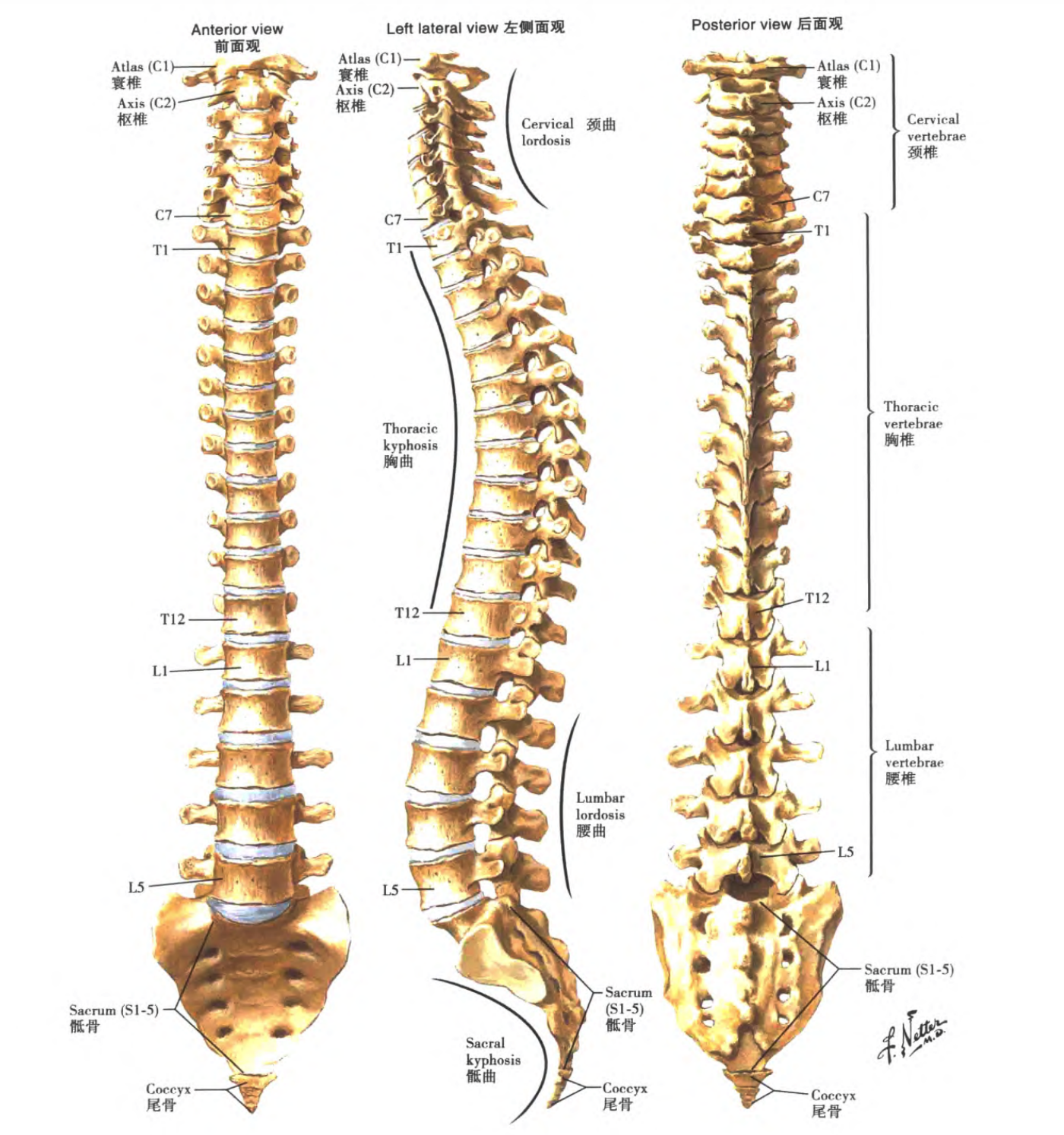
<hr>
<ul>
<li>
<p><strong>Course motivation</strong>: Explore the potential of existing tools and learn to develop more tools</p>
</li>
<li>
<p><strong>Course structure</strong>: 11 lectures, each focusing on a <a href="https://missing-semester-cn.github.io/missing-semester/2020/">specific topic</a></p>
</li>
<li>
<p><strong>Course topic</strong>: The Shell</p>
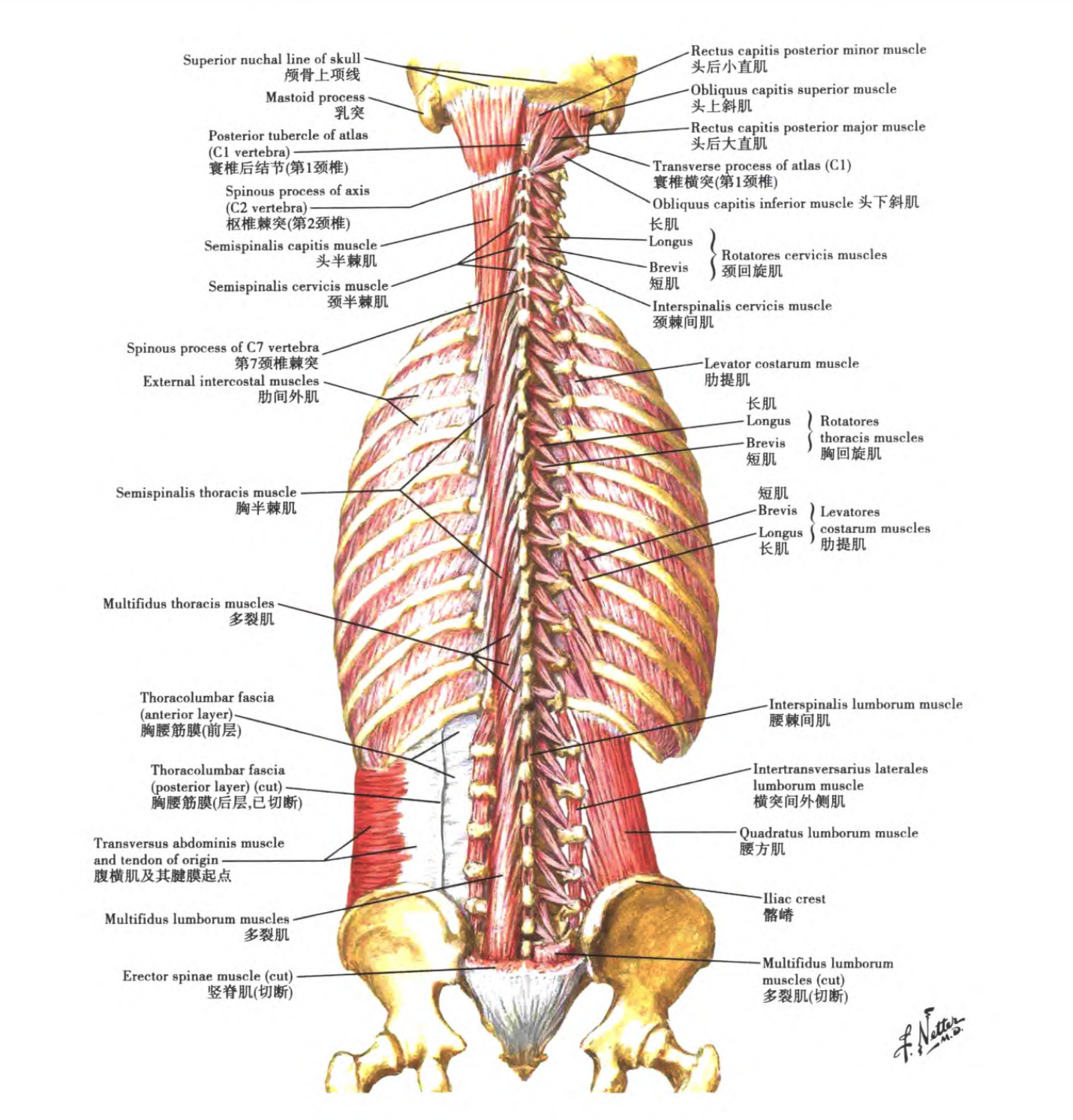
</li>
<li>
<p><strong>What is a shell</strong>: It lets you execute programs, enter input, and obtain some semi-structured output</p>
</li>
<li>
<p><strong>Using the shell</strong>: The shell is a programming environment, so it has variables, conditionals, loops, and functions. When you execute a command in the shell, you are actually executing a short piece of code that the shell can interpret and run. If you ask the shell to execute an instruction that is not a programming keyword the shell understands, it consults the <em>environment variable</em> <code>$PATH</code>, which lists the paths where the shell searches for programs when it receives an instruction. When we run the <code>echo</code> command, the shell understands that it needs to execute the <code>echo</code> program, then searches through a series of directories in <code>$PATH</code> separated by <code>:</code> to find that program by name. When it finds the program, it executes it (assuming the file is an <em>executable program</em>, which later lectures explain in detail). To determine which specific program a program name refers to, use the <code>which</code> program. We can also bypass <code>$PATH</code> by directly specifying the path of the program we want to execute.</p>
</li>
<li>
<p><strong>Navigating in the shell</strong>: A path in the shell is a set of separated directories, using <code>/</code> on Linux and macOS and <code>\</code> on Windows. The path <code>/</code> represents the system root directory; all folders are contained under this path, while on Windows each drive has its own root directory (for example: <code>C:\</code>). We assume you are using a Linux file system while studying this course. If a path starts with <code>/</code>, it is an <em>absolute path</em>; all others are <em>relative paths</em>. A relative path is a path relative to the current working directory, which can be obtained with the <code>pwd</code> command. In addition, use the <code>cd</code> command to change directories. In paths, <code>.</code> means the current directory, while <code>..</code> means the parent directory.</p>
</li>
<li>
<p><strong>Connecting programs</strong>: In the shell, programs have two main “streams”: their input stream and output stream. When a program tries to read information, it reads from the input stream; when it prints information, it writes to the output stream. Usually, a program’s input and output streams are your terminal. That is, your keyboard is the input and your display is the output. <strong>The simplest redirects are <code>&lt; file</code> and <code>&gt; file</code></strong>. These two commands redirect a program’s input and output streams to files, respectively. <strong>You can also use <code>&gt;&gt;</code> to append content to a file</strong>. With <em>pipes</em>, we can make better use of file redirection. <strong>The operator <code>|</code> lets us connect one program’s output to another program’s input</strong>.</p>
</li>
<li>
<p><strong>Root user</strong>: On most Unix-like systems, one type of user is very special: the root user. You should already have noticed that, in the output above, the root user is almost unrestricted: they can create, read, update, and delete any file on the system. Usually we do not log in to the system directly as root, because doing so could damage the system through mistaken operations. Instead, we use the sudo command when needed. As the name suggests, it lets you perform operations as su (short for super user or root). When you encounter a permission denied error, it is usually because you must be root to perform the operation. However, please double-check that you really want to perform it. One thing you must be root to do is write to sysfs files. The system is mounted under /sys, and sysfs files expose some kernel parameters. Therefore, without any specialized tools, you can easily configure the system kernel at runtime. Note that Windows and macOS do not have this file.</p>
</li>
</ul>
<h2 id="reduce">Reduce</h2>
<hr>
<ul>
<li>
<p>The shell is a programming environment</p>
</li>
<li>
<p>The shell parses command programs</p>
</li>
<li>
<p><em>Absolute paths</em> and <em>relative paths</em></p>
</li>
<li>
<p>Creating connections between programs</p>
</li>
<li>
<p>Root user</p>
</li>
<li>
<p>Commands: <code>echo</code>, <code>which</code>, <code>pwd</code>, <code>cd</code>, <code>ls</code>, <code>mv</code>, <code>cp</code>, <code>mkdir</code>, <code>man</code>, <code>sudo</code>, <code>touch</code>, and <code>chmod</code></p>
</li>
</ul>
<h2 id="recite">Recite</h2>
<hr>
<ul>
<li>
<p>The shell is a programming environment with variables, conditionals, loops, and functions</p>
</li>
<li>
<p>The shell parses command programs; when you execute a command in the shell, you are actually executing a short piece of code that the shell can interpret and run</p>
</li>
<li>
<p>An absolute path starts with <code>/</code>; it is an <em>absolute path</em>, while all others are <em>relative paths</em></p>
</li>
<li>
<p>Links created between programs, such as <code>|</code>, <code>&gt;</code>, and <code>&lt;</code>, are executed by the shell, not by each program individually</p>
</li>
<li>
<p>When you encounter a permission denied error, root privileges are usually required to execute the operation</p>
</li>
<li>
<p>Recommended commands to master: <code>echo</code> (print arguments), <code>which</code> (determine which specific program a program name refers to), <code>pwd</code> (get the path of the current working directory), <code>cd</code> (change directories), <code>ls</code> (view which files a specified directory contains), <code>mv</code> (rename or move files), <code>cp</code> (copy files), <code>mkdir</code> (create a new folder), <code>man</code> (look up program arguments and input/output information), <code>sudo</code> (execute as su [short for super user or root]), <code>touch</code> (create a new file), and <code>chmod</code> (change permissions)</p>
</li>
</ul>
<h2 id="reflect">Reflect</h2>
<hr>
<h3 id="1-detailed-explanation-of-the-echo-command">1. Detailed explanation of the <code>echo</code> command</h3>
<blockquote>
<p>Output a specified string or variable</p>
</blockquote>
<h4 id="additional-notes">Additional Notes</h4>
<p><strong>The echo command</strong> is used in the shell to print the value of shell variables or directly output a specified string. The Linux echo command is extremely common in shell programming, and it is also often used to print a variable value in the terminal, so it is necessary to understand how echo is used. The function of the echo command is to display a piece of text on the screen, generally serving as a prompt.</p>
<h4 id="syntax">Syntax</h4>
<div class="code-wrap" tabindex="0" aria-label="shell 代码块，可水平滚动">
  <div class="terminal-chrome" aria-hidden="true">
    <span class="terminal-dot terminal-dot--close"></span>
    <span class="terminal-dot terminal-dot--minimize"></span>
    <span class="terminal-dot terminal-dot--maximize"></span>
    <span class="code-label">shell</span>
  </div>
  <div class="highlight"><pre tabindex="0" class="chroma"><code class="language-shell" data-lang="shell"><span class="line"><span class="cl">echo<span class="o">(</span>选项<span class="o">)(</span>参数<span class="o">)</span></span></span></code></pre></div>
</div>
<h4 id="options">Options</h4>
<div class="code-wrap" tabindex="0" aria-label="shell 代码块，可水平滚动">
  <div class="terminal-chrome" aria-hidden="true">
    <span class="terminal-dot terminal-dot--close"></span>
    <span class="terminal-dot terminal-dot--minimize"></span>
    <span class="terminal-dot terminal-dot--maximize"></span>
    <span class="code-label">shell</span>
  </div>
  <div class="highlight"><pre tabindex="0" class="chroma"><code class="language-shell" data-lang="shell"><span class="line"><span class="cl">-e：启用转义字符。
</span></span><span class="line"><span class="cl">-E: 不启用转义字符（默认）
</span></span><span class="line"><span class="cl">-n: 结尾不换行</span></span></code></pre></div>
</div>
<p>When using the <code>-e</code> option, if the following characters appear in the string, they are handled specially rather than being output as ordinary text:</p>
<ul>
<li><code>\a</code> emits an alert sound;</li>
<li><code>\b</code> deletes the previous character;</li>
<li><code>\c</code> produces no further output (characters after \c are not output);</li>
<li><code>\f</code> starts a new line while the cursor remains in its original position;</li>
<li><code>\n</code> starts a new line and moves the cursor to the beginning of the line;</li>
<li><code>\r</code> moves the cursor to the beginning of the line without starting a new line;</li>
<li><code>\t</code> inserts a tab;</li>
<li><code>\v</code> is the same as \f;</li>
<li><code>\\</code> inserts the \ character;</li>
<li><code>\nnn</code> inserts the ASCII character represented by <code>nnn</code> (octal);</li>
</ul>
<h4 id="arguments">Arguments</h4>
<p>Variable: specifies the variable to print.</p>
<h4 id="examples">Examples</h4>
<div class="code-wrap" tabindex="0" aria-label="shell 代码块，可水平滚动">
  <div class="terminal-chrome" aria-hidden="true">
    <span class="terminal-dot terminal-dot--close"></span>
    <span class="terminal-dot terminal-dot--minimize"></span>
    <span class="terminal-dot terminal-dot--maximize"></span>
    <span class="code-label">shell</span>
  </div>
  <div class="highlight"><pre tabindex="0" class="chroma"><code class="language-shell" data-lang="shell"><span class="line"><span class="cl">/bin/echo Hello, world!</span></span></code></pre></div>
</div>
<p>In the command above, the two words (Hello and world!) are passed to echo as separate arguments, and echo prints them in order, separated by a space</p>
<p>The next command produces the same output:</p>
<div class="code-wrap" tabindex="0" aria-label="shell 代码块，可水平滚动">
  <div class="terminal-chrome" aria-hidden="true">
    <span class="terminal-dot terminal-dot--close"></span>
    <span class="terminal-dot terminal-dot--minimize"></span>
    <span class="terminal-dot terminal-dot--maximize"></span>
    <span class="code-label">shell</span>
  </div>
  <div class="highlight"><pre tabindex="0" class="chroma"><code class="language-shell" data-lang="shell"><span class="line"><span class="cl">/bin/echo <span class="s1">&#39;Hello, World!&#39;</span></span></span></code></pre></div>
</div>
<p>However, unlike the first example, the command above provides the single-quoted string &lsquo;Hello, world!&rsquo; as one single argument.</p>
<p>Single quotes reliably protect it from shell interpretation, passing special characters and escape sequences to echo literally.</p>
<p>For example, in the <code>bash shell</code>, variable names are preceded by a dollar sign ($). In the next command, the variable name inside quotes is treated literally; outside the quotes, it is converted to its value.</p>
<div class="code-wrap" tabindex="0" aria-label="shell 代码块，可水平滚动">
  <div class="terminal-chrome" aria-hidden="true">
    <span class="terminal-dot terminal-dot--close"></span>
    <span class="terminal-dot terminal-dot--minimize"></span>
    <span class="terminal-dot terminal-dot--maximize"></span>
    <span class="code-label">shell</span>
  </div>
  <div class="highlight"><pre tabindex="0" class="chroma"><code class="language-shell" data-lang="shell"><span class="line"><span class="cl">/bin/echo <span class="s1">&#39;The value of $PATH is&#39;</span> <span class="nv">$PATH</span>
</span></span><span class="line"><span class="cl"><span class="c1"># The value of $PATH is</span>
</span></span><span class="line"><span class="cl"><span class="c1"># /home/hope/bin:/usr/local/bin:/usr/sbin:/usr/bin:/sbin:/bin</span></span></span></code></pre></div>
</div>
<p>Print colored text with the echo command:</p>
<p><strong>Text color:</strong></p>
<div class="code-wrap" tabindex="0" aria-label="shell 代码块，可水平滚动">
  <div class="terminal-chrome" aria-hidden="true">
    <span class="terminal-dot terminal-dot--close"></span>
    <span class="terminal-dot terminal-dot--minimize"></span>
    <span class="terminal-dot terminal-dot--maximize"></span>
    <span class="code-label">shell</span>
  </div>
  <div class="highlight"><pre tabindex="0" class="chroma"><code class="language-shell" data-lang="shell"><span class="line"><span class="cl"><span class="c1"># 这段命令在我的Mac上没有执行成功</span>
</span></span><span class="line"><span class="cl"><span class="nb">echo</span> -e <span class="s2">&#34;\e[1;31mThis is red text\e[0m&#34;</span>
</span></span><span class="line"><span class="cl">This is red text</span></span></code></pre></div>
</div>
<ul>
<li><code>\e[1;31m</code> sets the color to red</li>
<li><code>\e[0m</code> resets the color</li>
</ul>
<p>Color codes: reset=0, black=30, red=31, green=32, yellow=33, blue=34, magenta=35, cyan=36, white=37</p>
<div class="code-wrap" tabindex="0" aria-label="shell 代码块，可水平滚动">
  <div class="terminal-chrome" aria-hidden="true">
    <span class="terminal-dot terminal-dot--close"></span>
    <span class="terminal-dot terminal-dot--minimize"></span>
    <span class="terminal-dot terminal-dot--maximize"></span>
    <span class="code-label">shell</span>
  </div>
  <div class="highlight"><pre tabindex="0" class="chroma"><code class="language-shell" data-lang="shell"><span class="line"><span class="cl"><span class="c1"># 这段执行成功</span>
</span></span><span class="line"><span class="cl"><span class="nb">echo</span> -e <span class="s2">&#34;\x1b[30;1m 0 黑色 \x1b[0m&#34;</span><span class="se">\
</span></span></span><span class="line"><span class="cl"><span class="s2">&#34;\x1b[31;1m 1 红色 \x1b[0m&#34;</span><span class="se">\
</span></span></span><span class="line"><span class="cl"><span class="s2">&#34;\x1b[32;1m 2 绿色 \x1b[0m&#34;</span><span class="se">\
</span></span></span><span class="line"><span class="cl"><span class="s2">&#34;\x1b[33;1m 3 黄色 \x1b[0m&#34;</span><span class="se">\
</span></span></span><span class="line"><span class="cl"><span class="s2">&#34;\x1b[34;1m 4 蓝色 \x1b[0m&#34;</span><span class="se">\
</span></span></span><span class="line"><span class="cl"><span class="s2">&#34;\x1b[35;1m 5 洋红 \x1b[0m&#34;</span><span class="se">\
</span></span></span><span class="line"><span class="cl"><span class="s2">&#34;\x1b[36;1m 6 青色 \x1b[0m&#34;</span><span class="se">\
</span></span></span><span class="line"><span class="cl"><span class="s2">&#34;\x1b[37;1m 7 白色 \x1b[0m&#34;</span></span></span></code></pre></div>
</div>
<p><strong>Background color</strong>:</p>
<div class="code-wrap" tabindex="0" aria-label="shell 代码块，可水平滚动">
  <div class="terminal-chrome" aria-hidden="true">
    <span class="terminal-dot terminal-dot--close"></span>
    <span class="terminal-dot terminal-dot--minimize"></span>
    <span class="terminal-dot terminal-dot--maximize"></span>
    <span class="code-label">shell</span>
  </div>
  <div class="highlight"><pre tabindex="0" class="chroma"><code class="language-shell" data-lang="shell"><span class="line"><span class="cl"><span class="c1"># 这段也没执行成功</span>
</span></span><span class="line"><span class="cl"><span class="nb">echo</span> -e <span class="s2">&#34;\e[1;42mGreed Background\e[0m&#34;</span>
</span></span><span class="line"><span class="cl">Greed Background</span></span></code></pre></div>
</div>
<p>Color codes: reset=0, black=40, red=41, green=42, yellow=43, blue=44, magenta=45, cyan=46, white=47</p>
<p><strong>Blinking text:</strong></p>
<div class="code-wrap" tabindex="0" aria-label="shell 代码块，可水平滚动">
  <div class="terminal-chrome" aria-hidden="true">
    <span class="terminal-dot terminal-dot--close"></span>
    <span class="terminal-dot terminal-dot--minimize"></span>
    <span class="terminal-dot terminal-dot--maximize"></span>
    <span class="code-label">shell</span>
  </div>
  <div class="highlight"><pre tabindex="0" class="chroma"><code class="language-shell" data-lang="shell"><span class="line"><span class="cl"><span class="c1"># 这段执行成功</span>
</span></span><span class="line"><span class="cl"><span class="nb">echo</span> -e <span class="s2">&#34;\033[37;31;5mMySQL Server Stop...\033[39;49;0m&#34;</span></span></span></code></pre></div>
</div>
<p>Other numeric parameters at the red number position: 0 turns off all attributes, 1 sets high intensity (bold), 4 underlines, 5 blinks, 7 reverses display, 8 conceals</p>
<p><strong>Do not add a newline at the end of the output</strong></p>
<div class="code-wrap" tabindex="0" aria-label="shell 代码块，可水平滚动">
  <div class="terminal-chrome" aria-hidden="true">
    <span class="terminal-dot terminal-dot--close"></span>
    <span class="terminal-dot terminal-dot--minimize"></span>
    <span class="terminal-dot terminal-dot--maximize"></span>
    <span class="code-label">shell</span>
  </div>
  <div class="highlight"><pre tabindex="0" class="chroma"><code class="language-shell" data-lang="shell"><span class="line"><span class="cl"><span class="nb">echo</span> -n <span class="s1">&#39;hello&#39;</span></span></span></code></pre></div>
</div>
<h3 id="2-detailed-explanation-of-the-touch-command">2. Detailed explanation of the <code>touch</code> command</h3>
<blockquote>
<p>Create a new empty file</p>
</blockquote>
<h4 id="additional-notes-1">Additional Notes</h4>
<p><strong>The touch command</strong> has two functions: first, it updates the timestamps of existing files to the current system time (the default behavior), leaving their data intact; second, it creates new empty files.</p>
<h4 id="syntax-1">Syntax</h4>
<div class="code-wrap" tabindex="0" aria-label="shell 代码块，可水平滚动">
  <div class="terminal-chrome" aria-hidden="true">
    <span class="terminal-dot terminal-dot--close"></span>
    <span class="terminal-dot terminal-dot--minimize"></span>
    <span class="terminal-dot terminal-dot--maximize"></span>
    <span class="code-label">shell</span>
  </div>
  <div class="highlight"><pre tabindex="0" class="chroma"><code class="language-shell" data-lang="shell"><span class="line"><span class="cl">touch<span class="o">(</span>选项<span class="o">)(</span>参数<span class="o">)</span></span></span></code></pre></div>
</div>
<h4 id="options-1">Options</h4>
<div class="code-wrap" tabindex="0" aria-label="shell 代码块，可水平滚动">
  <div class="terminal-chrome" aria-hidden="true">
    <span class="terminal-dot terminal-dot--close"></span>
    <span class="terminal-dot terminal-dot--minimize"></span>
    <span class="terminal-dot terminal-dot--maximize"></span>
    <span class="code-label">shell</span>
  </div>
  <div class="highlight"><pre tabindex="0" class="chroma"><code class="language-shell" data-lang="shell"><span class="line"><span class="cl">-a：或--time<span class="o">=</span>atime或--time<span class="o">=</span>access或--time<span class="o">=</span>use  只更改存取时间；
</span></span><span class="line"><span class="cl">-c：或--no-create  不建立任何文件；
</span></span><span class="line"><span class="cl">-d：&lt;时间日期&gt; 使用指定的日期时间，而非现在的时间；
</span></span><span class="line"><span class="cl">-f：此参数将忽略不予处理，仅负责解决BSD版本touch指令的兼容性问题；
</span></span><span class="line"><span class="cl">-m：或--time<span class="o">=</span>mtime或--time<span class="o">=</span>modify  只更该变动时间；
</span></span><span class="line"><span class="cl">-r：&lt;参考文件或目录&gt;  把指定文件或目录的日期时间，统统设成和参考文件或目录的日期时间相同；
</span></span><span class="line"><span class="cl">-t：&lt;日期时间&gt;  使用指定的日期时间，而非现在的时间；
</span></span><span class="line"><span class="cl">--help：在线帮助；
</span></span><span class="line"><span class="cl">--version：显示版本信息。</span></span></code></pre></div>
</div>
<h4 id="arguments-1">Arguments</h4>
<p>File: specifies the list of files whose time attributes are to be set.</p>
<h4 id="examples-1">Examples</h4>
<div class="code-wrap" tabindex="0" aria-label="shell 代码块，可水平滚动">
  <div class="terminal-chrome" aria-hidden="true">
    <span class="terminal-dot terminal-dot--close"></span>
    <span class="terminal-dot terminal-dot--minimize"></span>
    <span class="terminal-dot terminal-dot--maximize"></span>
    <span class="code-label">shell</span>
  </div>
  <div class="highlight"><pre tabindex="0" class="chroma"><code class="language-shell" data-lang="shell"><span class="line"><span class="cl">touch ex2</span></span></code></pre></div>
</div>
<p>Create an empty file ex2 in the current directory; then, using the <code>ls -l</code> command, you can see that file ex2 has a size of 0, indicating that it is an empty file.</p>
<p>Create files in batches</p>
<div class="code-wrap" tabindex="0" aria-label="shell 代码块，可水平滚动">
  <div class="terminal-chrome" aria-hidden="true">
    <span class="terminal-dot terminal-dot--close"></span>
    <span class="terminal-dot terminal-dot--minimize"></span>
    <span class="terminal-dot terminal-dot--maximize"></span>
    <span class="code-label">shell</span>
  </div>
  <div class="highlight"><pre tabindex="0" class="chroma"><code class="language-shell" data-lang="shell"><span class="line"><span class="cl">touch file<span class="o">{</span>1..5<span class="o">}</span>.txt</span></span></code></pre></div>
</div>
<p>Create the <code>job1.md</code> file and write <code>job 1</code> into it</p>
<div class="code-wrap" tabindex="0" aria-label="shell 代码块，可水平滚动">
  <div class="terminal-chrome" aria-hidden="true">
    <span class="terminal-dot terminal-dot--close"></span>
    <span class="terminal-dot terminal-dot--minimize"></span>
    <span class="terminal-dot terminal-dot--maximize"></span>
    <span class="code-label">shell</span>
  </div>
  <div class="highlight"><pre tabindex="0" class="chroma"><code class="language-shell" data-lang="shell"><span class="line"><span class="cl"><span class="nb">echo</span> <span class="s2">&#34;job 1&#34;</span> &gt; job1.md</span></span></code></pre></div>
</div>
<h3 id="3-detailed-explanation-of-the-chmod-command">3. Detailed explanation of the <code>chmod</code> command</h3>
<blockquote>
<p>Used to change the permissions of files or directories</p>
</blockquote>
<h4 id="synopsis">Synopsis</h4>
<div class="code-wrap" tabindex="0" aria-label="shell 代码块，可水平滚动">
  <div class="terminal-chrome" aria-hidden="true">
    <span class="terminal-dot terminal-dot--close"></span>
    <span class="terminal-dot terminal-dot--minimize"></span>
    <span class="terminal-dot terminal-dot--maximize"></span>
    <span class="code-label">shell</span>
  </div>
  <div class="highlight"><pre tabindex="0" class="chroma"><code class="language-shell" data-lang="shell"><span class="line"><span class="cl">chmod <span class="o">[</span>OPTION<span class="o">]</span>... MODE<span class="o">[</span>,MODE<span class="o">]</span>... FILE...
</span></span><span class="line"><span class="cl">chmod <span class="o">[</span>OPTION<span class="o">]</span>... OCTAL-MODE FILE...
</span></span><span class="line"><span class="cl">chmod <span class="o">[</span>OPTION<span class="o">]</span>... --reference<span class="o">=</span>RFILE FILE...</span></span></code></pre></div>
</div>
<h4 id="main-uses">Main Uses</h4>
<ul>
<li>Change the permissions of the target file or directory using symbolic combinations.</li>
<li>Change the permissions of the target file or directory using octal numbers.</li>
<li>Change the permissions of the target file or directory by referring to another file’s permissions.</li>
</ul>
<h4 id="arguments-2">Arguments</h4>
<p>mode: octal number or symbolic combination.</p>
<p>file: specifies one or more files whose permissions are to be changed.</p>
<h4 id="options-2">Options</h4>
<div class="code-wrap" tabindex="0" aria-label="shell 代码块，可水平滚动">
  <div class="terminal-chrome" aria-hidden="true">
    <span class="terminal-dot terminal-dot--close"></span>
    <span class="terminal-dot terminal-dot--minimize"></span>
    <span class="terminal-dot terminal-dot--maximize"></span>
    <span class="code-label">shell</span>
  </div>
  <div class="highlight"><pre tabindex="0" class="chroma"><code class="language-shell" data-lang="shell"><span class="line"><span class="cl">-c, --changes：当文件的权限更改时输出操作信息。
</span></span><span class="line"><span class="cl">--no-preserve-root：不将<span class="s1">&#39;/&#39;</span>特殊化处理，默认选项。
</span></span><span class="line"><span class="cl">--preserve-root：不能在根目录下递归操作。
</span></span><span class="line"><span class="cl">-f, --silent, --quiet：抑制多数错误消息的输出。
</span></span><span class="line"><span class="cl">-v, --verbose：无论文件是否更改了权限，一律输出操作信息。
</span></span><span class="line"><span class="cl">--reference<span class="o">=</span>RFILE：使用参考文件或参考目录RFILE的权限来设置目标文件或目录的权限。
</span></span><span class="line"><span class="cl">-R, --recursive：对目录以及目录下的文件递归执行更改权限操作。
</span></span><span class="line"><span class="cl">--help：显示帮助信息并退出。
</span></span><span class="line"><span class="cl">--version：显示版本信息并退出。</span></span></code></pre></div>
</div>
<h4 id="return-value">Return Value</h4>
<p>The return status is success unless an invalid option or invalid argument is provided.</p>
<h4 id="examples-2">Examples</h4>
<p>According to the <code>man chmod</code> documentation&rsquo;s <code>DESCRIPTION</code> section:</p>
<ul>
<li>The <code>u</code> symbol represents the current user.</li>
<li>The <code>g</code> symbol represents users in the same group as the current user, hereafter called group users.</li>
<li>The <code>o</code> symbol represents other users.</li>
<li>The <code>a</code> symbol represents all users.</li>
<li>The <code>r</code> symbol represents read permission and the octal number <code>4</code>.</li>
<li>The <code>w</code> symbol represents write permission and the octal number <code>2</code>.</li>
<li>The <code>x</code> symbol represents execute permission and the octal number <code>1</code>.</li>
<li>The <code>X</code> symbol means execute permission can be set if the target file is an executable file or directory.</li>
<li>The <code>s</code> symbol represents setting suid and sgid permissions; use the permission combination <code>u+s</code> to set the file user ID bit, and <code>g+s</code> to set the group user ID bit.</li>
<li>The <code>t</code> symbol means only the owner of a directory or file may delete files under the directory.</li>
<li>The <code>+</code> symbol means adding the corresponding permissions for the target users.</li>
<li>The <code>-</code> symbol means removing the corresponding permissions from the target users.</li>
<li>The <code>=</code> symbol means adding the corresponding permissions for the target users and removing permissions not mentioned.</li>
</ul>
<div class="code-wrap" tabindex="0" aria-label="shell 代码块，可水平滚动">
  <div class="terminal-chrome" aria-hidden="true">
    <span class="terminal-dot terminal-dot--close"></span>
    <span class="terminal-dot terminal-dot--minimize"></span>
    <span class="terminal-dot terminal-dot--maximize"></span>
    <span class="code-label">shell</span>
  </div>
  <div class="highlight"><pre tabindex="0" class="chroma"><code class="language-shell" data-lang="shell"><span class="line"><span class="cl">linux文件的用户权限说明：
</span></span><span class="line"><span class="cl">
</span></span><span class="line"><span class="cl"><span class="c1"># 查看当前目录（包含隐藏文件）的长格式。</span>
</span></span><span class="line"><span class="cl">ls -la
</span></span><span class="line"><span class="cl">  -rw-r--r--   <span class="m">1</span> user  staff   <span class="m">651</span> Oct <span class="m">12</span> 12:53 .gitmodules
</span></span><span class="line"><span class="cl">
</span></span><span class="line"><span class="cl"><span class="c1"># 第1位如果是d则代表目录，是-则代表普通文件。</span>
</span></span><span class="line"><span class="cl"><span class="c1"># 更多详情请参阅info coreutils &#39;ls invocation&#39;（ls命令的info文档）的&#39;-l&#39;选项部分。</span>
</span></span><span class="line"><span class="cl"><span class="c1"># 第2到4位代表当前用户的权限。</span>
</span></span><span class="line"><span class="cl"><span class="c1"># 第5到7位代表组用户的权限。</span>
</span></span><span class="line"><span class="cl"><span class="c1"># 第8到10位代表其他用户的权限。</span></span></span></code></pre></div>
</div>
<div class="code-wrap" tabindex="0" aria-label="shell 代码块，可水平滚动">
  <div class="terminal-chrome" aria-hidden="true">
    <span class="terminal-dot terminal-dot--close"></span>
    <span class="terminal-dot terminal-dot--minimize"></span>
    <span class="terminal-dot terminal-dot--maximize"></span>
    <span class="code-label">shell</span>
  </div>
  <div class="highlight"><pre tabindex="0" class="chroma"><code class="language-shell" data-lang="shell"><span class="line"><span class="cl"><span class="c1"># 添加组用户的写权限。</span>
</span></span><span class="line"><span class="cl">chmod g+w ./test.log
</span></span><span class="line"><span class="cl"><span class="c1"># 删除其他用户的所有权限。</span>
</span></span><span class="line"><span class="cl">chmod <span class="nv">o</span><span class="o">=</span> ./test.log
</span></span><span class="line"><span class="cl"><span class="c1"># 使得所有用户都没有写权限。</span>
</span></span><span class="line"><span class="cl">chmod a-w ./test.log
</span></span><span class="line"><span class="cl"><span class="c1"># 当前用户具有所有权限，组用户有读写权限，其他用户只有读权限。</span>
</span></span><span class="line"><span class="cl">chmod <span class="nv">u</span><span class="o">=</span>rwx, <span class="nv">g</span><span class="o">=</span>rw, <span class="nv">o</span><span class="o">=</span>r ./test.log
</span></span><span class="line"><span class="cl"><span class="c1"># 等价的八进制数表示：</span>
</span></span><span class="line"><span class="cl">chmod <span class="m">764</span> ./test.log
</span></span><span class="line"><span class="cl"><span class="c1"># 将目录以及目录下的文件都设置为所有用户拥有读写权限。</span>
</span></span><span class="line"><span class="cl"><span class="c1"># 注意，使用&#39;-R&#39;选项一定要保留当前用户的执行和读取权限，否则会报错！</span>
</span></span><span class="line"><span class="cl">chmod -R <span class="nv">a</span><span class="o">=</span>rw ./testdir/
</span></span><span class="line"><span class="cl"><span class="c1"># 根据其他文件的权限设置文件权限。</span>
</span></span><span class="line"><span class="cl">chmod --reference<span class="o">=</span>./1.log  ./test.log</span></span></code></pre></div>
</div>
<h4 id="notes">Notes</h4>
<ol>
<li>
<p>This command is part of the <code>GNU coreutils</code> package. For related help information, see <code>man chmod</code> or <code>info coreutils 'chmod invocation'</code>.</p>
</li>
<li>
<p>The permissions of symbolic links cannot be changed. If a user changes permissions on a symbolic link, the change applies to the original file being linked to.</p>
</li>
<li>
<p>When using the <code>-R</code> option, be sure to preserve the current user’s execute and read permissions, otherwise an error will occur!</p>
</li>
</ol>
<h2 id="review">Review</h2>
<hr>
<ul>
<li>Master commands such as <code>echo</code>, <code>touch</code>, and <code>chmod</code></li>
<li>Review the original example code</li>
<li>Try writing things by hand</li>
</ul>
<h2 id="course">Course</h2>
<hr>
<ul>
<li><a href="https://missing-semester-cn.github.io/">The Missing Semester of Your CS Education</a></li>
<li><a href="https://missing-semester-cn.github.io/2020/course-shell/">Course Overview and the Shell</a></li>
</ul>
]]></content></entry><entry><title>Deploying a Pelican Static Site with GitHub Pages and Cloudflare Pages</title><link href="https://gmlg.com/en/deploy-pelican-on-github-and-cloudflare-pages.html" rel="alternate"/><published>2023-07-20T00:00:00+08:00</published><updated>2023-07-20T00:00:00+08:00</updated><author><name>Xavier Zhang</name></author><id>tag:gmlg.com,2023-07-20:https://gmlg.com/en/deploy-pelican-on-github-and-cloudflare-pages.html</id><summary type="html">&lt;p>This is a detailed deployment note for installing and deploying Pelican: starting with configuring a local Pelican project environment, then pushing it to a GitHub repository, using Cloudflare to trigger and deploy it automatically, binding a domain, and bringing the full production environment online.&lt;/p></summary><content type="html"><![CDATA[<h2 id="prerequisites">Prerequisites</h2>
<hr>
<ul>
<li>Anaconda is installed for Python environment management</li>
<li>You are familiar with basic Git concepts</li>
<li>You already have a GitHub account and have created a project repository named <code>username.github.io</code></li>
<li>You already have a Cloudflare account</li>
</ul>
<h2 id="install-and-configure-the-local-pelican-project">Install and Configure the Local Pelican Project</h2>
<hr>
<h3 id="1-create-a-new-environment">1. Create a new environment</h3>
<p>Use the <code>conda</code> command to create a new installation environment named <code>pelican</code>, and specify a Python version greater than 3.7</p>
<div class="code-wrap" tabindex="0" aria-label="bash 代码块，可水平滚动">
  <div class="terminal-chrome" aria-hidden="true">
    <span class="terminal-dot terminal-dot--close"></span>
    <span class="terminal-dot terminal-dot--minimize"></span>
    <span class="terminal-dot terminal-dot--maximize"></span>
    <span class="code-label">bash</span>
  </div>
  <div class="highlight"><pre tabindex="0" class="chroma"><code class="language-bash" data-lang="bash"><span class="line"><span class="cl"><span class="c1"># 创建新环境pelican</span>
</span></span><span class="line"><span class="cl">conda create -n pelican <span class="nv">python</span><span class="o">=</span>3.10
</span></span><span class="line"><span class="cl">
</span></span><span class="line"><span class="cl"><span class="c1"># 激活新环境pelican</span>
</span></span><span class="line"><span class="cl">conda activate pelican</span></span></code></pre></div>
</div>
<p>Create a new project folder for subsequent configuration</p>
<div class="code-wrap" tabindex="0" aria-label="bash 代码块，可水平滚动">
  <div class="terminal-chrome" aria-hidden="true">
    <span class="terminal-dot terminal-dot--close"></span>
    <span class="terminal-dot terminal-dot--minimize"></span>
    <span class="terminal-dot terminal-dot--maximize"></span>
    <span class="code-label">bash</span>
  </div>
  <div class="highlight"><pre tabindex="0" class="chroma"><code class="language-bash" data-lang="bash"><span class="line"><span class="cl">mkdir ~/projects/gmlg.com</span></span></code></pre></div>
</div>
<p>Enter the project folder</p>
<div class="code-wrap" tabindex="0" aria-label="bash 代码块，可水平滚动">
  <div class="terminal-chrome" aria-hidden="true">
    <span class="terminal-dot terminal-dot--close"></span>
    <span class="terminal-dot terminal-dot--minimize"></span>
    <span class="terminal-dot terminal-dot--maximize"></span>
    <span class="code-label">bash</span>
  </div>
  <div class="highlight"><pre tabindex="0" class="chroma"><code class="language-bash" data-lang="bash"><span class="line"><span class="cl"><span class="nb">cd</span> ~/projects/gmlg.com</span></span></code></pre></div>
</div>
<h3 id="2-install-pelican">2. Install Pelican</h3>
<p>Install Pelican. It does not support Markdown syntax by default, so specify it during installation:</p>
<div class="code-wrap" tabindex="0" aria-label="bash 代码块，可水平滚动">
  <div class="terminal-chrome" aria-hidden="true">
    <span class="terminal-dot terminal-dot--close"></span>
    <span class="terminal-dot terminal-dot--minimize"></span>
    <span class="terminal-dot terminal-dot--maximize"></span>
    <span class="code-label">bash</span>
  </div>
  <div class="highlight"><pre tabindex="0" class="chroma"><code class="language-bash" data-lang="bash"><span class="line"><span class="cl">python -m pip install <span class="s2">&#34;pelican[markdown]&#34;</span></span></span></code></pre></div>
</div>
<p>If an older version has already been installed before, upgrade Pelican with the following command:</p>
<div class="code-wrap" tabindex="0" aria-label="bash 代码块，可水平滚动">
  <div class="terminal-chrome" aria-hidden="true">
    <span class="terminal-dot terminal-dot--close"></span>
    <span class="terminal-dot terminal-dot--minimize"></span>
    <span class="terminal-dot terminal-dot--maximize"></span>
    <span class="code-label">bash</span>
  </div>
  <div class="highlight"><pre tabindex="0" class="chroma"><code class="language-bash" data-lang="bash"><span class="line"><span class="cl">python -m pip install --upgrade pelican</span></span></code></pre></div>
</div>
<p>If you want to improve typography, you can also install the <code>typogrify</code> package:</p>
<div class="code-wrap" tabindex="0" aria-label="bash 代码块，可水平滚动">
  <div class="terminal-chrome" aria-hidden="true">
    <span class="terminal-dot terminal-dot--close"></span>
    <span class="terminal-dot terminal-dot--minimize"></span>
    <span class="terminal-dot terminal-dot--maximize"></span>
    <span class="code-label">bash</span>
  </div>
  <div class="highlight"><pre tabindex="0" class="chroma"><code class="language-bash" data-lang="bash"><span class="line"><span class="cl">python -m pip install typogrify</span></span></code></pre></div>
</div>
<p>Now run the Pelican quickstart command to enter the interactive configuration interface</p>
<div class="code-wrap" tabindex="0" aria-label="bash 代码块，可水平滚动">
  <div class="terminal-chrome" aria-hidden="true">
    <span class="terminal-dot terminal-dot--close"></span>
    <span class="terminal-dot terminal-dot--minimize"></span>
    <span class="terminal-dot terminal-dot--maximize"></span>
    <span class="code-label">bash</span>
  </div>
  <div class="highlight"><pre tabindex="0" class="chroma"><code class="language-bash" data-lang="bash"><span class="line"><span class="cl">pelican-quickstart</span></span></code></pre></div>
</div>
<p>The following interaction is for reference:</p>
<div class="code-wrap" tabindex="0" aria-label="bash 代码块，可水平滚动">
  <div class="terminal-chrome" aria-hidden="true">
    <span class="terminal-dot terminal-dot--close"></span>
    <span class="terminal-dot terminal-dot--minimize"></span>
    <span class="terminal-dot terminal-dot--maximize"></span>
    <span class="code-label">bash</span>
  </div>
  <div class="highlight"><pre tabindex="0" class="chroma"><code class="language-bash" data-lang="bash"><span class="line"><span class="cl">Welcome to pelican-quickstart v4.8.0.
</span></span><span class="line"><span class="cl">
</span></span><span class="line"><span class="cl">This script will <span class="nb">help</span> you create a new Pelican-based website.
</span></span><span class="line"><span class="cl">
</span></span><span class="line"><span class="cl">Please answer the following questions so this script can generate the files
</span></span><span class="line"><span class="cl">needed by Pelican.
</span></span><span class="line"><span class="cl">
</span></span><span class="line"><span class="cl">    
</span></span><span class="line"><span class="cl">&gt; Where <span class="k">do</span> you want to create your new web site? <span class="o">[</span>.<span class="o">]</span> .
</span></span><span class="line"><span class="cl">&gt; What will be the title of this web site? 国民老公
</span></span><span class="line"><span class="cl">&gt; Who will be the author of this web site? Xavier Zhang
</span></span><span class="line"><span class="cl">&gt; What will be the default language of this web site? <span class="o">[</span>en<span class="o">]</span> en
</span></span><span class="line"><span class="cl">&gt; Do you want to specify a URL prefix? e.g., https://example.com   <span class="o">(</span>Y/n<span class="o">)</span> y
</span></span><span class="line"><span class="cl">&gt; What is your URL prefix? <span class="o">(</span>see above example<span class="p">;</span> no trailing slash<span class="o">)</span> https://gmlg.com
</span></span><span class="line"><span class="cl">&gt; Do you want to <span class="nb">enable</span> article pagination? <span class="o">(</span>Y/n<span class="o">)</span> y
</span></span><span class="line"><span class="cl">&gt; How many articles per page <span class="k">do</span> you want? <span class="o">[</span>10<span class="o">]</span> <span class="m">10</span>
</span></span><span class="line"><span class="cl">&gt; What is your <span class="nb">time</span> zone? <span class="o">[</span>Europe/Rome<span class="o">]</span> Asia/Shanghai
</span></span><span class="line"><span class="cl">&gt; Do you want to generate a tasks.py/Makefile to automate generation and publishing? <span class="o">(</span>Y/n<span class="o">)</span> y
</span></span><span class="line"><span class="cl">&gt; Do you want to upload your website using FTP? <span class="o">(</span>y/N<span class="o">)</span> n
</span></span><span class="line"><span class="cl">&gt; Do you want to upload your website using SSH? <span class="o">(</span>y/N<span class="o">)</span> n
</span></span><span class="line"><span class="cl">&gt; Do you want to upload your website using Dropbox? <span class="o">(</span>y/N<span class="o">)</span> n
</span></span><span class="line"><span class="cl">&gt; Do you want to upload your website using S3? <span class="o">(</span>y/N<span class="o">)</span> n
</span></span><span class="line"><span class="cl">&gt; Do you want to upload your website using Rackspace Cloud Files? <span class="o">(</span>y/N<span class="o">)</span> n
</span></span><span class="line"><span class="cl">&gt; Do you want to upload your website using GitHub Pages? <span class="o">(</span>y/N<span class="o">)</span> y
</span></span><span class="line"><span class="cl">&gt; Is this your personal page <span class="o">(</span>username.github.io<span class="o">)</span>? <span class="o">(</span>y/N<span class="o">)</span> y
</span></span><span class="line"><span class="cl">Done. Your new project is available at /Users/xavier/Projects/gmlg.com</span></span></code></pre></div>
</div>
<blockquote>
<p>For time zone settings, see: <a href="https://en.wikipedia.org/wiki/List_of_tz_database_time_zones">List of tz database time zones</a></p>
</blockquote>
<p>The default theme looks rather ugly, so as a reference, we try downloading a new theme and practicing the related commands. Note that the theme chosen here for practice is Attila (<a href="https://github.com/arulrajnet/attila/releases">repository URL</a>); after downloading it, extract it to the current project root directory. Install the theme:</p>
<div class="code-wrap" tabindex="0" aria-label="bash 代码块，可水平滚动">
  <div class="terminal-chrome" aria-hidden="true">
    <span class="terminal-dot terminal-dot--close"></span>
    <span class="terminal-dot terminal-dot--minimize"></span>
    <span class="terminal-dot terminal-dot--maximize"></span>
    <span class="code-label">bash</span>
  </div>
  <div class="highlight"><pre tabindex="0" class="chroma"><code class="language-bash" data-lang="bash"><span class="line"><span class="cl">pelican-themes -U attila   <span class="c1"># attila为解压后的主题文件夹</span></span></span></code></pre></div>
</div>
<p>Check whether the theme has been installed successfully:</p>
<div class="code-wrap" tabindex="0" aria-label="bash 代码块，可水平滚动">
  <div class="terminal-chrome" aria-hidden="true">
    <span class="terminal-dot terminal-dot--close"></span>
    <span class="terminal-dot terminal-dot--minimize"></span>
    <span class="terminal-dot terminal-dot--maximize"></span>
    <span class="code-label">bash</span>
  </div>
  <div class="highlight"><pre tabindex="0" class="chroma"><code class="language-bash" data-lang="bash"><span class="line"><span class="cl">pelican-themes -l</span></span></code></pre></div>
</div>
<p>The query result shows that installation succeeded:</p>
<div class="code-wrap" tabindex="0" aria-label="bash 代码块，可水平滚动">
  <div class="terminal-chrome" aria-hidden="true">
    <span class="terminal-dot terminal-dot--close"></span>
    <span class="terminal-dot terminal-dot--minimize"></span>
    <span class="terminal-dot terminal-dot--maximize"></span>
    <span class="code-label">bash</span>
  </div>
  <div class="highlight"><pre tabindex="0" class="chroma"><code class="language-bash" data-lang="bash"><span class="line"><span class="cl">simple
</span></span><span class="line"><span class="cl">attila
</span></span><span class="line"><span class="cl">notmyidea</span></span></code></pre></div>
</div>
<p>Change the theme in <code>pelicanconf.py</code> to attila:</p>
<div class="code-wrap" tabindex="0" aria-label="python 代码块，可水平滚动">
  <div class="terminal-chrome" aria-hidden="true">
    <span class="terminal-dot terminal-dot--close"></span>
    <span class="terminal-dot terminal-dot--minimize"></span>
    <span class="terminal-dot terminal-dot--maximize"></span>
    <span class="code-label">python</span>
  </div>
  <div class="highlight"><pre tabindex="0" class="chroma"><code class="language-python" data-lang="python"><span class="line"><span class="cl"><span class="n">THEME</span> <span class="o">=</span> <span class="s1">&#39;attila&#39;</span>
</span></span><span class="line"><span class="cl"><span class="n">AUTHOR</span> <span class="o">=</span> <span class="s1">&#39;Xavier&#39;</span>
</span></span><span class="line"><span class="cl"><span class="n">SITENAME</span> <span class="o">=</span> <span class="s1">&#39;国民老公&#39;</span>
</span></span><span class="line"><span class="cl"><span class="n">SITEURL</span> <span class="o">=</span> <span class="s1">&#39;&#39;</span></span></span></code></pre></div>
</div>
<p>Install the Pelican plugin dependencies required by the theme:</p>
<div class="code-wrap" tabindex="0" aria-label="bash 代码块，可水平滚动">
  <div class="terminal-chrome" aria-hidden="true">
    <span class="terminal-dot terminal-dot--close"></span>
    <span class="terminal-dot terminal-dot--minimize"></span>
    <span class="terminal-dot terminal-dot--maximize"></span>
    <span class="code-label">bash</span>
  </div>
  <div class="highlight"><pre tabindex="0" class="chroma"><code class="language-bash" data-lang="bash"><span class="line"><span class="cl">python -m pip install pelican-neighbors pelican-webassets pelican-sitemap beautifulsoup4 pelican-readtime   <span class="c1"># 具体请参考主题仓库中的配置文件</span></span></span></code></pre></div>
</div>
<p>Then download the related plugins:</p>
<div class="code-wrap" tabindex="0" aria-label="bash 代码块，可水平滚动">
  <div class="terminal-chrome" aria-hidden="true">
    <span class="terminal-dot terminal-dot--close"></span>
    <span class="terminal-dot terminal-dot--minimize"></span>
    <span class="terminal-dot terminal-dot--maximize"></span>
    <span class="code-label">bash</span>
  </div>
  <div class="highlight"><pre tabindex="0" class="chroma"><code class="language-bash" data-lang="bash"><span class="line"><span class="cl"><span class="c1"># 在主目录安装插件</span>
</span></span><span class="line"><span class="cl">git clone --recursive https://github.com/getpelican/pelican-plugins</span></span></code></pre></div>
</div>
<p>Okay, at this point we know how to manually install themes and plugins and enable them in the configuration environment. However, the Attila plugin still does not look elegant enough, so for the production deployment we ultimately choose the Papyrus theme on GitHub, which was ported from PaperMod.</p>
<blockquote>
<p>Of course, if you really want to use the Attila theme, I recommend referring to <a href="https://github.com/Tseing/Pelican_blog">Leo&rsquo;s blog</a>. The blogger&rsquo;s use of this theme is very worth learning from.</p>
</blockquote>
<h3 id="3-install-the-papyrus-theme">3. Install the Papyrus theme</h3>
<p>The theme requires the <a href="https://github.com/pelican-plugins/search">pelican-search</a>, <a href="https://github.com/pelican-plugins/neighbors">pelican-neighbors</a>, <a href="https://github.com/JenkinsDev/pelican-readtime">pelican-readtime</a>, and <a href="https://github.com/ingwinlu/pelican-toc">pelican-toc</a> plugins. The first 3 plugins can be installed with the <code>pip</code> command, while Pelican-toc must be installed manually. In addition, we need to install the two dependencies <a href="https://stork-search.net/">stork</a> and <code>beautifulsoup4</code>.</p>
<div class="code-wrap" tabindex="0" aria-label="bash 代码块，可水平滚动">
  <div class="terminal-chrome" aria-hidden="true">
    <span class="terminal-dot terminal-dot--close"></span>
    <span class="terminal-dot terminal-dot--minimize"></span>
    <span class="terminal-dot terminal-dot--maximize"></span>
    <span class="code-label">bash</span>
  </div>
  <div class="highlight"><pre tabindex="0" class="chroma"><code class="language-bash" data-lang="bash"><span class="line"><span class="cl">python -m pip install pelican-search <span class="se">\
</span></span></span><span class="line"><span class="cl"><span class="o">&amp;&amp;</span> python -m pip install pelican-neighbors <span class="se">\
</span></span></span><span class="line"><span class="cl"><span class="o">&amp;&amp;</span> python -m pip install pelican-readtime</span></span></code></pre></div>
</div>
<p>Create <code>themes</code> and <code>pelican-plugins</code> folders in the project root directory. In the <code>themes</code> folder, clone the Papyrus theme.</p>
<div class="code-wrap" tabindex="0" aria-label="bash 代码块，可水平滚动">
  <div class="terminal-chrome" aria-hidden="true">
    <span class="terminal-dot terminal-dot--close"></span>
    <span class="terminal-dot terminal-dot--minimize"></span>
    <span class="terminal-dot terminal-dot--maximize"></span>
    <span class="code-label">bash</span>
  </div>
  <div class="highlight"><pre tabindex="0" class="chroma"><code class="language-bash" data-lang="bash"><span class="line"><span class="cl">mkdir themes <span class="se">\
</span></span></span><span class="line"><span class="cl"><span class="o">&amp;&amp;</span> <span class="nb">cd</span> themes <span class="se">\
</span></span></span><span class="line"><span class="cl"><span class="o">&amp;&amp;</span> git clone https://github.com/aleylara/Papyrus.git</span></span></code></pre></div>
</div>
<p>Now clone the pelican-toc plugin repository into the local plugin directory, and install the dependency module <code>beautifulsoup4</code>.</p>
<div class="code-wrap" tabindex="0" aria-label="bash 代码块，可水平滚动">
  <div class="terminal-chrome" aria-hidden="true">
    <span class="terminal-dot terminal-dot--close"></span>
    <span class="terminal-dot terminal-dot--minimize"></span>
    <span class="terminal-dot terminal-dot--maximize"></span>
    <span class="code-label">bash</span>
  </div>
  <div class="highlight"><pre tabindex="0" class="chroma"><code class="language-bash" data-lang="bash"><span class="line"><span class="cl">mkdir pelican-plugins <span class="se">\
</span></span></span><span class="line"><span class="cl"><span class="o">&amp;&amp;</span> <span class="nb">cd</span> pelican-plugins <span class="se">\
</span></span></span><span class="line"><span class="cl"><span class="o">&amp;&amp;</span> git clone https://github.com/ingwinlu/pelican-toc.git <span class="se">\
</span></span></span><span class="line"><span class="cl"><span class="c1"># &amp;&amp; git clone https://github.com/jameslittle230/stork.git \</span>
</span></span><span class="line"><span class="cl"><span class="o">&amp;&amp;</span> python -m pip install beautifulsoup4</span></span></code></pre></div>
</div>
<p>The Papyrus theme has search configured already. However, we still need to install the <code>stork</code> package on the local operating system. You can verify whether <a href="https://stork-search.net/">stork</a> is installed with the command <code>stork -h</code>; if it is not installed, use either of the commands below.</p>
<div class="code-wrap" tabindex="0" aria-label="shell 代码块，可水平滚动">
  <div class="terminal-chrome" aria-hidden="true">
    <span class="terminal-dot terminal-dot--close"></span>
    <span class="terminal-dot terminal-dot--minimize"></span>
    <span class="terminal-dot terminal-dot--maximize"></span>
    <span class="code-label">shell</span>
  </div>
  <div class="highlight"><pre tabindex="0" class="chroma"><code class="language-shell" data-lang="shell"><span class="line"><span class="cl"><span class="c1"># Install using Homebrew</span>
</span></span><span class="line"><span class="cl">brew install stork-search/stork-tap/stork
</span></span><span class="line"><span class="cl">
</span></span><span class="line"><span class="cl"><span class="c1"># Install using the Rust toolchain and install Stork with Cargo </span>
</span></span><span class="line"><span class="cl">cargo install stork-search --locked</span></span></code></pre></div>
</div>
<p>If the brew installation fails with <code>Error: Command failed with exit 128: git</code>, the reason is that HomeBrew components <code>homebrew-core</code> and <code>homebrew-cask</code> are not recognized as Git repositories. You can add the following Git global variables and try again:</p>
<div class="code-wrap" tabindex="0" aria-label="bash 代码块，可水平滚动">
  <div class="terminal-chrome" aria-hidden="true">
    <span class="terminal-dot terminal-dot--close"></span>
    <span class="terminal-dot terminal-dot--minimize"></span>
    <span class="terminal-dot terminal-dot--maximize"></span>
    <span class="code-label">bash</span>
  </div>
  <div class="highlight"><pre tabindex="0" class="chroma"><code class="language-bash" data-lang="bash"><span class="line"><span class="cl">brew -v  <span class="c1"># 根据输出结果的提示，输入下方命令，您的本机目录有可能不同</span>
</span></span><span class="line"><span class="cl">
</span></span><span class="line"><span class="cl">git config --global --add safe.directory /usr/local/Homebrew/Library/Taps/homebrew/homebrew-core <span class="se">\
</span></span></span><span class="line"><span class="cl"><span class="o">&amp;&amp;</span> git config --global --add safe.directory /usr/local/Homebrew/Library/Taps/homebrew/homebrew-cask</span></span></code></pre></div>
</div>
<p>In very rare cases, using <code>--add safe.directory</code> still does not help. In that case, you can remove the relevant directories and add them again. Example commands are as follows:</p>
<div class="code-wrap" tabindex="0" aria-label="bash 代码块，可水平滚动">
  <div class="terminal-chrome" aria-hidden="true">
    <span class="terminal-dot terminal-dot--close"></span>
    <span class="terminal-dot terminal-dot--minimize"></span>
    <span class="terminal-dot terminal-dot--maximize"></span>
    <span class="code-label">bash</span>
  </div>
  <div class="highlight"><pre tabindex="0" class="chroma"><code class="language-bash" data-lang="bash"><span class="line"><span class="cl">rm -rf /usr/local/Homebrew/Library/Taps/homebrew/homebrew-core <span class="se">\
</span></span></span><span class="line"><span class="cl"><span class="o">&amp;&amp;</span> brew tap homebrew/core
</span></span><span class="line"><span class="cl">
</span></span><span class="line"><span class="cl">rm -rf /usr/local/Homebrew/Library/Taps/homebrew/homebrew-cask <span class="se">\
</span></span></span><span class="line"><span class="cl"><span class="o">&amp;&amp;</span> brew tap homebrew/cask</span></span></code></pre></div>
</div>
<p>In addition, after Stork is installed successfully, running the <code>stork -h</code> command directly may still say that the <code>stork</code> command cannot be found. At this point, simply link Stork from Brew:</p>
<div class="code-wrap" tabindex="0" aria-label="bash 代码块，可水平滚动">
  <div class="terminal-chrome" aria-hidden="true">
    <span class="terminal-dot terminal-dot--close"></span>
    <span class="terminal-dot terminal-dot--minimize"></span>
    <span class="terminal-dot terminal-dot--maximize"></span>
    <span class="code-label">bash</span>
  </div>
  <div class="highlight"><pre tabindex="0" class="chroma"><code class="language-bash" data-lang="bash"><span class="line"><span class="cl">brew link stork</span></span></code></pre></div>
</div>
<h3 id="4-configure-theme-parameters">4. Configure theme parameters</h3>
<p>Next, configure <code>pelicanconf.py</code> to meet the needs of the actual environment. The following example mainly adjusts the configuration file from the official repository as a reference:</p>
<div class="code-wrap" tabindex="0" aria-label="python 代码块，可水平滚动">
  <div class="terminal-chrome" aria-hidden="true">
    <span class="terminal-dot terminal-dot--close"></span>
    <span class="terminal-dot terminal-dot--minimize"></span>
    <span class="terminal-dot terminal-dot--maximize"></span>
    <span class="code-label">python</span>
  </div>
  <div class="highlight"><pre tabindex="0" class="chroma"><code class="language-python" data-lang="python"><span class="line"><span class="cl"><span class="n">AUTHOR</span> <span class="o">=</span> <span class="s1">&#39;Xavier&#39;</span>
</span></span><span class="line"><span class="cl"><span class="n">SITENAME</span> <span class="o">=</span> <span class="s1">&#39;国民老公&#39;</span>
</span></span><span class="line"><span class="cl"><span class="n">SITEURL</span> <span class="o">=</span> <span class="s1">&#39;&#39;</span>
</span></span><span class="line"><span class="cl"><span class="n">TIMEZONE</span> <span class="o">=</span> <span class="s1">&#39;Asia/Shanghai&#39;</span>
</span></span><span class="line"><span class="cl"><span class="n">DEFAULT_LANG</span> <span class="o">=</span> <span class="s1">&#39;zh-CN&#39;</span>
</span></span><span class="line"><span class="cl">
</span></span><span class="line"><span class="cl"><span class="n">SUBTITLE</span> <span class="o">=</span> <span class="s1">&#39;Xavier&#39;</span>
</span></span><span class="line"><span class="cl"><span class="n">SUBTEXT</span> <span class="o">=</span> <span class="s1">&#39;&#39;&#39;
</span></span></span><span class="line"><span class="cl"><span class="s1">一个仍然有望成为&lt;b&gt;国民老公&lt;/b&gt;的人。&lt;br&gt;
</span></span></span><span class="line"><span class="cl"><span class="s1">科技至上主义者，坚信颠覆性创新的力量。&lt;br&gt;
</span></span></span><span class="line"><span class="cl"><span class="s1">更多信息，可前往 &lt;a class=&#34;underline&#34;
</span></span></span><span class="line"><span class="cl"><span class="s1">href=&#34;https://niaodian.com/&#34;&gt;鳥電&lt;/a&gt; 获取。
</span></span></span><span class="line"><span class="cl"><span class="s1">&#39;&#39;&#39;</span>
</span></span><span class="line"><span class="cl"><span class="n">COPYRIGHT</span> <span class="o">=</span> <span class="s1">&#39;©2023&#39;</span>
</span></span><span class="line"><span class="cl"><span class="n">PATH</span> <span class="o">=</span> <span class="s1">&#39;content&#39;</span>
</span></span><span class="line"><span class="cl"><span class="n">THEME</span> <span class="o">=</span> <span class="s1">&#39;themes/Papyrus&#39;</span>
</span></span><span class="line"><span class="cl"><span class="n">THEME_STATIC_PATHS</span> <span class="o">=</span> <span class="p">[</span><span class="s1">&#39;static&#39;</span><span class="p">]</span>
</span></span><span class="line"><span class="cl"><span class="n">PLUGIN_PATHS</span> <span class="o">=</span> <span class="p">[</span><span class="s1">&#39;pelican-plugins&#39;</span><span class="p">]</span>
</span></span><span class="line"><span class="cl"><span class="n">PLUGINS</span> <span class="o">=</span> <span class="p">[</span><span class="s1">&#39;readtime&#39;</span><span class="p">,</span> <span class="s1">&#39;search&#39;</span><span class="p">,</span> <span class="s1">&#39;neighbors&#39;</span><span class="p">,</span> <span class="s1">&#39;pelican-toc&#39;</span><span class="p">]</span>
</span></span><span class="line"><span class="cl"><span class="n">STATIC_PATHS</span> <span class="o">=</span> <span class="p">[</span>
</span></span><span class="line"><span class="cl">    <span class="s1">&#39;images&#39;</span><span class="p">,</span>
</span></span><span class="line"><span class="cl">    <span class="s1">&#39;images/favicon.ico&#39;</span><span class="p">,</span>
</span></span><span class="line"><span class="cl">    <span class="s1">&#39;extra/robots.txt&#39;</span><span class="p">,</span>
</span></span><span class="line"><span class="cl">    <span class="p">]</span>
</span></span><span class="line"><span class="cl"><span class="n">EXTRA_PATH_METADATA</span> <span class="o">=</span> <span class="p">{</span>
</span></span><span class="line"><span class="cl">    <span class="s1">&#39;extra/robots.txt&#39;</span><span class="p">:</span> <span class="p">{</span><span class="s1">&#39;path&#39;</span><span class="p">:</span> <span class="s1">&#39;robots.txt&#39;</span><span class="p">},</span>
</span></span><span class="line"><span class="cl">    <span class="s1">&#39;images/favicon.ico&#39;</span><span class="p">:</span> <span class="p">{</span><span class="s1">&#39;path&#39;</span><span class="p">:</span> <span class="s1">&#39;favicon.ico&#39;</span><span class="p">},</span>
</span></span><span class="line"><span class="cl">    <span class="p">}</span>
</span></span><span class="line"><span class="cl">
</span></span><span class="line"><span class="cl"><span class="n">DISPLAY_PAGES_ON_MENU</span> <span class="o">=</span> <span class="kc">True</span>
</span></span><span class="line"><span class="cl"><span class="n">DIRECT_TEMPLATES</span> <span class="o">=</span> <span class="p">((</span><span class="s1">&#39;index&#39;</span><span class="p">,</span> <span class="s1">&#39;search&#39;</span><span class="p">,</span> <span class="s1">&#39;tags&#39;</span><span class="p">,</span> <span class="s1">&#39;categories&#39;</span><span class="p">,</span> <span class="s1">&#39;archives&#39;</span><span class="p">,))</span>
</span></span><span class="line"><span class="cl"><span class="n">PAGINATED_TEMPLATES</span> <span class="o">=</span> <span class="p">{</span><span class="s1">&#39;index&#39;</span><span class="p">:</span> <span class="kc">None</span><span class="p">,</span> <span class="s1">&#39;tag&#39;</span><span class="p">:</span> <span class="kc">None</span><span class="p">,</span> <span class="s1">&#39;category&#39;</span><span class="p">:</span> <span class="kc">None</span><span class="p">,</span> <span class="s1">&#39;author&#39;</span><span class="p">:</span> <span class="kc">None</span><span class="p">,</span> <span class="s1">&#39;archives&#39;</span><span class="p">:</span> <span class="mi">24</span><span class="p">,</span> <span class="p">}</span>
</span></span><span class="line"><span class="cl">
</span></span><span class="line"><span class="cl"><span class="c1"># Site search plugin</span>
</span></span><span class="line"><span class="cl"><span class="n">SEARCH_MODE</span> <span class="o">=</span> <span class="s2">&#34;output&#34;</span>
</span></span><span class="line"><span class="cl"><span class="n">SEARCH_HTML_SELECTOR</span> <span class="o">=</span> <span class="s2">&#34;main&#34;</span>
</span></span><span class="line"><span class="cl"><span class="c1"># Table of Content Plugin</span>
</span></span><span class="line"><span class="cl"><span class="n">TOC</span> <span class="o">=</span> <span class="p">{</span>
</span></span><span class="line"><span class="cl">    <span class="s1">&#39;TOC_HEADERS&#39;</span><span class="p">:</span> <span class="s1">&#39;^h[1-3]&#39;</span><span class="p">,</span>   <span class="c1"># What headers should be included in</span>
</span></span><span class="line"><span class="cl">                                <span class="c1"># the generated toc</span>
</span></span><span class="line"><span class="cl">                                <span class="c1"># Expected format is a regular expression</span>
</span></span><span class="line"><span class="cl">    <span class="s1">&#39;TOC_RUN&#39;</span><span class="p">:</span> <span class="s1">&#39;true&#39;</span><span class="p">,</span>    <span class="c1"># Default value for toc generation,</span>
</span></span><span class="line"><span class="cl">                          <span class="c1"># if it does not evaluate</span>
</span></span><span class="line"><span class="cl">                          <span class="c1"># to &#39;true&#39; no toc will be generated</span>
</span></span><span class="line"><span class="cl">    <span class="s1">&#39;TOC_INCLUDE_TITLE&#39;</span><span class="p">:</span> <span class="s1">&#39;false&#39;</span><span class="p">,</span>    <span class="c1"># If &#39;true&#39; include title in toc</span>
</span></span><span class="line"><span class="cl"><span class="p">}</span>
</span></span><span class="line"><span class="cl">
</span></span><span class="line"><span class="cl"><span class="c1"># Feed generation is usually not desired when developing</span>
</span></span><span class="line"><span class="cl"><span class="n">FEED_ALL_ATOM</span> <span class="o">=</span> <span class="s1">&#39;feeds/all.atom.xml&#39;</span>
</span></span><span class="line"><span class="cl"><span class="n">CATEGORY_FEED_ATOM</span> <span class="o">=</span> <span class="kc">None</span>
</span></span><span class="line"><span class="cl"><span class="n">TRANSLATION_FEED_ATOM</span> <span class="o">=</span> <span class="kc">None</span>
</span></span><span class="line"><span class="cl"><span class="n">AUTHOR_FEED_ATOM</span> <span class="o">=</span> <span class="kc">None</span>
</span></span><span class="line"><span class="cl"><span class="n">AUTHOR_FEED_RSS</span> <span class="o">=</span> <span class="kc">None</span>
</span></span><span class="line"><span class="cl"><span class="n">RSS_FEED_SUMMARY_ONLY</span> <span class="o">=</span> <span class="kc">True</span>
</span></span><span class="line"><span class="cl">
</span></span><span class="line"><span class="cl"><span class="c1"># Social widgets 改成您自己的社交账号</span>
</span></span><span class="line"><span class="cl"><span class="n">SOCIAL</span> <span class="o">=</span> <span class="p">(</span>
</span></span><span class="line"><span class="cl">    <span class="p">(</span><span class="s1">&#39;github&#39;</span><span class="p">,</span> <span class="s1">&#39;https://github.com/niaodian&#39;</span><span class="p">),</span>
</span></span><span class="line"><span class="cl">    <span class="p">(</span><span class="s1">&#39;twitter&#39;</span><span class="p">,</span> <span class="s1">&#39;https://twitter.com/niaodian&#39;</span><span class="p">),</span>
</span></span><span class="line"><span class="cl">    <span class="p">(</span><span class="s1">&#39;instagram&#39;</span><span class="p">,</span> <span class="s1">&#39;https://instagram.com/niaodian&#39;</span><span class="p">),</span>
</span></span><span class="line"><span class="cl">    <span class="p">(</span><span class="s1">&#39;telegram&#39;</span><span class="p">,</span> <span class="s1">&#39;https://t.me/niaodian&#39;</span><span class="p">),</span>
</span></span><span class="line"><span class="cl"><span class="p">)</span>
</span></span><span class="line"><span class="cl">
</span></span><span class="line"><span class="cl"><span class="c1"># Article share widgets</span>
</span></span><span class="line"><span class="cl"><span class="n">SHARE</span> <span class="o">=</span> <span class="p">(</span>
</span></span><span class="line"><span class="cl">    <span class="p">(</span><span class="s2">&#34;twitter&#34;</span><span class="p">,</span> <span class="s2">&#34;https://twitter.com/intent/tweet/?text=Features&amp;amp;url=&#34;</span><span class="p">),</span>
</span></span><span class="line"><span class="cl">    <span class="p">(</span><span class="s2">&#34;linkedin&#34;</span><span class="p">,</span> <span class="s2">&#34;https://www.linkedin.com/sharing/share-offsite/?url=&#34;</span><span class="p">),</span>
</span></span><span class="line"><span class="cl">    <span class="p">(</span><span class="s2">&#34;reddit&#34;</span><span class="p">,</span> <span class="s2">&#34;https://reddit.com/submit?url=&#34;</span><span class="p">),</span>
</span></span><span class="line"><span class="cl">    <span class="p">(</span><span class="s2">&#34;facebook&#34;</span><span class="p">,</span> <span class="s2">&#34;https://facebook.com/sharer/sharer.php?u=&#34;</span><span class="p">),</span>
</span></span><span class="line"><span class="cl">    <span class="p">(</span><span class="s2">&#34;whatsapp&#34;</span><span class="p">,</span> <span class="s2">&#34;https://api.whatsapp.com/send?text=Features - &#34;</span><span class="p">),</span>
</span></span><span class="line"><span class="cl">    <span class="p">(</span><span class="s2">&#34;telegram&#34;</span><span class="p">,</span> <span class="s2">&#34;https://telegram.me/share/url?text=Features&amp;amp;url=&#34;</span><span class="p">),</span>
</span></span><span class="line"><span class="cl"><span class="p">)</span>
</span></span><span class="line"><span class="cl">
</span></span><span class="line"><span class="cl"><span class="n">DEFAULT_PAGINATION</span> <span class="o">=</span> <span class="mi">8</span>
</span></span><span class="line"><span class="cl">
</span></span><span class="line"><span class="cl"><span class="c1"># Uncomment following line if you want document-relative URLs when developing</span>
</span></span><span class="line"><span class="cl"><span class="c1"># RELATIVE_URLS = True</span>
</span></span><span class="line"><span class="cl">
</span></span><span class="line"><span class="cl"><span class="c1"># DISQUS_SITENAME = &#39;&#39;</span>
</span></span><span class="line"><span class="cl"><span class="c1"># GOOGLE_ANALYTICS = &#39;&#39;</span></span></span></code></pre></div>
</div>
<h3 id="5-write-articles">5. Write articles</h3>
<p>An article title example is shown below. It is strongly recommended to add the <code>Summary</code> field. It can replace the article description and be added to the HTML metadata <meta name="description" content="...">. The summary can also be used on the blog homepage. It helps keep article previews at a similar height when there is no title, image, or code block.</p>
<div class="code-wrap" tabindex="0" aria-label="markdown 代码块，可水平滚动">
  <div class="terminal-chrome" aria-hidden="true">
    <span class="terminal-dot terminal-dot--close"></span>
    <span class="terminal-dot terminal-dot--minimize"></span>
    <span class="terminal-dot terminal-dot--maximize"></span>
    <span class="code-label">markdown</span>
  </div>
  <div class="highlight"><pre tabindex="0" class="chroma"><code class="language-markdown" data-lang="markdown"><span class="line"><span class="cl">Title: Installation
</span></span><span class="line"><span class="cl">Date: 2023-07-13
</span></span><span class="line"><span class="cl">Tags: CSS, Markdown, Python, AI
</span></span><span class="line"><span class="cl">Category: Software
</span></span><span class="line"><span class="cl">Summary: Lorem ipsum dolor sit amet, consectetuer adipiscing elit. Nullam dignissim convallis est. Quisque aliquam. Donec faucibus. Nunc iaculis suscipit dui. Nam sit amet sem. Aliquam libero nisi, imperdiet at, tincidunt nec, gravida vehicula, nisl.</span></span></code></pre></div>
</div>
<p>Articles created inside a directory named pages will have an independent static page and a direct link, similar to the &ldquo;About&rdquo; page.</p>
<p>Now you can run the development server and visit <code>http://127.0.0.1:8000/</code></p>
<div class="code-wrap" tabindex="0" aria-label="bash 代码块，可水平滚动">
  <div class="terminal-chrome" aria-hidden="true">
    <span class="terminal-dot terminal-dot--close"></span>
    <span class="terminal-dot terminal-dot--minimize"></span>
    <span class="terminal-dot terminal-dot--maximize"></span>
    <span class="code-label">bash</span>
  </div>
  <div class="highlight"><pre tabindex="0" class="chroma"><code class="language-bash" data-lang="bash"><span class="line"><span class="cl">pelican content <span class="se">\
</span></span></span><span class="line"><span class="cl"><span class="o">&amp;&amp;</span> pelican --autoreload --listen --ignore-cache</span></span></code></pre></div>
</div>
<p>The final project directory structure looks like this:</p>
<div class="code-wrap" tabindex="0" aria-label="bash 代码块，可水平滚动">
  <div class="terminal-chrome" aria-hidden="true">
    <span class="terminal-dot terminal-dot--close"></span>
    <span class="terminal-dot terminal-dot--minimize"></span>
    <span class="terminal-dot terminal-dot--maximize"></span>
    <span class="code-label">bash</span>
  </div>
  <div class="highlight"><pre tabindex="0" class="chroma"><code class="language-bash" data-lang="bash"><span class="line"><span class="cl">$ <span class="o">(</span>pelican<span class="o">)</span> ➜ myProject tree
</span></span><span class="line"><span class="cl">├── myBlog
</span></span><span class="line"><span class="cl">│   ├── content
</span></span><span class="line"><span class="cl">│   │   ├── images
</span></span><span class="line"><span class="cl">│   │   │   └── camera.png
</span></span><span class="line"><span class="cl">│   │   ├── pages
</span></span><span class="line"><span class="cl">│   │   │   ├── about.md
</span></span><span class="line"><span class="cl">│   │   │   └── events.md
</span></span><span class="line"><span class="cl">│   │   ├── Hardware
</span></span><span class="line"><span class="cl">│   │   │   ├── article-one.md
</span></span><span class="line"><span class="cl">│   │   │   └── article-two.md
</span></span><span class="line"><span class="cl">│   │   └── Software
</span></span><span class="line"><span class="cl">│   │       ├── article-three.md
</span></span><span class="line"><span class="cl">│   │       └── article-four.md
</span></span><span class="line"><span class="cl">│   ├── Makefile
</span></span><span class="line"><span class="cl">│   ├── output
</span></span><span class="line"><span class="cl">│   │
</span></span><span class="line"><span class="cl">│   ├── pelicanconf.py
</span></span><span class="line"><span class="cl">│   ├── pelican-plugins
</span></span><span class="line"><span class="cl">│   │   └── pelican-toc
</span></span><span class="line"><span class="cl">│   │
</span></span><span class="line"><span class="cl">│   ├── publishconf.py
</span></span><span class="line"><span class="cl">│   ├── tasks.py
</span></span><span class="line"><span class="cl">│   └── themes
</span></span><span class="line"><span class="cl">│       └── Papyrus
</span></span><span class="line"><span class="cl">└── venv</span></span></code></pre></div>
</div>
<h3 id="6-about-image-size-and-position">6. About image size and position</h3>
<p>By adding custom class names in Markdown, such as <code>image-left</code>, <code>image-right</code>, and <code>image-center</code>, you can place images on the page.</p>
<p>Similarly, you can use custom classes <code>image-thumbnail</code>, <code>image-small</code>, <code>image-medium</code>, and <code>image-large</code> to specify the size of placed images.</p>
<p>You can also use the <code>&lt;img/&gt;</code> tag directly in Markdown together with custom image classes.</p>
<div class="code-wrap" tabindex="0" aria-label="html 代码块，可水平滚动">
  <div class="terminal-chrome" aria-hidden="true">
    <span class="terminal-dot terminal-dot--close"></span>
    <span class="terminal-dot terminal-dot--minimize"></span>
    <span class="terminal-dot terminal-dot--maximize"></span>
    <span class="code-label">html</span>
  </div>
  <div class="highlight"><pre tabindex="0" class="chroma"><code class="language-html" data-lang="html"><span class="line"><span class="cl"><span class="p">&lt;</span><span class="nt">img</span> <span class="na">src</span><span class="o">=</span><span class="s">&#34;/images/screenshot.png&#34;</span> <span class="na">alt</span><span class="o">=</span><span class="s">&#34;screenshot&#34;</span> <span class="na">class</span><span class="o">=</span><span class="s">&#34;image-left image-medium&#34;</span> <span class="p">/&gt;</span>
</span></span><span class="line"><span class="cl"><span class="p">&lt;</span><span class="nt">img</span> <span class="na">src</span><span class="o">=</span><span class="s">&#34;/images/screenshot.png&#34;</span> <span class="na">alt</span><span class="o">=</span><span class="s">&#34;screenshot&#34;</span> <span class="na">class</span><span class="o">=</span><span class="s">&#34;image-right image-thumbnail&#34;</span> <span class="p">/&gt;</span>
</span></span><span class="line"><span class="cl">
</span></span><span class="line"><span class="cl">Alternatively you could use inline styling.
</span></span><span class="line"><span class="cl"><span class="p">&lt;</span><span class="nt">img</span> <span class="na">src</span><span class="o">=</span><span class="s">&#34;/images/screenshot.png&#34;</span> <span class="na">alt</span><span class="o">=</span><span class="s">&#34;screenshot&#34;</span> <span class="na">style</span><span class="o">=</span><span class="s">&#34;width:200px;&#34;</span> <span class="p">/&gt;</span></span></span></code></pre></div>
</div>
<h3 id="7-embed-videos">7. Embed videos</h3>
<p>To obtain responsive video thumbnails, in a Markdown document the <code>&lt;iframe&gt;</code> tag must be wrapped in <code>&lt;div class=&quot;aspect-w-16 aspect-h-9&quot;&gt;&lt;/div&gt;</code> in the markup file.</p>
<div class="code-wrap" tabindex="0" aria-label="html 代码块，可水平滚动">
  <div class="terminal-chrome" aria-hidden="true">
    <span class="terminal-dot terminal-dot--close"></span>
    <span class="terminal-dot terminal-dot--minimize"></span>
    <span class="terminal-dot terminal-dot--maximize"></span>
    <span class="code-label">html</span>
  </div>
  <div class="highlight"><pre tabindex="0" class="chroma"><code class="language-html" data-lang="html"><span class="line"><span class="cl"><span class="p">&lt;</span><span class="nt">div</span> <span class="na">class</span><span class="o">=</span><span class="s">&#34;aspect-w-16 aspect-h-9&#34;</span><span class="p">&gt;</span>
</span></span><span class="line"><span class="cl">    <span class="p">&lt;</span><span class="nt">iframe</span> <span class="na">width</span><span class="o">=</span><span class="s">&#34;736&#34;</span> <span class="na">height</span><span class="o">=</span><span class="s">&#34;414&#34;</span> <span class="na">src</span><span class="o">=</span><span class="s">&#34;https://www.youtube.com/embed/TmWIrBPE6Bc&#34;</span> <span class="na">title</span><span class="o">=</span><span class="s">&#34;YouTube video player&#34;</span> <span class="na">frameborder</span><span class="o">=</span><span class="s">&#34;0&#34;</span> <span class="na">allow</span><span class="o">=</span><span class="s">&#34;accelerometer; autoplay; clipboard-write; encrypted-media; gyroscope; picture-in-picture&#34;</span> <span class="na">allowfullscreen</span><span class="p">&gt;</span>
</span></span><span class="line"><span class="cl">    <span class="p">&lt;/</span><span class="nt">iframe</span><span class="p">&gt;</span>
</span></span><span class="line"><span class="cl"><span class="p">&lt;/</span><span class="nt">div</span><span class="p">&gt;</span></span></span></code></pre></div>
</div>
<h3 id="8-tailwind-css">8. Tailwind CSS</h3>
<p>If you want to make any local changes, the theme also includes a tailwindcss configuration file. First enter the Papyrus directory and use <code>npm install</code> to install the missing packages. Then run the development server, which will watch the tailwind classes you change in the <code>templates</code> folder and update <code>main.css</code> at any time. Remember to install Node.js first.</p>
<div class="code-wrap" tabindex="0" aria-label="bash 代码块，可水平滚动">
  <div class="terminal-chrome" aria-hidden="true">
    <span class="terminal-dot terminal-dot--close"></span>
    <span class="terminal-dot terminal-dot--minimize"></span>
    <span class="terminal-dot terminal-dot--maximize"></span>
    <span class="code-label">bash</span>
  </div>
  <div class="highlight"><pre tabindex="0" class="chroma"><code class="language-bash" data-lang="bash"><span class="line"><span class="cl"><span class="c1"># Initial installation of packages</span>
</span></span><span class="line"><span class="cl">$ npm install
</span></span><span class="line"><span class="cl">
</span></span><span class="line"><span class="cl"><span class="c1"># JIT compiled main.css</span>
</span></span><span class="line"><span class="cl">$ npm run dev</span></span></code></pre></div>
</div>
<h3 id="9-performance-and-seo-improvements">9. Performance and SEO improvements</h3>
<figure class="article-media">
  <a class="media-link" href="https://os.niaodian.com/2023/07/c616a88b1df2d8fdd9b9f4e8b7d5b24d.png" data-lightbox>
    <img src="https://os.niaodian.com/2023/07/c616a88b1df2d8fdd9b9f4e8b7d5b24d.png" alt="pagespeed.png" loading="lazy" decoding="async">
    <span class="sr-only">Open larger image: pagespeed.png</span>
  </a></figure><p>The settings file now has placeholders for the <code>robots.txt</code> and <code>favicon.ico</code> files. Please note that these files are <strong>not included</strong> and need to be added by yourself.</p>
<div class="code-wrap" tabindex="0" aria-label="bash 代码块，可水平滚动">
  <div class="terminal-chrome" aria-hidden="true">
    <span class="terminal-dot terminal-dot--close"></span>
    <span class="terminal-dot terminal-dot--minimize"></span>
    <span class="terminal-dot terminal-dot--maximize"></span>
    <span class="code-label">bash</span>
  </div>
  <div class="highlight"><pre tabindex="0" class="chroma"><code class="language-bash" data-lang="bash"><span class="line"><span class="cl">├── content
</span></span><span class="line"><span class="cl">│    ├── extra
</span></span><span class="line"><span class="cl">│    │    └── robots.txt
</span></span><span class="line"><span class="cl">│    ├── images
</span></span><span class="line"><span class="cl">│    │   ├── favicon.ico
</span></span><span class="line"><span class="cl">│    │   └── camera.png</span></span></code></pre></div>
</div>
<p>If you are updating from an older version, make sure your <code>pelicanconf.py</code> has updated <code>EXTRA_PATH_METADATA</code> and <code>STATIC_PATHS</code>, as shown in the example settings above.</p>
<h2 id="configure-the-local-git-environment">Configure the Local Git Environment</h2>
<hr>
<p>If you want to successfully submit the locally deployed Pelican project to a GitHub repository, you need to complete some preparations.</p>
<blockquote>
<p>Please note that if you have already completed Git-related configuration, you can skip directly to the Git submission section</p>
</blockquote>
<h3 id="1-configure-ssh-keys-for-your-github-account">1. Configure SSH keys for your GitHub account</h3>
<p>You can generate a new SSH key on your local computer. After generating the key, you can add the public key to your account on GitHub.com to enable authentication for Git operations over SSH.</p>
<ul>
<li>
<p>Open the terminal or Git Bash</p>
</li>
<li>
<p>Paste the text below (replace the email with your GitHub email address)</p>
</li>
</ul>
<div class="code-wrap" tabindex="0" aria-label="bash 代码块，可水平滚动">
  <div class="terminal-chrome" aria-hidden="true">
    <span class="terminal-dot terminal-dot--close"></span>
    <span class="terminal-dot terminal-dot--minimize"></span>
    <span class="terminal-dot terminal-dot--maximize"></span>
    <span class="code-label">bash</span>
  </div>
  <div class="highlight"><pre tabindex="0" class="chroma"><code class="language-bash" data-lang="bash"><span class="line"><span class="cl">ssh-keygen -t ed25519 -C <span class="s2">&#34;your_email@example.com&#34;</span></span></span></code></pre></div>
</div>
<p>If your system is too old and may not support the Ed25519 algorithm, use the RSA algorithm instead:</p>
<div class="code-wrap" tabindex="0" aria-label="bash 代码块，可水平滚动">
  <div class="terminal-chrome" aria-hidden="true">
    <span class="terminal-dot terminal-dot--close"></span>
    <span class="terminal-dot terminal-dot--minimize"></span>
    <span class="terminal-dot terminal-dot--maximize"></span>
    <span class="code-label">bash</span>
  </div>
  <div class="highlight"><pre tabindex="0" class="chroma"><code class="language-bash" data-lang="bash"><span class="line"><span class="cl">ssh-keygen -t rsa -b <span class="m">4096</span> -C <span class="s2">&#34;your_email@example.com&#34;</span></span></span></code></pre></div>
</div>
<p>Follow the prompts to finish generating the key. In this example, the <code>passphrase</code> is empty.</p>
<ul>
<li>
<p>SSH keys are stored in the <code>/Users/YOU/.ssh/</code> directory by default. If you do not want to enter a password every time you use the key, you need to add the generated SSH key to <code>ssh-agent</code></p>
</li>
<li>
<p>Start <code>ssh-agent</code> in the background</p>
</li>
</ul>
<div class="code-wrap" tabindex="0" aria-label="bash 代码块，可水平滚动">
  <div class="terminal-chrome" aria-hidden="true">
    <span class="terminal-dot terminal-dot--close"></span>
    <span class="terminal-dot terminal-dot--minimize"></span>
    <span class="terminal-dot terminal-dot--maximize"></span>
    <span class="code-label">bash</span>
  </div>
  <div class="highlight"><pre tabindex="0" class="chroma"><code class="language-bash" data-lang="bash"><span class="line"><span class="cl">$ <span class="nb">eval</span> <span class="s2">&#34;</span><span class="k">$(</span>ssh-agent -s<span class="k">)</span><span class="s2">&#34;</span>
</span></span><span class="line"><span class="cl">&gt; Agent pid <span class="m">59566</span></span></span></code></pre></div>
</div>
<p>Depending on the environment, you may need to use different commands. For example, before starting ssh-agent, you may need root access by running <code>sudo -s -H</code>, or you may need to use <code>exec ssh-agent bash</code> or <code>exec ssh-agent zsh</code> to run <code>ssh-agent</code>.</p>
<ul>
<li>If you are using macOS Sierra 10.12.2 or later, you need to modify the <code>~/.ssh/config</code> file to automatically load keys into ssh-agent and store passwords in the keychain.</li>
</ul>
<p>Check whether the <code>~/.ssh/config</code> file is in the default location</p>
<div class="code-wrap" tabindex="0" aria-label="bash 代码块，可水平滚动">
  <div class="terminal-chrome" aria-hidden="true">
    <span class="terminal-dot terminal-dot--close"></span>
    <span class="terminal-dot terminal-dot--minimize"></span>
    <span class="terminal-dot terminal-dot--maximize"></span>
    <span class="code-label">bash</span>
  </div>
  <div class="highlight"><pre tabindex="0" class="chroma"><code class="language-bash" data-lang="bash"><span class="line"><span class="cl">$ open ~/.ssh/config
</span></span><span class="line"><span class="cl">&gt; The file /Users/YOU/.ssh/config does not exist.</span></span></code></pre></div>
</div>
<p>If the file does not exist, create it</p>
<div class="code-wrap" tabindex="0" aria-label="bash 代码块，可水平滚动">
  <div class="terminal-chrome" aria-hidden="true">
    <span class="terminal-dot terminal-dot--close"></span>
    <span class="terminal-dot terminal-dot--minimize"></span>
    <span class="terminal-dot terminal-dot--maximize"></span>
    <span class="code-label">bash</span>
  </div>
  <div class="highlight"><pre tabindex="0" class="chroma"><code class="language-bash" data-lang="bash"><span class="line"><span class="cl">touch ~/.ssh/config</span></span></code></pre></div>
</div>
<p>Open the <code>~/.ssh/config</code> file, then modify the file to include the following lines. If your SSH key file has a different name or path than the example code, modify the filename or path to match your current setup</p>
<div class="code-wrap" tabindex="0" aria-label="bash 代码块，可水平滚动">
  <div class="terminal-chrome" aria-hidden="true">
    <span class="terminal-dot terminal-dot--close"></span>
    <span class="terminal-dot terminal-dot--minimize"></span>
    <span class="terminal-dot terminal-dot--maximize"></span>
    <span class="code-label">bash</span>
  </div>
  <div class="highlight"><pre tabindex="0" class="chroma"><code class="language-bash" data-lang="bash"><span class="line"><span class="cl">Host github.com
</span></span><span class="line"><span class="cl">	AddKeysToAgent yes
</span></span><span class="line"><span class="cl">	IgnoreUnknown UseKeychain
</span></span><span class="line"><span class="cl">	<span class="c1"># 如果你选择不向密钥添加密码，应该省略 UseKeychain 行。</span>
</span></span><span class="line"><span class="cl">	<span class="c1"># 如果看到 Bad configuration option: usekeychain 错误，请在配置的 Host *.github.com 部分添加额外的一行。</span>
</span></span><span class="line"><span class="cl">	<span class="c1">#UseKeychain yes</span>
</span></span><span class="line"><span class="cl">	IdentityFile ~/.ssh/id_ed25519</span></span></code></pre></div>
</div>
<ul>
<li>Add the SSH private key to ssh-agent and store the password in the keychain. If you created the key with another name, or want to add an existing key with another name, replace ided25519 in the command with the name of the private key file.</li>
</ul>
<div class="code-wrap" tabindex="0" aria-label="bash 代码块，可水平滚动">
  <div class="terminal-chrome" aria-hidden="true">
    <span class="terminal-dot terminal-dot--close"></span>
    <span class="terminal-dot terminal-dot--minimize"></span>
    <span class="terminal-dot terminal-dot--maximize"></span>
    <span class="code-label">bash</span>
  </div>
  <div class="highlight"><pre tabindex="0" class="chroma"><code class="language-bash" data-lang="bash"><span class="line"><span class="cl">ssh-add --apple-use-keychain ~/.ssh/id_ed25519</span></span></code></pre></div>
</div>
<ul>
<li>Add the SSH public key to your account on GitHub.</li>
</ul>
<p>Copy the SSH public key to the clipboard</p>
<div class="code-wrap" tabindex="0" aria-label="bash 代码块，可水平滚动">
  <div class="terminal-chrome" aria-hidden="true">
    <span class="terminal-dot terminal-dot--close"></span>
    <span class="terminal-dot terminal-dot--minimize"></span>
    <span class="terminal-dot terminal-dot--maximize"></span>
    <span class="code-label">bash</span>
  </div>
  <div class="highlight"><pre tabindex="0" class="chroma"><code class="language-bash" data-lang="bash"><span class="line"><span class="cl">pbcopy &lt; ~/.ssh/id_ed25519.pub  <span class="c1"># 复制 id_ed25519.pub 文件至剪贴板，如果不起作用，可以改用 cat ~/.ssh/id_ed25519.pub</span></span></span></code></pre></div>
</div>
<p>Visit <a href="https://github.com/settings/keys">SSH and GPG keys</a> and add the new SSH key.</p>
<ul>
<li>Test the SSH connection</li>
</ul>
<div class="code-wrap" tabindex="0" aria-label="bash 代码块，可水平滚动">
  <div class="terminal-chrome" aria-hidden="true">
    <span class="terminal-dot terminal-dot--close"></span>
    <span class="terminal-dot terminal-dot--minimize"></span>
    <span class="terminal-dot terminal-dot--maximize"></span>
    <span class="code-label">bash</span>
  </div>
  <div class="highlight"><pre tabindex="0" class="chroma"><code class="language-bash" data-lang="bash"><span class="line"><span class="cl">ssh -T git@github.com</span></span></code></pre></div>
</div>
<p>If the fingerprint matches, the test is successful: <code>Hi USERNAME! You've successfully authenticated, but GitHub does not provide shell access.</code></p>
<h3 id="2-submit-the-project-to-the-github-repository-with-git">2. Submit the project to the GitHub repository with Git</h3>
<p>Configure Git global variables and check the configuration:</p>
<div class="code-wrap" tabindex="0" aria-label="bash 代码块，可水平滚动">
  <div class="terminal-chrome" aria-hidden="true">
    <span class="terminal-dot terminal-dot--close"></span>
    <span class="terminal-dot terminal-dot--minimize"></span>
    <span class="terminal-dot terminal-dot--maximize"></span>
    <span class="code-label">bash</span>
  </div>
  <div class="highlight"><pre tabindex="0" class="chroma"><code class="language-bash" data-lang="bash"><span class="line"><span class="cl">git config --global user.name <span class="s2">&#34;[username]&#34;</span>
</span></span><span class="line"><span class="cl">git config --global user.email <span class="s2">&#34;[email address]&#34;</span>
</span></span><span class="line"><span class="cl"><span class="c1"># [可选] 启用带帮助的彩色命令行输出</span>
</span></span><span class="line"><span class="cl">git config --global color.ui auto
</span></span><span class="line"><span class="cl"><span class="c1"># 对于 Windows 用户，建议额外执行下面两条配置</span>
</span></span><span class="line"><span class="cl">git config --global core.autocrlf <span class="nb">true</span>
</span></span><span class="line"><span class="cl">git config --global core.safecrlf warn
</span></span><span class="line"><span class="cl">
</span></span><span class="line"><span class="cl"><span class="c1"># 检查现在的配置</span>
</span></span><span class="line"><span class="cl">git config --list
</span></span><span class="line"><span class="cl"><span class="c1"># 获得 config 命令手册</span>
</span></span><span class="line"><span class="cl">git <span class="nb">help</span> config</span></span></code></pre></div>
</div>
<p>Because the plugin <code>pelican-plugins/pelican-toc</code> is an external repository, if it is cloned directly, the files in that repository will not be included, which will cause problems later. Therefore, it needs to be installed as a submodule:</p>
<div class="code-wrap" tabindex="0" aria-label="bash 代码块，可水平滚动">
  <div class="terminal-chrome" aria-hidden="true">
    <span class="terminal-dot terminal-dot--close"></span>
    <span class="terminal-dot terminal-dot--minimize"></span>
    <span class="terminal-dot terminal-dot--maximize"></span>
    <span class="code-label">bash</span>
  </div>
  <div class="highlight"><pre tabindex="0" class="chroma"><code class="language-bash" data-lang="bash"><span class="line"><span class="cl">git rm --cached pelican-plugins/pelican-toc -f
</span></span><span class="line"><span class="cl">git rm --cached themes/Papyrus -f
</span></span><span class="line"><span class="cl">
</span></span><span class="line"><span class="cl">git submodule add https://github.com/ingwinlu/pelican-toc.git pelican-plugins/pelican-toc
</span></span><span class="line"><span class="cl">
</span></span><span class="line"><span class="cl">git submodule add https://github.com/aleylara/Papyrus.git themes/Papyrus</span></span></code></pre></div>
</div>
<p>Before formally starting the submission, we have one more very important step. Run:</p>
<div class="code-wrap" tabindex="0" aria-label="bash 代码块，可水平滚动">
  <div class="terminal-chrome" aria-hidden="true">
    <span class="terminal-dot terminal-dot--close"></span>
    <span class="terminal-dot terminal-dot--minimize"></span>
    <span class="terminal-dot terminal-dot--maximize"></span>
    <span class="code-label">bash</span>
  </div>
  <div class="highlight"><pre tabindex="0" class="chroma"><code class="language-bash" data-lang="bash"><span class="line"><span class="cl">pip freeze &gt; requirements.txt</span></span></code></pre></div>
</div>
<p>In the local Pelican project folder, initialize Git and commit the project:</p>
<div class="code-wrap" tabindex="0" aria-label="bash 代码块，可水平滚动">
  <div class="terminal-chrome" aria-hidden="true">
    <span class="terminal-dot terminal-dot--close"></span>
    <span class="terminal-dot terminal-dot--minimize"></span>
    <span class="terminal-dot terminal-dot--maximize"></span>
    <span class="code-label">bash</span>
  </div>
  <div class="highlight"><pre tabindex="0" class="chroma"><code class="language-bash" data-lang="bash"><span class="line"><span class="cl"><span class="c1"># 初始化 Git 仓库</span>
</span></span><span class="line"><span class="cl">git init
</span></span><span class="line"><span class="cl">
</span></span><span class="line"><span class="cl">git add .
</span></span><span class="line"><span class="cl">git commit -m <span class="s2">&#34;initial commit&#34;</span>
</span></span><span class="line"><span class="cl">
</span></span><span class="line"><span class="cl">git branch -M main
</span></span><span class="line"><span class="cl">
</span></span><span class="line"><span class="cl"><span class="c1"># 可以部署至公有或私有仓库，建议始终部署至私有仓库，以避免一旦发生信息泄露而出现无法控制的局面</span>
</span></span><span class="line"><span class="cl">git remote add origin git@github.com:username/username.github.io.git
</span></span><span class="line"><span class="cl">git push -u origin main</span></span></code></pre></div>
</div>
<p>Here, if you use <code>git push -u origin master</code>, you will receive the following error message:</p>
<div class="code-wrap" tabindex="0" aria-label="bash 代码块，可水平滚动">
  <div class="terminal-chrome" aria-hidden="true">
    <span class="terminal-dot terminal-dot--close"></span>
    <span class="terminal-dot terminal-dot--minimize"></span>
    <span class="terminal-dot terminal-dot--maximize"></span>
    <span class="code-label">bash</span>
  </div>
  <div class="highlight"><pre tabindex="0" class="chroma"><code class="language-bash" data-lang="bash"><span class="line"><span class="cl">git push -u origin master
</span></span><span class="line"><span class="cl">
</span></span><span class="line"><span class="cl"><span class="c1"># 结果：</span>
</span></span><span class="line"><span class="cl"><span class="c1"># error: src refspec master does not match any</span>
</span></span><span class="line"><span class="cl"><span class="c1"># error: failed to push some refs to &#39;github.com:niaodian/xavier.git&#39;</span></span></span></code></pre></div>
</div>
<p>This error can be caused by different reasons. The most likely reason is that the <code>master</code> branch does not exist. Since the default branch in your new repository may be <code>main</code>, there is no <code>master</code> branch when you try to push.</p>
<p>You can use the <code>git branch -v</code> command to display the remote branches connected to the local repository:</p>
<div class="code-wrap" tabindex="0" aria-label="bash 代码块，可水平滚动">
  <div class="terminal-chrome" aria-hidden="true">
    <span class="terminal-dot terminal-dot--close"></span>
    <span class="terminal-dot terminal-dot--minimize"></span>
    <span class="terminal-dot terminal-dot--maximize"></span>
    <span class="code-label">bash</span>
  </div>
  <div class="highlight"><pre tabindex="0" class="chroma"><code class="language-bash" data-lang="bash"><span class="line"><span class="cl">git branch -v
</span></span><span class="line"><span class="cl">
</span></span><span class="line"><span class="cl"><span class="c1"># 结果：</span>
</span></span><span class="line"><span class="cl"><span class="c1"># * main b1...28 the first time commit</span></span></span></code></pre></div>
</div>
<p>Use <code>git show-ref</code> to check the refs names and confirm that the issue is indeed caused by the branch name:</p>
<div class="code-wrap" tabindex="0" aria-label="bash 代码块，可水平滚动">
  <div class="terminal-chrome" aria-hidden="true">
    <span class="terminal-dot terminal-dot--close"></span>
    <span class="terminal-dot terminal-dot--minimize"></span>
    <span class="terminal-dot terminal-dot--maximize"></span>
    <span class="code-label">bash</span>
  </div>
  <div class="highlight"><pre tabindex="0" class="chroma"><code class="language-bash" data-lang="bash"><span class="line"><span class="cl">git show-ref
</span></span><span class="line"><span class="cl">
</span></span><span class="line"><span class="cl"><span class="c1"># 结果：</span>
</span></span><span class="line"><span class="cl"><span class="c1"># b14a328...5a2a747 refs/heads/main</span></span></span></code></pre></div>
</div>
<p>The solution is to replace the <code>git push origin HEAD:master</code> command with the <code>git push origin HEAD:main</code> command.</p>
<p>Now we can push normally, but then we encounter a new problem: <code>error: failed to push some refs to 'github.com:username/username.github.io.git'</code>:</p>
<div class="code-wrap" tabindex="0" aria-label="bash 代码块，可水平滚动">
  <div class="terminal-chrome" aria-hidden="true">
    <span class="terminal-dot terminal-dot--close"></span>
    <span class="terminal-dot terminal-dot--minimize"></span>
    <span class="terminal-dot terminal-dot--maximize"></span>
    <span class="code-label">bash</span>
  </div>
  <div class="highlight"><pre tabindex="0" class="chroma"><code class="language-bash" data-lang="bash"><span class="line"><span class="cl">git push -u origin main
</span></span><span class="line"><span class="cl">
</span></span><span class="line"><span class="cl"><span class="c1"># 结果：</span>
</span></span><span class="line"><span class="cl"><span class="c1"># To github.com:username/username.github.io.git</span>
</span></span><span class="line"><span class="cl"><span class="c1">#  ! [rejected]        main -&gt; main (fetch first)</span>
</span></span><span class="line"><span class="cl"><span class="c1"># error: failed to push some refs to &#39;github.com:username/username.github.io.git&#39;</span>
</span></span><span class="line"><span class="cl"><span class="c1"># hint: Updates were rejected because the remote contains work that you do</span>
</span></span><span class="line"><span class="cl"><span class="c1"># hint: not have locally. This is usually caused by another repository pushing</span>
</span></span><span class="line"><span class="cl"><span class="c1"># hint: to the same ref. You may want to first integrate the remote changes</span>
</span></span><span class="line"><span class="cl"><span class="c1"># hint: (e.g., &#39;git pull ...&#39;) before pushing again.</span>
</span></span><span class="line"><span class="cl"><span class="c1"># hint: See the &#39;Note about fast-forwards&#39; in &#39;git push --help&#39; for details.</span></span></span></code></pre></div>
</div>
<p>This message means that the online version has newer content than the files in the current project, so Git blocks our submission. To solve this, we can pull first and then push:</p>
<div class="code-wrap" tabindex="0" aria-label="bash 代码块，可水平滚动">
  <div class="terminal-chrome" aria-hidden="true">
    <span class="terminal-dot terminal-dot--close"></span>
    <span class="terminal-dot terminal-dot--minimize"></span>
    <span class="terminal-dot terminal-dot--maximize"></span>
    <span class="code-label">bash</span>
  </div>
  <div class="highlight"><pre tabindex="0" class="chroma"><code class="language-bash" data-lang="bash"><span class="line"><span class="cl"><span class="c1"># --rebase 参数表示：内容拉取之后采用rebase方式合并</span>
</span></span><span class="line"><span class="cl">git pull --rebase
</span></span><span class="line"><span class="cl">
</span></span><span class="line"><span class="cl"><span class="c1"># 结果：</span>
</span></span><span class="line"><span class="cl">remote: Enumerating objects: 3, <span class="k">done</span>.
</span></span><span class="line"><span class="cl">remote: Counting objects: 100% <span class="o">(</span>3/3<span class="o">)</span>, <span class="k">done</span>.
</span></span><span class="line"><span class="cl">remote: Compressing objects: 100% <span class="o">(</span>2/2<span class="o">)</span>, <span class="k">done</span>.
</span></span><span class="line"><span class="cl">remote: Total <span class="m">3</span> <span class="o">(</span>delta 0<span class="o">)</span>, reused <span class="m">0</span> <span class="o">(</span>delta 0<span class="o">)</span>, pack-reused <span class="m">0</span>
</span></span><span class="line"><span class="cl">Unpacking objects: 100% <span class="o">(</span>3/3<span class="o">)</span>, 12.40 KiB <span class="p">|</span> 3.10 MiB/s, <span class="k">done</span>.
</span></span><span class="line"><span class="cl">From github.com:username/username.github.io
</span></span><span class="line"><span class="cl"> * <span class="o">[</span>new branch<span class="o">]</span>      main       -&gt; origin/main
</span></span><span class="line"><span class="cl">There is no tracking information <span class="k">for</span> the current branch.
</span></span><span class="line"><span class="cl">Please specify which branch you want to rebase against.
</span></span><span class="line"><span class="cl">See git-pull<span class="o">(</span>1<span class="o">)</span> <span class="k">for</span> details.
</span></span><span class="line"><span class="cl">
</span></span><span class="line"><span class="cl">    git pull &lt;remote&gt; &lt;branch&gt;
</span></span><span class="line"><span class="cl">
</span></span><span class="line"><span class="cl">If you wish to <span class="nb">set</span> tracking information <span class="k">for</span> this branch you can <span class="k">do</span> so with:
</span></span><span class="line"><span class="cl">
</span></span><span class="line"><span class="cl">    git branch --set-upstream-to<span class="o">=</span>origin/&lt;branch&gt; main</span></span></code></pre></div>
</div>
<p>Then submit again:</p>
<div class="code-wrap" tabindex="0" aria-label="bash 代码块，可水平滚动">
  <div class="terminal-chrome" aria-hidden="true">
    <span class="terminal-dot terminal-dot--close"></span>
    <span class="terminal-dot terminal-dot--minimize"></span>
    <span class="terminal-dot terminal-dot--maximize"></span>
    <span class="code-label">bash</span>
  </div>
  <div class="highlight"><pre tabindex="0" class="chroma"><code class="language-bash" data-lang="bash"><span class="line"><span class="cl">git push -u origin main
</span></span><span class="line"><span class="cl">
</span></span><span class="line"><span class="cl"><span class="c1"># 如果仍旧报错的话，可以添加 -f 参数进行强制提交。由于强制提交可能会毁坏其他的commit记录，在团队协作项目中应谨慎使用。考虑本例为首次提交，使用 -f 参数可以快速解决问题。</span>
</span></span><span class="line"><span class="cl"><span class="c1"># git push -u origin main -f</span>
</span></span><span class="line"><span class="cl">
</span></span><span class="line"><span class="cl"><span class="c1"># 结果：</span>
</span></span><span class="line"><span class="cl">Enumerating objects: 43, <span class="k">done</span>.
</span></span><span class="line"><span class="cl">Counting objects: 100% <span class="o">(</span>43/43<span class="o">)</span>, <span class="k">done</span>.
</span></span><span class="line"><span class="cl">Delta compression using up to <span class="m">8</span> threads
</span></span><span class="line"><span class="cl">Compressing objects: 100% <span class="o">(</span>34/34<span class="o">)</span>, <span class="k">done</span>.
</span></span><span class="line"><span class="cl">Writing objects: 100% <span class="o">(</span>43/43<span class="o">)</span>, 27.68 KiB <span class="p">|</span> 4.61 MiB/s, <span class="k">done</span>.
</span></span><span class="line"><span class="cl">Total <span class="m">43</span> <span class="o">(</span>delta 12<span class="o">)</span>, reused <span class="m">0</span> <span class="o">(</span>delta 0<span class="o">)</span>, pack-reused <span class="m">0</span>
</span></span><span class="line"><span class="cl">remote: Resolving deltas: 100% <span class="o">(</span>12/12<span class="o">)</span>, <span class="k">done</span>.
</span></span><span class="line"><span class="cl">To github.com:username/username.github.io.git
</span></span><span class="line"><span class="cl"> + dacc0dc...05d46b0 main -&gt; main <span class="o">(</span>forced update<span class="o">)</span>
</span></span><span class="line"><span class="cl">branch <span class="s1">&#39;main&#39;</span> <span class="nb">set</span> up to track <span class="s1">&#39;origin/main&#39;</span>.</span></span></code></pre></div>
</div>
<p>Now, check the online repository and you can see that it has been submitted successfully:
<img class="inline-media" src="https://os.niaodian.com/2023/07/07b81af374545358c6efba3a096eeaf8.png" alt="image.png" loading="lazy" decoding="async"></p>
<h2 id="deploy-online">Deploy Online</h2>
<hr>
<h3 id="deploy-the-site-with-cloudflare-pages">Deploy the site with Cloudflare Pages</h3>
<p>Log in to <a href="https://dash.cloudflare.com">Cloudflare Dashboard</a>, select <code>Workers和Pages</code> in the left sidebar, and click <code>创建应用程序</code> in the upper-right corner.
<img class="inline-media" src="https://os.niaodian.com/2023/07/578b343b2787df34f9366e1d3806c203.png" alt="Screenshot 2023-07-14 at 12.11.57 AM.png" loading="lazy" decoding="async"></p>
<figure class="article-media">
  <a class="media-link" href="https://os.niaodian.com/2023/07/29bbb400ea7bf875e97dc673df23d66d.png" data-lightbox>
    <img src="https://os.niaodian.com/2023/07/29bbb400ea7bf875e97dc673df23d66d.png" alt="image.png" loading="lazy" decoding="async">
    <span class="sr-only">Open larger image: image.png</span>
  </a></figure><p>Go to <a href="https://github.com/settings/installations/38071351">GitHub Apps</a> to configure storage-bucket access permissions.
<img class="inline-media" src="https://os.niaodian.com/2023/07/62e0f5d7f5c95f9a2015574ca151214a.png" alt="image.png" loading="lazy" decoding="async"></p>
<p>Return to Cloudflare to complete the build and deployment.
<img class="inline-media" src="https://os.niaodian.com/2023/07/a7b3be729139179a4662c51121058b35.png" alt="image.png" loading="lazy" decoding="async"></p>
<p>During build and deployment, an error message appears. The reason is that Stork, which we manually installed locally, is not installed during online deployment, so it needs to be installed separately during deployment and added to the system path.</p>
<blockquote>
<p><strong>Warning</strong> <br>
The Stork installation below ultimately failed. Do not follow these steps :-)</p>
</blockquote>
<p>Next, we try installing Stork:</p>
<ol>
<li>Go to the <a href="https://www.npmjs.com/settings/niaodian/tokens/">NPM</a> website to generate an NPM_TOKEN</li>
<li>In the Cloudflare deployment project&rsquo;s settings, add an environment variable with variable name <code>NPM_TOKEN</code> and value <code>npm_EHIx...6kJ</code></li>
<li>Set the build command to <code>npm run build</code></li>
<li>Create a new <code>package.json</code> in the project folder and add the deployment command:
<div class="code-wrap" tabindex="0" aria-label="json 代码块，可水平滚动">
  <div class="terminal-chrome" aria-hidden="true">
    <span class="terminal-dot terminal-dot--close"></span>
    <span class="terminal-dot terminal-dot--minimize"></span>
    <span class="terminal-dot terminal-dot--maximize"></span>
    <span class="code-label">json</span>
  </div>
  <div class="highlight"><pre tabindex="0" class="chroma"><code class="language-json" data-lang="json"><span class="line"><span class="cl">    <span class="s2">&#34;scripts&#34;</span><span class="err">:</span> <span class="p">{</span>
</span></span><span class="line"><span class="cl">    <span class="nt">&#34;build&#34;</span><span class="p">:</span> <span class="s2">&#34;npm install stork-search &amp;&amp; wget -O /usr/local/bin/stork https://files.stork-search.net/releases/v1.6.0/stork-ubuntu-20-04 &amp;&amp; chmod +x /usr/local/bin/stork &amp;&amp; pelican content&#34;</span>
</span></span><span class="line"><span class="cl"><span class="p">}</span><span class="err">,</span></span></span></code></pre></div>
</div>
</li>
<li>Use Git commands to push to the main branch, and Cloudflare will automatically start deployment</li>
</ol>
<p>Actual testing shows that because of permission restrictions, although the method above can download Stork successfully, invoking Stork during execution produces a <code>Permission denied</code> error, so the deployment still cannot succeed.</p>
<blockquote>
<p><strong>Note</strong> <br>
Alternative solution</p>
</blockquote>
<p>After running the <code>pelican content</code> command in the local environment, the static pages generated in the output folder already have full search functionality. Therefore, in practice, we only need to deploy the contents of the output folder to Cloudflare; there is no need to build the entire Pelican production environment from 0 again.</p>
<p>Based on this idea, we can add a new branch to the project repository <code>username.github.io</code>, named <code>gh-pages</code>, push the contents of the output folder to that branch, and then select the <code>gh-pages</code> branch in Cloudflare Pages for deployment.</p>
<p>Note that the framework preset, build command, and build output directory in <strong>build settings</strong> can all be left blank.</p>
<p>Finally, bind the custom domain to complete the deployment.
<img class="inline-media" src="https://os.niaodian.com/2023/07/f6cea3690c9271bb7723f19ff68584d0.png" alt="image.png" loading="lazy" decoding="async"></p>
<p>Done. Time to celebrate~</p>
<h2 id="summary">Summary</h2>
<hr>
<p>This note is a detailed record of exploring how to deploy a static blog with Pelican. For many technically oriented readers, the tutorial may be too basic. Even so, I believe it still has some reference value for many non-programming readers who are encountering Python and Pelican for the first time. During the deployment process, the author indeed encountered many odd issues. In particular, during the Cloudflare Pages deployment process, the failed Stork installation caused a great deal of time to be spent looking for a solution. Although it could not ultimately be solved completely, an alternative solution was found. If any reader has found a successful installation method, you are also welcome to share your practical experience. Thank you all!</p>
<h2 id="references">References:</h2>
<hr>
<ol>
<li><a href="https://github.com/aleylara/Papyrus">Papyrus</a></li>
<li><a href="https://blog.dejavu.moe/posts/how-i-built-my-personal-blog/">How did I build my personal blog?</a></li>
<li><a href="https://docs.github.com/zh/authentication/connecting-to-github-with-ssh/generating-a-new-ssh-key-and-adding-it-to-the-ssh-agent">Generating a new SSH key and adding it to the ssh-agent</a></li>
<li><a href="https://stackoverflow.com/questions/4181861/message-src-refspec-master-does-not-match-any-when-pushing-commits-in-git">Message &lsquo;src refspec master does not match any&rsquo; when pushing commits in Git</a></li>
<li><a href="https://gitbook.tw/chapters/github/fail-to-push">Scenario: why does pushing sometimes fail?</a></li>
<li><a href="https://developers.cloudflare.com/pages/framework-guides/deploy-a-pelican-site/">Deploy a Pelican site</a></li>
<li><a href="https://developers.cloudflare.com/pages/how-to/npm-private-registry/">Install private packages</a></li>
<li><a href="https://xingzuoshe.cn/pelican-github-actions.html">Use GitHub Actions to automatically deploy GitHub Pages generated by Pelican</a></li>
</ol>
]]></content></entry><entry><title>Mounting OneDrive Remotely with Rclone to Expand Server Storage</title><link href="https://gmlg.com/en/mount-onedrive-with-rclone-on-ubuntu.html" rel="alternate"/><published>2023-07-10T00:00:00+08:00</published><updated>2023-07-10T00:00:00+08:00</updated><author><name>Xavier Zhang</name></author><id>tag:gmlg.com,2023-07-10:https://gmlg.com/en/mount-onedrive-with-rclone-on-ubuntu.html</id><summary type="html">&lt;p>When purchasing instances from cloud providers, we often choose relatively conservative disk sizes for cost-performance reasons. As more and more services are deployed on an instance, the impact of insufficient space becomes increasingly obvious. This article shares how to use Rclone to expand disk space for free.&lt;/p></summary><content type="html"><![CDATA[<h2 id="prerequisites">Prerequisites</h2>
<hr>
<ul>
<li>
<p>You already have a cloud computing instance, and the server operating system is Ubuntu</p>
</li>
<li>
<p>You already have a Microsoft Developer E5 account; this setup uses a non-admin account</p>
<ol>
<li>Go to <a href="https://portal.azure.com/#blade/Microsoft_AAD_RegisteredApps/ApplicationsListBlade">Azure Portal</a> and click <code>新注册</code></li>
<li>Enter a name, choose <code>任何组织目录(任何 Azure AD 目录 - 多租户)中的帐户和个人 Microsoft 帐户(例如，Skype、Xbox)</code> as the account type, choose <code>重定向 URI (可选)</code> as <code>Web</code>, enter <code>http://localhost:53682/</code> as the address (manual input is recommended to avoid mistakes), and click Register. Copy and save the <code>Application (client) ID 应用程序(客户端) ID</code> below the display name for later use: <code>b2...ef</code></li>
<li>In the left <code>管理</code> menu, select <code>证书和密码</code>, click <code>新客户端密码</code>, enter a description, choose <code>730天（24个月）</code> for the expiration date, click Add, then obtain and save the client secret <code>值</code> for later use (visible only once): <code>.m28...ocqx</code></li>
<li>In the left <code>管理</code> menu, select <code>API权限</code>, click <code>添加权限</code>, select <code>Microsoft Graph</code>, choose <code>委托的权限</code>, then search for and select these permissions:
<code>Files.Read</code>, 
<code>Files.ReadWrite</code>, 
<code>Files.Read.All</code>, 
<code>Files.ReadWrite.All</code>, 
<code>offline_access</code>, 
<code>User.Read</code> and <code>Sites.Read.All</code> 
(if you have customized the access scope, select the corresponding permissions as well).
After making your selections, click <code>添加权限</code> </li>
</ol>
</li>
<li>
<p>If using a business account</p>
<ol>
<li>Repeat steps 1-4, and add the extra steps below. Note that when choosing the account type in step 2, select Accounts in this organizational directory only (*** - Single tenant)</li>
<li>Go to <a href="https://portal.azure.com/#view/Microsoft_AAD_IAM/DirectorySwitchBlade/subtitle/">Azure Portal</a> to obtain the <code>租户ID</code>: <code>e9...56</code></li>
<li>During rclone config, set <code>auth_url</code> to: <a href="https://login.microsoftonline.com/YOUR_TENANT_ID/oauth2/v2.0/authorize">https://login.microsoftonline.com/YOUR_TENANT_ID/oauth2/v2.0/authorize</a></li>
<li>During rclone config, set <code>token_url</code> to: <a href="https://login.microsoftonline.com/YOUR_TENANT_ID/oauth2/v2.0/token">https://login.microsoftonline.com/YOUR_TENANT_ID/oauth2/v2.0/token</a></li>
</ol>
</li>
<li>
<p>Download Rclone in advance from the official website <code>https://rclone.org/downloads/</code> and extract it locally for later use</p>
</li>
</ul>
<h2 id="server-side-configuration">Server-Side Configuration</h2>
<hr>
<h3 id="1-install-rclone">1. Install Rclone</h3>
<p>Enter the official installation script (here it is run with a non-root account; in practice, I feel that running it as root would make the following steps smoother):</p>
<div class="code-wrap" tabindex="0" aria-label="bash 代码块，可水平滚动">
  <div class="terminal-chrome" aria-hidden="true">
    <span class="terminal-dot terminal-dot--close"></span>
    <span class="terminal-dot terminal-dot--minimize"></span>
    <span class="terminal-dot terminal-dot--maximize"></span>
    <span class="code-label">bash</span>
  </div>
  <div class="highlight"><pre tabindex="0" class="chroma"><code class="language-bash" data-lang="bash"><span class="line"><span class="cl">sudo -v <span class="p">;</span> curl https://rclone.org/install.sh <span class="p">|</span> sudo bash</span></span></code></pre></div>
</div>
<p>Example output:</p>
<div class="code-wrap" tabindex="0" aria-label="bash 代码块，可水平滚动">
  <div class="terminal-chrome" aria-hidden="true">
    <span class="terminal-dot terminal-dot--close"></span>
    <span class="terminal-dot terminal-dot--minimize"></span>
    <span class="terminal-dot terminal-dot--maximize"></span>
    <span class="code-label">bash</span>
  </div>
  <div class="highlight"><pre tabindex="0" class="chroma"><code class="language-bash" data-lang="bash"><span class="line"><span class="cl">$ sudo -v <span class="p">;</span> curl https://rclone.org/install.sh <span class="p">|</span> sudo bash
</span></span><span class="line"><span class="cl">
</span></span><span class="line"><span class="cl"><span class="c1"># 输出：</span>
</span></span><span class="line"><span class="cl">  % Total    % Received % Xferd  Average Speed   Time    Time     Time  Current
</span></span><span class="line"><span class="cl">                                 Dload  Upload   Total   Spent    Left  Speed
</span></span><span class="line"><span class="cl"><span class="m">100</span>  <span class="m">4707</span>  <span class="m">100</span>  <span class="m">4707</span>    <span class="m">0</span>     <span class="m">0</span>   <span class="m">4085</span>      <span class="m">0</span>  0:00:01  0:00:01 --:--:--  <span class="m">4089</span>
</span></span><span class="line"><span class="cl">Archive:  rclone-current-linux-arm64.zip
</span></span><span class="line"><span class="cl">   creating: tmp_unzip_dir_for_rclone/rclone-v1.63.0-linux-arm64/
</span></span><span class="line"><span class="cl">  inflating: tmp_unzip_dir_for_rclone/rclone-v1.63.0-linux-arm64/rclone  <span class="o">[</span>binary<span class="o">]</span>
</span></span><span class="line"><span class="cl">  inflating: tmp_unzip_dir_for_rclone/rclone-v1.63.0-linux-arm64/README.txt  <span class="o">[</span>text<span class="o">]</span>  
</span></span><span class="line"><span class="cl">  inflating: tmp_unzip_dir_for_rclone/rclone-v1.63.0-linux-arm64/git-log.txt  <span class="o">[</span>text<span class="o">]</span>  
</span></span><span class="line"><span class="cl">  inflating: tmp_unzip_dir_for_rclone/rclone-v1.63.0-linux-arm64/rclone.1  <span class="o">[</span>text<span class="o">]</span>  
</span></span><span class="line"><span class="cl">  inflating: tmp_unzip_dir_for_rclone/rclone-v1.63.0-linux-arm64/README.html  <span class="o">[</span>text<span class="o">]</span>  
</span></span><span class="line"><span class="cl">Purging old database entries in /usr/share/man...
</span></span><span class="line"><span class="cl">Processing manual pages under /usr/share/man...
</span></span><span class="line"><span class="cl">Purging old database entries in /usr/share/man/zh_CN...
</span></span><span class="line"><span class="cl">Processing manual pages under /usr/share/man/zh_CN...
</span></span><span class="line"><span class="cl">Purging old database entries in /usr/share/man/fr...
</span></span><span class="line"><span class="cl">Processing manual pages under /usr/share/man/fr...
</span></span><span class="line"><span class="cl">Processing manual pages under /usr/local/man...
</span></span><span class="line"><span class="cl">mandb: can<span class="s1">&#39;t update index cache /var/cache/man/oldlocal/267107: No such file or directory
</span></span></span><span class="line"><span class="cl"><span class="s1">Updating index cache for path `/usr/local/man/man1&#39;</span>. Wait...done.
</span></span><span class="line"><span class="cl">Checking <span class="k">for</span> stray cats under /usr/local/man...
</span></span><span class="line"><span class="cl">Checking <span class="k">for</span> stray cats under /var/cache/man/oldlocal...
</span></span><span class="line"><span class="cl"><span class="m">1</span> man subdirectory contained newer manual pages.
</span></span><span class="line"><span class="cl"><span class="m">1</span> manual page was added.
</span></span><span class="line"><span class="cl"><span class="m">0</span> stray cats were added.
</span></span><span class="line"><span class="cl"><span class="m">0</span> old database entries were purged.
</span></span><span class="line"><span class="cl">
</span></span><span class="line"><span class="cl">rclone v1.63.0 has successfully installed.
</span></span><span class="line"><span class="cl">Now run <span class="s2">&#34;rclone config&#34;</span> <span class="k">for</span> setup. Check https://rclone.org/docs/ <span class="k">for</span> more details.</span></span></code></pre></div>
</div>
<h3 id="2-configure-rclone">2. Configure Rclone:</h3>
<div class="code-wrap" tabindex="0" aria-label="bash 代码块，可水平滚动">
  <div class="terminal-chrome" aria-hidden="true">
    <span class="terminal-dot terminal-dot--close"></span>
    <span class="terminal-dot terminal-dot--minimize"></span>
    <span class="terminal-dot terminal-dot--maximize"></span>
    <span class="code-label">bash</span>
  </div>
  <div class="highlight"><pre tabindex="0" class="chroma"><code class="language-bash" data-lang="bash"><span class="line"><span class="cl">rclone config</span></span></code></pre></div>
</div>
<p>Use the interactive prompts and choose according to your actual situation:</p>
<div class="code-wrap" tabindex="0" aria-label="bash 代码块，可水平滚动">
  <div class="terminal-chrome" aria-hidden="true">
    <span class="terminal-dot terminal-dot--close"></span>
    <span class="terminal-dot terminal-dot--minimize"></span>
    <span class="terminal-dot terminal-dot--maximize"></span>
    <span class="code-label">bash</span>
  </div>
  <div class="highlight"><pre tabindex="0" class="chroma"><code class="language-bash" data-lang="bash"><span class="line"><span class="cl">$ rclone config
</span></span><span class="line"><span class="cl">
</span></span><span class="line"><span class="cl"><span class="c1"># 输出：</span>
</span></span><span class="line"><span class="cl">2023/07/04 15:59:21 NOTICE: Config file <span class="s2">&#34;/root/.config/rclone/rclone.conf&#34;</span> not found - using defaults
</span></span><span class="line"><span class="cl">No remotes found, make a new one?
</span></span><span class="line"><span class="cl">n<span class="o">)</span> New remote
</span></span><span class="line"><span class="cl">s<span class="o">)</span> Set configuration password
</span></span><span class="line"><span class="cl">q<span class="o">)</span> Quit config
</span></span><span class="line"><span class="cl">n/s/q&gt; n
</span></span><span class="line"><span class="cl">
</span></span><span class="line"><span class="cl">Enter name <span class="k">for</span> new remote.
</span></span><span class="line"><span class="cl">name&gt; onedrive
</span></span><span class="line"><span class="cl">
</span></span><span class="line"><span class="cl">Option Storage.
</span></span><span class="line"><span class="cl">Type of storage to configure.
</span></span><span class="line"><span class="cl">Choose a number from below, or <span class="nb">type</span> in your own value.
</span></span><span class="line"><span class="cl"> <span class="m">1</span> / 1Fichier
</span></span><span class="line"><span class="cl">   <span class="se">\ </span><span class="o">(</span>fichier<span class="o">)</span>
</span></span><span class="line"><span class="cl"> <span class="m">2</span> / Akamai NetStorage
</span></span><span class="line"><span class="cl">   <span class="se">\ </span><span class="o">(</span>netstorage<span class="o">)</span>
</span></span><span class="line"><span class="cl"> <span class="m">3</span> / Alias <span class="k">for</span> an existing remote
</span></span><span class="line"><span class="cl">   <span class="se">\ </span><span class="o">(</span><span class="nb">alias</span><span class="o">)</span>
</span></span><span class="line"><span class="cl"> <span class="m">4</span> / Amazon Drive
</span></span><span class="line"><span class="cl">   <span class="se">\ </span><span class="o">(</span>amazon cloud drive<span class="o">)</span>
</span></span><span class="line"><span class="cl"> <span class="m">5</span> / Amazon S3 Compliant Storage Providers including AWS, Alibaba, ArvanCloud, Ceph, China Mobile, Cloudflare, GCS, DigitalOcean, Dreamhost, Huawei OBS, IBM COS, IDrive e2, IONOS Cloud, Liara, Lyve Cloud, Minio, Netease, Petabox, RackCorp, Scaleway, SeaweedFS, StackPath, Storj, Tencent COS, Qiniu and Wasabi
</span></span><span class="line"><span class="cl">   <span class="se">\ </span><span class="o">(</span>s3<span class="o">)</span>
</span></span><span class="line"><span class="cl"> <span class="m">6</span> / Backblaze B2
</span></span><span class="line"><span class="cl">   <span class="se">\ </span><span class="o">(</span>b2<span class="o">)</span>
</span></span><span class="line"><span class="cl"> <span class="m">7</span> / Better checksums <span class="k">for</span> other remotes
</span></span><span class="line"><span class="cl">   <span class="se">\ </span><span class="o">(</span>hasher<span class="o">)</span>
</span></span><span class="line"><span class="cl"> <span class="m">8</span> / Box
</span></span><span class="line"><span class="cl">   <span class="se">\ </span><span class="o">(</span>box<span class="o">)</span>
</span></span><span class="line"><span class="cl"> <span class="m">9</span> / Cache a remote
</span></span><span class="line"><span class="cl">   <span class="se">\ </span><span class="o">(</span>cache<span class="o">)</span>
</span></span><span class="line"><span class="cl"><span class="m">10</span> / Citrix Sharefile
</span></span><span class="line"><span class="cl">   <span class="se">\ </span><span class="o">(</span>sharefile<span class="o">)</span>
</span></span><span class="line"><span class="cl"><span class="m">11</span> / Combine several remotes into one
</span></span><span class="line"><span class="cl">   <span class="se">\ </span><span class="o">(</span>combine<span class="o">)</span>
</span></span><span class="line"><span class="cl"><span class="m">12</span> / Compress a remote
</span></span><span class="line"><span class="cl">   <span class="se">\ </span><span class="o">(</span>compress<span class="o">)</span>
</span></span><span class="line"><span class="cl"><span class="m">13</span> / Dropbox
</span></span><span class="line"><span class="cl">   <span class="se">\ </span><span class="o">(</span>dropbox<span class="o">)</span>
</span></span><span class="line"><span class="cl"><span class="m">14</span> / Encrypt/Decrypt a remote
</span></span><span class="line"><span class="cl">   <span class="se">\ </span><span class="o">(</span>crypt<span class="o">)</span>
</span></span><span class="line"><span class="cl"><span class="m">15</span> / Enterprise File Fabric
</span></span><span class="line"><span class="cl">   <span class="se">\ </span><span class="o">(</span>filefabric<span class="o">)</span>
</span></span><span class="line"><span class="cl"><span class="m">16</span> / FTP
</span></span><span class="line"><span class="cl">   <span class="se">\ </span><span class="o">(</span>ftp<span class="o">)</span>
</span></span><span class="line"><span class="cl"><span class="m">17</span> / Google Cloud Storage <span class="o">(</span>this is not Google Drive<span class="o">)</span>
</span></span><span class="line"><span class="cl">   <span class="se">\ </span><span class="o">(</span>google cloud storage<span class="o">)</span>
</span></span><span class="line"><span class="cl"><span class="m">18</span> / Google Drive
</span></span><span class="line"><span class="cl">   <span class="se">\ </span><span class="o">(</span>drive<span class="o">)</span>
</span></span><span class="line"><span class="cl"><span class="m">19</span> / Google Photos
</span></span><span class="line"><span class="cl">   <span class="se">\ </span><span class="o">(</span>google photos<span class="o">)</span>
</span></span><span class="line"><span class="cl"><span class="m">20</span> / HTTP
</span></span><span class="line"><span class="cl">   <span class="se">\ </span><span class="o">(</span>http<span class="o">)</span>
</span></span><span class="line"><span class="cl"><span class="m">21</span> / Hadoop distributed file system
</span></span><span class="line"><span class="cl">   <span class="se">\ </span><span class="o">(</span>hdfs<span class="o">)</span>
</span></span><span class="line"><span class="cl"><span class="m">22</span> / HiDrive
</span></span><span class="line"><span class="cl">   <span class="se">\ </span><span class="o">(</span>hidrive<span class="o">)</span>
</span></span><span class="line"><span class="cl"><span class="m">23</span> / In memory object storage system.
</span></span><span class="line"><span class="cl">   <span class="se">\ </span><span class="o">(</span>memory<span class="o">)</span>
</span></span><span class="line"><span class="cl"><span class="m">24</span> / Internet Archive
</span></span><span class="line"><span class="cl">   <span class="se">\ </span><span class="o">(</span>internetarchive<span class="o">)</span>
</span></span><span class="line"><span class="cl"><span class="m">25</span> / Jottacloud
</span></span><span class="line"><span class="cl">   <span class="se">\ </span><span class="o">(</span>jottacloud<span class="o">)</span>
</span></span><span class="line"><span class="cl"><span class="m">26</span> / Koofr, Digi Storage and other Koofr-compatible storage providers
</span></span><span class="line"><span class="cl">   <span class="se">\ </span><span class="o">(</span>koofr<span class="o">)</span>
</span></span><span class="line"><span class="cl"><span class="m">27</span> / Local Disk
</span></span><span class="line"><span class="cl">   <span class="se">\ </span><span class="o">(</span><span class="nb">local</span><span class="o">)</span>
</span></span><span class="line"><span class="cl"><span class="m">28</span> / Mail.ru Cloud
</span></span><span class="line"><span class="cl">   <span class="se">\ </span><span class="o">(</span>mailru<span class="o">)</span>
</span></span><span class="line"><span class="cl"><span class="m">29</span> / Mega
</span></span><span class="line"><span class="cl">   <span class="se">\ </span><span class="o">(</span>mega<span class="o">)</span>
</span></span><span class="line"><span class="cl"><span class="m">30</span> / Microsoft Azure Blob Storage
</span></span><span class="line"><span class="cl">   <span class="se">\ </span><span class="o">(</span>azureblob<span class="o">)</span>
</span></span><span class="line"><span class="cl"><span class="m">31</span> / Microsoft OneDrive
</span></span><span class="line"><span class="cl">   <span class="se">\ </span><span class="o">(</span>onedrive<span class="o">)</span>
</span></span><span class="line"><span class="cl"><span class="m">32</span> / OpenDrive
</span></span><span class="line"><span class="cl">   <span class="se">\ </span><span class="o">(</span>opendrive<span class="o">)</span>
</span></span><span class="line"><span class="cl"><span class="m">33</span> / OpenStack Swift <span class="o">(</span>Rackspace Cloud Files, Blomp Cloud Storage, Memset Memstore, OVH<span class="o">)</span>
</span></span><span class="line"><span class="cl">   <span class="se">\ </span><span class="o">(</span>swift<span class="o">)</span>
</span></span><span class="line"><span class="cl"><span class="m">34</span> / Oracle Cloud Infrastructure Object Storage
</span></span><span class="line"><span class="cl">   <span class="se">\ </span><span class="o">(</span>oracleobjectstorage<span class="o">)</span>
</span></span><span class="line"><span class="cl"><span class="m">35</span> / Pcloud
</span></span><span class="line"><span class="cl">   <span class="se">\ </span><span class="o">(</span>pcloud<span class="o">)</span>
</span></span><span class="line"><span class="cl"><span class="m">36</span> / PikPak
</span></span><span class="line"><span class="cl">   <span class="se">\ </span><span class="o">(</span>pikpak<span class="o">)</span>
</span></span><span class="line"><span class="cl"><span class="m">37</span> / Put.io
</span></span><span class="line"><span class="cl">   <span class="se">\ </span><span class="o">(</span>putio<span class="o">)</span>
</span></span><span class="line"><span class="cl"><span class="m">38</span> / QingCloud Object Storage
</span></span><span class="line"><span class="cl">   <span class="se">\ </span><span class="o">(</span>qingstor<span class="o">)</span>
</span></span><span class="line"><span class="cl"><span class="m">39</span> / SMB / CIFS
</span></span><span class="line"><span class="cl">   <span class="se">\ </span><span class="o">(</span>smb<span class="o">)</span>
</span></span><span class="line"><span class="cl"><span class="m">40</span> / SSH/SFTP
</span></span><span class="line"><span class="cl">   <span class="se">\ </span><span class="o">(</span>sftp<span class="o">)</span>
</span></span><span class="line"><span class="cl"><span class="m">41</span> / Sia Decentralized Cloud
</span></span><span class="line"><span class="cl">   <span class="se">\ </span><span class="o">(</span>sia<span class="o">)</span>
</span></span><span class="line"><span class="cl"><span class="m">42</span> / Storj Decentralized Cloud Storage
</span></span><span class="line"><span class="cl">   <span class="se">\ </span><span class="o">(</span>storj<span class="o">)</span>
</span></span><span class="line"><span class="cl"><span class="m">43</span> / Sugarsync
</span></span><span class="line"><span class="cl">   <span class="se">\ </span><span class="o">(</span>sugarsync<span class="o">)</span>
</span></span><span class="line"><span class="cl"><span class="m">44</span> / Transparently chunk/split large files
</span></span><span class="line"><span class="cl">   <span class="se">\ </span><span class="o">(</span>chunker<span class="o">)</span>
</span></span><span class="line"><span class="cl"><span class="m">45</span> / Union merges the contents of several upstream fs
</span></span><span class="line"><span class="cl">   <span class="se">\ </span><span class="o">(</span>union<span class="o">)</span>
</span></span><span class="line"><span class="cl"><span class="m">46</span> / Uptobox
</span></span><span class="line"><span class="cl">   <span class="se">\ </span><span class="o">(</span>uptobox<span class="o">)</span>
</span></span><span class="line"><span class="cl"><span class="m">47</span> / WebDAV
</span></span><span class="line"><span class="cl">   <span class="se">\ </span><span class="o">(</span>webdav<span class="o">)</span>
</span></span><span class="line"><span class="cl"><span class="m">48</span> / Yandex Disk
</span></span><span class="line"><span class="cl">   <span class="se">\ </span><span class="o">(</span>yandex<span class="o">)</span>
</span></span><span class="line"><span class="cl"><span class="m">49</span> / Zoho
</span></span><span class="line"><span class="cl">   <span class="se">\ </span><span class="o">(</span>zoho<span class="o">)</span>
</span></span><span class="line"><span class="cl"><span class="m">50</span> / premiumize.me
</span></span><span class="line"><span class="cl">   <span class="se">\ </span><span class="o">(</span>premiumizeme<span class="o">)</span>
</span></span><span class="line"><span class="cl"><span class="m">51</span> / seafile
</span></span><span class="line"><span class="cl">   <span class="se">\ </span><span class="o">(</span>seafile<span class="o">)</span>
</span></span><span class="line"><span class="cl">Storage&gt; <span class="m">31</span>
</span></span><span class="line"><span class="cl">
</span></span><span class="line"><span class="cl">Option client_id.
</span></span><span class="line"><span class="cl">OAuth Client Id.
</span></span><span class="line"><span class="cl">Leave blank normally.
</span></span><span class="line"><span class="cl">Enter a value. Press Enter to leave empty.
</span></span><span class="line"><span class="cl">client_id&gt; b2...ef
</span></span><span class="line"><span class="cl">
</span></span><span class="line"><span class="cl">Option client_secret.
</span></span><span class="line"><span class="cl">OAuth Client Secret.
</span></span><span class="line"><span class="cl">Leave blank normally.
</span></span><span class="line"><span class="cl">Enter a value. Press Enter to leave empty.
</span></span><span class="line"><span class="cl">client_secret&gt; .m28...cqx
</span></span><span class="line"><span class="cl">
</span></span><span class="line"><span class="cl">Option region.
</span></span><span class="line"><span class="cl">Choose national cloud region <span class="k">for</span> OneDrive.
</span></span><span class="line"><span class="cl">Choose a number from below, or <span class="nb">type</span> in your own string value.
</span></span><span class="line"><span class="cl">Press Enter <span class="k">for</span> the default <span class="o">(</span>global<span class="o">)</span>.
</span></span><span class="line"><span class="cl"> <span class="m">1</span> / Microsoft Cloud Global
</span></span><span class="line"><span class="cl">   <span class="se">\ </span><span class="o">(</span>global<span class="o">)</span>
</span></span><span class="line"><span class="cl"> <span class="m">2</span> / Microsoft Cloud <span class="k">for</span> US Government
</span></span><span class="line"><span class="cl">   <span class="se">\ </span><span class="o">(</span>us<span class="o">)</span>
</span></span><span class="line"><span class="cl"> <span class="m">3</span> / Microsoft Cloud Germany
</span></span><span class="line"><span class="cl">   <span class="se">\ </span><span class="o">(</span>de<span class="o">)</span>
</span></span><span class="line"><span class="cl"> <span class="m">4</span> / Azure and Office <span class="m">365</span> operated by Vnet Group in China
</span></span><span class="line"><span class="cl">   <span class="se">\ </span><span class="o">(</span>cn<span class="o">)</span>
</span></span><span class="line"><span class="cl">region&gt; <span class="m">1</span>
</span></span><span class="line"><span class="cl">
</span></span><span class="line"><span class="cl">Edit advanced config?
</span></span><span class="line"><span class="cl">y<span class="o">)</span> Yes
</span></span><span class="line"><span class="cl">n<span class="o">)</span> No <span class="o">(</span>default<span class="o">)</span>
</span></span><span class="line"><span class="cl">y/n&gt; n
</span></span><span class="line"><span class="cl">
</span></span><span class="line"><span class="cl">Use web browser to automatically authenticate rclone with remote?
</span></span><span class="line"><span class="cl"> * Say Y <span class="k">if</span> the machine running rclone has a web browser you can use
</span></span><span class="line"><span class="cl"> * Say N <span class="k">if</span> running rclone on a <span class="o">(</span>remote<span class="o">)</span> machine without web browser access
</span></span><span class="line"><span class="cl">If not sure try Y. If Y failed, try N.
</span></span><span class="line"><span class="cl">
</span></span><span class="line"><span class="cl">y<span class="o">)</span> Yes <span class="o">(</span>default<span class="o">)</span>
</span></span><span class="line"><span class="cl">n<span class="o">)</span> No
</span></span><span class="line"><span class="cl">y/n&gt; n
</span></span><span class="line"><span class="cl">
</span></span><span class="line"><span class="cl">Option config_token.
</span></span><span class="line"><span class="cl">For this to work, you will need rclone available on a machine that has
</span></span><span class="line"><span class="cl">a web browser available.
</span></span><span class="line"><span class="cl">For more <span class="nb">help</span> and alternate methods see: https://rclone.org/remote_setup/
</span></span><span class="line"><span class="cl">Execute the following on the machine with the web browser <span class="o">(</span>same rclone
</span></span><span class="line"><span class="cl">version recommended<span class="o">)</span>:
</span></span><span class="line"><span class="cl">	rclone authorize <span class="s2">&#34;onedrive&#34;</span> <span class="s2">&#34;eyJjbGl...b2NxeCJ9&#34;</span>
</span></span><span class="line"><span class="cl">Then paste the result.
</span></span><span class="line"><span class="cl">Enter a value.
</span></span><span class="line"><span class="cl">config_token&gt;</span></span></code></pre></div>
</div>
<p>Next, go to the local machine to perform authorization. After entering the local Rclone directory, run:</p>
<div class="code-wrap" tabindex="0" aria-label="bash 代码块，可水平滚动">
  <div class="terminal-chrome" aria-hidden="true">
    <span class="terminal-dot terminal-dot--close"></span>
    <span class="terminal-dot terminal-dot--minimize"></span>
    <span class="terminal-dot terminal-dot--maximize"></span>
    <span class="code-label">bash</span>
  </div>
  <div class="highlight"><pre tabindex="0" class="chroma"><code class="language-bash" data-lang="bash"><span class="line"><span class="cl">./rclone authorize <span class="s2">&#34;onedrive&#34;</span> <span class="s2">&#34;eyJjbGl...b2NxeCJ9&#34;</span></span></span></code></pre></div>
</div>
<p><strong>Note</strong>: After executing this, a browser will be opened for authorization. Once successful, you can obtain the <code>config_token</code> in the terminal. However, note that due to a bug in Rclone itself, the token displayed on the local machine may be incomplete, for example:</p>
<div class="code-wrap" tabindex="0" aria-label="bash 代码块，可水平滚动">
  <div class="terminal-chrome" aria-hidden="true">
    <span class="terminal-dot terminal-dot--close"></span>
    <span class="terminal-dot terminal-dot--minimize"></span>
    <span class="terminal-dot terminal-dot--maximize"></span>
    <span class="code-label">bash</span>
  </div>
  <div class="highlight"><pre tabindex="0" class="chroma"><code class="language-bash" data-lang="bash"><span class="line"><span class="cl">2023/07/04 23:19:39 NOTICE: Got code
</span></span><span class="line"><span class="cl">Paste the following into your remote machine ---&gt;
</span></span><span class="line"><span class="cl">eyJ0b2tlbi...In0ifQ
</span></span><span class="line"><span class="cl">&lt;---End paste</span></span></code></pre></div>
</div>
<p>If you copy this content directly from the terminal and paste it on the server side, an error will occur. You will need to use the <code>rclone config reconnect onedrive:</code> command to re-enter it, but even after several attempts it may still fail. The official workaround is actually simple: complete the entire <code>rclone config</code> process locally, then replace the remote configuration file with the local configuration file (use <code>rclone config file</code> to find the file location). Here, we only need to obtain the complete token information:</p>
<div class="code-wrap" tabindex="0" aria-label="bash 代码块，可水平滚动">
  <div class="terminal-chrome" aria-hidden="true">
    <span class="terminal-dot terminal-dot--close"></span>
    <span class="terminal-dot terminal-dot--minimize"></span>
    <span class="terminal-dot terminal-dot--maximize"></span>
    <span class="code-label">bash</span>
  </div>
  <div class="highlight"><pre tabindex="0" class="chroma"><code class="language-bash" data-lang="bash"><span class="line"><span class="cl">- token: <span class="o">{</span><span class="s2">&#34;access_token&#34;</span>:<span class="s2">&#34;eyJ0eX...chVKv-FC&#34;</span>,<span class="s2">&#34;expiry&#34;</span>:<span class="s2">&#34;2023-07-05T00:29:16.923549+08:00&#34;</span><span class="o">}</span></span></span></code></pre></div>
</div>
<p>Paste the token information into the remote terminal to complete the remaining interactive steps successfully:</p>
<div class="code-wrap" tabindex="0" aria-label="bash 代码块，可水平滚动">
  <div class="terminal-chrome" aria-hidden="true">
    <span class="terminal-dot terminal-dot--close"></span>
    <span class="terminal-dot terminal-dot--minimize"></span>
    <span class="terminal-dot terminal-dot--maximize"></span>
    <span class="code-label">bash</span>
  </div>
  <div class="highlight"><pre tabindex="0" class="chroma"><code class="language-bash" data-lang="bash"><span class="line"><span class="cl">
</span></span><span class="line"><span class="cl">Option config_type.
</span></span><span class="line"><span class="cl">Type of connection
</span></span><span class="line"><span class="cl">Choose a number from below, or <span class="nb">type</span> in an existing string value.
</span></span><span class="line"><span class="cl">Press Enter <span class="k">for</span> the default <span class="o">(</span>onedrive<span class="o">)</span>.
</span></span><span class="line"><span class="cl"> <span class="m">1</span> / OneDrive Personal or Business
</span></span><span class="line"><span class="cl">   <span class="se">\ </span><span class="o">(</span>onedrive<span class="o">)</span>
</span></span><span class="line"><span class="cl"> <span class="m">2</span> / Root Sharepoint site
</span></span><span class="line"><span class="cl">   <span class="se">\ </span><span class="o">(</span>sharepoint<span class="o">)</span>
</span></span><span class="line"><span class="cl">   / Sharepoint site name or URL
</span></span><span class="line"><span class="cl"> <span class="m">3</span> <span class="p">|</span> E.g. mysite or https://contoso.sharepoint.com/sites/mysite
</span></span><span class="line"><span class="cl">   <span class="se">\ </span><span class="o">(</span>url<span class="o">)</span>
</span></span><span class="line"><span class="cl"> <span class="m">4</span> / Search <span class="k">for</span> a Sharepoint site
</span></span><span class="line"><span class="cl">   <span class="se">\ </span><span class="o">(</span>search<span class="o">)</span>
</span></span><span class="line"><span class="cl"> <span class="m">5</span> / Type in driveID <span class="o">(</span>advanced<span class="o">)</span>
</span></span><span class="line"><span class="cl">   <span class="se">\ </span><span class="o">(</span>driveid<span class="o">)</span>
</span></span><span class="line"><span class="cl"> <span class="m">6</span> / Type in SiteID <span class="o">(</span>advanced<span class="o">)</span>
</span></span><span class="line"><span class="cl">   <span class="se">\ </span><span class="o">(</span>siteid<span class="o">)</span>
</span></span><span class="line"><span class="cl">   / Sharepoint server-relative path <span class="o">(</span>advanced<span class="o">)</span>
</span></span><span class="line"><span class="cl"> <span class="m">7</span> <span class="p">|</span> E.g. /teams/hr
</span></span><span class="line"><span class="cl">   <span class="se">\ </span><span class="o">(</span>path<span class="o">)</span>
</span></span><span class="line"><span class="cl">config_type&gt; <span class="m">1</span>
</span></span><span class="line"><span class="cl">
</span></span><span class="line"><span class="cl">Option config_driveid.
</span></span><span class="line"><span class="cl">Select drive you want to use
</span></span><span class="line"><span class="cl">Choose a number from below, or <span class="nb">type</span> in your own string value.
</span></span><span class="line"><span class="cl">Press Enter <span class="k">for</span> the default <span class="o">(</span>b!a_9W...50kT<span class="o">)</span>.
</span></span><span class="line"><span class="cl"> <span class="m">1</span> / OneDrive <span class="o">(</span>business<span class="o">)</span>
</span></span><span class="line"><span class="cl">   <span class="se">\ </span><span class="o">(</span>b!a_9W...50kT<span class="o">)</span>
</span></span><span class="line"><span class="cl">config_driveid&gt; <span class="m">1</span>
</span></span><span class="line"><span class="cl">
</span></span><span class="line"><span class="cl">Drive OK?
</span></span><span class="line"><span class="cl">
</span></span><span class="line"><span class="cl">Found drive <span class="s2">&#34;root&#34;</span> of <span class="nb">type</span> <span class="s2">&#34;business&#34;</span>
</span></span><span class="line"><span class="cl">URL: https://xxxx-my.sharepoint.com/personal/xxx_xxx_com/Documents
</span></span><span class="line"><span class="cl">
</span></span><span class="line"><span class="cl">y<span class="o">)</span> Yes <span class="o">(</span>default<span class="o">)</span>
</span></span><span class="line"><span class="cl">n<span class="o">)</span> No
</span></span><span class="line"><span class="cl">y/n&gt; y
</span></span><span class="line"><span class="cl">
</span></span><span class="line"><span class="cl">Configuration complete.
</span></span><span class="line"><span class="cl">Options:
</span></span><span class="line"><span class="cl">- type: onedrive
</span></span><span class="line"><span class="cl">- client_id: b2...ef
</span></span><span class="line"><span class="cl">- client_secret: .m28...ocqx
</span></span><span class="line"><span class="cl">- token: <span class="o">{</span><span class="s2">&#34;access_token&#34;</span>:<span class="s2">&#34;eyJ0eX...chVKv-FC&#34;</span>,<span class="s2">&#34;expiry&#34;</span>:<span class="s2">&#34;2023-07-05T00:29:16.923549+08:00&#34;</span><span class="o">}</span>
</span></span><span class="line"><span class="cl">- drive_id: b!a_9W...50kT
</span></span><span class="line"><span class="cl">- drive_type: business
</span></span><span class="line"><span class="cl">Keep this <span class="s2">&#34;onedrive&#34;</span> remote?
</span></span><span class="line"><span class="cl">y<span class="o">)</span> Yes this is OK <span class="o">(</span>default<span class="o">)</span>
</span></span><span class="line"><span class="cl">e<span class="o">)</span> Edit this remote
</span></span><span class="line"><span class="cl">d<span class="o">)</span> Delete this remote
</span></span><span class="line"><span class="cl">y/e/d&gt; y
</span></span><span class="line"><span class="cl">
</span></span><span class="line"><span class="cl">Current remotes:
</span></span><span class="line"><span class="cl">
</span></span><span class="line"><span class="cl">Name                 <span class="nv">Type</span>
</span></span><span class="line"><span class="cl"><span class="o">====</span>                 <span class="o">====</span>
</span></span><span class="line"><span class="cl">onedrive             onedrive
</span></span><span class="line"><span class="cl">
</span></span><span class="line"><span class="cl">e<span class="o">)</span> Edit existing remote
</span></span><span class="line"><span class="cl">n<span class="o">)</span> New remote
</span></span><span class="line"><span class="cl">d<span class="o">)</span> Delete remote
</span></span><span class="line"><span class="cl">r<span class="o">)</span> Rename remote
</span></span><span class="line"><span class="cl">c<span class="o">)</span> Copy remote
</span></span><span class="line"><span class="cl">s<span class="o">)</span> Set configuration password
</span></span><span class="line"><span class="cl">q<span class="o">)</span> Quit config
</span></span><span class="line"><span class="cl">e/n/d/r/c/s/q&gt; q</span></span></code></pre></div>
</div>
<p>At this point, the Rclone configuration is basically complete. Next, we finish the mount.</p>
<h3 id="3-mount-the-remote-cloud-drive">3. Mount the remote cloud drive:</h3>
<p>Create the <code>/onedrive</code> folder on the server as the local folder mapped to the remote cloud drive. Use the command below for a temporary mount:</p>
<div class="code-wrap" tabindex="0" aria-label="bash 代码块，可水平滚动">
  <div class="terminal-chrome" aria-hidden="true">
    <span class="terminal-dot terminal-dot--close"></span>
    <span class="terminal-dot terminal-dot--minimize"></span>
    <span class="terminal-dot terminal-dot--maximize"></span>
    <span class="code-label">bash</span>
  </div>
  <div class="highlight"><pre tabindex="0" class="chroma"><code class="language-bash" data-lang="bash"><span class="line"><span class="cl">rclone mount onedrive:/ /onedrive --copy-links --no-gzip-encoding --no-check-certificate --allow-other --allow-non-empty --umask <span class="m">000</span> --vfs-cache-mode writes</span></span></code></pre></div>
</div>
<p>If an error like the following appears:</p>
<div class="code-wrap" tabindex="0" aria-label="text 代码块，可水平滚动">
  <div class="terminal-chrome" aria-hidden="true">
    <span class="terminal-dot terminal-dot--close"></span>
    <span class="terminal-dot terminal-dot--minimize"></span>
    <span class="terminal-dot terminal-dot--maximize"></span>
    <span class="code-label">text</span>
  </div>
  <div class="highlight"><pre tabindex="0" class="chroma"><code class="language-text" data-lang="text"><span class="line"><span class="cl">2023/07/04 23:41:40 Fatal error: failed to mount FUSE fs: mount stopped before calling Init: mount failed: cgofuse: cannot find FUSE</span></span></code></pre></div>
</div>
<p>Or an error like this:</p>
<div class="code-wrap" tabindex="0" aria-label="text 代码块，可水平滚动">
  <div class="terminal-chrome" aria-hidden="true">
    <span class="terminal-dot terminal-dot--close"></span>
    <span class="terminal-dot terminal-dot--minimize"></span>
    <span class="terminal-dot terminal-dot--maximize"></span>
    <span class="code-label">text</span>
  </div>
  <div class="highlight"><pre tabindex="0" class="chroma"><code class="language-text" data-lang="text"><span class="line"><span class="cl">2023/07/04 16:31:23 Fatal error: failed to mount FUSE fs: fusermount: exec: &#34;fusermount3&#34;: executable file not found in $PATH</span></span></code></pre></div>
</div>
<p>You can solve it by installing the corresponding software version:</p>
<div class="code-wrap" tabindex="0" aria-label="bash 代码块，可水平滚动">
  <div class="terminal-chrome" aria-hidden="true">
    <span class="terminal-dot terminal-dot--close"></span>
    <span class="terminal-dot terminal-dot--minimize"></span>
    <span class="terminal-dot terminal-dot--maximize"></span>
    <span class="code-label">bash</span>
  </div>
  <div class="highlight"><pre tabindex="0" class="chroma"><code class="language-bash" data-lang="bash"><span class="line"><span class="cl">apt install fuse3</span></span></code></pre></div>
</div>
<p>After the required software is installed, mount it again. Once the mount command is running, you can open a new terminal to access the server and use <code>df -h</code> to verify whether the mount succeeded. If the mount succeeds, you can proceed to configure the boot-time startup service.</p>
<h3 id="4-configure-the-boot-time-startup-service">4. Configure the boot-time startup service</h3>
<p>First, create the Rclone service:</p>
<div class="code-wrap" tabindex="0" aria-label="bash 代码块，可水平滚动">
  <div class="terminal-chrome" aria-hidden="true">
    <span class="terminal-dot terminal-dot--close"></span>
    <span class="terminal-dot terminal-dot--minimize"></span>
    <span class="terminal-dot terminal-dot--maximize"></span>
    <span class="code-label">bash</span>
  </div>
  <div class="highlight"><pre tabindex="0" class="chroma"><code class="language-bash" data-lang="bash"><span class="line"><span class="cl"><span class="nv">command</span><span class="o">=</span><span class="s2">&#34;mount onedrive:/ /onedrive --default-permissions --transfers 4 --buffer-size 32M --low-level-retries 200 --dir-cache-time 6h --vfs-read-chunk-size 64M --vfs-read-chunk-size-limit 1G --copy-links --no-gzip-encoding --no-check-certificate --allow-other --allow-non-empty --umask 000 --vfs-cache-mode writes&#34;</span></span></span></code></pre></div>
</div>
<p>Add the command to the service configuration:</p>
<div class="code-wrap" tabindex="0" aria-label="bash 代码块，可水平滚动">
  <div class="terminal-chrome" aria-hidden="true">
    <span class="terminal-dot terminal-dot--close"></span>
    <span class="terminal-dot terminal-dot--minimize"></span>
    <span class="terminal-dot terminal-dot--maximize"></span>
    <span class="code-label">bash</span>
  </div>
  <div class="highlight"><pre tabindex="0" class="chroma"><code class="language-bash" data-lang="bash"><span class="line"><span class="cl">cat &gt; /etc/systemd/system/rclone.service <span class="s">&lt;&lt;EOF
</span></span></span><span class="line"><span class="cl"><span class="s">[Unit]
</span></span></span><span class="line"><span class="cl"><span class="s">Description=Rclone
</span></span></span><span class="line"><span class="cl"><span class="s">After=network-online.target
</span></span></span><span class="line"><span class="cl"><span class="s">
</span></span></span><span class="line"><span class="cl"><span class="s">[Service]
</span></span></span><span class="line"><span class="cl"><span class="s">Type=simple
</span></span></span><span class="line"><span class="cl"><span class="s">ExecStart=$(command -v rclone) ${command}
</span></span></span><span class="line"><span class="cl"><span class="s">Restart=on-abort
</span></span></span><span class="line"><span class="cl"><span class="s">User=root
</span></span></span><span class="line"><span class="cl"><span class="s">
</span></span></span><span class="line"><span class="cl"><span class="s">[Install]
</span></span></span><span class="line"><span class="cl"><span class="s">WantedBy=default.target
</span></span></span><span class="line"><span class="cl"><span class="s">EOF</span></span></span></code></pre></div>
</div>
<p>Or directly:</p>
<div class="code-wrap" tabindex="0" aria-label="bash 代码块，可水平滚动">
  <div class="terminal-chrome" aria-hidden="true">
    <span class="terminal-dot terminal-dot--close"></span>
    <span class="terminal-dot terminal-dot--minimize"></span>
    <span class="terminal-dot terminal-dot--maximize"></span>
    <span class="code-label">bash</span>
  </div>
  <div class="highlight"><pre tabindex="0" class="chroma"><code class="language-bash" data-lang="bash"><span class="line"><span class="cl">cat &gt; /etc/systemd/system/rclone.service <span class="s">&lt;&lt;EOF
</span></span></span><span class="line"><span class="cl"><span class="s">[Unit]
</span></span></span><span class="line"><span class="cl"><span class="s">Description=Rclone
</span></span></span><span class="line"><span class="cl"><span class="s">After=network-online.target
</span></span></span><span class="line"><span class="cl"><span class="s">
</span></span></span><span class="line"><span class="cl"><span class="s">[Service]
</span></span></span><span class="line"><span class="cl"><span class="s">Type=simple
</span></span></span><span class="line"><span class="cl"><span class="s">ExecStart=/usr/bin/rclone mount onedrive:/ /data/onedrive \
</span></span></span><span class="line"><span class="cl"><span class="s"> --umask 0000 \
</span></span></span><span class="line"><span class="cl"><span class="s"> --default-permissions \
</span></span></span><span class="line"><span class="cl"><span class="s"> --allow-non-empty \
</span></span></span><span class="line"><span class="cl"><span class="s"> --allow-other \
</span></span></span><span class="line"><span class="cl"><span class="s"> --transfers 4 \
</span></span></span><span class="line"><span class="cl"><span class="s"> --buffer-size 32M \
</span></span></span><span class="line"><span class="cl"><span class="s"> --low-level-retries 200 \
</span></span></span><span class="line"><span class="cl"><span class="s"> --dir-cache-time 6h \
</span></span></span><span class="line"><span class="cl"><span class="s"> --vfs-read-chunk-size 64M \
</span></span></span><span class="line"><span class="cl"><span class="s"> --vfs-read-chunk-size-limit 1G \
</span></span></span><span class="line"><span class="cl"><span class="s"> --vfs-cache-mode writes
</span></span></span><span class="line"><span class="cl"><span class="s">Restart=on-abort
</span></span></span><span class="line"><span class="cl"><span class="s">User=root
</span></span></span><span class="line"><span class="cl"><span class="s">
</span></span></span><span class="line"><span class="cl"><span class="s">[Install]
</span></span></span><span class="line"><span class="cl"><span class="s">WantedBy=default.target
</span></span></span><span class="line"><span class="cl"><span class="s">EOF</span></span></span></code></pre></div>
</div>
<p>Then reload the daemon so the service file takes effect:</p>
<div class="code-wrap" tabindex="0" aria-label="bash 代码块，可水平滚动">
  <div class="terminal-chrome" aria-hidden="true">
    <span class="terminal-dot terminal-dot--close"></span>
    <span class="terminal-dot terminal-dot--minimize"></span>
    <span class="terminal-dot terminal-dot--maximize"></span>
    <span class="code-label">bash</span>
  </div>
  <div class="highlight"><pre tabindex="0" class="chroma"><code class="language-bash" data-lang="bash"><span class="line"><span class="cl">systemctl daemon-reload</span></span></code></pre></div>
</div>
<div class="code-wrap" tabindex="0" aria-label="bash 代码块，可水平滚动">
  <div class="terminal-chrome" aria-hidden="true">
    <span class="terminal-dot terminal-dot--close"></span>
    <span class="terminal-dot terminal-dot--minimize"></span>
    <span class="terminal-dot terminal-dot--maximize"></span>
    <span class="code-label">bash</span>
  </div>
  <div class="highlight"><pre tabindex="0" class="chroma"><code class="language-bash" data-lang="bash"><span class="line"><span class="cl">systemctl start rclone</span></span></code></pre></div>
</div>
<div class="code-wrap" tabindex="0" aria-label="bash 代码块，可水平滚动">
  <div class="terminal-chrome" aria-hidden="true">
    <span class="terminal-dot terminal-dot--close"></span>
    <span class="terminal-dot terminal-dot--minimize"></span>
    <span class="terminal-dot terminal-dot--maximize"></span>
    <span class="code-label">bash</span>
  </div>
  <div class="highlight"><pre tabindex="0" class="chroma"><code class="language-bash" data-lang="bash"><span class="line"><span class="cl">systemctl <span class="nb">enable</span> rclone</span></span></code></pre></div>
</div>
<p>Output:</p>
<div class="code-wrap" tabindex="0" aria-label="shell 代码块，可水平滚动">
  <div class="terminal-chrome" aria-hidden="true">
    <span class="terminal-dot terminal-dot--close"></span>
    <span class="terminal-dot terminal-dot--minimize"></span>
    <span class="terminal-dot terminal-dot--maximize"></span>
    <span class="code-label">shell</span>
  </div>
  <div class="highlight"><pre tabindex="0" class="chroma"><code class="language-shell" data-lang="shell"><span class="line"><span class="cl">Created symlink /etc/systemd/system/default.target.wants/rclone.service → /etc/systemd/system/rclone.service.</span></span></code></pre></div>
</div>
<p>Other Rclone service-related commands for reference:</p>
<div class="code-wrap" tabindex="0" aria-label="bash 代码块，可水平滚动">
  <div class="terminal-chrome" aria-hidden="true">
    <span class="terminal-dot terminal-dot--close"></span>
    <span class="terminal-dot terminal-dot--minimize"></span>
    <span class="terminal-dot terminal-dot--maximize"></span>
    <span class="code-label">bash</span>
  </div>
  <div class="highlight"><pre tabindex="0" class="chroma"><code class="language-bash" data-lang="bash"><span class="line"><span class="cl"><span class="c1"># 重启：</span>
</span></span><span class="line"><span class="cl">systemctl restart rclone 
</span></span><span class="line"><span class="cl">
</span></span><span class="line"><span class="cl"><span class="c1"># 停止：</span>
</span></span><span class="line"><span class="cl">systemctl stop rclone 
</span></span><span class="line"><span class="cl">
</span></span><span class="line"><span class="cl"><span class="c1"># 状态：</span>
</span></span><span class="line"><span class="cl">systemctl status rclone</span></span></code></pre></div>
</div>
<p>Finally, use <code>df -h</code> to check whether the disk has been mounted successfully. The result looks great:</p>
<div class="code-wrap" tabindex="0" aria-label="bash 代码块，可水平滚动">
  <div class="terminal-chrome" aria-hidden="true">
    <span class="terminal-dot terminal-dot--close"></span>
    <span class="terminal-dot terminal-dot--minimize"></span>
    <span class="terminal-dot terminal-dot--maximize"></span>
    <span class="code-label">bash</span>
  </div>
  <div class="highlight"><pre tabindex="0" class="chroma"><code class="language-bash" data-lang="bash"><span class="line"><span class="cl">$ df -h
</span></span><span class="line"><span class="cl">Filesystem      Size  Used Avail Use% Mounted on
</span></span><span class="line"><span class="cl">tmpfs           2.4G  2.3M  2.4G   1% /run
</span></span><span class="line"><span class="cl">/dev/sda1       146G  7.3G  138G   6% /
</span></span><span class="line"><span class="cl">tmpfs            12G     <span class="m">0</span>   12G   0% /dev/shm
</span></span><span class="line"><span class="cl">tmpfs           5.0M     <span class="m">0</span>  5.0M   0% /run/lock
</span></span><span class="line"><span class="cl">/dev/sda15       98M  6.3M   92M   7% /boot/efi
</span></span><span class="line"><span class="cl">tmpfs           2.4G  4.0K  2.4G   1% /run/user/1001
</span></span><span class="line"><span class="cl">onedrive:       5.0T  1.7M  5.0T   1% /onedrive</span></span></code></pre></div>
</div>
<h2 id="summary">Summary</h2>
<hr>
<p>Rclone is simply a fantastic tool. It supports not only OneDrive, but also common cloud drive services and object storage services. I have to say, this software is incredibly powerful. More importantly, after mounting a cloud drive, it can be combined with other open-source programs for many more practical uses, such as automatic backups, image hosting support, and more. The main problem encountered during this setup was the bug when configuring the server-side <code>config_token</code>, which is very easy to trip over during the first deployment.</p>
<h2 id="references">References</h2>
<hr>
<ul>
<li><a href="https://rclone.org/onedrive/">Rclone-Microsoft OneDrive</a></li>
</ul>
]]></content></entry><entry><title>Managing Images with PicGo and Oracle Object Storage</title><link href="https://gmlg.com/en/setup-picgo-with-oracle-object-storage.html" rel="alternate"/><published>2023-07-01T00:00:00+08:00</published><updated>2023-07-01T00:00:00+08:00</updated><author><name>Xavier Zhang</name></author><id>tag:gmlg.com,2023-07-01:https://gmlg.com/en/setup-picgo-with-oracle-object-storage.html</id><summary type="html">&lt;p>This article is part of the author's setup for an automated writing workflow. At present, I mainly use Markdown in Obsidian to write blog posts and notes, and images are often needed to enrich the information. Because Obsidian's local image management is not convenient enough, an automated workflow is needed to handle images in notes and blog posts.&lt;/p></summary><content type="html"><![CDATA[<h2 id="prerequisites">Prerequisites</h2>
<hr>
<ul>
<li>You already have an Oracle Cloud account, have created a storage bucket (with public visibility), and have recorded the bucket name and namespace</li>
<li>You have downloaded and installed PicGo, and enabled the S3 image upload plugin and the squoosh image compression plugin</li>
<li>You already have a Cloudflare account</li>
</ul>
<h2 id="configuration-method">Configuration Method</h2>
<hr>
<h3 id="1-generate-an-oracle-object-storage-customer-secret-key">1. Generate an Oracle Object Storage customer secret key</h3>
<p>After logging in to Oracle Cloud, click your avatar in the upper-right corner, go to <code>用户设置-资源-客户密钥-生成密钥</code>, and create a new Secret Access Key and Access Key ID:</p>
<div class="code-wrap" tabindex="0" aria-label="TeXT 代码块，可水平滚动">
  <div class="terminal-chrome" aria-hidden="true">
    <span class="terminal-dot terminal-dot--close"></span>
    <span class="terminal-dot terminal-dot--minimize"></span>
    <span class="terminal-dot terminal-dot--maximize"></span>
    <span class="code-label">TeXT</span>
  </div>
  <div class="highlight"><pre tabindex="0" class="chroma"><code class="language-TeXT" data-lang="TeXT"><span class="line"><span class="cl"># 存储桶名称
</span></span><span class="line"><span class="cl">bucket
</span></span><span class="line"><span class="cl">
</span></span><span class="line"><span class="cl"># 生成密钥 Secret Access Key:
</span></span><span class="line"><span class="cl">oe...Mc
</span></span><span class="line"><span class="cl">
</span></span><span class="line"><span class="cl"># 访问密钥 Access Key ID:
</span></span><span class="line"><span class="cl">c1...73</span></span></code></pre></div>
</div>
<p>The Oracle Object Storage server address is:</p>
<div class="code-wrap" tabindex="0" aria-label="Shell 代码块，可水平滚动">
  <div class="terminal-chrome" aria-hidden="true">
    <span class="terminal-dot terminal-dot--close"></span>
    <span class="terminal-dot terminal-dot--minimize"></span>
    <span class="terminal-dot terminal-dot--maximize"></span>
    <span class="code-label">Shell</span>
  </div>
  <div class="highlight"><pre tabindex="0" class="chroma"><code class="language-Shell" data-lang="Shell"><span class="line"><span class="cl">名称空间.compat.objectstorage.主区域代码.oraclecloud.com
</span></span><span class="line"><span class="cl">
</span></span><span class="line"><span class="cl"><span class="c1"># 示例</span>
</span></span><span class="line"><span class="cl">abcdefg.compat.objectstorage.ap-tokyo-1.oraclecloud.com</span></span></code></pre></div>
</div>
<p>For the complete API endpoints, see the official documentation: <a href="https://docs.oracle.com/en-us/iaas/api/#/en/s3objectstorage/20160918/">Amazon S3 Compatibility API</a></p>
<p>In addition, for better security and to avoid the risks caused by DNS pollution in some regions, Oracle officially recommends using <a href="https://docs.oracle.com/en-us/iaas/Content/Object/Concepts/dedicatedendpoints.htm">OCI Object Storage Dedicated Endpoints</a>. Interested readers can configure them accordingly.</p>
<h3 id="2-understand-the-s3-plugin-setting-fields-and-their-meanings">2. Understand the S3 plugin setting fields and their meanings</h3>
<p>According to the official introduction, the plugin settings are explained and exemplified as follows:</p>
<table>
	<thead>
			<tr>
					<th>Key</th>
					<th>Description</th>
					<th>Example</th>
			</tr>
	</thead>
	<tbody>
			<tr>
					<td><code>accessKeyID</code></td>
					<td>AWS credential ID</td>
					<td></td>
			</tr>
			<tr>
					<td><code>secretAccessKey</code></td>
					<td>AWS credential secret</td>
					<td></td>
			</tr>
			<tr>
					<td><code>bucketName</code></td>
					<td>S3 bucket name</td>
					<td><code>gallery</code></td>
			</tr>
			<tr>
					<td><code>uploadPath</code></td>
					<td>Upload path</td>
					<td><code>{year}/{month}/{fullName}</code></td>
			</tr>
			<tr>
					<td><code>urlPrefix</code></td>
					<td>Custom prefix for the final generated image URL</td>
					<td><code>https://img.example.com/my-blog/</code></td>
			</tr>
			<tr>
					<td><code>endpoint</code></td>
					<td>Specify a custom endpoint</td>
					<td><code>s3.us-west-2.amazonaws.com</code></td>
			</tr>
			<tr>
					<td><code>proxy</code></td>
					<td>Proxy address</td>
					<td>Supports HTTP proxy, for example <code>http://127.0.0.1:1080</code></td>
			</tr>
			<tr>
					<td><code>region</code></td>
					<td>Specify the region used to execute service requests</td>
					<td><code>us-west-1</code></td>
			</tr>
			<tr>
					<td><code>pathStyleAccess</code></td>
					<td>Whether to enable S3 path style</td>
					<td>Defaults to <code>false</code>; set to <code>true</code> when using minio (e.g., <a href="https://s3.amazonaws.com/bucketName/key">https://s3.amazonaws.com/bucketName/key</a> instead of <a href="https://bucketName.s3.amazonaws.com/key">https://bucketName.s3.amazonaws.com/key</a>)</td>
			</tr>
			<tr>
					<td><code>rejectUnauthorized</code></td>
					<td>Whether to reject invalid TLS certificate connections</td>
					<td>Defaults to <code>true</code>; if the upload failure log shows certificate issues, it can be set to <code>false</code></td>
			</tr>
			<tr>
					<td><code>acl</code></td>
					<td>Access control list, the access policy for uploaded resources</td>
					<td>Defaults to <code>public-read</code>; AWS options include `private&quot;</td>
			</tr>
			<tr>
					<td><code>disableBucketPrefixToURL</code></td>
					<td>When <code>pathStyleAccess</code> is enabled, whether to disable adding the bucket prefix to the final generated URL</td>
					<td>Defaults to <code>false</code></td>
			</tr>
	</tbody>
</table>
<p>The payloads supported by <strong>upload path</strong> and their descriptions are as follows. You can configure the upload path in the storage bucket as needed:</p>
<table>
	<thead>
			<tr>
					<th>payload</th>
					<th>Description</th>
			</tr>
	</thead>
	<tbody>
			<tr>
					<td><code>{year}</code></td>
					<td>Current date - year</td>
			</tr>
			<tr>
					<td><code>{month}</code></td>
					<td>Current date - month</td>
			</tr>
			<tr>
					<td><code>{day}</code></td>
					<td>Current date - day</td>
			</tr>
			<tr>
					<td><code>{fullName}</code></td>
					<td>Full filename (including extension)</td>
			</tr>
			<tr>
					<td><code>{fileName}</code></td>
					<td>Filename (without extension)</td>
			</tr>
			<tr>
					<td><code>{extName}</code></td>
					<td>Extension (without <code>.</code>)</td>
			</tr>
			<tr>
					<td><code>{md5}</code></td>
					<td>Image MD5 calculated value</td>
			</tr>
			<tr>
					<td><code>{sha1}</code></td>
					<td>Image SHA1 calculated value</td>
			</tr>
			<tr>
					<td><code>{sha256}</code></td>
					<td>Image SHA256 calculated value</td>
			</tr>
	</tbody>
</table>
<h3 id="3-configure-the-s3-image-hosting">3. Configure the S3 image hosting</h3>
<p>A software configuration example is shown below:
<img class="inline-media" src="https://os.niaodian.com/2023/07/e8e56ecb70b2445e14c40d2ef9d2ae8c.png" alt="Screenshot 2023-07-09 at 5.59.47 PM.png" loading="lazy" decoding="async"></p>
<p><strong>Note:</strong> Previously, <code>ForcePathStyle</code> had to be set to <code>True</code>; otherwise, when uploading, the custom endpoint would automatically have the bucket name prefixed to the endpoint you entered, causing the upload to fail. The problem this introduced was that when using a custom domain, the link to the uploaded file would also automatically include the bucket name after the custom domain, which could easily prevent images from displaying properly in Obsidian under the custom domain.</p>
<p>Also pay attention to the <code>Bucket前缀</code> option in the settings. Here we use the default value <strong>False</strong>, which causes uploaded images to appear as <code>&lt;自定义URL&gt;/&lt;存储桶名&gt;/&lt;文件名&gt;</code>. The Worker configuration logic later in this article is also based on this.</p>
<p><strong>In theory</strong>, when the <code>Bucket前缀</code> option is <strong>True</strong>, uploaded images will appear as <code>&lt;自定义URL&gt;/&lt;文件名&gt;</code>, which is more concise. Readers can try it themselves and adjust the Worker configuration logic accordingly.</p>
<figure class="article-media">
  <a class="media-link" href="https://os.niaodian.com/2023/07/75ae920ea3dab30ef2c49035d71df27c.png" data-lightbox>
    <img src="https://os.niaodian.com/2023/07/75ae920ea3dab30ef2c49035d71df27c.png" alt="image.png" loading="lazy" decoding="async">
    <span class="sr-only">Open larger image: image.png</span>
  </a></figure><h3 id="4-proxy-a-custom-domain-through-a-cloudflare-worker">4. Proxy a custom domain through a Cloudflare Worker</h3>
<p>In fact, once step 3, the S3 image-hosting configuration, is complete, the workflow for PicGo to automatically upload images to Oracle Object Storage already works normally. If you are only keeping private notes, this is already enough.</p>
<p>However, considering that some of the content I write in Obsidian will be published to my blog, using a custom domain is quite important. In my testing, pointing a CNAME subdomain to the Object Storage bucket URL did not work smoothly, so a Cloudflare Worker is needed for automatic reverse proxying.</p>
<p>First, prepare the Worker configuration code:</p>
<div class="code-wrap" tabindex="0" aria-label="js 代码块，可水平滚动">
  <div class="terminal-chrome" aria-hidden="true">
    <span class="terminal-dot terminal-dot--close"></span>
    <span class="terminal-dot terminal-dot--minimize"></span>
    <span class="terminal-dot terminal-dot--maximize"></span>
    <span class="code-label">js</span>
  </div>
  <div class="highlight"><pre tabindex="0" class="chroma"><code class="language-js" data-lang="js"><span class="line"><span class="cl"><span class="cm">/**
</span></span></span><span class="line"><span class="cl"><span class="cm"> * Welcome to Cloudflare Workers! This is your first worker.
</span></span></span><span class="line"><span class="cl"><span class="cm"> *
</span></span></span><span class="line"><span class="cl"><span class="cm"> * - Run &#34;npm run dev&#34; in your terminal to start a development server
</span></span></span><span class="line"><span class="cl"><span class="cm"> * - Open a browser tab at http://localhost:8787/ to see your worker in action
</span></span></span><span class="line"><span class="cl"><span class="cm"> * - Run &#34;npm run deploy&#34; to publish your worker
</span></span></span><span class="line"><span class="cl"><span class="cm"> *
</span></span></span><span class="line"><span class="cl"><span class="cm"> * Learn more at https://developers.cloudflare.com/workers/
</span></span></span><span class="line"><span class="cl"><span class="cm"> */</span>
</span></span><span class="line"><span class="cl">
</span></span><span class="line"><span class="cl"><span class="c1">// Website you intended to retrieve for users.
</span></span></span><span class="line"><span class="cl"><span class="c1">// 请填写您的实际存储服务地址
</span></span></span><span class="line"><span class="cl"><span class="kr">const</span> <span class="nx">upstream</span> <span class="o">=</span> <span class="s1">&#39;abcdefg.compat.objectstorage.ap-tokyo-1.oraclecloud.com&#39;</span>
</span></span><span class="line"><span class="cl">
</span></span><span class="line"><span class="cl"><span class="c1">// Custom pathname for the upstream website.
</span></span></span><span class="line"><span class="cl"><span class="c1">// 如果ForcePathStyle为False，或者为True且同时Buket前缀为True时，则在此处填入存储桶名称
</span></span></span><span class="line"><span class="cl"><span class="kr">const</span> <span class="nx">upstream_path</span> <span class="o">=</span> <span class="s1">&#39;&#39;</span>
</span></span><span class="line"><span class="cl">
</span></span><span class="line"><span class="cl"><span class="c1">// Website you intended to retrieve for users using mobile devices.
</span></span></span><span class="line"><span class="cl"><span class="c1">// 请填写您的实际存储服务地址
</span></span></span><span class="line"><span class="cl"><span class="kr">const</span> <span class="nx">upstream_mobile</span> <span class="o">=</span> <span class="s1">&#39;abcdefg.compat.objectstorage.ap-tokyo-1.oraclecloud.com&#39;</span>
</span></span><span class="line"><span class="cl">
</span></span><span class="line"><span class="cl"><span class="c1">// Countries and regions where you wish to suspend your service.
</span></span></span><span class="line"><span class="cl"><span class="kr">const</span> <span class="nx">blocked_region</span> <span class="o">=</span> <span class="p">[</span><span class="s1">&#39;&#39;</span><span class="p">]</span>
</span></span><span class="line"><span class="cl">
</span></span><span class="line"><span class="cl"><span class="c1">// IP addresses which you wish to block from using your service.
</span></span></span><span class="line"><span class="cl"><span class="kr">const</span> <span class="nx">blocked_ip_address</span> <span class="o">=</span> <span class="p">[</span><span class="s1">&#39;0.0.0.0&#39;</span><span class="p">,</span> <span class="s1">&#39;127.0.0.1&#39;</span><span class="p">]</span>
</span></span><span class="line"><span class="cl">
</span></span><span class="line"><span class="cl"><span class="c1">// Whether to use HTTPS protocol for upstream address.
</span></span></span><span class="line"><span class="cl"><span class="kr">const</span> <span class="nx">https</span> <span class="o">=</span> <span class="kc">true</span>
</span></span><span class="line"><span class="cl">
</span></span><span class="line"><span class="cl"><span class="c1">// Whether to disable cache.
</span></span></span><span class="line"><span class="cl"><span class="kr">const</span> <span class="nx">disable_cache</span> <span class="o">=</span> <span class="kc">true</span>
</span></span><span class="line"><span class="cl">
</span></span><span class="line"><span class="cl"><span class="c1">// Replace texts.
</span></span></span><span class="line"><span class="cl"><span class="kr">const</span> <span class="nx">replace_dict</span> <span class="o">=</span> <span class="p">{</span>
</span></span><span class="line"><span class="cl">    <span class="s1">&#39;$upstream&#39;</span><span class="o">:</span> <span class="s1">&#39;$custom_domain&#39;</span>
</span></span><span class="line"><span class="cl"><span class="p">}</span>
</span></span><span class="line"><span class="cl">
</span></span><span class="line"><span class="cl"><span class="nx">addEventListener</span><span class="p">(</span><span class="s1">&#39;fetch&#39;</span><span class="p">,</span> <span class="nx">event</span> <span class="p">=&gt;</span> <span class="p">{</span>
</span></span><span class="line"><span class="cl">    <span class="nx">event</span><span class="p">.</span><span class="nx">respondWith</span><span class="p">(</span><span class="nx">fetchAndApply</span><span class="p">(</span><span class="nx">event</span><span class="p">.</span><span class="nx">request</span><span class="p">));</span>
</span></span><span class="line"><span class="cl"><span class="p">})</span>
</span></span><span class="line"><span class="cl">
</span></span><span class="line"><span class="cl"><span class="kr">async</span> <span class="kd">function</span> <span class="nx">fetchAndApply</span><span class="p">(</span><span class="nx">request</span><span class="p">)</span> <span class="p">{</span>
</span></span><span class="line"><span class="cl">
</span></span><span class="line"><span class="cl">    <span class="kr">const</span> <span class="nx">region</span> <span class="o">=</span> <span class="nx">request</span><span class="p">.</span><span class="nx">headers</span><span class="p">.</span><span class="nx">get</span><span class="p">(</span><span class="s1">&#39;cf-ipcountry&#39;</span><span class="p">).</span><span class="nx">toUpperCase</span><span class="p">();</span>
</span></span><span class="line"><span class="cl">    <span class="kr">const</span> <span class="nx">ip_address</span> <span class="o">=</span> <span class="nx">request</span><span class="p">.</span><span class="nx">headers</span><span class="p">.</span><span class="nx">get</span><span class="p">(</span><span class="s1">&#39;cf-connecting-ip&#39;</span><span class="p">);</span>
</span></span><span class="line"><span class="cl">    <span class="kr">const</span> <span class="nx">user_agent</span> <span class="o">=</span> <span class="nx">request</span><span class="p">.</span><span class="nx">headers</span><span class="p">.</span><span class="nx">get</span><span class="p">(</span><span class="s1">&#39;user-agent&#39;</span><span class="p">);</span>
</span></span><span class="line"><span class="cl">
</span></span><span class="line"><span class="cl">    <span class="kd">let</span> <span class="nx">response</span> <span class="o">=</span> <span class="kc">null</span><span class="p">;</span>
</span></span><span class="line"><span class="cl">    <span class="kd">let</span> <span class="nx">url</span> <span class="o">=</span> <span class="k">new</span> <span class="nx">URL</span><span class="p">(</span><span class="nx">request</span><span class="p">.</span><span class="nx">url</span><span class="p">);</span>
</span></span><span class="line"><span class="cl">    <span class="kd">let</span> <span class="nx">url_hostname</span> <span class="o">=</span> <span class="nx">url</span><span class="p">.</span><span class="nx">hostname</span><span class="p">;</span>
</span></span><span class="line"><span class="cl">
</span></span><span class="line"><span class="cl">    <span class="k">if</span> <span class="p">(</span><span class="nx">https</span> <span class="o">==</span> <span class="kc">true</span><span class="p">)</span> <span class="p">{</span>
</span></span><span class="line"><span class="cl">        <span class="nx">url</span><span class="p">.</span><span class="nx">protocol</span> <span class="o">=</span> <span class="s1">&#39;https:&#39;</span><span class="p">;</span>
</span></span><span class="line"><span class="cl">    <span class="p">}</span> <span class="k">else</span> <span class="p">{</span>
</span></span><span class="line"><span class="cl">        <span class="nx">url</span><span class="p">.</span><span class="nx">protocol</span> <span class="o">=</span> <span class="s1">&#39;http:&#39;</span><span class="p">;</span>
</span></span><span class="line"><span class="cl">    <span class="p">}</span>
</span></span><span class="line"><span class="cl">
</span></span><span class="line"><span class="cl">    <span class="k">if</span> <span class="p">(</span><span class="kr">await</span> <span class="nx">device_status</span><span class="p">(</span><span class="nx">user_agent</span><span class="p">))</span> <span class="p">{</span>
</span></span><span class="line"><span class="cl">        <span class="kd">var</span> <span class="nx">upstream_domain</span> <span class="o">=</span> <span class="nx">upstream</span><span class="p">;</span>
</span></span><span class="line"><span class="cl">    <span class="p">}</span> <span class="k">else</span> <span class="p">{</span>
</span></span><span class="line"><span class="cl">        <span class="kd">var</span> <span class="nx">upstream_domain</span> <span class="o">=</span> <span class="nx">upstream_mobile</span><span class="p">;</span>
</span></span><span class="line"><span class="cl">    <span class="p">}</span>
</span></span><span class="line"><span class="cl">
</span></span><span class="line"><span class="cl">    <span class="nx">url</span><span class="p">.</span><span class="nx">host</span> <span class="o">=</span> <span class="nx">upstream_domain</span><span class="p">;</span>
</span></span><span class="line"><span class="cl">    <span class="k">if</span> <span class="p">(</span><span class="nx">url</span><span class="p">.</span><span class="nx">pathname</span> <span class="o">==</span> <span class="s1">&#39;/&#39;</span><span class="p">)</span> <span class="p">{</span>
</span></span><span class="line"><span class="cl">        <span class="nx">url</span><span class="p">.</span><span class="nx">pathname</span> <span class="o">=</span> <span class="nx">upstream_path</span><span class="p">;</span>
</span></span><span class="line"><span class="cl">    <span class="p">}</span> <span class="k">else</span> <span class="p">{</span>
</span></span><span class="line"><span class="cl">        <span class="nx">url</span><span class="p">.</span><span class="nx">pathname</span> <span class="o">=</span> <span class="nx">upstream_path</span> <span class="o">+</span> <span class="nx">url</span><span class="p">.</span><span class="nx">pathname</span><span class="p">;</span>
</span></span><span class="line"><span class="cl">    <span class="p">}</span>
</span></span><span class="line"><span class="cl">
</span></span><span class="line"><span class="cl">    <span class="k">if</span> <span class="p">(</span><span class="nx">blocked_region</span><span class="p">.</span><span class="nx">includes</span><span class="p">(</span><span class="nx">region</span><span class="p">))</span> <span class="p">{</span>
</span></span><span class="line"><span class="cl">        <span class="nx">response</span> <span class="o">=</span> <span class="k">new</span> <span class="nx">Response</span><span class="p">(</span><span class="s1">&#39;Access denied: WorkersProxy is not available in your region yet.&#39;</span><span class="p">,</span> <span class="p">{</span>
</span></span><span class="line"><span class="cl">            <span class="nx">status</span><span class="o">:</span> <span class="mi">403</span>
</span></span><span class="line"><span class="cl">        <span class="p">});</span>
</span></span><span class="line"><span class="cl">    <span class="p">}</span> <span class="k">else</span> <span class="k">if</span> <span class="p">(</span><span class="nx">blocked_ip_address</span><span class="p">.</span><span class="nx">includes</span><span class="p">(</span><span class="nx">ip_address</span><span class="p">))</span> <span class="p">{</span>
</span></span><span class="line"><span class="cl">        <span class="nx">response</span> <span class="o">=</span> <span class="k">new</span> <span class="nx">Response</span><span class="p">(</span><span class="s1">&#39;Access denied: Your IP address is blocked by WorkersProxy.&#39;</span><span class="p">,</span> <span class="p">{</span>
</span></span><span class="line"><span class="cl">            <span class="nx">status</span><span class="o">:</span> <span class="mi">403</span>
</span></span><span class="line"><span class="cl">        <span class="p">});</span>
</span></span><span class="line"><span class="cl">    <span class="p">}</span> <span class="k">else</span> <span class="p">{</span>
</span></span><span class="line"><span class="cl">        <span class="kd">let</span> <span class="nx">method</span> <span class="o">=</span> <span class="nx">request</span><span class="p">.</span><span class="nx">method</span><span class="p">;</span>
</span></span><span class="line"><span class="cl">        <span class="kd">let</span> <span class="nx">request_headers</span> <span class="o">=</span> <span class="nx">request</span><span class="p">.</span><span class="nx">headers</span><span class="p">;</span>
</span></span><span class="line"><span class="cl">        <span class="kd">let</span> <span class="nx">new_request_headers</span> <span class="o">=</span> <span class="k">new</span> <span class="nx">Headers</span><span class="p">(</span><span class="nx">request_headers</span><span class="p">);</span>
</span></span><span class="line"><span class="cl">
</span></span><span class="line"><span class="cl">        <span class="nx">new_request_headers</span><span class="p">.</span><span class="nx">set</span><span class="p">(</span><span class="s1">&#39;Host&#39;</span><span class="p">,</span> <span class="nx">upstream_domain</span><span class="p">);</span>
</span></span><span class="line"><span class="cl">        <span class="nx">new_request_headers</span><span class="p">.</span><span class="nx">set</span><span class="p">(</span><span class="s1">&#39;Referer&#39;</span><span class="p">,</span> <span class="nx">url</span><span class="p">.</span><span class="nx">protocol</span> <span class="o">+</span> <span class="s1">&#39;//&#39;</span> <span class="o">+</span> <span class="nx">url_hostname</span><span class="p">);</span>
</span></span><span class="line"><span class="cl">
</span></span><span class="line"><span class="cl">        <span class="kd">let</span> <span class="nx">original_response</span> <span class="o">=</span> <span class="kr">await</span> <span class="nx">fetch</span><span class="p">(</span><span class="nx">url</span><span class="p">.</span><span class="nx">href</span><span class="p">,</span> <span class="p">{</span>
</span></span><span class="line"><span class="cl">            <span class="nx">method</span><span class="o">:</span> <span class="nx">method</span><span class="p">,</span>
</span></span><span class="line"><span class="cl">            <span class="nx">headers</span><span class="o">:</span> <span class="nx">new_request_headers</span>
</span></span><span class="line"><span class="cl">        <span class="p">})</span>
</span></span><span class="line"><span class="cl">
</span></span><span class="line"><span class="cl">        <span class="kd">let</span> <span class="nx">original_response_clone</span> <span class="o">=</span> <span class="nx">original_response</span><span class="p">.</span><span class="nx">clone</span><span class="p">();</span>
</span></span><span class="line"><span class="cl">        <span class="kd">let</span> <span class="nx">original_text</span> <span class="o">=</span> <span class="kc">null</span><span class="p">;</span>
</span></span><span class="line"><span class="cl">        <span class="kd">let</span> <span class="nx">response_headers</span> <span class="o">=</span> <span class="nx">original_response</span><span class="p">.</span><span class="nx">headers</span><span class="p">;</span>
</span></span><span class="line"><span class="cl">        <span class="kd">let</span> <span class="nx">new_response_headers</span> <span class="o">=</span> <span class="k">new</span> <span class="nx">Headers</span><span class="p">(</span><span class="nx">response_headers</span><span class="p">);</span>
</span></span><span class="line"><span class="cl">        <span class="kd">let</span> <span class="nx">status</span> <span class="o">=</span> <span class="nx">original_response</span><span class="p">.</span><span class="nx">status</span><span class="p">;</span>
</span></span><span class="line"><span class="cl">		
</span></span><span class="line"><span class="cl">		<span class="k">if</span> <span class="p">(</span><span class="nx">disable_cache</span><span class="p">)</span> <span class="p">{</span>
</span></span><span class="line"><span class="cl">			<span class="nx">new_response_headers</span><span class="p">.</span><span class="nx">set</span><span class="p">(</span><span class="s1">&#39;Cache-Control&#39;</span><span class="p">,</span> <span class="s1">&#39;no-store&#39;</span><span class="p">);</span>
</span></span><span class="line"><span class="cl">	    <span class="p">}</span>
</span></span><span class="line"><span class="cl">
</span></span><span class="line"><span class="cl">        <span class="nx">new_response_headers</span><span class="p">.</span><span class="nx">set</span><span class="p">(</span><span class="s1">&#39;access-control-allow-origin&#39;</span><span class="p">,</span> <span class="s1">&#39;*&#39;</span><span class="p">);</span>
</span></span><span class="line"><span class="cl">        <span class="nx">new_response_headers</span><span class="p">.</span><span class="nx">set</span><span class="p">(</span><span class="s1">&#39;access-control-allow-credentials&#39;</span><span class="p">,</span> <span class="kc">true</span><span class="p">);</span>
</span></span><span class="line"><span class="cl">        <span class="nx">new_response_headers</span><span class="p">.</span><span class="k">delete</span><span class="p">(</span><span class="s1">&#39;content-security-policy&#39;</span><span class="p">);</span>
</span></span><span class="line"><span class="cl">        <span class="nx">new_response_headers</span><span class="p">.</span><span class="k">delete</span><span class="p">(</span><span class="s1">&#39;content-security-policy-report-only&#39;</span><span class="p">);</span>
</span></span><span class="line"><span class="cl">        <span class="nx">new_response_headers</span><span class="p">.</span><span class="k">delete</span><span class="p">(</span><span class="s1">&#39;clear-site-data&#39;</span><span class="p">);</span>
</span></span><span class="line"><span class="cl">		
</span></span><span class="line"><span class="cl">        <span class="k">if</span><span class="p">(</span><span class="nx">new_response_headers</span><span class="p">.</span><span class="nx">get</span><span class="p">(</span><span class="s2">&#34;x-pjax-url&#34;</span><span class="p">))</span> <span class="p">{</span>
</span></span><span class="line"><span class="cl">            <span class="nx">new_response_headers</span><span class="p">.</span><span class="nx">set</span><span class="p">(</span><span class="s2">&#34;x-pjax-url&#34;</span><span class="p">,</span> <span class="nx">response_headers</span><span class="p">.</span><span class="nx">get</span><span class="p">(</span><span class="s2">&#34;x-pjax-url&#34;</span><span class="p">).</span><span class="nx">replace</span><span class="p">(</span><span class="s2">&#34;//&#34;</span> <span class="o">+</span> <span class="nx">upstream_domain</span><span class="p">,</span> <span class="s2">&#34;//&#34;</span> <span class="o">+</span> <span class="nx">url_hostname</span><span class="p">));</span>
</span></span><span class="line"><span class="cl">        <span class="p">}</span>
</span></span><span class="line"><span class="cl">		
</span></span><span class="line"><span class="cl">        <span class="kr">const</span> <span class="nx">content_type</span> <span class="o">=</span> <span class="nx">new_response_headers</span><span class="p">.</span><span class="nx">get</span><span class="p">(</span><span class="s1">&#39;content-type&#39;</span><span class="p">);</span>
</span></span><span class="line"><span class="cl">        <span class="k">if</span> <span class="p">(</span><span class="nx">content_type</span> <span class="o">!=</span> <span class="kc">null</span> <span class="o">&amp;&amp;</span> <span class="nx">content_type</span><span class="p">.</span><span class="nx">includes</span><span class="p">(</span><span class="s1">&#39;text/html&#39;</span><span class="p">)</span> <span class="o">&amp;&amp;</span> <span class="nx">content_type</span><span class="p">.</span><span class="nx">includes</span><span class="p">(</span><span class="s1">&#39;UTF-8&#39;</span><span class="p">))</span> <span class="p">{</span>
</span></span><span class="line"><span class="cl">            <span class="nx">original_text</span> <span class="o">=</span> <span class="kr">await</span> <span class="nx">replace_response_text</span><span class="p">(</span><span class="nx">original_response_clone</span><span class="p">,</span> <span class="nx">upstream_domain</span><span class="p">,</span> <span class="nx">url_hostname</span><span class="p">);</span>
</span></span><span class="line"><span class="cl">        <span class="p">}</span> <span class="k">else</span> <span class="p">{</span>
</span></span><span class="line"><span class="cl">            <span class="nx">original_text</span> <span class="o">=</span> <span class="nx">original_response_clone</span><span class="p">.</span><span class="nx">body</span>
</span></span><span class="line"><span class="cl">        <span class="p">}</span>
</span></span><span class="line"><span class="cl">		
</span></span><span class="line"><span class="cl">        <span class="nx">response</span> <span class="o">=</span> <span class="k">new</span> <span class="nx">Response</span><span class="p">(</span><span class="nx">original_text</span><span class="p">,</span> <span class="p">{</span>
</span></span><span class="line"><span class="cl">            <span class="nx">status</span><span class="p">,</span>
</span></span><span class="line"><span class="cl">            <span class="nx">headers</span><span class="o">:</span> <span class="nx">new_response_headers</span>
</span></span><span class="line"><span class="cl">        <span class="p">})</span>
</span></span><span class="line"><span class="cl">    <span class="p">}</span>
</span></span><span class="line"><span class="cl">    <span class="k">return</span> <span class="nx">response</span><span class="p">;</span>
</span></span><span class="line"><span class="cl"><span class="p">}</span>
</span></span><span class="line"><span class="cl">
</span></span><span class="line"><span class="cl"><span class="kr">async</span> <span class="kd">function</span> <span class="nx">replace_response_text</span><span class="p">(</span><span class="nx">response</span><span class="p">,</span> <span class="nx">upstream_domain</span><span class="p">,</span> <span class="nx">host_name</span><span class="p">)</span> <span class="p">{</span>
</span></span><span class="line"><span class="cl">    <span class="kd">let</span> <span class="nx">text</span> <span class="o">=</span> <span class="kr">await</span> <span class="nx">response</span><span class="p">.</span><span class="nx">text</span><span class="p">()</span>
</span></span><span class="line"><span class="cl">
</span></span><span class="line"><span class="cl">    <span class="kd">var</span> <span class="nx">i</span><span class="p">,</span> <span class="nx">j</span><span class="p">;</span>
</span></span><span class="line"><span class="cl">    <span class="k">for</span> <span class="p">(</span><span class="nx">i</span> <span class="k">in</span> <span class="nx">replace_dict</span><span class="p">)</span> <span class="p">{</span>
</span></span><span class="line"><span class="cl">        <span class="nx">j</span> <span class="o">=</span> <span class="nx">replace_dict</span><span class="p">[</span><span class="nx">i</span><span class="p">]</span>
</span></span><span class="line"><span class="cl">        <span class="k">if</span> <span class="p">(</span><span class="nx">i</span> <span class="o">==</span> <span class="s1">&#39;$upstream&#39;</span><span class="p">)</span> <span class="p">{</span>
</span></span><span class="line"><span class="cl">            <span class="nx">i</span> <span class="o">=</span> <span class="nx">upstream_domain</span>
</span></span><span class="line"><span class="cl">        <span class="p">}</span> <span class="k">else</span> <span class="k">if</span> <span class="p">(</span><span class="nx">i</span> <span class="o">==</span> <span class="s1">&#39;$custom_domain&#39;</span><span class="p">)</span> <span class="p">{</span>
</span></span><span class="line"><span class="cl">            <span class="nx">i</span> <span class="o">=</span> <span class="nx">host_name</span>
</span></span><span class="line"><span class="cl">        <span class="p">}</span>
</span></span><span class="line"><span class="cl">
</span></span><span class="line"><span class="cl">        <span class="k">if</span> <span class="p">(</span><span class="nx">j</span> <span class="o">==</span> <span class="s1">&#39;$upstream&#39;</span><span class="p">)</span> <span class="p">{</span>
</span></span><span class="line"><span class="cl">            <span class="nx">j</span> <span class="o">=</span> <span class="nx">upstream_domain</span>
</span></span><span class="line"><span class="cl">        <span class="p">}</span> <span class="k">else</span> <span class="k">if</span> <span class="p">(</span><span class="nx">j</span> <span class="o">==</span> <span class="s1">&#39;$custom_domain&#39;</span><span class="p">)</span> <span class="p">{</span>
</span></span><span class="line"><span class="cl">            <span class="nx">j</span> <span class="o">=</span> <span class="nx">host_name</span>
</span></span><span class="line"><span class="cl">        <span class="p">}</span>
</span></span><span class="line"><span class="cl">
</span></span><span class="line"><span class="cl">        <span class="kd">let</span> <span class="nx">re</span> <span class="o">=</span> <span class="k">new</span> <span class="nb">RegExp</span><span class="p">(</span><span class="nx">i</span><span class="p">,</span> <span class="s1">&#39;g&#39;</span><span class="p">)</span>
</span></span><span class="line"><span class="cl">        <span class="nx">text</span> <span class="o">=</span> <span class="nx">text</span><span class="p">.</span><span class="nx">replace</span><span class="p">(</span><span class="nx">re</span><span class="p">,</span> <span class="nx">j</span><span class="p">);</span>
</span></span><span class="line"><span class="cl">    <span class="p">}</span>
</span></span><span class="line"><span class="cl">    <span class="k">return</span> <span class="nx">text</span><span class="p">;</span>
</span></span><span class="line"><span class="cl"><span class="p">}</span>
</span></span><span class="line"><span class="cl">
</span></span><span class="line"><span class="cl"><span class="kr">async</span> <span class="kd">function</span> <span class="nx">device_status</span><span class="p">(</span><span class="nx">user_agent_info</span><span class="p">)</span> <span class="p">{</span>
</span></span><span class="line"><span class="cl">    <span class="kd">var</span> <span class="nx">agents</span> <span class="o">=</span> <span class="p">[</span><span class="s2">&#34;Android&#34;</span><span class="p">,</span> <span class="s2">&#34;iPhone&#34;</span><span class="p">,</span> <span class="s2">&#34;SymbianOS&#34;</span><span class="p">,</span> <span class="s2">&#34;Windows Phone&#34;</span><span class="p">,</span> <span class="s2">&#34;iPad&#34;</span><span class="p">,</span> <span class="s2">&#34;iPod&#34;</span><span class="p">];</span>
</span></span><span class="line"><span class="cl">    <span class="kd">var</span> <span class="nx">flag</span> <span class="o">=</span> <span class="kc">true</span><span class="p">;</span>
</span></span><span class="line"><span class="cl">    <span class="k">for</span> <span class="p">(</span><span class="kd">var</span> <span class="nx">v</span> <span class="o">=</span> <span class="mi">0</span><span class="p">;</span> <span class="nx">v</span> <span class="o">&lt;</span> <span class="nx">agents</span><span class="p">.</span><span class="nx">length</span><span class="p">;</span> <span class="nx">v</span><span class="o">++</span><span class="p">)</span> <span class="p">{</span>
</span></span><span class="line"><span class="cl">        <span class="k">if</span> <span class="p">(</span><span class="nx">user_agent_info</span><span class="p">.</span><span class="nx">indexOf</span><span class="p">(</span><span class="nx">agents</span><span class="p">[</span><span class="nx">v</span><span class="p">])</span> <span class="o">&gt;</span> <span class="mi">0</span><span class="p">)</span> <span class="p">{</span>
</span></span><span class="line"><span class="cl">            <span class="nx">flag</span> <span class="o">=</span> <span class="kc">false</span><span class="p">;</span>
</span></span><span class="line"><span class="cl">            <span class="k">break</span><span class="p">;</span>
</span></span><span class="line"><span class="cl">        <span class="p">}</span>
</span></span><span class="line"><span class="cl">    <span class="p">}</span>
</span></span><span class="line"><span class="cl">    <span class="k">return</span> <span class="nx">flag</span><span class="p">;</span>
</span></span><span class="line"><span class="cl"><span class="p">}</span></span></span></code></pre></div>
</div>
<p>Then configure it manually:</p>
<ol>
<li>
<p>Go to <a href="https://workers.cloudflare.com">Cloudflare Workers</a>, set a subdomain for Workers, and create a new Worker.</p>
</li>
<li>
<p>Copy the code above into the online editor.</p>
</li>
<li>
<p>Save the code and deploy it, then test that the reverse proxy works properly.</p>
</li>
</ol>
<h3 id="5-bind-a-custom-domain">5. Bind a custom domain</h3>
<ol>
<li>
<p>Add the domain to Cloudflare.</p>
</li>
<li>
<p>Open the domain&rsquo;s control panel, select <code>Workers路由</code>, and click <code>添加路由</code>.</p>
</li>
<li>
<p>In <code>路由</code>, enter <code>https://&lt;自定义域名&gt;/&lt;对象存储桶名&gt;/*</code> and select the Worker you just created (note that if the <code>Bucket前缀</code> option above was set to <strong>True</strong>, this should be <code>https://&lt;自定义域名&gt;/*</code>).</p>
</li>
<li>
<p>Add a CNAME DNS record for the custom domain. On the DNS page, enter the custom domain&rsquo;s subdomain (or @) in the <code>名称</code> field, enter the Worker&rsquo;s <strong>third-level domain</strong> (for example, os.test.workers.dev) in the <code>目标</code> field, and turn on proxy status.</p>
</li>
</ol>
<figure class="article-media">
  <a class="media-link" href="https://os.niaodian.com/2023/07/c32ead6400b66454f2fb042034978813.png" data-lightbox>
    <img src="https://os.niaodian.com/2023/07/c32ead6400b66454f2fb042034978813.png" alt="image.png" loading="lazy" decoding="async">
    <span class="sr-only">Open larger image: image.png</span>
  </a></figure><h3 id="6-direct-image-links-are-opened-by-chrome-as-xml-text">6. Direct image links are opened by Chrome as XML text</h3>
<p>According to an article by <a href="https://www.wnark.com/">Hanye Ark</a>, the cause is that Oracle Object Storage does not provide the file&rsquo;s &ldquo;content-type&rdquo; in the Response Header. Cloudflare&rsquo;s No-Sniff Header feature prevents Chrome from determining the file type on its own, causing Chrome to open the image file as XML text.</p>
<p>Solution:</p>
<ol>
<li>
<p>Go to the SSL/TLS settings for the corresponding domain in Cloudflare.</p>
</li>
<li>
<p>Click Edge Certificates.</p>
</li>
<li>
<p>Enable HTTP Strict Transport Security (HSTS), then select Change HSTS Settings.</p>
</li>
<li>
<p>Set No-Sniff Header to Off.</p>
</li>
</ol>
<figure class="article-media">
  <a class="media-link" href="https://os.niaodian.com/2023/07/2a77859d5c10a8d1ef8ca0592d7d0208.png" data-lightbox>
    <img src="https://os.niaodian.com/2023/07/2a77859d5c10a8d1ef8ca0592d7d0208.png" alt="image.png" loading="lazy" decoding="async">
    <span class="sr-only">Open larger image: image.png</span>
  </a></figure><h2 id="summary">Summary</h2>
<hr>
<p>The images displayed in this article benefit from the automated workflow in which PicGo uploads images to Oracle Object Storage. After taking a screenshot on the computer, I can paste it directly into Obsidian; PicGo completes image compression, uploads the image to the storage bucket, and embeds it directly into the article in Markdown syntax. Of course, because this article was written relatively early, <code>ForcePathStyle</code> was set to <code>True</code>, and the <code>Bucket前缀</code> option was also left at the default <strong>False</strong>. As a result, I encountered a bug in PicGo (or possibly in the S3 plugin): after uploading images multiple times, the upload link would repeatedly nest the bucket name into the image URL (such as <code>https://&lt;URL&gt;/bucket/bucket/xxx.png</code>), so the image URL still had to be manually corrected each time. Readers can try setting the <code>Bucket前缀</code> option to the default <strong>True</strong> when configuring it; I believe that would be more complete and could avoid the software or plugin bug.</p>
<h2 id="references">References</h2>
<hr>
<ul>
<li><a href="https://github.com/niaodian/Workers-Proxy">Workers-Proxy</a></li>
<li><a href="https://www.wnark.com/archives/106.html">Using Cloudflare Workers to connect to Oracle Object Storage</a></li>
</ul>
]]></content></entry><entry><title>Starting with Pelican</title><link href="https://gmlg.com/en/start-from-pelican.html" rel="alternate"/><published>2023-01-01T00:00:00+08:00</published><updated>2023-01-01T00:00:00+08:00</updated><author><name>Xavier Zhang</name></author><id>tag:gmlg.com,2023-01-01:https://gmlg.com/en/start-from-pelican.html</id><summary type="html">&lt;p>Starting with Pelican, I began a new attempt at writing consistently. As the old line goes, 'The ancients spared no effort in learning; what is achieved in youth is only completed in old age. What comes from books alone always feels shallow; true understanding requires practice.' In this post, we try out how common Markdown syntax is rendered in Pelican.&lt;/p></summary><content type="html"><![CDATA[<h1 id="beginning">Beginning</h1>
<hr>
<p>Let the whole journey begin with Pelican.</p>
<h2 id="steps">Steps</h2>
<p>The level-two heading does not seem very clear.</p>
<h3 id="1-first">1. First</h3>
<ul>
<li>An unordered list</li>
<li>An ordered list nested under an unordered item
<ol>
<li>This is a problem</li>
<li>This is not a problem</li>
</ol>
</li>
</ul>
<h3 id="2-then">2. Then</h3>
<blockquote>
<p>This is a quote</p>
</blockquote>
<blockquote>
<p>This is still a quote</p>
</blockquote>
<p>This is <strong>bold text</strong>, which does not really look more advanced than <em>italic text</em> unless it is <em><strong>both bold and italic</strong></em>.</p>
<h3 id="3-finally">3. Finally</h3>
<p>Here comes a table:</p>
<table>
	<thead>
			<tr>
					<th>Name</th>
					<th>Role</th>
			</tr>
	</thead>
	<tbody>
			<tr>
					<td>Xavier</td>
					<td>God!</td>
			</tr>
	</tbody>
</table>
<p>This is a piece of code: <code>code</code>.</p>
<p>This is a code block:</p>
<div class="code-wrap" tabindex="0" aria-label="Shell 代码块，可水平滚动">
  <div class="terminal-chrome" aria-hidden="true">
    <span class="terminal-dot terminal-dot--close"></span>
    <span class="terminal-dot terminal-dot--minimize"></span>
    <span class="terminal-dot terminal-dot--maximize"></span>
    <span class="code-label">Shell</span>
  </div>
  <div class="highlight"><pre tabindex="0" class="chroma"><code class="language-Shell" data-lang="Shell"><span class="line"><span class="cl"><span class="c1"># 进入项目文件夹</span>
</span></span><span class="line"><span class="cl"><span class="nb">cd</span> ~/leitbild.cn</span></span></code></pre></div>
</div>
<p>And here is a referenced image:
<img class="inline-media" src="https://os.niaodian.com/2023/07/0a3753e4fb4013c1a3645867d4393bc6.jpg" alt="IMGP0104.jpg" loading="lazy" decoding="async"></p>
]]></content></entry></feed>