Device
A Belated iPhone 15 Pro Max and Apple Watch Ultra 2 Experience Report
Apple’s September event has been over for more than a month, and more than half a month has passed since reservations opened on the official website. Professor is here to talk with everyone about this belated iPhone 15 Pro Max and Apple Watch Ultra 2 experience report.
On this page
Apple’s September (9) event has been over for more than a month, and more than half a month has passed since reservations opened on the official website. Professor is here to talk with everyone about this belated iPhone 15 Pro Max and Apple Watch Ultra 2 experience report.
Background
For a long time, Professor’s use of personal electronic devices has been rather mixed. I have never had an especially strong preference between Apple products and products from the Microsoft and Android camps. The devices I used before mainly included Apple’s MacBook Pro and iPad Pro, a Windows ThinkPad laptop for work, Huawei phones, watches, VR glasses, and wireless earbuds, plus a few odds and ends.
All of that changed this autumn.
The reason I used Huawei products back then was simply the China–US trade war: Trump began imposing trade sanctions on China, so I switched to a whole series of Huawei products that year.
I still remember when my American colleague Rebecca, who worked with us at the time, came to Shanghai on a business trip from the German headquarters. During dinner, while chatting, she asked why the device she saw Professor using during the daytime training was a MacBook (I had lent my work computer to her so she could train colleagues in China), yet I did not use an iPhone. I told her then: since the U.S. government had decided to “Ban” Huawei, I had decided to “Ban” the iPhone and switch to Huawei products. Rebecca looked utterly speechless, which secretly delighted Professor.
That year, our China business had just surpassed Japan to become the world’s second-largest market. It seemed like a joke at the time, yet nobody expected that, even today, 4 or 5 years later, those sanctions would still be in place. It is just that Professor is no longer an advocate for Huawei products, which is a little sad to think about.
The trigger for replacing my devices this time was mainly that the old devices had long started to feel outdated, while the A17 series chip Apple showed at the event made me perhaps a little too excited. Especially after moving to a 3nm process, the performance improvement ought to have an impressive side to it. Since the phone carries so much personal privacy and has become an inseparable part of life, concerns over information security and privacy protection made Professor want to migrate back into the iOS ecosystem more quickly.
Since the phone was going back to iOS, the watch naturally had to switch back to watchOS as well. And that is the premise for this iPhone 15 Pro Max and Apple Watch Ultra 2 experience report.
The Official Site’s Mysterious Presale
To be honest, the reservation experience on the official website this time was passable overall; it was just that a few steps in the middle were rather baffling. I still hope brands will try not to play the “hunger marketing” game anymore. If inventory really is insufficient, then strengthen supply-chain management.
Because the Apple Watch Ultra 2 presale started earlier, and demand did not seem as strong as for the iPhone, it was delivered very smoothly on 9 / 22, without any trouble.
By comparison, reserving and receiving the iPhone 15 Pro Max was more tortuous.
First, after the official website opened reservations at 8 p.m., it could not be opened until nearly half an hour later. There was also a small episode here: Professor refreshed in Chrome for more than 20 minutes and still could not get the purchase page to load, so I turned around and switched to Safari. After logging in, it loaded very quickly. I have no idea whether that was just an illusion.
Then, after painstakingly placing the order and completing payment via WeChat Pay, the order still kept showing as pending payment. Seeing that the remaining payment countdown had only just over 10 minutes left, I thought the payment had failed. So I called the official 400 hotline for consultation. Good grief, the phone queue also took just over 10 minutes. I mean, was iPhone demand really this fierce this time? When I finally got through, the agent said they could not find the order number. Good lord, could the order have been lost…
Just as I was speechless, I casually refreshed the page again. Fortunately, I found that the order status had updated to “You have completed payment” (it was not even willing to use the more formal Chinese character “您”). The agent on the other end also said they had found the order, and then began shouting in an extremely sentimental tone, “Sir, congratulations, you have successfully reserved an iPhone 15 Pro Max,” plus a huge pile of similar scripted lines, which left me not knowing whether to laugh or cry.
After hanging up, I also complained to Steve on WeChat. He could not get anything to load in the Apple Store app either, so he went to shower first. Later, when he placed his order, he was about 20 minutes later. With just that tiny time difference, Professor’s estimated delivery date was 10 / 10, while his was 10 / 10-17, roughly. In the end, though, everyone’s devices arrived early: Professor got mine on 9 / 28, while his arrived only on 10 / 8, after a longer wait.
Overall, it feels like demand for this year’s 15 series is still strong, but it also seems there was a large wave of scalper returns; otherwise, Professor’s unit could not have arrived so much earlier. You can also glimpse a trace of this from the scalper-market prices in the early days after launch. Most likely, overall sales of this year’s 15 series will not be especially ideal. If you hold Apple stock, you may need to be careful for a while (laughs 😂).
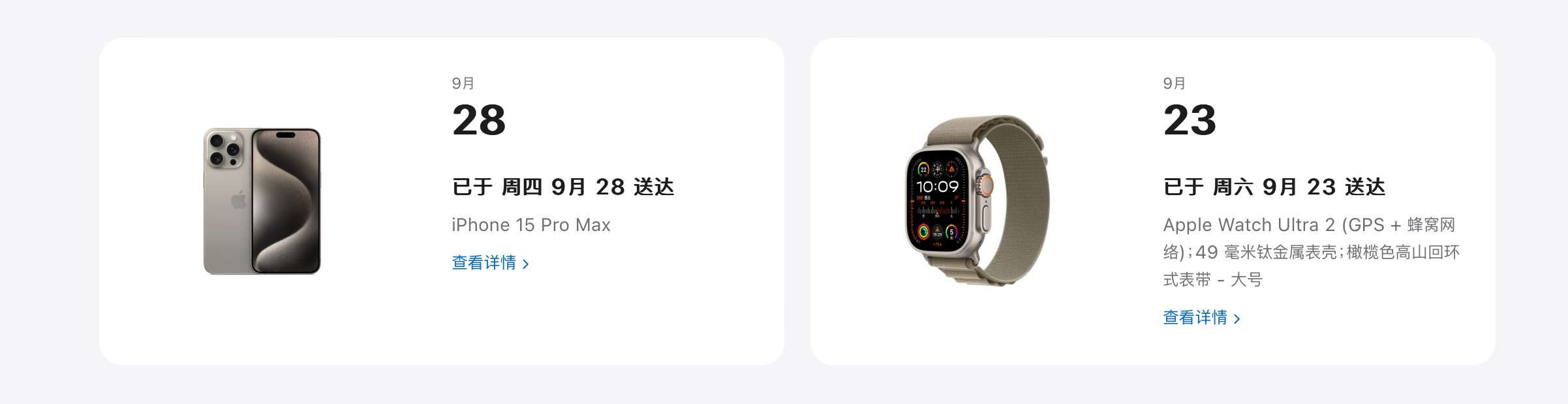 Open larger image: IMG_0565.PNG
Accessories to Buy
Based on my experience so far, there are some necessary accessories that I highly recommend everyone pick up together.
Apple Watch Ultra 2 Accessory Recommendations
- Titanium watch bezel: Strongly recommended. Because the Ultra 2 has such a “burly build,” it is very easy to bump in daily use. That includes, but is not limited to, intimate contact with these objects: desktops, laptops, desk edges, doorframes, washbasins, walls, and so on.
- Tempered glass watch protector: This is an essential accessory, mainly to prevent screen scratches from affecting the viewing experience. A standard Corning glass film is fine; there are also sapphire-glass options and the like. Rich folks, feel free.
- Watch band: Optional accessory. The one Professor ordered this time was the “Alpine Loop.” It looks fine, but it is extremely inconvenient to take off and put on. Every time I remove it for charging, I do so very carefully, because I am rather worried that using too much force could make the metal hook smash the watch crystal. If possible, choosing the “Trail Loop” at purchase might be a more appropriate approach.
iPhone 15 Pro Max Accessory Recommendations
- Tempered glass screen protector: The market for iPhone tempered glass screen protectors is quite chaotic, with prices all over the place, from tens to hundreds. The materials are basically Corning glass, sapphire glass, AR anti-reflective glass, and so on. Before buying, I recommend watching some review videos to help choose the right brand. Professor uses a relatively cheap Corning glass protector; it cost a few dozen yuan, and so far I feel there is no problem with it. Also, I do not really recommend privacy tempered glass protectors: they affect screen brightness and the viewing experience. Unless you have a special use case, there is no need to choose one.
- Phone camera-lens protector: Highly recommended. After installation, its impact on shooting quality is negligible, but it provides a full sense of security. The main reason is that this generation of iPhone has huge lenses, and the whole lens area takes up more than half the phone’s width. Even with a case on, when placed flat on a desk, it is easy for clutter on the desk to scratch it. During the National Day holiday, I ate hot pot with friends on an uneven stone tabletop; because I was using a lens protector, I felt much more at ease.
- Phone case: There are many MagSafe-compatible phone cases, but Professor has still not found a particularly reliable item so far. That includes the pseudo-leather case I bought myself (I thought it was leather from the advertising, but it turned out to be plastic). Magnetic strength seems to be a fairly challenging issue. To be honest, the bare phone feels best in the hand, and a phone case is honestly superfluous. After all, people play with devices; devices should not play with people. If conditions allow, just get AC+.
- Magnetic charger: Another item in a rather chaotic market, with all kinds of prices. Some three-in-one chargers actually dare to list for over 1,000 yuan. Are accessory brands this brave now? When buying, pay attention to choosing accessories that meet official standards: QI certification, MagSafe magnetic charging, and PD fast charging.
- Wireless power bank: Choose according to need. Prices are still rather firm at the moment, so you can look forward to Double 11.
- External storage: Optional accessory. In fact, choosing the 512G version this time was also a compromise, but I really no longer have much capacity anxiety. Thinking back to the days of using the 6s, I was troubled every day about which apps to delete to leave enough storage space for photos.
- Livestreaming accessories: Choose according to need. Selfie tripods, recording microphones, fill lights, and even stabilizers and so on—one can only say this generation of iPhone is looking more and more like a professional film-and-video creation tool. I am just very curious: accessory brands do not seem very interested in deeply researching accessory lenses for the iPhone, and the related products I found on JD.com all looked pretty crappy. I hope that one day professional-quality iPhone cinema lenses will appear.
User Experience
Apple Watch Ultra 2 watchOS 10 Experience
Apple Watch’s product strength has always been outstanding. It had already been 4 or 5 years since I last used an Apple Watch. In recent years, I had been using Huawei’s first-generation GT watch all along.
After switching back to the Ultra 2 this time, the most direct feeling is that it pays more attention to health. At the functional level, this should mainly be thanks to Apple’s long-term investment in health tracking. Today’s Apple Watch can help us meet almost all of our health-tracking needs. From physical to mental health, there are corresponding native apps to help users manage their health continuously—or, in other words, to help users develop the habit of health management.
Before sharing the watch experience, it is inevitably necessary to compare it with the watch I used before. Every product has its own features, value, and shortcomings. Professor’s comparison here is not about right or wrong, only real experience feedback from a user.
The value and shortcomings of the Huawei watch
What impressed me most about the Huawei Watch GT I used before was its battery life. A 2-week battery life meant absolutely no battery anxiety. Even today, after 4 years of use, a single charge can still fully carry the needs of a workweek. Since Professor has always worn a watch while sleeping and synchronously performed sleep monitoring, the watch’s actual working time was still quite long-lasting.
Functionally speaking, the Huawei watch could also satisfy a large portion of personal needs. Things like heart rate, sleep monitoring, workout records, NFC transit cards, Alipay payments, breathing training, barometer, compass, stress detection, and so on. The only real pity is that many functions are relatively passive and require the user to trigger them actively, so in actual use, the only functions I truly used often were heart-rate and sleep monitoring, plus NFC subway tap-in. In other words, the vast majority of product functions were actually wasted. During use, I also did not develop good exercise habits; of course, that is mainly because Professor himself does not really like exercise, so I cannot dump the blame on the product 😂.
The shortcomings are also obvious.
First, this generation of GT watch probably did not use an independent watch OS, so third-party apps could not be installed. That took away a lot of the fun from expanding watch usage scenarios, though it was still enough.
Second, data recording had to be used together with Huawei’s Health app. This is not really a design problem; it is mainly because the Health app has too many ads and overly cluttered information, which meant I basically did not open it in ordinary times. As a result, all the health data basically became just for show to me. That said, this app sometimes also has some magical features, such as recording snoring, which resolved Professor’s long-standing curiosity.
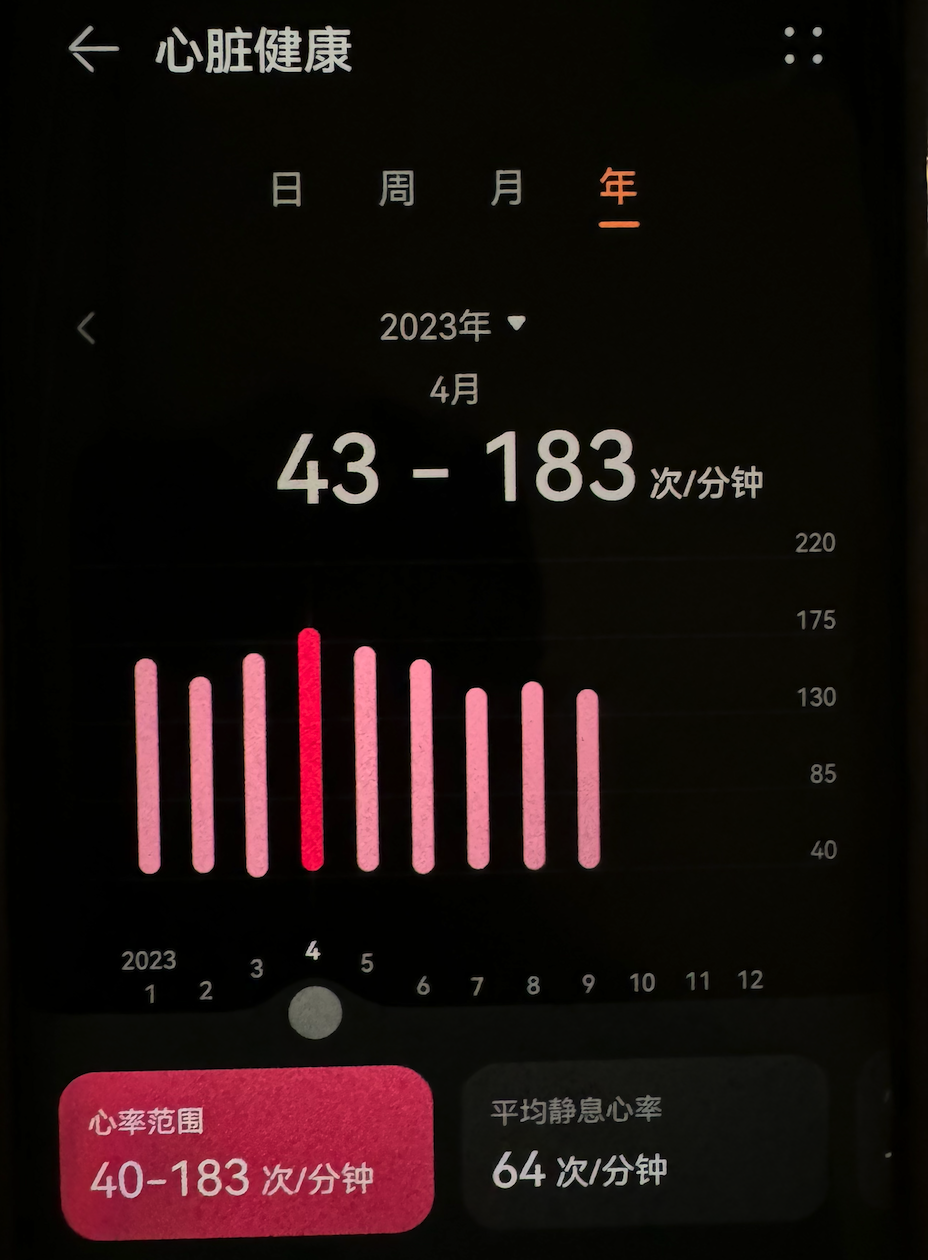
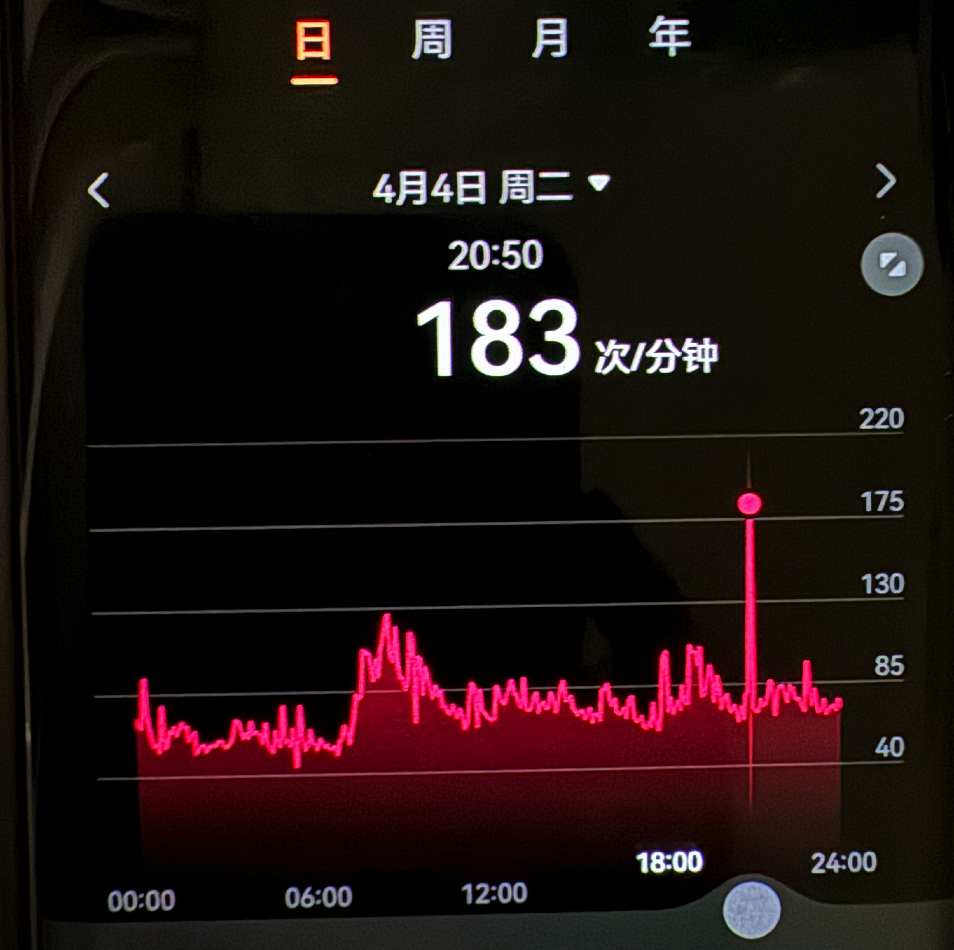
Finally, there are large errors in the accuracy of data recording. This mainly concerns heart-rate monitoring, where there is considerable uncertainty. Professor used e-cigarettes for 3 years before, which gradually triggered heart-rate problems. At rest, my heart rate would easily be over 100 beats/minute; if I walked slightly faster, it would rise to over 150 beats/minute, and at its highest it even reached over 190 beats/minute. Of course, these were all results recorded by the watch. When I saw this data at the time, Professor thought I was about to die, which was very frightening. Yet the physical-exam results for my heart were still basically normal, so it was very confusing. Unfortunately, this watch did not have an ECG function, so there was no way to know whether my heart rhythm at the time was sinus rhythm. After carefully observing for a while, I found it might still be watch-monitoring error. For example, in the case below, Professor is very curious what on earth I was doing at 8:50 that evening 🤔.
 Open larger image: image.png
 Open larger image: image.png
The value and shortcomings of Apple Watch
The greatest value of Apple Watch may be that it assists users in developing healthy living habits and continuously reinforces users’ health awareness. Relatively speaking, watchOS is a highly intelligent operating system. It makes the watch intervene more actively in the user’s behavior patterns. From the alarm waking you up every morning to the nearly screen-off display effect after Sleep mode starts at night, it seems to be constantly reinforcing and hinting that users should embrace a more active and healthier lifestyle.
At the same time, it can interact with the phone almost seamlessly, and many modes and settings can also directly “Mirror iPhone,” which connects it closely with users’ actual usage scenarios. For example, when you are in Sleep mode, the watch automatically dims the watch-face display and locks regular interactions; you must press and hold the crown button to unlock it. This has real practical value for helping the user focus on sleep itself before bed. However, some people also say “Mirror iPhone” may increase power consumption; Professor’s feeling during use does not seem to make this obvious.
In addition, Apple Watch Ultra 2 also supports eSIM functionality. China Mobile users only need 10 yuan per month to enable it, which is very practical for expanding watch usage scenarios. When exercising, you no longer need to carry your phone in a running backpack, and you do not even need a heart-rate strap. With just one watch, you can complete almost all monitoring needs.
During just a few weeks of use, Professor felt direct benefits in the following areas:
- Medication reminders: After the medications being used are set up, the watch really does tirelessly remind me every day to take medicine on time. I used to be dismissive of similar reminder features, but the reminders on Apple Watch seem noticeably more effective. At least so far, there has not been a single day when I missed a dose. Even if one day I was several hours past the scheduled medication time, I was still able to complete the medication after later reminders. The value and meaning of this function have never been so huge, and personally I feel the watch’s reminder efficiency far exceeds phone reminders.
- Mental health: Emotion logging at random daily time points and nightly all-day mood-record reminders, plus the watch actively inviting the user to do mindfulness meditation or deep breathing to adjust the current mood after detecting changes in physiological indicators—these self-learning functional designs have given these previously simple functions stronger scenario value and user value.
- Exercise management: The three rings made Professor start paying attention to exercise, and I have also gradually begun exercising. The long-term value still needs further observation, but in the short term, it has already produced behavioral change. At least, every time the watch reminds me to stand for 1 minute, I try to obediently complete it as much as possible (a few times it told Professor to stand up while I was on the toilet; Professor refuses to accept this 😠).
- Sleep management: Although Sleep mode is very helpful, Professor’s sleep has been too poor for a long time. I am currently trying hard to move toward the mode set by the watch, but it is very challenging. I feel the system should have better management value for people with normal sleep. For people like Professor who have long-term sleep disorders, the level of active intervention still seems too low.
- Device unlocking: Wearing the watch can automatically unlock the MacBook and iPhone, which is quite convenient.
- Navigation and route finding: Following the watch is much more convenient and safer than picking up the phone and constantly staring at the map. At least while walking, you will not step into empty air or trip over obstacles.
- Spatial item finding: Thanks to the new-generation U2 chip, indoor navigation and item finding are much more accurate. I mainly use it to navigate to find the iPhone, though I do not use it that much.
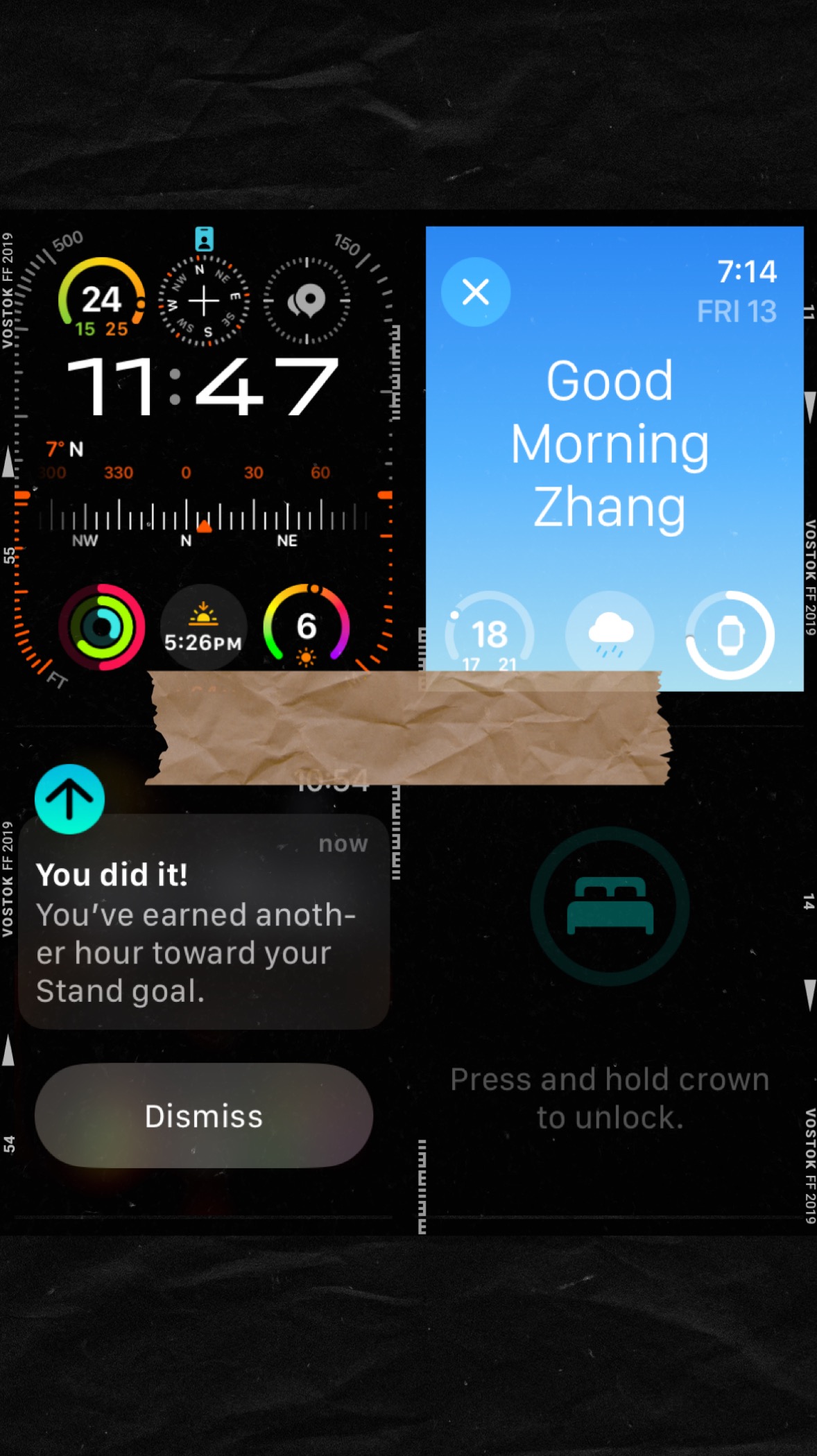 Open larger image: IMG_0221.JPG
Where there are advantages, there will naturally also be shortcomings.
The first thing to complain about is what was mentioned earlier: sometimes it makes people stand up while they are on the toilet, which leaves me quite speechless. I do not know whether, after a period of self-learning, it can become more obedient.
Second is that battery life is too short. Charging every day is honestly a very annoying thing, especially when I think that I must not forget to bring the watch charging cable when traveling for business. It feels bothersome. Fortunately, I basically do not travel much for business now, so it is not a big problem.
Then there is the fact that sleep monitoring is not very accurate. It seems temporarily unable to recognize scenarios such as naps and afternoon naps. To be honest, this is admittedly a little hard on Apple Watch. Professor’s sleep is not merely poor; it is extremely irregular, especially during holidays. Long-term sleep deprivation really affects external appearance and health. I hope the watch can complete its self-learning as soon as possible and better adapt to and manage my sleep.
Finally, the transit card in Wallet needs to be purchased separately on the watch; it cannot be shared with the one on the phone. I did not know this at first. I thought that cards in the same app should be present on both sides, so the first time I used the watch to tap through the subway gate, I swiped for a long time like an idiot. What kept popping up on the watch was the credit card, and I was still wondering why it had not worked.
Overall, satisfaction with Apple Watch Ultra 2 is still quite high, and the user experience is very smooth. If, like Professor, you also care about self-health management, I highly recommend buying one.
iPhone 15 Pro Max iOS 17 Experience
Professor chose the natural titanium model, and its appearance is genuinely handsome. When the phone first arrived, I was amazed as soon as I unboxed it. It feels a bit heavy in the hand, but the hand feel is very good. The display effect of the 6.7-inch screen is also quite stunning, which can be considered an Apple product tradition: it never skimps on materials.
What did surprise me was the iPhone’s packaging box, which seemed rather plain and simple. There were also some issues with the design of this packaging box: it did not wrap the phone very tightly, so many tragic moments of dropping the phone right after unboxing also appeared online. After everyone gets the phone, you still need to be careful when unboxing to avoid the phone sliding straight out and falling to the ground.
After turning it on, I finally saw the long-missed iOS system again. After so many years, Apple’s UI design is still outstanding. Some feelings truly only become profound after something is lost and then regained. When I saw the system’s clean interface and could not find the slightest trace of advertising, I felt this was what a phone was originally supposed to look like. Even the preinstalled official software looked friendly at this moment.
You need to know that over the past several years, while using a Huawei phone every day, I had to face omnipresent ads and useless system-preinstalled apps that could not be deleted. Every time, I felt very discouraged and deeply wondered whether my original patriotic enthusiasm had been a bit ridiculous. To avoid seeing ads, I turned off many functions in HarmonyOS, and even gave up using apps such as the smart assistant. Even so, when opening the app market or theme market and seeing a screen full of inexplicable apps and advertisements, I felt deep despair. Perhaps phones really should be replaced a bit more frequently.
Perhaps life really should be lived a little more freely: buy what you like, and quickly throw away what you do not.
However, what truly changed Professor’s impression of Huawei was the experience of applying for the “Cangjie” language beta test. That is another story. That experience finally made Professor understand that everyone’s values are not the same. From then on, my feelings toward Huawei slowly faded. When I looked at it through the eyes of an ordinary commercial company, I no longer felt it had any special halo. The commercial world is cruel by nature: winners become kings, losers are bandits, and the resources you can mobilize determine the ceiling of your future. Whether selling sentiment or selling anxiety, in essence it is only a commercial strategy.
Back to the point: let’s continue talking about the iOS 17 experience.
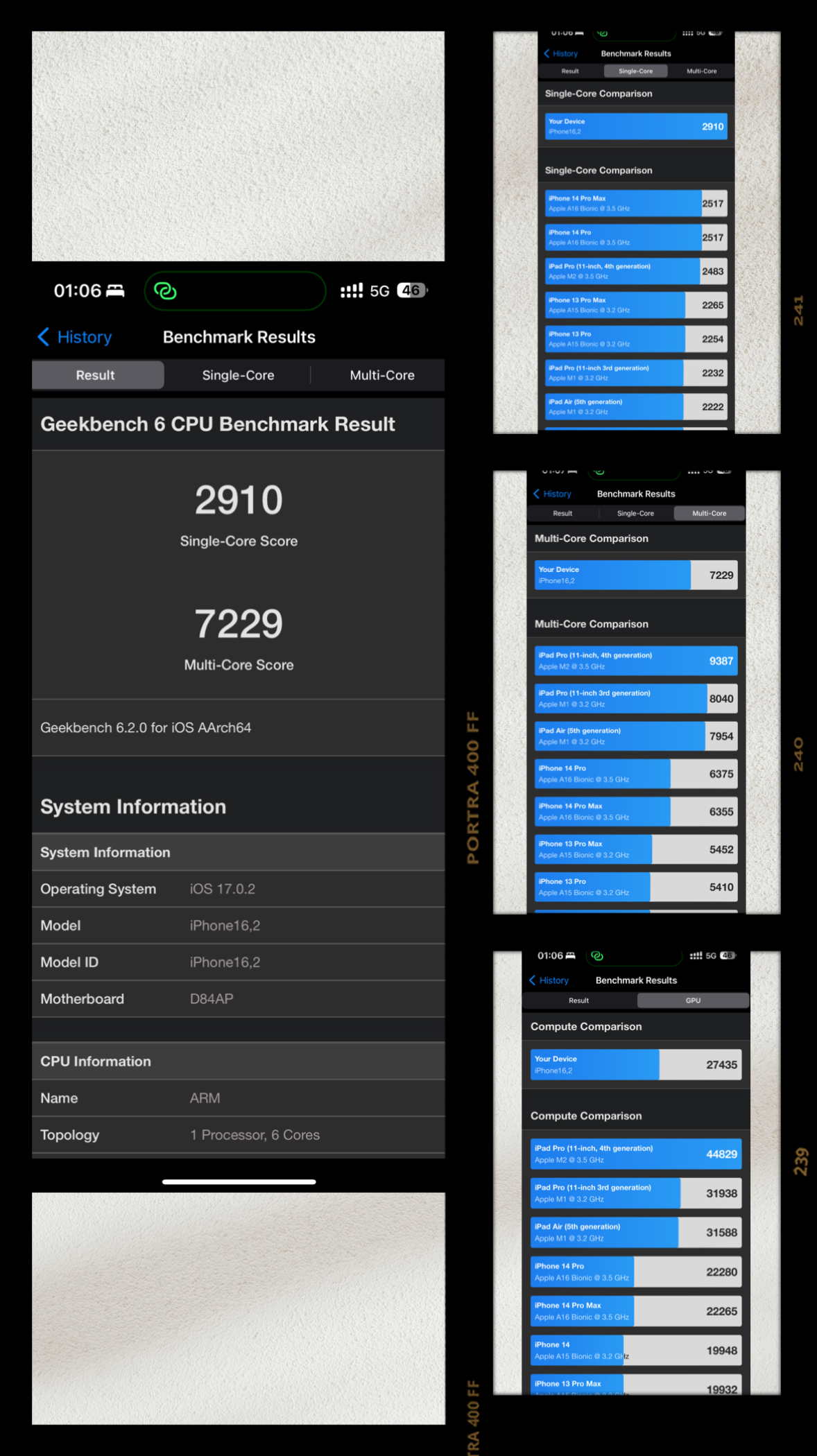
After activating the phone, of course I first needed to run some tests and look at the specific scores and the gap from the previous generation. I decisively downloaded GeekBench 6, and the test results are as follows:
 Open larger image: JPEG image-4C51-B768-66-0.jpeg
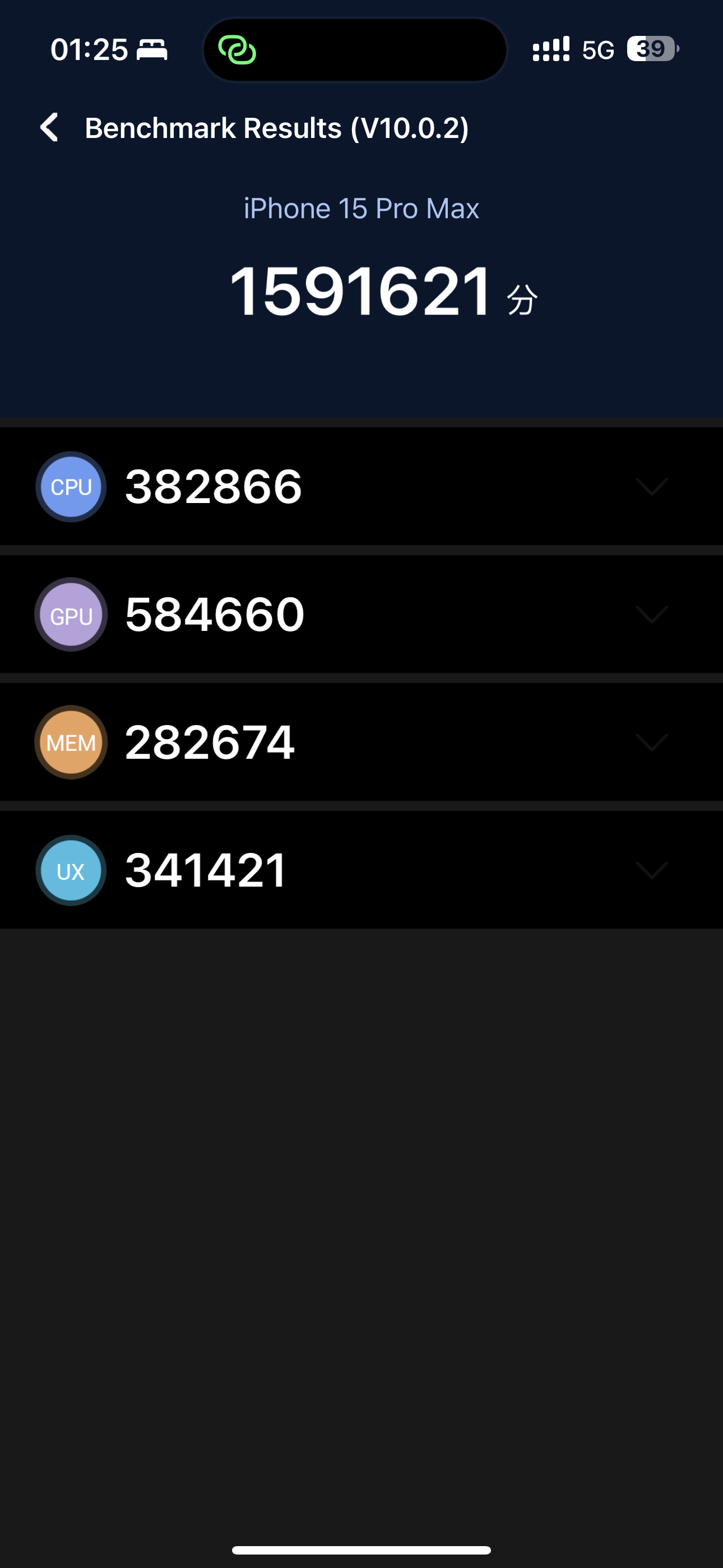
The AnTuTu benchmark is as follows:
 Open larger image: IMG_0228.PNG
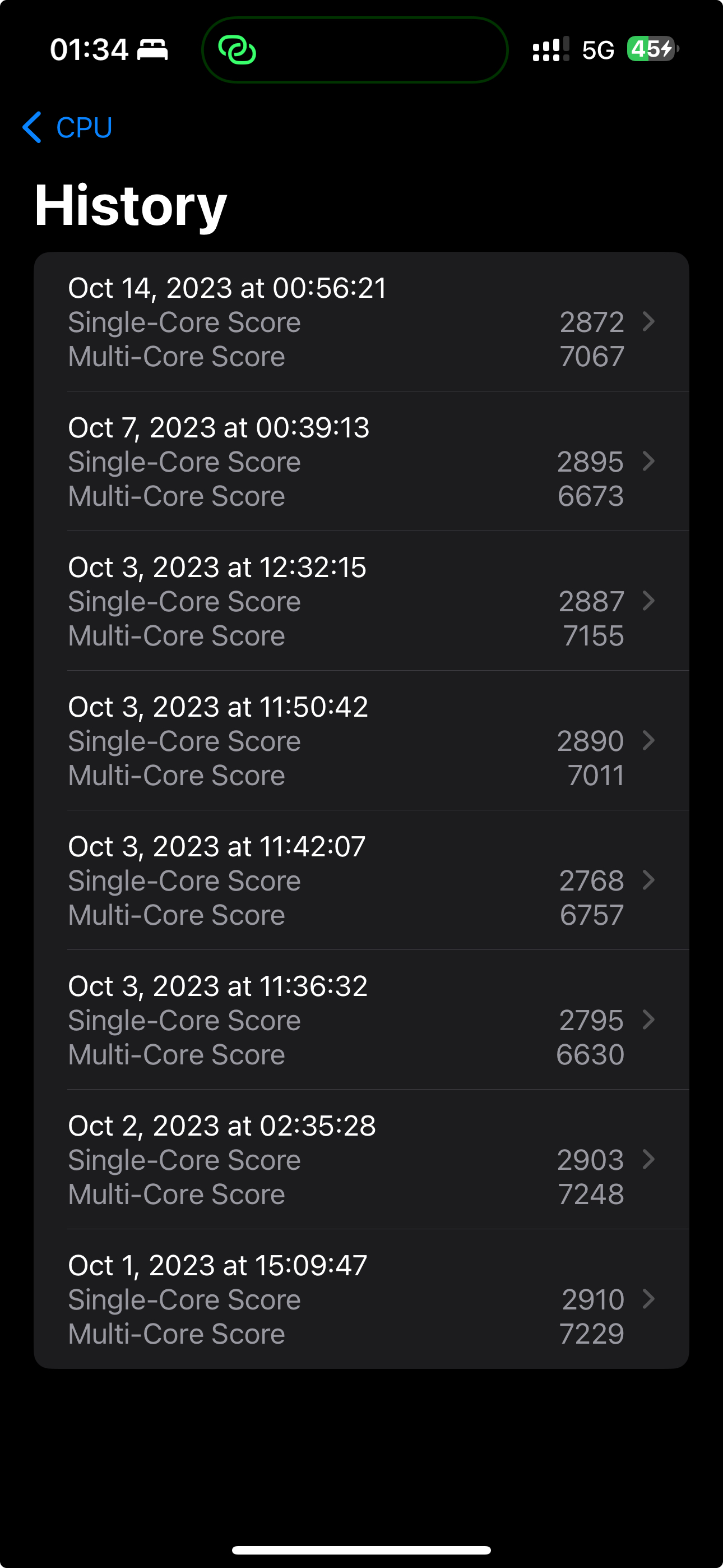
At first glance, after the A17 chip adopted the 3nm process, CPU single-core and multi-core performance improved by around 10–15%, while GPU performance improved by around 20–25% because it has one more core than the previous-generation chip. To be honest, this result is below my psychological expectations after watching the launch event. In addition, I later tested it many times in different environments. In extreme cases, such as testing with the phone placed in a refrigerator (scores dropped sharply), or testing after upgrading to iOS 17.03, which had already solved the overheating issue, the results were not very stable. I deeply suspect TSMC’s first-generation 3nm process should still be very immature. Previously I only knew the yield was low, but from the current picture, performance also seems not very stable. This does not seem like especially good news for the new-generation MacBook Pro with a 3nm M3 chip launching early next year.
 Open larger image: Screenshot 2023-10-15 at 01.34.54.jpeg
Anyway, the A17 chip currently used in the iPhone is still the strongest phone chip in history. For daily phone use, purely in terms of performance, it is already extremely excessive. Add to that the Pro series itself upgrading memory to 8G, and saying the system smoothness is silky is not an overstatement. What we should look forward to even more is the performance after AAA titles are natively ported to iPhone. It is expected that very soon, in November (11), we will be able to experience the power of the legendary ray-tracing effect.
In actual use, Professor is very satisfied with the overall iOS 17 system. Especially after 17.03 fixed the overheating issue and the failure of the 80% charging limit, it can basically receive more than 85 points.
But even a powerhouse like the iPhone 15 series still has some designs one cannot help complaining about. First and foremost is the “Dynamic Island.”
Dynamic Island is an extremely stupid design
Even if everyone on the internet hypes “Dynamic Island” to the skies, and even if they say things like “Dynamic Island is Apple’s miraculous craftsmanship that turns decay into magic,” Professor still firmly believes that Dynamic Island is an extremely stupid design, bar none. Of the 15 points lost in the score above, at least 10 were because of this stupid and idiotic Dynamic Island design.
Here is a simple example.
Careful users may already have noticed that Professor has always used the phone’s hotspot to provide internet access for other devices. By default, the Dynamic Island area displays the hotspot icon, and tapping it takes you directly to hotspot settings. Here, what Dynamic Island provides is actually a shortcut entry for a service. But in users’ real usage scenarios, the situations encountered will be more complex and may involve multiple system services or third-party app services needing to use Dynamic Island. However, the system does not provide Dynamic Island with priority switching or an option for short-term persistent display. As a result, when a more time-sensitive service needs to use Dynamic Island as a shortcut entry, a tap will directly misfire into the service that first occupied Dynamic Island (in Professor’s case here, the phone hotspot).
There is actually already a solution to this problem. For example, when using Podcasts, the service icon automatically shrinks to the right side to avoid accidental touches. But when other services come in, because the area where Dynamic Island is located cannot actually serve a complete display function, the service flashes by and then disappears without a trace. The most typical example is when a call comes in. Professor has already several times not known how to answer the phone when a call came in. Although part of the blame here lies with the phone-and-watch linkage, and in theory it can be resolved by changing settings, in the end it still violates user intuition.
When Professor logged in to a Wise account, this stupid Dynamic Island design nearly drove me mad. Wise requires two-factor verification when logging in on a new device for the first time. The several methods provided were all not very feasible; the only feasible way was to send a verification code through Whatsapp. Ridiculously, logging in to Whatsapp also requires two-factor verification, and the SMS would not come through, so I had no choice but to choose a phone call. The call did come in, but the voice prompt said I had to press “4” to obtain it; if there was no response for a few seconds, the other side hung up directly. Thanks to this stupid Dynamic Island design, in short, Professor spent 2 days and answered 4 calls from Houston before completing the Wise account login.
Another stupid aspect of Dynamic Island’s design is that it is extremely easy to touch by mistake. When browsing WeChat or Reeder, I habitually tap the top bar to refresh. Well, now Professor knows that if I want to tap the top bar to refresh, I have to tap the top bar slightly below and to the left of Dynamic Island. It really is “a stupid design lets you master one little trick every day”!
I have to say, after cursing Dynamic Island, I feel much more comfortable. Only now can I recommend some decent apps to everyone.
App Recommendations
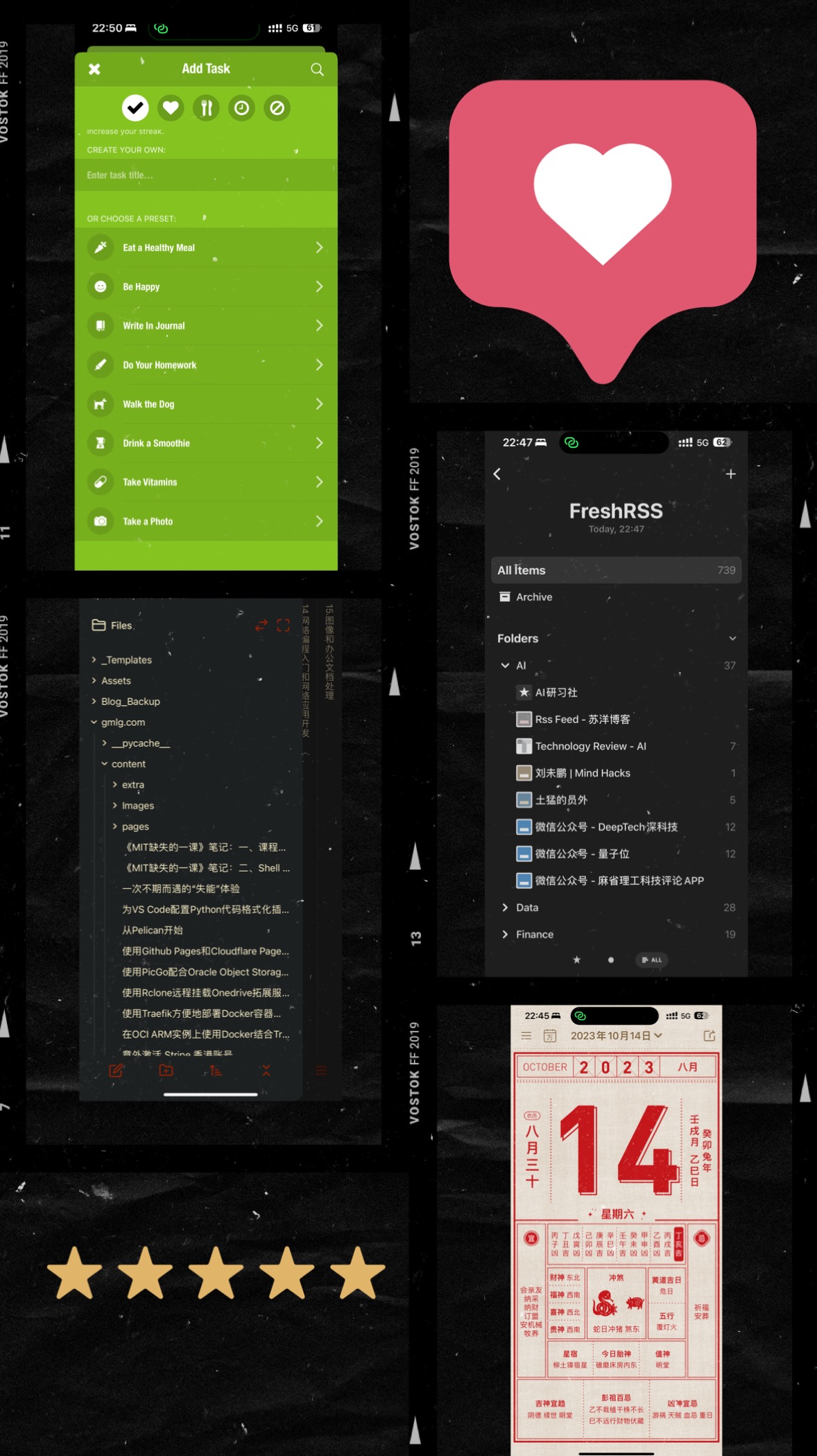
That the iOS ecosystem has a good user experience is at least one-third thanks to excellent third-party apps. Professor will briefly recommend some apps I commonly use here for everyone’s reference:
- Podcasts: A genuinely commendable official app. It is hard to imagine that, under such a heavily commercialized iOS ecosystem, the official side can actually provide a platform with such high information quality, and one that is completely free. Many people may love listening to audiobooks, yet rarely use podcasts, which is truly a great loss. Here I simply recommend a few channels for your reference; they are basically technology-oriented: Lex Fridman Podcast, 硅谷 101, 硬地骇客, Huberman Lab, 知本论.
- TED: If podcasts are a high-quality channel for acquiring audio information, then TED is absolutely a high-quality channel for acquiring video information that you cannot miss. Many items here are talks by scholars and famous people: easy to understand, lively, and interesting. It is very easy to be inspired by wise people. Trust me, you will definitely like it.
- Books: Another genuinely commendable official app. Multi-device sync is extremely smooth. Usually Professor imports books on the MacBook and then reads them on the iPad or iPhone. It is completely private, with no need to worry about someone with ulterior motives using social-engineering techniques to analyze you as they might on WeChat Reading.
- Reeder: An excellent RSS reader. A powerful tool for text-based reading, and the best tool for obtaining timely information in fields you choose yourself. The user experience is excellent. Used together with FreshRSS and RSSHub (please refer to Quickly Deploy FreshRSS and RSSHub Services on an OCI ARM Instance with Docker and Traefik), the effect is superb.
- Obsidian: A strongly recommended personal knowledge-management and note-taking app that supports Markdown syntax. Similar options include Logseq, but Professor personally uses Obsidian heavily, so I recommend it more. It supports multiple platforms, can sync across devices, has abundant plugins, and has a healthy open-source ecosystem. Combined with other software such as Zotero and so on, it can build a smooth and efficient workflow for research, study, recording, and writing.
- Bitwarden: An extremely excellent password-manager app that can be used together with a self-hosted Vaultwarden service. After installation, please enable it under “Settings - Passwords - Password Options” for a system-level silky experience.
- Streaks: A habit-building app that can be combined with Shortcuts to build automated workflows. Its fitness app Streaks Workout is also worth trying.
- Code: What coder does not need a mobile editor? Code is already open source. Although it requires payment in the App Store, you can go to the official website to join TestFlight and keep using it for free.
- 小黄历: An excellent free perpetual-calendar app developed by Chinese developers. Its in-app purchases are tip-like in nature. The experience is excellent, and Professor has already tipped. Rich folks, feel free.
- NextCloud: An open-source, self-hostable multi-device synchronization tool. Please note that this is a synchronization tool, not a pure backup tool, though it does have backup functionality. Professor actually also uses it to synchronize and back up photos. Of course, I use self-hosted services after all—after all, you would not want photos of you and young models leaking out either 🤣.
- Others: There are honestly too many excellent apps, including the official Notes, Reminders, Freeform, and Shortcuts, as well as third-party apps such as Vector Q (photo stylization), DailyCircle (anniversaries), Omnivore (read-it-later), Snapseed (photo editing), Sketchbook (sketching), Curve (vector drawing), Vostok (image stitching), Carnets plus (Jupyter Notebook), FABY FM (white noise), TieRight (tie-tying tutorial), and so on. Readers can explore more possibilities on their own.
 Open larger image: IMG_0222.JPG
Summary
Writing to this point, I have finally finished this experience report.
In fact, considering some external influences, there is a lot of content in the article that I did not mention. There is also some content I honestly have no motivation to write about, such as configuring end-to-end encryption and the like. There is also how to use Shortcuts to configure automated workflows. This part is actually a very big Topic, and in Professor’s view, it is one of the highlights of the iOS system’s powerful functionality. If I were to share it, I should create a separate series of articles to talk about it.
In addition, I did not discuss the artificial-intelligence potential of the iPhone 15 Pro Max. Of course, whether this part of its capabilities, combined with the U2 ultra-wideband chip in the future, will derive surprising application scenarios is also very worth looking forward to.
Finally, a bit of reflection. Nowadays, whenever I write an article, it easily runs to over ten thousand Chinese characters. Professor does not know whether I am gradually getting used to writing long-form pieces, and I do not mind whether anyone will seriously read them. In any case, the shift from absorber toward producer is ultimately a good thing. At present, I may be writing more articles; in the future, I hope I can also develop some valuable iOS apps and become a true developer.
Let us encourage each other!
References
- Everything in this entry comes from Professor personally playing with the devices; there are currently no external references.